
Lucen Timeline
PowerPoint add-in that turns project plans into timeline slides
Lucen Timeline report card
Weak · out of 4.0 · graded Oct 18, 2026
Best for timeline slides in PowerPoint
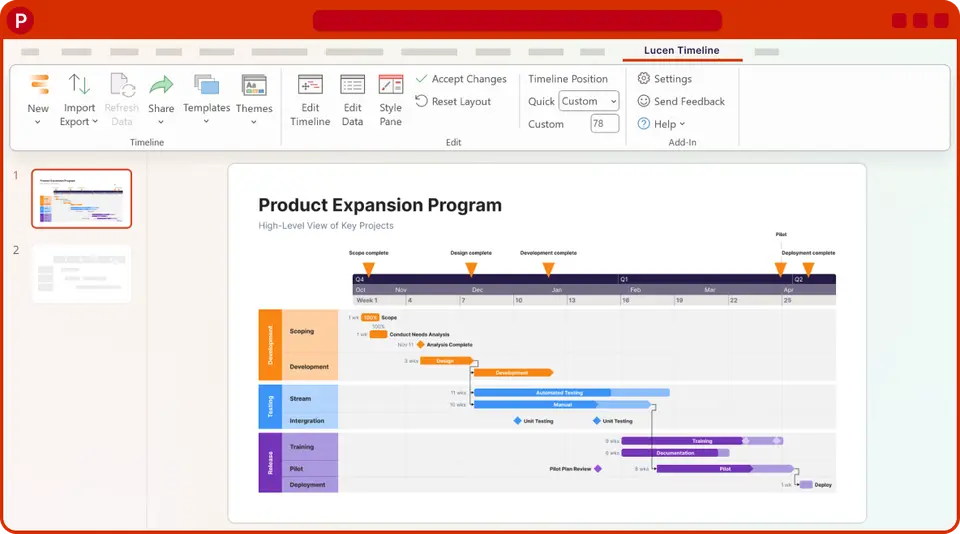
Lucen Timeline, called Office Timeline until May 2026, adds a button to PowerPoint on Windows that turns a project plan into an editable timeline or Gantt slide. It's narrower than a presentation app, so we've graded it as the add-in it is. Lite is under $9 a month, but importing from Excel, Project or Jira costs a good deal more.
Who Lucen Timeline is for
- Great if you report project schedules to your bosses in PowerPoint
- Handy when your plan lives in Project, Smartsheet or Jira and the slide must keep up
- Good for consultants whose client roadmaps have to stay editable
Who Lucen Timeline is not for
- Not for you if you're on a Mac, as the add-in is Windows only
- Pricey if you need imports from Project or Jira, which take Expert at under $21 a month
- Skip it if you want to build whole decks, since it only makes timeline slides
Why Lucen Timeline gets a 1.8
Five grades, each with its reason. The GPA is their average: an A is 4 points, an F is none.
- DValue for moneyLite is under $9 a user a month billed yearly, ordinary for presentation tools, but it allows 2 swimlanes. Unlimited swimlanes and Excel import need Plus at under $17, and refreshing from Project or Jira needs Expert at under $21, all on top of PowerPoint itself.
- CFree plan and trialThe free add-in doesn't run out and has the themes, but each slide stops at 10 milestones and tasks, with limited swimlanes and 1 timescale. Fine for a simple roadmap; a real project plan won't fit.
- DFeaturesThe timeline work is thorough: swimlanes, dependencies, critical path, up to 3 timescales, import and refresh from Project, Smartsheet and Jira, and planned against actual. But it's one narrow job, and it needs PowerPoint on Windows to be any use.
- BEase of useNo rating on record, but it sits on the PowerPoint ribbon you already use: type the dates in or import a plan, and out comes a normal slide you can edit. Nothing to export, nothing to learn outside PowerPoint.
- CPlatforms and integrationsThe add-in is Windows and PowerPoint only, and Mac or browser users need Timeline Online, a separate licence. It does pull plans from Excel, Project, Smartsheet, Jira and Wrike, but there are no phone apps.
What these grades rest on. Graded from this listing, whose facts were read from Lucen Software's own pages on 18 October 2026. Not based on using the product, and shorter than our full reviews. How we review and grade.
Make Lucen Timeline? Put this grade on your site

Paste this where you want the badge. It links here and follows the grade if it changes. About badges
<a href="https://toolgpa.com/tools/office-timeline#review"><img src="https://toolgpa.com/badge/office-timeline.svg" alt="Lucen Timeline: 1.8 GPA on ToolGPA" width="196" height="56"></a>Where Lucen Timeline stands among presentation tools
Lucen Timeline's GPA of 1.8 is higher than 0 of the 24 other presentation tools we grade, and level with 2.
It stands best on ease of use (B, above 15 of 24) and worst on value for money (D, above 0).
Its paid plans start at $9 a month for each person, against a middle price of $8.66 for the category: 11 of the 21 others that charge start lower.
On features, ease of use and platforms it scores 2.0 out of 4. 10 tools score higher and cost less.
Each grade against the category
Every bar is all 25 presentation tools we grade, cut by the letter each got. Lucen Timeline’s own letter is outlined.
- DValue for moneyAbove 0 of 24, level with 8
- CFree plan and trialAbove 3 of 24, level with 11
- DFeaturesAbove 0 of 24, level with 1
- BEase of useAbove 15 of 24, level with 6
- CPlatforms and integrationsAbove 0 of 24, level with 6
Price against what you get
Each dot is one of 23 presentation tools. Further left costs less, and higher up scores better on features, ease of use and platforms. Point at a dot to see which tool it is.
Features, ease of use and platforms, averaged
What paid plans start at, a month (each step along is roughly double) →
- The best score at each price
- Has a free plan
- No free plan
Keep Lucen Timeline, or make your own?
Keep it
The plain part of Lucen Timeline you could make: Gantt & timelines and templates. What surrounds it you could not. The 4 things listed below take a company, not a weekend.
That makes this kind of software worth paying for, not this one in particular: 22 of the 24 other presentation tools grade higher. It costs $108 a year.
What you could make
- Gantt & timelines and templates: an app builder makes these well.
What you could not
- A slide editor.
- A real app for Windows. Something home-made would be a web page.
- It is priced for each person, which means accounts and billing for a team.
- It plugs into other products, Microsoft PowerPoint, Microsoft Excel and Microsoft Project among them.
What this rests on. Lucen Timeline’s listing: what it does, where it runs, what it plugs into and what it costs. It is a judgement about the kind of software this is. We have not built a replacement for it, and making your own means looking after it too. How we decide, and every tool’s verdict.
What is Lucen Timeline?
Lucen Timeline, called Office Timeline until a May 2026 rebrand, is a PowerPoint add-in for Windows that builds timelines, Gantt charts and roadmaps as editable PowerPoint slides. Plans can be typed in or imported from Excel, Microsoft Project, Smartsheet, Jira or Wrike, then refreshed when the source changes. A browser version, Timeline Online, is sold separately for Mac users and people without PowerPoint.
Lucen Timeline has a free plan. Paid plans start at $9 per user / month, billed annually. See every plan
Good for
- Project managers who report schedules to executives in PowerPoint
- Teams that keep plans in Microsoft Project, Smartsheet or Jira and need slides from them
- Consultants building client roadmaps that must stay editable
Worth knowing
- The add-in needs Windows and PowerPoint. Timeline Online, for Mac and browser users, is a separate license at less than $13 a month billed annually.
- The free version stops at 10 milestones and tasks per slide, and its license has to be renewed each year.
- Microsoft Project, Jira, Smartsheet and Wrike import and planned vs. actual tracking need the Expert plan.
- Licenses are per user and sold only as yearly subscriptions, with a 30-day money-back guarantee.
Key features
- Timelines built inside PowerPoint
- The add-in sits on the PowerPoint ribbon and creates timelines and Gantt charts as native, editable slides, so there is nothing to export.
- Swimlanes and timescales
- Group tasks into swimlanes and nested sub-swimlanes and show up to 3 timescales on one chart. Lite allows 2 swimlanes; Plus and Expert are unlimited.
- Dependencies and critical path
- Link tasks and highlight the critical path from Plus. Importing dependencies from a source plan needs Expert.
- Import and refresh
- Plus imports from Excel. Expert imports and refreshes from Microsoft Project, Smartsheet and Jira, including several Jira projects or boards, and imports from Wrike.
- Planned vs. actual
- Expert shows progress bars, baselines and variance against the original plan, so a slide can show where a project has slipped.
- Templates and themes
- Pre-designed themes on every plan, timeline, Gantt and swimlane templates from Lite, and custom themes that can be shared and imported on Expert.
Lucen Timeline pricing
- Starts at
- $9 per user / month, billed annually
- Free plan
- Free add-in: timelines of up to 10 milestones and tasks per slide, limited swimlanes, 1 timescale and the pre-designed themes. The free license is renewed each year.
- Free trial
- None listed
| Plan | Price | What you get |
|---|---|---|
| Free | $0 | Up to 10 milestones and tasks per slide, limited swimlanes and dependencies, 1 timescale and pre-designed themes. |
| Lite | $9per user / month, billed annually as a 1-year license | More than 10 items per timeline, 2 swimlanes, timeline, Gantt and swimlane templates. Shown as less than $9 a month; the yearly total is not shown. |
| Plus | $17per user / month, billed annually as a 1-year license | Unlimited swimlanes and sub-swimlanes, dependencies and critical path, 3 timescales and import from Excel. Shown as less than $17 a month. |
| Expert | $21per user / month, billed annually as a 1-year license | Import and refresh from Microsoft Project, Smartsheet, Jira and Wrike, Excel refresh, planned vs. actual, baselines and custom themes. Less than $21 a month. |
Read from lucensoftware.com on Oct 18, 2026. Prices change, so confirm with Lucen Timeline before you buy.
Works with
- Microsoft PowerPoint
- Microsoft Excel
- Microsoft Project
- Smartsheet
- Jira
- Wrike
Lucen Timeline alternatives
- Lucen Timeline vs Microsoft PowerPoint
Free plan · from $9.99/mo
- Lucen Timeline vs Visme
Free plan · from $12.25/mo
- Lucen Timeline vs TeamGantt
Free plan · from $59/mo
- Lucen Timeline vs GanttPRO
Free trial · from $8/mo
- Lucen Timeline vs Microsoft Project
Free trial · from $30.00/mo





Common questions
Is Lucen Timeline free?
Lucen Timeline has a free plan. Free add-in: timelines of up to 10 milestones and tasks per slide, limited swimlanes, 1 timescale and the pre-designed themes. The free license is renewed each year. Paid plans start at $9 per user / month, billed annually.
How much does Lucen Timeline cost?
Lucen Timeline lists 4 plans. Free: $0. Lite: $9 per user / month, billed annually as a 1-year license. Plus: $17 per user / month, billed annually as a 1-year license. Expert: $21 per user / month, billed annually as a 1-year license. Prices were read from lucensoftware.com on Oct 18, 2026.
What platforms does Lucen Timeline work on?
Lucen Timeline is available on Windows and Web.
Does Lucen Timeline have an Android app?
No Android app was listed when its pages were read on Oct 18, 2026. Lucen Timeline is listed for Windows and Web.
Does Lucen Timeline have an iPhone app?
No iPhone app was listed when its pages were read on Oct 18, 2026. Lucen Timeline is listed for Windows and Web.
Is Lucen Timeline open source?
Lucen Timeline is not described as open source on its own site, as read on Oct 18, 2026.
What does Lucen Timeline integrate with?
Lucen Timeline's listing names Microsoft PowerPoint, Microsoft Excel, Microsoft Project, Smartsheet, Jira and Wrike. A listing names up to eight integrations, so it may connect to more.
Who makes Lucen Timeline?
Lucen Timeline is made by Lucen Software. It dates from 2012.
What are the alternatives to Lucen Timeline?
The closest alternatives to Lucen Timeline in our directory are Microsoft PowerPoint, Visme, TeamGantt, GanttPRO and Microsoft Project. Each one has a side-by-side comparison with Lucen Timeline.
How does Lucen Timeline compare with other presentation tools?
Lucen Timeline's GPA of 1.8 is higher than 0 of the 24 other presentation tools we grade, and level with 2. It stands best on ease of use (B, above 15 of 24) and worst on value for money (D, above 0).
Is Lucen Timeline good value for money?
ToolGPA grades Lucen Timeline D for value for money. Its paid plans start at $9 a month for each person, against a middle price of $8.66 for the category: 11 of the 21 others that charge start lower. On features, ease of use and platforms it scores 2.0 out of 4. 10 tools score higher and cost less.
Could I make my own version of Lucen Timeline?
The plain part of Lucen Timeline you could make: Gantt & timelines and templates. What surrounds it you could not. The 4 things listed below take a company, not a weekend. That makes this kind of software worth paying for, not this one in particular: 22 of the 24 other presentation tools grade higher. It costs $108 a year. What you could not make: A slide editor. A real app for Windows. Something home-made would be a web page. It is priced for each person, which means accounts and billing for a team. It plugs into other products, Microsoft PowerPoint, Microsoft Excel and Microsoft Project among them. This is a judgement from its listing. We have not built one.
Sources for this page
The prices, plans, platforms and features above were read from these pages on Oct 18, 2026.