
Google Slides
Browser-based presentation builder, free with a Google Account
Our verdict
Second of our top three presentation tools
For: Anyone who wants to pay nothing and edit decks together
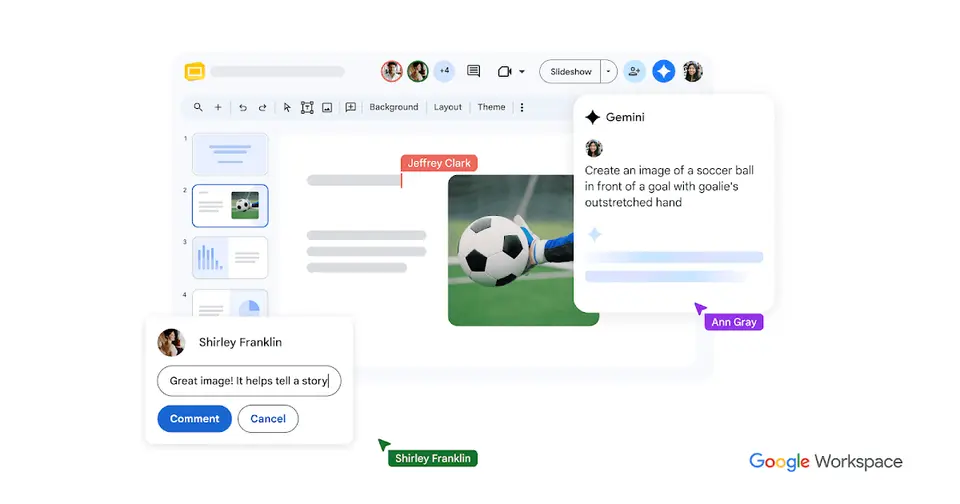
Google Slides is free with a personal Google Account: several people can work on the same slide at once, with comments, and revision history restores earlier versions. It runs in a browser and on iPhone and Android, edits PowerPoint files directly, and its iPhone and iPad app averages 4.7 from about 413,000 ratings. It is second because it runs in fewer places than PowerPoint: no Windows or Mac desktop app is listed, and offline editing on a computer needs Chrome or Edge with an extension. Slides recording and speaker spotlight are limited to some Workspace plans, and the business version comes only with Google Workspace, from $7 per user a month on a 1-year commitment.
See all three and how we rankWhat is Google Slides?
Google Slides is an online presentation app in which several people can edit the same deck at once, with comments, sharing controls and revision history. It is free with a personal Google Account and is also part of every Google Workspace business plan. Slides recording and speaker spotlight are limited to some Workspace plans, and among the Business editions Gemini in Slides starts at Business Standard.
Google Slides has a free plan. Paid plans start at $7 per user / month with a 1-year commitment (Workspace Business Starter). See every plan
Good for
- Teams that build and review the same deck together in a browser
- Organizations that already pay for Google Workspace
- Presenters who share their slides in Google Meet calls
Worth knowing
- There is no standalone paid Slides plan; the business version comes only as part of Google Workspace, with Gmail, Drive and Meet.
- Gemini in Slides is not in Business Starter; it starts at Business Standard, $14 per user / month on a 1-year commitment.
- Slides recording and speaker spotlight are not available with a free personal account; Google limits them to some Workspace plans.
- Google's help lists Slides for computer browsers, Android, iPhone and iPad; no Windows or Mac desktop app is listed.
Key features
- Co-editing and revision history
- Several people can work on the same slide at the same time. Sharing settings control who can view, comment or edit, and revision history restores earlier versions.
- Gemini in Slides
- Generates new slides and images from a prompt, summarizes a presentation, rewrites text and can draw on files in Drive. It requires an eligible Google Workspace or Google AI plan.
- Slides recording
- Records a presenter talking through a deck and saves the video to Drive for sharing. Each recording is limited to 30 minutes and can only be made in Chrome or Edge.
- Presenting in Google Meet
- Slides and Meet controls appear in one place during a call, and speaker spotlight places the presenter's video inside the slide. Both are limited to some Workspace Business and Enterprise plans.
- PowerPoint and Canva files
- PowerPoint presentations can be edited directly without making a copy, or converted to Slides format. Canva presentations can also be imported.
- Offline editing
- Presentations can be opened, created and edited without a connection. On a computer this requires Chrome or Microsoft Edge with the Google Docs Offline extension.
Google Slides pricing
- Starts at
- $7 per user / month with a 1-year commitment (Workspace Business Starter)
- Free plan
- Free with a personal Google Account: anyone signed in can create, edit and share presentations. Slides recording and speaker spotlight are available only on Google Workspace plans.
- Free trial
- 14-day Google Workspace trial
| Plan | Price | What you get |
|---|---|---|
| Personal Google Account | $0 | Create, edit and present slides in a browser or the mobile apps, with co-editing, comments, templates and offline access. |
| Business Starter | $7per user / month, 1-year commitment ($8.40 flexible) | Google Workspace with Slides and 30 GB of pooled storage per user. Gemini in Slides is not included. |
| Business Standard | $14per user / month, 1-year commitment ($16.80 flexible) | 2 TB of pooled storage per user. The lowest Business edition that includes Gemini in Slides. |
| Business Plus | $22per user / month, 1-year commitment ($26.40 flexible) | Everything in Standard with 5 TB of pooled storage per user, plus Vault, eDiscovery and advanced endpoint management. |
| Enterprise | Custom | No minimum or maximum user count, with data loss prevention, context-aware access and data regions; priced through Google sales. |
Read from workspace.google.com on Oct 5, 2026. Prices change, so confirm with Google Slides before you buy.
Ways to pay less
- Annual discountSave 16% with a 1-year commitment
Business Starter is $7 per user per month on the Annual/Fixed-Term Plan against $8.40 on the Flexible Plan. Standard drops from $16.80 to $14 and Plus from $26.40 to $22.
Stated on knowledge.workspace.google.com - NonprofitGoogle Workspace for Nonprofits at $0
Eligible nonprofits get Google Workspace for Nonprofits at $0, or Business Standard at $3.50 and Business Plus at $6.16 per user per month on a 1-year commitment.
Stated on google.com - EducationEducation Fundamentals at no charge
Google Workspace for Education Fundamentals, which includes Slides, is available at no charge to qualifying institutions.
Stated on edu.google.com
What people say about Google Slides
4.7
out of 5 for the iPhone and iPad app
- 5 stars85%
- 4 stars7%
- 3 stars2%
- 2 stars1%
- 1 star4%
413,281 ratings on the App Store in the United States, read Oct 7, 2026. It rates the app, not everything the product does. See the listing
Often praised
Often criticised
- Reviewers of the iPhone and iPad app say it leaves out much of what the web version does, with background colours, custom colours and working in two decks at once among the gaps. App Store reviews
- The built-in AI tools draw complaints from commenters, from a slide-tidying button that flattens the slide into an image to an assistant that could only change one slide at a time. Hacker News 1, 2, 3
- Commenters complain that SVG images cannot be brought into a deck directly. Hacker News 1, 2, 3
Based on 10 App Store reviews of the iPhone and iPad app, seven of them three stars or lower and seven more than three years old, and about 12 Hacker News comments from November 2025 to September 2026, read Oct 7, 2026. These are themes summarised in our words, not our own verdict. Follow the links to read what was said.
Works with
Google Slides alternatives
- Google Slides vs Microsoft PowerPoint
Free plan · from $9.99/mo
- Google Slides vs Keynote
Free plan · from $12.99/mo
- Google Slides vs Canva
Free plan · from $14.99/mo
- Google Slides vs Zoho Show
Free plan · from $2.50/mo
- Google Slides vs Pitch
Free plan · from $13/mo




Common questions
Is Google Slides free?
Google Slides has a free plan. Free with a personal Google Account: anyone signed in can create, edit and share presentations. Slides recording and speaker spotlight are available only on Google Workspace plans. Paid plans start at $7 per user / month with a 1-year commitment (Workspace Business Starter).
How much does Google Slides cost?
Google Slides lists 5 plans. Personal Google Account: $0. Business Starter: $7 per user / month, 1-year commitment ($8.40 flexible). Business Standard: $14 per user / month, 1-year commitment ($16.80 flexible). Business Plus: $22 per user / month, 1-year commitment ($26.40 flexible). Enterprise: custom pricing. Prices were read from workspace.google.com on Oct 5, 2026.
What platforms does Google Slides work on?
Google Slides is available on Web, iOS and Android.
Does Google Slides offer any discounts?
Google Slides publicly lists the following: Save 16% with a 1-year commitment; Google Workspace for Nonprofits at $0; Education Fundamentals at no charge.
How is Google Slides rated?
Google Slides's iPhone and iPad app averages 4.7 out of 5 from 413,281 ratings on the App Store in the United States, as read on Oct 7, 2026. That is the store's rating of the app, not a score from us.
Is Google Slides any good?
We have not tested Google Slides, so this is what reviewers say. Often praised: Commenters who make only simple decks say it covers what they need, and prefer it to heavier desktop presentation software. Often criticised: Reviewers of the iPhone and iPad app say it leaves out much of what the web version does, with background colours, custom colours and working in two decks at once among the gaps. The reviews page has every theme with its sources.
Does Google Slides have a Windows app?
No Windows app was listed when its pages were read on Oct 5, 2026. Google Slides is listed for Web, iOS and Android.
Does Google Slides have a macOS app?
No macOS app was listed when its pages were read on Oct 5, 2026. Google Slides is listed for Web, iOS and Android.
Is Google Slides open source?
Google Slides is not described as open source on its own site, as read on Oct 5, 2026.
Does Google Slides work offline?
Yes, according to its own site. What works without a connection differs by plan and platform, so check the vendor's page for the detail.
Does Google Slides have an API?
Yes. Google Slides offers a public API, according to its own site.
What does Google Slides integrate with?
Google Slides's listing names Google Meet, Google Drive, Gemini, Microsoft PowerPoint and Canva. A listing names up to eight integrations, so it may connect to more.
Does Google Slides have a student discount?
Education Fundamentals at no charge. Google Workspace for Education Fundamentals, which includes Slides, is available at no charge to qualifying institutions.
Does Google Slides have a free trial?
Yes. 14-day Google Workspace trial.
Who makes Google Slides?
Google Slides is made by Google.
What are the alternatives to Google Slides?
The closest alternatives to Google Slides in our directory are Microsoft PowerPoint, Keynote, Canva, Zoho Show and Pitch. Each one has a side-by-side comparison with Google Slides.
Sources for this page
The prices, plans, platforms and features above were read from these pages on Oct 5, 2026. What people say is linked where it appears.
- workspace.google.com/products/slides/
- workspace.google.com/pricing?region=US&hl=en
- knowledge.workspace.google.com/admin/billing/compare-flexible-and-annual-fixed-term-payment-plans
- support.google.com/docs/answer/2763168?hl=en
- support.google.com/docs/answer/6388102?hl=en
- support.google.com/docs/answer/14221290?hl=en
- support.google.com/docs/answer/14355071?hl=en
- developers.google.com/workspace/slides/api/guides/overview
- google.com/nonprofits/offerings/workspace/
- edu.google.com/workspace-for-education/editions/compare-editions/