
Atto
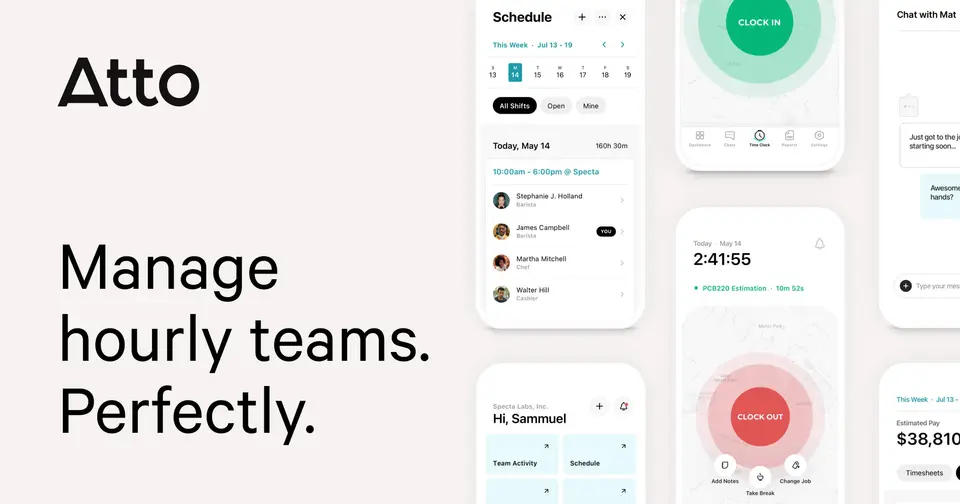
GPS time clock and shift scheduling for field crews
Atto report card
Fair · out of 4.0 · graded Oct 18, 2026
Best for GPS time clocks for field crews
Atto is a time clock first: crews clock in from their phones with a location stamp, and the hours become timesheets with breaks and overtime worked out. Scheduling is there too, but it's the lighter half. And at $5.65 a person, a team of 15 pays more here than anywhere else in this category.
Who Atto is for
- Great if you run construction, landscaping or cleaning crews on job sites
- Handy when you need proof of where every clock-in happened
- Good for owners who reimburse mileage and want drives logged for them
Who Atto is not for
- Pricey if you have 15 or more staff, as every user costs at least $5.65 a month
- Too light for managers who want shifts filled from staff availability
- Skip it if your payroll isn't QuickBooks Online, Xero or Atto's own US add-on
Why Atto gets a 2.2
Five grades, each with its reason. The GPA is their average: an A is 4 points, an F is none.
- DValue for moneyStarter is $5.65 a user a month billed yearly, so 15 staff pay $84.75 a month. That's the dearest figure in this category for a team that size. Team chat and live GPS tracking need Plus at $7.95 a head.
- CFree plan and trialNo free plan, but a 14-day trial of Advanced with no credit card needed. Two weeks is enough to see whether your crew takes to it.
- CFeaturesThe time clock side is strong: GPS punches, a kiosk, automatic timesheets and mileage logs. The scheduling half covers templates, open shifts, trades and covers, but nothing on record fills shifts from availability, and time-off requests need Advanced.
- BEase of use4.58 from 3,784 App Store ratings. Clocking in is a tap on the phone, which is most of what a crew will ever do in it.
- BPlatforms and integrationsWeb, iPhone and Android. Payroll links are just QuickBooks Online and Xero, and the API only comes with Expert, which you buy through sales.
What these grades rest on. Graded from this listing, whose facts were read from Atto's own pages on 18 October 2026, and its App Store rating. Not based on using the product, and shorter than our full reviews. How we review and grade.
Make Atto? Put this grade on your site
Paste this where you want the badge. It links here and follows the grade if it changes. About badges
<a href="https://toolgpa.com/tools/atto#review"><img src="https://toolgpa.com/badge/atto.svg" alt="Atto: 2.2 GPA on ToolGPA" width="196" height="56"></a>Where Atto stands among shift scheduling apps
Atto's GPA of 2.2 is higher than 1 of the 12 other shift scheduling apps we grade.
It stands best on ease of use (B, above 6 of 12) and worst on value for money (D, above 0).
Its paid plans start at $5.65 a month for each person, against a middle price of $5.65 for the category: 6 of the 12 others that charge start lower.
On features, ease of use and platforms it scores 2.7 out of 4. 3 tools score higher and cost less.
Each grade against the category
Every bar is all 13 shift scheduling apps we grade, cut by the letter each got. Atto’s own letter is outlined.
- DValue for moneyAbove 0 of 12, level with 1
- CFree plan and trialAbove 0 of 12, level with 6
- CFeaturesAbove 0 of 12, level with 3
- BEase of useAbove 6 of 12, level with 1
- BPlatforms and integrationsAbove 1 of 12, level with 11
Price against what you get
Each dot is one of 13 shift scheduling apps. Further left costs less, and higher up scores better on features, ease of use and platforms. Point at a dot to see which tool it is.
Features, ease of use and platforms, averaged
What paid plans start at, a month (each step along is roughly double) →
- The best score at each price
- Has a free plan
- No free plan
Keep Atto, or make your own?
Keep it
To replace Atto you would be making chat that a whole team counts on staying up. That is not a weekend's work, with an AI app builder or without one.
That makes this kind of software worth paying for, not this one in particular: 11 of the 12 other shift scheduling apps grade higher. It costs $67.80 a year.
What you could make
- Time off: an app builder makes this well.
What you could not
- Chat that a whole team counts on staying up.
- Payroll taxes worked out and filed with the government for you.
- A rota the whole staff sees on their phones, with swaps and alerts.
- Clocking in from a phone, checked against where and when.
- A real app for iOS and Android. Something home-made would be a web page.
- It is priced for each person, which means accounts and billing for a team.
- It plugs into other products, QuickBooks Online and Xero among them, and has an API.
What this rests on. Atto’s listing: what it does, where it runs, what it plugs into and what it costs. It is a judgement about the kind of software this is. We have not built a replacement for it, and making your own means looking after it too. How we decide, and every tool’s verdict.
What is Atto?
Atto is a time tracking and scheduling app for field and deskless teams such as construction, cleaning and home services crews. Workers clock in from their phones with a location stamp, and the hours become timesheets with breaks and overtime. Managers also build schedules, handle shift trades, track mileage and chat with the team, and US payroll is sold as an add-on.
Atto is a paid product with a free trial, starting at $5.65 per user / month, billed annually (Starter). See every plan
Good for
- Construction, landscaping and home services crews working on job sites
- Owners who want proof of where each clock-in happened
- Teams that reimburse mileage and want drives logged automatically
Worth knowing
- Payroll is a US-only add-on at $5.95 per payroll user a month plus a $39.95 monthly base fee.
- Real-time GPS tracking and team chat start on Plus; mileage tracking, time-off requests and job costing need Advanced.
- API access comes only with Expert, which is bought through the sales team.
- Seats are paid upfront and recounted at the start of each billing cycle; downgrades and cancellations apply at the end of the cycle.
Key features
- GPS time clock
- Workers clock in and out from the iOS or Android app or a browser, with the location of each punch recorded and optional limits on clocking in away from the job site.
- Shared kiosk
- A time clock kiosk lets a whole crew clock in from one device at the job site.
- Automatic timesheets
- Clock-ins become timesheets with breaks and overtime worked out, ready to review and approve, and they connect to QuickBooks Online and Xero for payroll.
- Shift scheduling
- Managers build, copy and publish schedules with open shifts and templates, staff send trade and cover requests, and reminders nudge people who forget to clock in.
- Location and mileage tracking
- Higher plans show who is on the clock and where in real time, keep a location history report and log drives automatically for mileage reimbursements.
- Team chat and activity feed
- One-to-one and group chats, plus a daily feed of clock-ins, locations, jobs and status changes.
Atto pricing
- Starts at
- $5.65 per user / month, billed annually (Starter)
- Free plan
- None
- Free trial
- 14-day free trial of the Advanced plan, no credit card required
| Plan | Price | What you get |
|---|---|---|
| Starter | $5.65per user / month, billed annually ($6.95 billed monthly) | Time tracking on mobile and web, shift scheduling, automated timesheets, job codes, breaks and notes. |
| Plus | $7.95per user / month, billed annually ($9.95 billed monthly) | Adds team chat, real-time GPS tracking, basic time-off management and automated pay calculations. |
| Advanced | $10.75per user / month, billed annually ($12.95 billed monthly) | Adds mileage tracking, advanced shift controls, time-off requests and job costing. Marked most popular. |
| Expert | $16.55per user / month, billed annually ($19.95 billed monthly) | Adds priority support, concierge onboarding, custom implementation and API access. Sold through sales. |
Read from attotime.com on Oct 18, 2026. Prices change, so confirm with Atto before you buy.
Ways to pay less
- Annual discount20% off with annual billing
Annual billing brings Starter, Plus, Advanced and Expert to $5.65, $7.95, $10.75 and $16.55 per user a month, against $6.95, $9.95, $12.95 and $19.95 monthly.
Stated on attotime.com
How people rate the Atto app
4.6
out of 5 for the iPhone and iPad app
- 5 stars83%
- 4 stars5%
- 3 stars3%
- 2 stars1%
- 1 star7%
3,784 ratings on the App Store in the United States, read Oct 18, 2026. It rates the app, not everything the product does. See the listing
Works with
Atto alternatives
- Atto vs Connecteam
Free plan · from $29/mo
- Atto vs Homebase
Free plan · from $24/mo
- Atto vs When I Work
Free trial · from $2.50/mo
- Atto vs Jibble
Free plan
- Atto vs QuickBooks Time
Free trial · from $20/mo





Common questions
Is Atto free?
No, Atto is a paid product, but you can try it first. 14-day free trial of the Advanced plan, no credit card required.
How much does Atto cost?
Atto lists 4 plans. Starter: $5.65 per user / month, billed annually ($6.95 billed monthly). Plus: $7.95 per user / month, billed annually ($9.95 billed monthly). Advanced: $10.75 per user / month, billed annually ($12.95 billed monthly). Expert: $16.55 per user / month, billed annually ($19.95 billed monthly). Prices were read from attotime.com on Oct 18, 2026.
What platforms does Atto work on?
Atto is available on Web, iOS and Android.
Does Atto offer any discounts?
Atto publicly lists the following: 20% off with annual billing.
How is Atto rated?
Atto's iPhone and iPad app averages 4.6 out of 5 from 3,784 ratings on the App Store in the United States, as read on Oct 18, 2026. That is the store's rating of the app, not a score from us.
Does Atto have a Windows app?
No Windows app was listed when its pages were read on Oct 18, 2026. Atto is listed for Web, iOS and Android.
Does Atto have a macOS app?
No macOS app was listed when its pages were read on Oct 18, 2026. Atto is listed for Web, iOS and Android.
Is Atto open source?
Atto is not described as open source on its own site, as read on Oct 18, 2026.
Does Atto have an API?
Yes. Atto offers a public API, according to its own site.
What does Atto integrate with?
Atto's listing names QuickBooks Online and Xero. A listing names up to eight integrations, so it may connect to more.
Who makes Atto?
Atto is made by Specta Labs, Inc.
What are the alternatives to Atto?
The closest alternatives to Atto in our directory are Connecteam, Homebase, When I Work, Jibble and QuickBooks Time. Each one has a side-by-side comparison with Atto.
How does Atto compare with other shift scheduling apps?
Atto's GPA of 2.2 is higher than 1 of the 12 other shift scheduling apps we grade. It stands best on ease of use (B, above 6 of 12) and worst on value for money (D, above 0).
Is Atto good value for money?
ToolGPA grades Atto D for value for money. Its paid plans start at $5.65 a month for each person, against a middle price of $5.65 for the category: 6 of the 12 others that charge start lower. On features, ease of use and platforms it scores 2.7 out of 4. 3 tools score higher and cost less.
Could I make my own version of Atto?
To replace Atto you would be making chat that a whole team counts on staying up. That is not a weekend's work, with an AI app builder or without one. That makes this kind of software worth paying for, not this one in particular: 11 of the 12 other shift scheduling apps grade higher. It costs $67.80 a year. What you could not make: Chat that a whole team counts on staying up. Payroll taxes worked out and filed with the government for you. A rota the whole staff sees on their phones, with swaps and alerts. Clocking in from a phone, checked against where and when. This is a judgement from its listing. We have not built one.
Sources for this page
The prices, plans, platforms and features above were read from these pages on Oct 18, 2026. What people say is linked where it appears.