The Accelevents Insider’s Guide
Everything we know about Accelevents in one document: what it costs, its grades, getting a refund, getting help and what else to look at. Read it here, or keep a copy.
Accelevents
The Insider’s Guide
Event management platform for conferences, with ticketing built in
Every plan, grade, refund rule and rival among event ticketing platforms, read from Accelevents’s own pages.
Made by Accelevents · checked Oct 18, 2026 · toolgpa.com
Contents
- 01WelcomeWhat it is, who it suits, its grades and the ten things to know first
- 02What it costsEvery plan, the free plan, ways to pay less and how prices have moved
- 03What it doesIts main features, where it runs, what it works with and who makes it
- 04Where it standsIts grades against its category, and whether to keep it or make your own
- 05The alternativesThe tools it is most often weighed against, side by side
- 06Quick answersThe questions people ask about it, each answered in a line or two
- 07About ToolGPAWho made this guide, what else is on the site, and how to cite it
ToolGPA put this guide together from Accelevents’s own pages, its app-store listings and our grades. Every fact in it is on Accelevents’s page too, where it is kept up to date. Checked Oct 18, 2026.
Part 01 · Overview
Welcome
What it is, who it suits, its grades and the ten things to know first
2.4
GPA, above 0 of the 11 other event ticketing platforms we grade
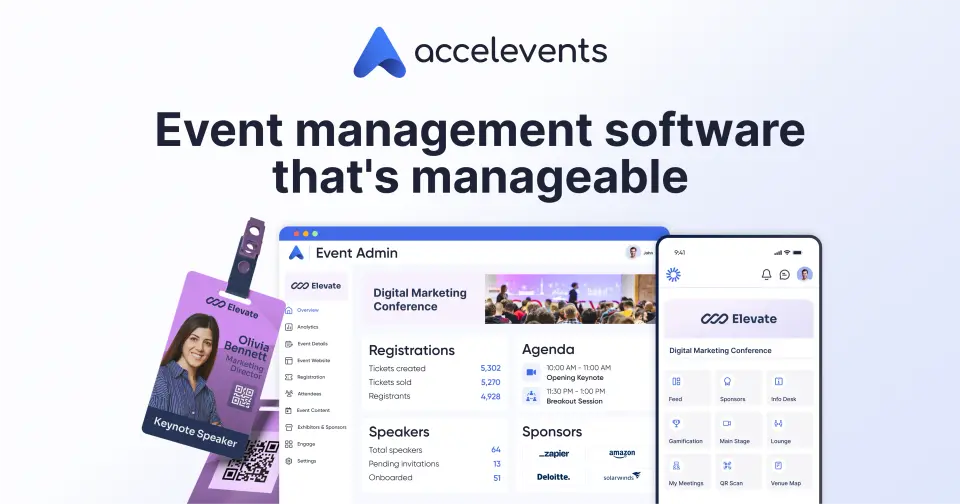
Accelevents is an event management platform for conferences, trade shows and other in-person, hybrid and virtual events, sold as a license for one event or for unlimited events rather than as a cut of ticket sales. Registration and ticketing sit alongside an event website builder, agendas, kiosk check-in with badge printing, exhibitor lead capture and an attendee app. It charges no transaction fees on tickets, and organizers can add their own.
To get you started, here are 9 things to know about Accelevents, taken from its own pages and our grades.
Setting up a conference with kiosks, badges, agendas and exhibitors is a real project, with plenty to configure before the doors open.
- 1
Best for big conferences with exhibitors and badges
For a club night or a meetup that's way too much; it only makes sense for a proper conference or trade show.
- 2
What it costs
Paid plans start at $7,500 and up, for a single event.
- 3
You can try it first
Try for Free self-service sign-up to set up an event; the length and limits are not stated
- 4
It runs on 2 platforms
Web and iOS.
- 5
Registration and ticketing
Unlimited ticket types, conditional logic, waitlists, discount and access codes, passwordless registration, approval workflows and embeddable registration widgets.
- 6
Check-in and badge printing
Staff check-in in the Admin App or iPad self check-in kiosks scan QR codes or RFID, work offline, and print badges on demand; an onsite hardware kit is offered.
- 7
Agendas and speakers
An agenda builder, call for speakers and speaker management, with continuing education credit tracking and room block management.
- 8
A 2.4 GPA, above 0 of 11
That is against the other event ticketing platforms we grade, on value, the free plan, features, ease of use and platforms.
- 9
Keep it
The plain part of Accelevents you could make: reports. What surrounds it you could not. The 5 things listed below take a company, not a weekend.
Accelevents at a glance
- Pricing
- Free trial, from $7,500 and up, for a single event
- Free plan
- No
- Free trial
- Try for Free self-service sign-up to set up an event; the length and limits are not stated
- Runs on
- Web, iOS
- Made by
- Accelevents
- Category
- Event Ticketing
- Our grade
- 2.4 GPA, fair
The report card
Best for big conferences with exhibitors and badges
Accelevents is a conference platform that sells tickets along the way, not a ticket shop: badge printing, kiosks, agendas, exhibitor lead capture and an attendee app all come with it. It's priced as a licence, from $7,500 for one event, with no fee on tickets. For a club night or a meetup that's way too much; it only makes sense for a proper conference or trade show.
| Subject | Grade | Comment |
|---|---|---|
| Value for money | D | A licence from $7,500 for one event, or $13,500 for unlimited events, with no fee on tickets. It's a different kind of thing, so we set it against its listed alternatives, Eventzilla, Eventbrite, Tito and Luma, which charge per ticket or by the month and cost less unless your event is very big. |
| Free plan and trial | C | No free plan. A Try for Free sign-up lets you set up an event, but its length and limits aren't stated. |
| Features | A | Registration, kiosk check-in by QR code or RFID, badge printing, agendas, call for speakers, exhibitor floor plans and lead capture, and an attendee app with networking. It covers the whole job and handles exhibitors, which nothing else here does. |
| Ease of use | C | No App Store rating on record. Setting up a conference with kiosks, badges, agendas and exhibitors is a real project, with plenty to configure before the doors open. |
| Platforms and integrations | B | Web and iPhone, with Salesforce, HubSpot, Marketo, ActiveCampaign, Zapier and an MCP server, though the API and webhooks need Enterprise. No Android or desktop app is listed. |
An A is worth 4 points, a B 3, a C 2, a D 1 and an F nothing. The GPA is the average of the five.
Who Accelevents is for
- Great if you run trade shows with exhibitors who want leads
- Good for organizations running many conferences a year on one licence
- Handy when you need badges printed at kiosks on the day
Who it is not for
- Pricey if your event is small, as a single event starts at $7,500
- Skip it if you sell tickets to club nights, gigs or meetups
- Not for you if you want the API without paying for Enterprise
Good to know
Good for
- Conferences and trade shows that need badges, exhibitors and agendas
- Organizations running many events a year on one license
- Teams that want ticketing with no per-ticket platform fee
Worth knowing
- Plans are licenses, not ticket fees: Professional starts at $7,500 for one event and Business at $13,500, with the billing period not stated.
- The API and webhooks come only with Enterprise, and removing Accelevents branding needs the White Label plan.
- Virtual event features are a paid add-on on every plan, and single sign-on costs extra.
- Card payments run through Stripe, Square or Payflow, whose processing fees apply; Accelevents adds no transaction fee.
Part 02 · Pricing
What it costs
Every plan, the free plan, ways to pay less and how prices have moved
$7,500
To start
Accelevents is a paid product with a free trial, starting at $7,500 and up, for a single event.
A Try for Free sign-up lets you set up an event, but its length and limits aren't stated.
Professional
$7,500
and up, for one event
One event with unlimited admin seats, registration types and custom fields, kiosk check-in and badge printing, integrations and an MCP server.
Business
$13,500
and up, for unlimited events; billing period not stated
Adds unlimited events, an event listing page, and cross-event and custom reporting.
Enterprise
Custom
For several departments: approval workflows, call for speakers, the API and webhooks, and unlimited organizer profiles.
White Label
Custom
Removes Accelevents branding, adds a custom URL and email domain and a branded app with its own store listing; single sign-on is extra.
Trying it first
Try for Free self-service sign-up to set up an event; the length and limits are not stated
Read from accelevents.com on Oct 18, 2026.
Part 03 · Features
What it does
Its main features, where it runs, what it works with and who makes it
2
Places it runs: Web and iOS
Event management platform for conferences, with ticketing built in. Here is what it does, as its own site describes it, and what it covers: public API, reports, ticketing.
It covers the whole job and handles exhibitors, which nothing else here does.
- Registration and ticketing
- Unlimited ticket types, conditional logic, waitlists, discount and access codes, passwordless registration, approval workflows and embeddable registration widgets.
- Check-in and badge printing
- Staff check-in in the Admin App or iPad self check-in kiosks scan QR codes or RFID, work offline, and print badges on demand; an onsite hardware kit is offered.
- Agendas and speakers
- An agenda builder, call for speakers and speaker management, with continuing education credit tracking and room block management.
- Exhibitors and attendee app
- Floor plans, exhibitor lead capture, a mobile event app with schedules and updates, networking, meeting scheduling and gamification.
- Virtual and hybrid events
- A paid add-on with a native broadcast studio, recordings, on-demand viewing, automated transcription and sponsor placements.
- Integrations and reporting
- Native Salesforce, HubSpot, Marketo and ActiveCampaign integrations, an MCP server, API and webhooks on Enterprise, and cross-event and custom reports.
Where it runs
- Web
- iOS
What it works with
- Salesforce
- HubSpot
- Marketo
- ActiveCampaign
- Zapier
- Stripe
- Square
- Adyen
Accelevents is made by Accelevents.
Part 04 · Standing
Where it stands
Its grades against its category, and whether to keep it or make your own
0/11
Other event ticketing platforms it is graded above
Accelevents's GPA of 2.4 is higher than 0 of the 11 other event ticketing platforms we grade.
It stands best on features (A, above 11 of 11) and worst on value for money (D, above 0).
Each grade against the category
Every bar is all 12 event ticketing platforms we grade, cut by the letter each got. Accelevents’s own letter is outlined.
- DValue for moneyAbove 0 of 11
- CFree plan and trialAbove 0 of 11
- AFeaturesAbove 11 of 11
- CEase of useAbove 0 of 11
- BPlatforms and integrationsAbove 0 of 11
Keep it, or make your own?
Whether this is something you could build for yourself with an AI app builder, and what you would give up.
Keep it
The plain part of Accelevents you could make: reports. What surrounds it you could not. The 5 things listed below take a company, not a weekend.
That makes this kind of software worth paying for, not this one in particular: 11 of the 11 other event ticketing platforms grade higher.
What you could make
- Reports: an app builder makes this well.
What you could not
- Selling tickets and checking them at the door.
- A real app for iOS. Something home-made would be a web page.
- It plugs into other products, Salesforce, HubSpot and Marketo among them, and has an API.
- Hooks into the device itself: widgets.
- The depth: we grade its features A, which means it covers the whole job.
What this rests on. Accelevents’s listing: what it does, where it runs, what it plugs into and what it costs. It is a judgement about the kind of software this is. We have not built a replacement for it, and making your own means looking after it too. How we decide, and every tool’s verdict.
Part 05 · Alternatives
The alternatives
The tools it is most often weighed against, side by side





Eventzilla, Eventbrite, Tito, Luma and Livestorm
The 5 tools Accelevents is most often weighed against, with where each one differs from it.
- 2.6GPA
Eventzilla
Free plan · from $200/mo
Registration and ticketing for conferences, training and fundraisers.
- Eventzilla has a free plan. Accelevents does not, though it has a free trial.
- Only Accelevents lists an iOS app.
- Eventzilla also covers email campaigns.
- 3.0GPA
Eventbrite
Free plan · from $15/mo
Ticketing and event marketplace, with fees usually paid by buyers.
- Eventbrite has a free plan. Accelevents does not, though it has a free trial.
- Only Eventbrite lists an Android app.
- Eventbrite also covers email campaigns.
- 2.8GPA
Tito
Free
Ticketing for conferences and meetups, for 3% of each ticket.
- Tito has a free plan. Accelevents does not, though it has a free trial.
- Only Tito lists an Android app.
- 3.2GPA
Luma
Free plan · from $59/mo
Event pages and calendars for community events, free or paid.
- Luma has a free plan. Accelevents does not, though it has a free trial.
- Only Luma lists an Android app.
- Accelevents also covers reports.
- 1.8GPA
Livestorm
Free plan · from $1,200/yr
Browser-based webinars, live or on demand, priced per attendee.
- Livestorm has a free plan. Accelevents does not, though it has a free trial.
- Only Accelevents lists an iOS app.
- Accelevents also covers reports and ticketing.
Part 06 · Questions
Quick answers
The questions people ask about it, each answered in a line or two
12
Questions, each answered in a line or two
The short version of everything above, for when you only need the answer. Each one is told in full in its part of the guide.
Is Accelevents free?
No, Accelevents is a paid product, but you can try it first. Try for Free self-service sign-up to set up an event; the length and limits are not stated.
How much does Accelevents cost?
Accelevents lists 4 plans. Professional: $7,500 and up, for one event.
What platforms does Accelevents work on?
Accelevents is available on Web and iOS.
Does Accelevents have an Android app?
No Android app was listed when its pages were read on Oct 18, 2026. Accelevents is listed for Web and iOS.
Does Accelevents have a Windows app?
No Windows app was listed when its pages were read on Oct 18, 2026. Accelevents is listed for Web and iOS.
Is Accelevents open source?
Accelevents is not described as open source on its own site, as read on Oct 18, 2026.
Does Accelevents have an API?
Yes. Accelevents offers a public API, according to its own site.
What does Accelevents integrate with?
Accelevents's listing names Salesforce, HubSpot, Marketo, ActiveCampaign, Zapier, Stripe, Square and Adyen.
Who makes Accelevents?
Accelevents is made by Accelevents.
What are the alternatives to Accelevents?
The closest alternatives to Accelevents in our directory are Eventzilla, Eventbrite, Tito, Luma and Livestorm.
How does Accelevents compare with other event ticketing platforms?
Accelevents's GPA of 2.4 is higher than 0 of the 11 other event ticketing platforms we grade.
Could I make my own version of Accelevents?
The plain part of Accelevents you could make: reports. What surrounds it you could not.
Where this guide comes from
The prices, plans, platforms and features were read from Accelevents’s own pages on Oct 18, 2026, and the grades were given on Oct 18, 2026. Graded from this listing, whose facts were read from Accelevents' own pages on 18 October 2026. Not based on using the product, and shorter than our full reviews.
Every tool we list gets five grades, A to F, each with its reason, and a GPA that averages them. How each is decided is at toolgpa.com/grades. This guide is ToolGPA’s own work; it is not made, paid for or approved by Accelevents. Prices change, so check accelevents.com before you buy.
Part 07 · About
About ToolGPA
Who made this guide, what else is on the site, and how to cite it
2,281
Tools graded, in 73 categories
ToolGPA grades software the way a school report grades a pupil: five subjects, a letter for each with the reason written beside it, and a GPA that averages them. Prices, plans and platforms are read from each maker’s own pages and dated, so you always know how fresh a figure is.
ToolGPA is free to read. It may earn a commission from affiliate links and it works with sponsors, but anything paid for is labelled and no one can pay for a grade. Every tool on the site has a guide like this one, free to download and pass on. It all lives at toolgpa.com.
2,281
tools graded
73
categories
426
price changes on record
579
apps priced in 12 countries
What else is on toolgpa.com
- Accelevents, kept up to dateEverything in this guide, with prices and grades as they are todaytoolgpa.com/tools/accelevents
- How grades are givenThe rules behind every letter and every GPAtoolgpa.com/grades
- Value chartsWhat each tool costs against what it scores, for every categorytoolgpa.com/charts
- CompareAny two tools side by side, plan by plantoolgpa.com/compare
- Price changesEvery price rise and cut on record, each with its sourcetoolgpa.com/price-changes
- Prices by countryWhat apps cost on the App Store in 12 countriestoolgpa.com/prices-by-country
- Pay lessEvery public discount: yearly billing, students, nonprofitstoolgpa.com/save
- Keep or makeWhich tools are worth paying for, and which you could build yourselftoolgpa.com/keep-or-make
Scan for the live page
Prices and grades as they are today
Quoting this guide?
Please name ToolGPA and link to the live page, so readers can check the figures for themselves:
ToolGPA, "Accelevents: The Insider's Guide", checked Oct 18, 2026. https://toolgpa.com/tools/accelevents
Know someone choosing between event ticketing platforms?
Send them this guide: toolgpa.com/tools/accelevents/guide
ToolGPA elsewhere: youtube.com/@toolgpa
See our other guides
The best-graded event ticketing platforms after Accelevents, each with an Insider's Guide of its own.
- Event Ticketing Insider's GuideEvery one of the 12 event ticketing platforms we grade, compared
- Luma Insider's GuideEvent pages and calendars for community events, free or paid3.2 GPA
- Zeffy Insider's GuideFree event ticketing and fundraising for nonprofits3.2 GPA
- Billetto Insider's GuideEuropean ticketing marketplace with ads you pay for per sale3.0 GPA


Choosing software? Every tool graded, every price dated.
Compare tools at toolgpa.com ›Everything in this guide is ToolGPA’s own summary of what Accelevents’s pages, its app-store listings and public reviews said on the dates shown. Grades are our judgement under the rules at toolgpa.com/grades. ToolGPA uses affiliate links and may earn a commission from them, and it works with sponsors; anything paid for is labelled, and no one can pay for a grade. Accelevents is a trademark of its owner, and this guide is not made, paid for or approved by Accelevents. Prices and plans change: check accelevents.com before you buy.