Adobe Acrobat
Adobe's PDF editor for desktop, web and mobile, with an AI tier
Adobe Acrobat report card
Good · out of 4.0 · graded Oct 18, 2026
Best for the complete PDF toolkit, if the price is fine
Acrobat is a desktop app for Windows and Mac with a web version, and it's the one the rest of this category gets compared to: editing, OCR, redaction and e-signatures in one place. The free Reader is great for reading and signing. Editing starts at $14.99 a month on a yearly plan, though, and we'd only pay that if your work really needs Acrobat.
Who Adobe Acrobat is for
- Great if your clients send Acrobat files and expect them back marked up
- Handy when you need OCR, redaction and e-signatures in one desktop app
- Good for anyone who only reads and signs PDFs, using the free Reader
Who Adobe Acrobat is not for
- Pricey if you just fix the odd typo, since $14.99 a month is a lot for that
- Skip it if you want to buy once and be done, as Adobe no longer sells a perpetual license
- Tight if you're on Standard and need OCR or redaction, as both need Pro
Why Adobe Acrobat gets a 2.6
Five grades, each with its reason. The GPA is their average: an A is 4 points, an F is none.
- DValue for moneyStandard, the cheapest plan that edits, is $14.99 a month on a yearly plan, and OCR, redaction and compare need Pro at $19.99. That's the top of what PDF editors charge. Acrobat Pro 2024 is sold once for three years of desktop use, but no price for it is on record.
- CFree plan and trialAcrobat Reader is free for good and views, comments on and signs PDFs. Nice. But it won't edit or convert, which is the job here. The 7-day trial covers Pro or Studio, and Standard has no trial at all.
- BFeaturesEdits text with reflowing layout, converts Office files, OCRs scans, compares versions, redacts, runs batch actions and sends documents to sign in bulk. It covers the whole job, though a lot of that sits on Pro rather than Standard.
- BEase of use4.64 from 661,119 App Store ratings for the Acrobat Reader app, just shy of the top grade. Most people have opened a PDF in it already, so there's not much to learn.
- APlatforms and integrationsWindows, Mac, web, iPhone, Android and a browser extension, plus Microsoft 365, Teams, Outlook, OneDrive, Google Drive, Dropbox and Box. It's everywhere.
What these grades rest on. Graded from this listing, whose facts were read from Adobe's own pages on 18 October 2026, and its App Store rating. Not based on using the product, and shorter than our full reviews. How we review and grade.
Make Adobe Acrobat? Put this grade on your site
Paste this where you want the badge. It links here and follows the grade if it changes. About badges
<a href="https://toolgpa.com/tools/adobe-acrobat#review"><img src="https://toolgpa.com/badge/adobe-acrobat.svg" alt="Adobe Acrobat: 2.6 GPA on ToolGPA" width="196" height="56"></a>Where Adobe Acrobat stands among PDF editors
Adobe Acrobat's GPA of 2.6 is higher than 6 of the 15 other PDF editors we grade, and level with 2.
It stands best on platforms and integrations (A, above 13 of 15) and worst on value for money (D, above 0).
Its paid plans start at $14.99 a month, against a middle price of $6.67 for the category: 9 of the 10 others that charge start lower.
On features, ease of use and platforms it scores 3.3 out of 4. Nothing scores higher for less, though at least one tool matches that score at a lower price.
Each grade against the category
Every bar is all 16 PDF editors we grade, cut by the letter each got. Adobe Acrobat’s own letter is outlined.
- DValue for moneyAbove 0 of 15, level with 1
- CFree plan and trialAbove 0 of 15, level with 13
- BFeaturesAbove 10 of 15, level with 5
- BEase of useAbove 2 of 15, level with 11
- APlatforms and integrationsAbove 13 of 15, level with 2
Price against what you get
Each dot is one of 13 PDF editors. Further left costs less, and higher up scores better on features, ease of use and platforms. Point at a dot to see which tool it is.
Features, ease of use and platforms, averaged
What paid plans start at, a month (each step along is roughly double) →
- The best score at each price
- Has a free plan
- No free plan
Keep Adobe Acrobat, or make your own?
Keep it
The plain part of Adobe Acrobat you could make: forms and documents. What surrounds it you could not. The 6 things listed below take a company, not a weekend.
It costs $179.88 a year.
What you could make
- Forms and documents: an app builder makes these well.
What you could not
- Editing the text inside a PDF without breaking its layout.
- Apps for macOS, Windows, iOS and Android that stay in step with each other.
- It plugs into other products, Microsoft 365, Microsoft Teams and Outlook among them.
- AI features, unless you pay a model provider for each request yourself.
- Sharing with other people, which means accounts and invitations.
- The depth: we grade its features B, which means it covers the whole job.
What this rests on. Adobe Acrobat’s listing: what it does, where it runs, what it plugs into and what it costs. It is a judgement about the kind of software this is. We have not built a replacement for it, and making your own means looking after it too. How we decide, and every tool’s verdict.
What is Adobe Acrobat?
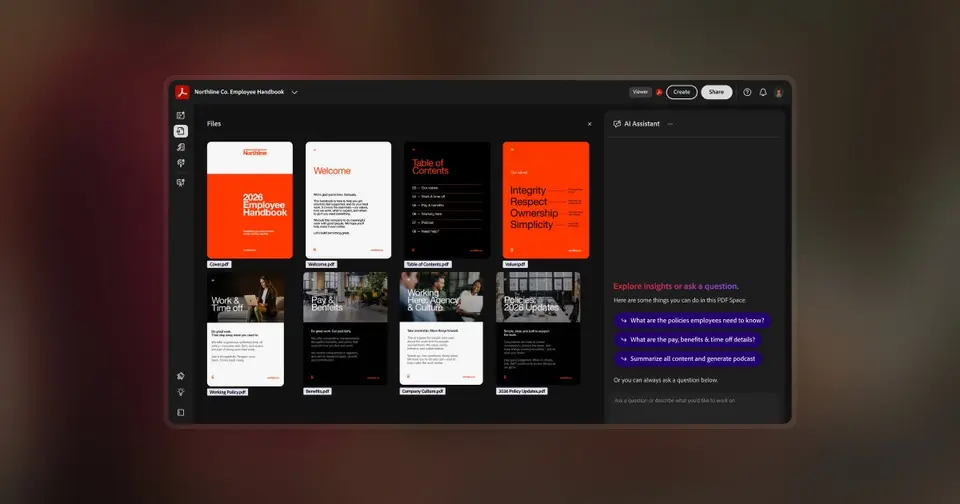
Adobe Acrobat is a desktop and web PDF editor: the subscription covers the Windows and Mac apps, Acrobat online in a browser and the Acrobat Reader and Adobe Scan mobile apps. Standard edits, converts, signs and protects PDFs, Pro adds OCR, redaction, comparison and bulk e-signatures, and Studio adds AI Assistant, PDF Spaces and Adobe Express Premium. The free Acrobat Reader app views, comments on and signs PDFs.
Adobe Acrobat has a free plan. Paid plans start at $14.99 per month on an annual plan, billed monthly. See every plan
Good for
- Offices that exchange PDFs with clients who also use Acrobat
- People who need OCR, redaction and e-signatures in one desktop app
- Users who read and sign PDFs for free with Acrobat Reader
Worth knowing
- OCR, redaction, comparing PDFs and bulk e-signatures need Pro; Standard has no free trial.
- AI Assistant comes with Studio, or as an add-on at $4.99 a month on an annual plan for Reader, Standard and Pro users.
- Month-to-month billing costs $10 a month more than the annual plan on each individual tier.
- Adobe no longer sells perpetual licenses; Acrobat Pro 2024 is a one-time purchase for three years of desktop use without online services.
Key features
- Editing and conversion
- Edit text and images with reflowing layout, add, delete and reorder pages, combine files and convert to and from Word, Excel and PowerPoint.
- OCR, compare and redaction
- Pro turns scans into searchable, editable PDFs, shows the differences between two versions and permanently removes sensitive content.
- E-signatures built in
- Every paid plan can request signatures and track them; Pro adds branded requests, web forms, reusable templates and bulk sending.
- Batch actions
- Pro's Action Wizard runs saved sequences such as OCR, redaction, watermarking and conversion across many PDFs at once.
- AI Assistant and PDF Spaces
- Studio summarizes and answers questions about documents with citations, and PDF Spaces gathers PDFs, Microsoft 365 files and links into one workspace.
- Shared review
- Share a PDF by link, collect comments from several reviewers in one place and get notified as they respond, including from Teams and Outlook.
Adobe Acrobat pricing
- Starts at
- $14.99 per month on an annual plan, billed monthly
- Free plan
- Acrobat Reader is free: view, print, share and comment on PDFs and sign them, without editing, converting or the paid tools.
- Free trial
- 7-day free trial of Acrobat Pro or Studio; 14 days on the team plans
| Plan | Price | What you get |
|---|---|---|
| Acrobat Reader | $0 | Free app for viewing, printing, commenting on and signing PDFs. |
| Acrobat Standard | $14.99per month on an annual plan, billed monthly ($24.99 month to month) | Edit and organize PDFs, convert to and from Office files, fill and sign forms, request e-signatures and password-protect files. |
| Acrobat Standard for teams | $16.99per license / month on an annual plan, billed monthly | Standard for several people, managed from one admin console. |
| Acrobat Pro | $19.99per month on an annual plan, billed monthly ($29.99 month to month) | Adds OCR for scans, comparing PDFs, redaction, branded e-signature requests, web forms, reusable templates and bulk sending. |
| Acrobat Pro for teams | $23.99per license / month on an annual plan, billed monthly | Pro for several people with admin console license management; 14-day free trial. |
| Acrobat Studio | $24.99per month on an annual plan, billed monthly ($34.99 month to month) | Pro plus AI Assistant, PDF Spaces for asking questions across many files, and Adobe Express Premium; $29.99 per license for teams. |
Read from adobe.com on Oct 18, 2026. Prices change, so confirm with Adobe Acrobat before you buy.
Ways to pay less
- Annual discountLower price on an annual plan
Adobe's plans page lists Standard at $14.99, Pro at $19.99 and Studio at $24.99 a month on an annual plan, against $24.99, $29.99 and $34.99 month to month.
Stated on adobe.com
How people rate the Adobe Acrobat app
4.6
out of 5 for the iPhone and iPad app
- 5 stars84%
- 4 stars7%
- 3 stars2%
- 2 stars1%
- 1 star5%
661,119 ratings on the App Store in the United States, read Oct 18, 2026. It rates the app, not everything the product does. See the listing
Works with
Adobe Acrobat alternatives
- Adobe Acrobat vs Foxit PDF Editor
Free trial · from $129.99/yr
- Adobe Acrobat vs Nitro PDF Pro
Free trial · from $15/mo
- Adobe Acrobat vs PDFelement
Free trial · from $11.99
- Adobe Acrobat vs PDF Expert
Free plan · from $79.99/yr
- Adobe Acrobat vs Smallpdf
Free plan


Common questions
Is Adobe Acrobat free?
Adobe Acrobat has a free plan. Acrobat Reader is free: view, print, share and comment on PDFs and sign them, without editing, converting or the paid tools. Paid plans start at $14.99 per month on an annual plan, billed monthly.
How much does Adobe Acrobat cost?
Adobe Acrobat lists 6 plans. Acrobat Reader: $0. Acrobat Standard: $14.99 per month on an annual plan, billed monthly ($24.99 month to month). Acrobat Standard for teams: $16.99 per license / month on an annual plan, billed monthly. Acrobat Pro: $19.99 per month on an annual plan, billed monthly ($29.99 month to month). Acrobat Pro for teams: $23.99 per license / month on an annual plan, billed monthly. Acrobat Studio: $24.99 per month on an annual plan, billed monthly ($34.99 month to month). Prices were read from adobe.com on Oct 18, 2026.
What platforms does Adobe Acrobat work on?
Adobe Acrobat is available on Windows, macOS, Web, iOS and Android. It also has a browser extension.
Does Adobe Acrobat offer any discounts?
Adobe Acrobat publicly lists the following: Lower price on an annual plan.
How is Adobe Acrobat rated?
Adobe Acrobat's iPhone and iPad app averages 4.6 out of 5 from 661,119 ratings on the App Store in the United States, as read on Oct 18, 2026. That is the store's rating of the app, not a score from us.
Does Adobe Acrobat have a Linux app?
No Linux app was listed when its pages were read on Oct 18, 2026. Adobe Acrobat is listed for Windows, macOS, Web, iOS and Android.
Is Adobe Acrobat open source?
Adobe Acrobat is not described as open source on its own site, as read on Oct 18, 2026.
What does Adobe Acrobat integrate with?
Adobe Acrobat's listing names Microsoft 365, Microsoft Teams, Outlook, OneDrive, Google Drive, Dropbox, Box and Adobe Express. A listing names up to eight integrations, so it may connect to more.
Does Adobe Acrobat have a free trial?
Yes. 7-day free trial of Acrobat Pro or Studio; 14 days on the team plans.
Who makes Adobe Acrobat?
Adobe Acrobat is made by Adobe.
What are the alternatives to Adobe Acrobat?
The closest alternatives to Adobe Acrobat in our directory are Foxit PDF Editor, Nitro PDF Pro, PDFelement, PDF Expert and Smallpdf. Each one has a side-by-side comparison with Adobe Acrobat.
How does Adobe Acrobat compare with other PDF editors?
Adobe Acrobat's GPA of 2.6 is higher than 6 of the 15 other PDF editors we grade, and level with 2. It stands best on platforms and integrations (A, above 13 of 15) and worst on value for money (D, above 0).
Is Adobe Acrobat good value for money?
ToolGPA grades Adobe Acrobat D for value for money. Its paid plans start at $14.99 a month, against a middle price of $6.67 for the category: 9 of the 10 others that charge start lower. On features, ease of use and platforms it scores 3.3 out of 4. Nothing scores higher for less, though at least one tool matches that score at a lower price.
Could I make my own version of Adobe Acrobat?
The plain part of Adobe Acrobat you could make: forms and documents. What surrounds it you could not. The 6 things listed below take a company, not a weekend. It costs $179.88 a year. What you could not make: Editing the text inside a PDF without breaking its layout. Apps for macOS, Windows, iOS and Android that stay in step with each other. It plugs into other products, Microsoft 365, Microsoft Teams and Outlook among them. AI features, unless you pay a model provider for each request yourself. This is a judgement from its listing. We have not built one.
Sources for this page
The prices, plans, platforms and features above were read from these pages on Oct 18, 2026. What people say is linked where it appears.