Bebop review (2026): is the free plan enough?
Capture-first plain-text notes app for iPhone
Black Friday: is there a Bebop sale?
Bebop report card
Fair · out of 4.0 · graded Oct 10, 2026
Best for catching a thought on your iPhone as a text file
Bebop is an iPhone capture app that opens on a blank note and saves each one as a plain text file in your iCloud Drive or Dropbox folder, for Obsidian or another app to read. That is all it does: there's no list of old notes to browse, no iPad, Mac or Android version, and the developer's write-up says free caps Flashback at three notes.
Who Bebop is for
- Fits if you use Obsidian on a computer and want a quick way in from your iPhone
- Works for people who keep notes as plain text files in iCloud Drive or Dropbox
Who Bebop is not for
- Skip it if you want to read and search old notes on your phone, as there's no note browser
- Not for you if you use Android or want it on an iPad or Mac, because it's iPhone only
- Too light for anyone who wants one app for both writing notes and organizing them
- Watch out: Dropbox sync needs the Dropbox iOS app installed, and themes and templating need the $4.99 Pro upgrade
- Tight if you add to recent notes a lot, since the developer's 2024 write-up says free caps Flashback at three notes
Why Bebop gets a 2.4
Five grades, each with its reason. The GPA is their average: an A is 4 points, an F is none.
- AValue for moneyThe Pro upgrade is $4.99 once on the US App Store, less than a single month of this category's $6 middle plan. It buys colour themes, custom templating and power-user settings, and you may never want any of them.
- BFree plan and trialUnlimited notes, sync to iCloud Drive or Dropbox, the share extension and widgets, free, with no ads, logins or tracking. One person could live on it. The developer's own write-up does say the free version caps Flashback at three notes.
- DFeaturesCapture and nothing else: a blank note the second you open it, files named and formatted your way, Flashback to add to recent notes, Quick Append to tack text onto an existing file. That's one narrow job. There's no note browser, and the listing leaves reading and organizing to another app at your desk.
- BEase of useNo store rating on record, so we go by the listing: open, type, save, with the save button under your thumb. The only setup is picking the folder, and Dropbox wants its own app installed first.
- DPlatforms and integrationsOne operating system, and not even all of it: the App Store lists iPhone only, no iPad, no Mac, no Android. It gets round that by writing plain files into iCloud Drive or Dropbox, which Obsidian or NVAlt can open.
What these grades rest on. Graded from this listing, whose facts were read from Jack Cheng's own pages on 9 October 2026. How we review and grade.
Make Bebop? Put this grade on your site

Paste this where you want the badge. It links here and follows the grade if it changes. About badges
<a href="https://toolgpa.com/tools/bebop#review"><img src="https://toolgpa.com/badge/bebop.svg" alt="Bebop: 2.4 GPA on ToolGPA" width="196" height="56"></a>Where Bebop stands among note-taking apps
Bebop's GPA of 2.4 is higher than 95 of the 169 other note-taking apps we grade, and level with 28.
It stands best on value for money (A, above 99 of 169) and worst on features (D, above 1).
Each grade against the category
Every bar is all 170 note-taking apps we grade, cut by the letter each got. Bebop’s own letter is outlined.
- AValue for moneyAbove 99 of 169, level with 70
- BFree plan and trialAbove 88 of 169, level with 25
- DFeaturesAbove 1 of 169, level with 80
- BEase of useAbove 117 of 169, level with 50
- DPlatforms and integrationsAbove 2 of 169, level with 49
Keep Bebop, or make your own?
You could make this
A notes app at its plainest is text in folders with a search box.
What Bebop does at its core is notes and Markdown, and that is the kind of thing an AI app builder makes well. You would give up 2 things, listed below, and little else. It costs $4.99, paid once. An AI app builder starts at about $20 a month on our listings, and you only need it while you build.
What you could make
- Notes and Markdown: an app builder makes these well.
What you could not
- A real app for iOS. Something home-made would be a web page.
- Hooks into the device itself: widgets.
What this rests on. Bebop’s listing: what it does, where it runs, what it plugs into and what it costs. It is a judgement about the kind of software this is. We have not built a replacement for it, and making your own means looking after it too. How we decide, and every tool’s verdict.
What is Bebop?
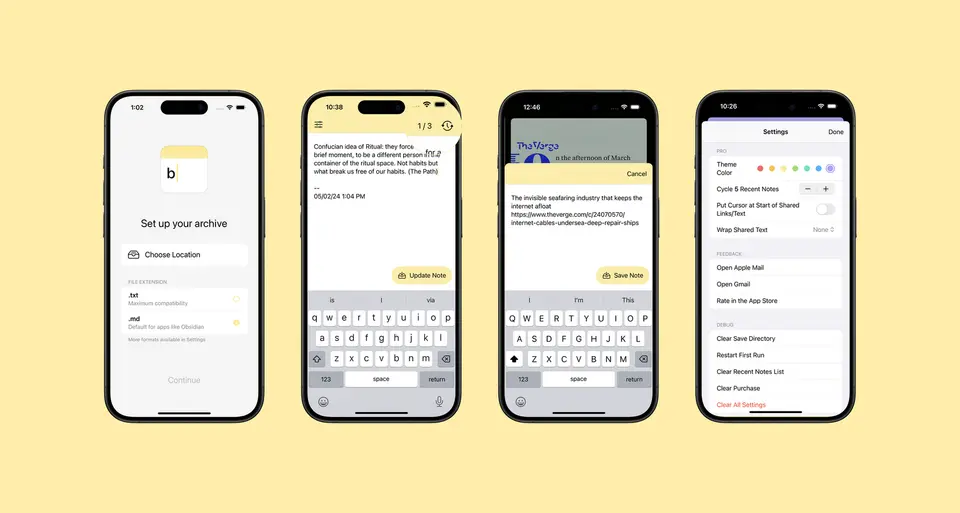
Bebop is an iPhone notes app built for capture: it opens on a blank note, and each saved note becomes a plain-text or Markdown file in an iCloud Drive or Dropbox folder the user chooses. Review and organization are left to desktop apps that read the same folder, such as Obsidian. The free version allows unlimited notes with no ads, logins or tracking, and a one-time Pro upgrade adds color themes, custom templating and power-user settings.
Worth knowing
- The App Store lists it for iPhone only; there is no iPad, Mac or Android version.
- It is a capture tool with no note browser: older notes are reached through Flashback or another app that opens the same folder.
- Dropbox sync requires the Dropbox iOS app to be installed.
- Color themes, custom templating and power-user settings need the $4.99 Pro upgrade; the developer's 2024 write-up also says the free version caps Flashback at three notes.
Key features
- Capture-first editor
- The app opens on a blank note with the save button within thumb reach, so a thought can be typed and saved without passing through a note list.
- Plain-text files in your own folder
- Notes are saved as .txt or .md files in a chosen iCloud Drive or Dropbox folder, with custom headers, footers, filename formats and file extensions.
- Flashback
- One tap cycles back through recent notes so more can be added to them, and a long press on the button pins a note.
- Quick Append
- Starting a note with @ picks an existing file, and the text is appended to that file instead of being saved as a new note.
- Share extension, widgets and shortcut
- Links and text can be saved from other iOS apps through the share sheet, and widgets and a shortcut open Bebop ready for a new note.
- Markdown helpers
- A helper bar inserts Markdown symbols, lists continue automatically on the next line, and the editor applies light Markdown styling.
Bebop pricing
As of Oct 9, 2026, Bebop has a free plan, and paid plans start at $4.99 one-time Pro upgrade.
- Starts at
- $4.99 one-time Pro upgrade
- Free plan
- Unlimited notes with iCloud Drive or Dropbox sync, Flashback, the share extension and widgets, with no ads, logins or tracking.
- Free trial
- None listed
| Plan | Price | What you get |
|---|---|---|
| Free | $0 | Unlimited notes saved as text files to an iCloud Drive or Dropbox folder, with no ads, logins or tracking. |
| Pro Upgrade | $4.99one-time in-app purchase (US App Store) | Adds color themes, custom templating and power-user settings, and supports further development of the app. |
Read from apps.apple.com on Oct 9, 2026. Prices change, so confirm with Bebop before you buy.
Works with
Bebop alternatives
- Bebop vs Drafts
Free plan · from $2.99/mo
- Bebop vs Strflow
Free plan · from $1.49/mo
- Bebop vs Gravity
From $9.99 one-time
- Bebop vs Braintoss
From $2.79 one-time
- Bebop vs Obsidian
Free plan · from $4/mo





Common questions
Does Bebop have an Android app?
No Android app was listed when its pages were read on Oct 9, 2026. Bebop is listed for iOS.
Does Bebop have a Windows app?
No Windows app was listed when its pages were read on Oct 9, 2026. Bebop is listed for iOS.
Is Bebop open source?
Bebop is not described as open source on its own site, as read on Oct 9, 2026.
Sources for this page
The prices, plans, platforms and features above were read from these pages on Oct 9, 2026.