
Bootstrap Studio review (2026): is it worth $29?
Desktop drag-and-drop editor for Bootstrap websites
Black Friday: is there a Bootstrap Studio sale?
Bootstrap Studio report card
Fair · out of 4.0 · graded Nov 13, 2026
Best for a desktop Bootstrap designer with a one-time price
Bootstrap Studio is a desktop app for designing sites on Bootstrap, sold once for $29. It exports static HTML with no built-in CMS, has no browser or phone edition, and shop building is on the $59 Lifetime plan only.
Who Bootstrap Studio is for
- Fits if you want to design Bootstrap sites on your own computer and pay once
- Works for people who hand over static HTML to clients
Who Bootstrap Studio is not for
- Skip it if you want to try it first, because there is no free plan or trial
- Skip it if you want a CMS, as sites export as static HTML
- Tight if you want a shop: ecommerce is on Lifetime only
- Watch out: Standard includes one year of upgrades, and upgrades for life need Lifetime at $59
Why Bootstrap Studio gets a 2.0
Five grades, each with its reason. The GPA is their average: an A is 4 points, an F is none.
- AValue for money$29 one-time, under a year of the category's middle subscription ($144). Lifetime is $59.
- FFree plan and trialNo free plan and no trial; the page offers a 30-day refund policy.
- CFeaturesVisual editing on Bootstrap 3, 4 and 5, an AI assistant, forms and static HTML export. It does that job fully, but it is a smaller job: no built-in CMS.
- CEase of useNo rating on record. You learn the editor and Bootstrap's way of laying out pages.
- CPlatforms and integrationsA program for computers only: Windows 10+, Mac and Linux. No browser or mobile edition.
What these grades rest on. Graded from this listing, whose facts were read from Bootstrap Studio's own pages on 13 November 2026. Not based on using the product, and shorter than our full reviews. How we review and grade.
Make Bootstrap Studio? Put this grade on your site

Paste this where you want the badge. It links here and follows the grade if it changes. About badges
<a href="https://toolgpa.com/tools/bootstrap-studio#review"><img src="https://toolgpa.com/badge/bootstrap-studio.svg" alt="Bootstrap Studio: 2.0 GPA on ToolGPA" width="196" height="56"></a>Where Bootstrap Studio stands among website and landing page builders
Bootstrap Studio's GPA of 2.0 is higher than 16 of the 104 other website and landing page builders we grade, and level with 23.
It stands best on value for money (A, above 94 of 104) and worst on free plan and trial (F, above 0).
Each grade against the category
Every bar is all 105 website and landing page builders we grade, cut by the letter each got. Bootstrap Studio’s own letter is outlined.
- AValue for moneyAbove 94 of 104, level with 10
- FFree plan and trialAbove 0 of 104, level with 12
- CFeaturesAbove 5 of 104, level with 81
- CEase of useAbove 6 of 104, level with 92
- CPlatforms and integrationsAbove 2 of 104, level with 32
Keep Bootstrap Studio, or make your own?
Keep it
To replace Bootstrap Studio you would be making a builder that other people can use without writing code. That is not a weekend's work, with an AI app builder or without one.
That makes this kind of software worth paying for, not this one in particular: 65 of the 104 other website and landing page builders grade higher. It costs $29, paid once.
What you could make
- Templates: an app builder makes this well.
What you could not
- A builder that other people can use without writing code.
- Checkout, card payments and sales tax handled for you.
- Apps for macOS, Windows and Linux that stay in step with each other.
- AI features, unless you pay a model provider for each request yourself.
What this rests on. Bootstrap Studio’s listing: what it does, where it runs, what it plugs into and what it costs. It is a judgement about the kind of software this is. We have not built a replacement for it, and making your own means looking after it too. How we decide, and every tool’s verdict.
What is Bootstrap Studio?
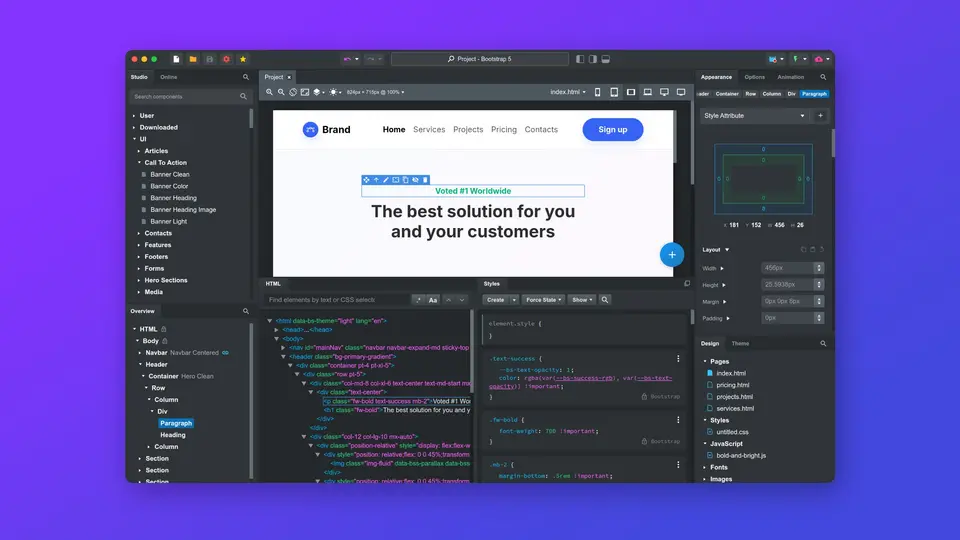
Bootstrap Studio is a desktop application for designing websites visually on the Bootstrap framework, with a component library, templates, a code editor and an optional AI assistant. It works offline and exports static HTML, and it is sold as a one-time purchase rather than a subscription.
Worth knowing
- It is a desktop app for Windows 10+, macOS and Linux; there is no browser or mobile edition.
- Standard includes one year of upgrades; free upgrades forever need Lifetime.
- Ecommerce store building is listed only under the Lifetime plan.
- Sites export as static HTML, so there is no built-in CMS.
Key features
- Visual drag-and-drop editor
- Pages are assembled from built-in components such as headers, footers, galleries and slideshows, and custom components can be added.
- Bootstrap 3, 4 and 5
- Pages are built on the Bootstrap framework, and all three major versions are supported, with SASS, JavaScript and HTML editing in a code editor.
- AI Assistant
- An assistant can edit pages, build sites and redesign pages; the vendor says use is unlimited with your own API key.
- Smart Forms and publishing
- Forms can be delivered as email messages, and sites publish by SFTP or to 5 free slots on the vendor's hosting platform.
- Static HTML export
- Projects are stored as local files and exported as static HTML with local assets that can be hosted anywhere.
Bootstrap Studio pricing
As of Nov 13, 2026, Bootstrap Studio is a paid product, starting at $29 one-time.
- Starts at
- $29 one-time
- Free plan
- None
- Free trial
- None listed
| Plan | Price | What you get |
|---|---|---|
| Standard | $29one-time | Install on all your computers. One year of upgrades, plus free web hosting and Smart Forms for 1 year. |
| Lifetime | $59one-time | Everything in Standard, with free upgrades forever, free hosting and Smart Forms for life, and ecommerce stores. |
Read from bootstrapstudio.io on Nov 13, 2026. Prices change, so confirm with Bootstrap Studio before you buy.
Ways to pay less
- Lifetime licenseLifetime license for $59
A one-time $59 purchase includes every new version free forever, plus hosting and Smart Forms for life.
Stated on bootstrapstudio.io - Other savings30-day refund policy on Standard
The Standard plan lists a 30-day refund policy.
Stated on bootstrapstudio.io
Works with
- Bootstrap
- Google Fonts
- Lottie
- SFTP
Bootstrap Studio alternatives
- Bootstrap Studio vs Pinegrow
Free trial · from $49.50/yr
- Bootstrap Studio vs Blocs
Free plan · from $112.99 one-time
- Bootstrap Studio vs Nicepage
Free plan · from $6.75/mo
- Bootstrap Studio vs Mobirise
Free plan · from $149/yr
- Bootstrap Studio vs Webflow
Free plan · from $15/mo





Common questions
Does Bootstrap Studio have an Android app?
No Android app was listed when its pages were read on Nov 13, 2026. Bootstrap Studio is listed for Windows, macOS and Linux.
Does Bootstrap Studio have an iPhone app?
No iPhone app was listed when its pages were read on Nov 13, 2026. Bootstrap Studio is listed for Windows, macOS and Linux.
Is Bootstrap Studio open source?
Bootstrap Studio is not described as open source on its own site, as read on Nov 13, 2026.
Does Bootstrap Studio work offline?
Yes, according to its own site. What works without a connection differs by plan and platform, so check the vendor's page for the detail.
Sources for this page
The prices, plans, platforms and features above were read from these pages on Nov 13, 2026.