
Calmly Writer
Distraction-free Markdown writing app sold as a one-time purchase
What is Calmly Writer?
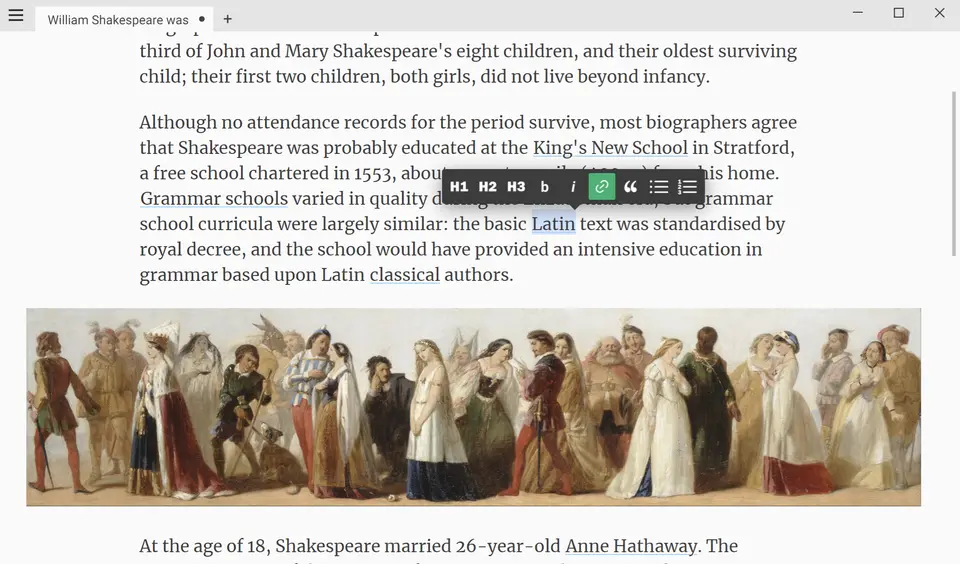
Calmly Writer is a minimalist writing app with a WYSIWYG Markdown editor, so headings, tables and lists appear formatted while typing. It is sold as a pay-once desktop license covering Windows, Mac and Linux and as a separate Android app, and a free, cut-down version runs in the browser with no signup. The apps work offline on local files and add tabs, writing targets, comments, backups and PDF export.
Calmly Writer has a free plan. Paid plans start at $16.99 one-time (Android); $23.90 one-time for Windows, Mac and Linux. See every plan
Good for
- Writers who want a blank page and very few controls
- People who like Markdown but not seeing its syntax
- Buyers who prefer a single payment to a subscription
- Households that mix Windows, Mac and Linux computers
Worth knowing
- The desktop license does not cover Android; the Android app is a separate purchase on Google Play with no trial.
- No iPhone or iPad app is listed.
- Files are local with no cloud service of its own; the site suggests saving into a Dropbox or Google Drive folder to sync.
- The free online version is a limited preview without backups, comments, writing targets or PDF export.
Key features
- WYSIWYG Markdown
- Markdown is rendered as it is typed, so the syntax is never on screen: headings, tables and lists look formatted. Selecting text brings up a toolbar.
- Focus mode and full screen
- A focus mode and a full-screen mode, each with a keyboard shortcut, strip the window down to the text being written.
- Counts and writing targets
- Shows word and character counts with custom targets, plus reading time and a table of contents built from the document's headings.
- Tabs, autosave and backups
- Several documents stay open in tabs. Each is saved automatically and gets its own permanent backups and previous versions.
- File formats
- Opens and saves HTML, plain text, Markdown and its own .calmly format, imports Word .docx files and exports to .docx and PDF.
- Typewriter sounds and themes
- Optional typewriter sounds, smart punctuation, a customizable caret and five color themes, with an Open Dyslexic mode and right-to-left support.
Calmly Writer pricing
- Starts at
- $16.99 one-time (Android); $23.90 one-time for Windows, Mac and Linux
- Free plan
- Calmly Writer Online: a free browser editor with no signup, with auto-save in the browser, word count, typewriter sounds, dark mode and Markdown. It has only a subset of the apps' features.
- Free trial
- 14-day free trial of the desktop app with all features. Afterwards documents open and export, but editing needs a license.
| Plan | Price | What you get |
|---|---|---|
| Calmly Writer Online | $0 | A lightweight browser version for quick edits, with no account. It lacks backups, previous versions, writing targets, comments and PDF export. |
| Android app | $16.99one-time purchase on Google Play | The full app for Android 7.0 or later phones, tablets and Chromebooks. No trial; a 30-day money-back guarantee applies. |
| Desktop license | $23.90one-time purchase | One license for Windows, Mac and Linux on up to three computers at once, with all future updates and a 30-day money-back guarantee. |
Read from calmlywriter.com on Oct 9, 2026. Prices change, so confirm with Calmly Writer before you buy.
Calmly Writer alternatives
- Calmly Writer vs iA Writer
Free trial · from $19.99 one-time
- Calmly Writer vs Typora
Free trial · from $14.99 one-time
- Calmly Writer vs Cold Turkey Writer
Free plan · from $14.99 one-time





Common questions
Is Calmly Writer free?
Calmly Writer has a free plan. Calmly Writer Online: a free browser editor with no signup, with auto-save in the browser, word count, typewriter sounds, dark mode and Markdown. It has only a subset of the apps' features. Paid plans start at $16.99 one-time (Android); $23.90 one-time for Windows, Mac and Linux.
How much does Calmly Writer cost?
Calmly Writer lists 3 plans. Calmly Writer Online: $0. Android app: $16.99 one-time purchase on Google Play. Desktop license: $23.90 one-time purchase. Prices were read from calmlywriter.com on Oct 9, 2026.
What platforms does Calmly Writer work on?
Calmly Writer is available on Web, macOS, Windows, Linux and Android.
Does Calmly Writer have an iPhone app?
No iPhone app was listed when its pages were read on Oct 9, 2026. Calmly Writer is listed for Web, macOS, Windows, Linux and Android.
Is Calmly Writer open source?
Calmly Writer is not described as open source on its own site, as read on Oct 9, 2026.
Does Calmly Writer work offline?
Yes, according to its own site. What works without a connection differs by plan and platform, so check the vendor's page for the detail.
Does Calmly Writer have a free trial?
Yes. 14-day free trial of the desktop app with all features. Afterwards documents open and export, but editing needs a license.
Who makes Calmly Writer?
Calmly Writer is made by Calmly Studio.
What are the alternatives to Calmly Writer?
The closest alternatives to Calmly Writer in our directory are iA Writer, Typora, FocusWriter, Cold Turkey Writer and ghostwriter. Each one has a side-by-side comparison with Calmly Writer.
Sources for this page
The prices, plans, platforms and features above were read from these pages on Oct 9, 2026.