
Dropshare review (2026): is it worth paying for?
Upload files and screenshots from a Mac to your own storage
Black Friday: is there a Dropshare sale?
Dropshare report card
Fair · out of 4.0 · graded Nov 13, 2026
Best for uploading Mac screenshots and files to your own storage
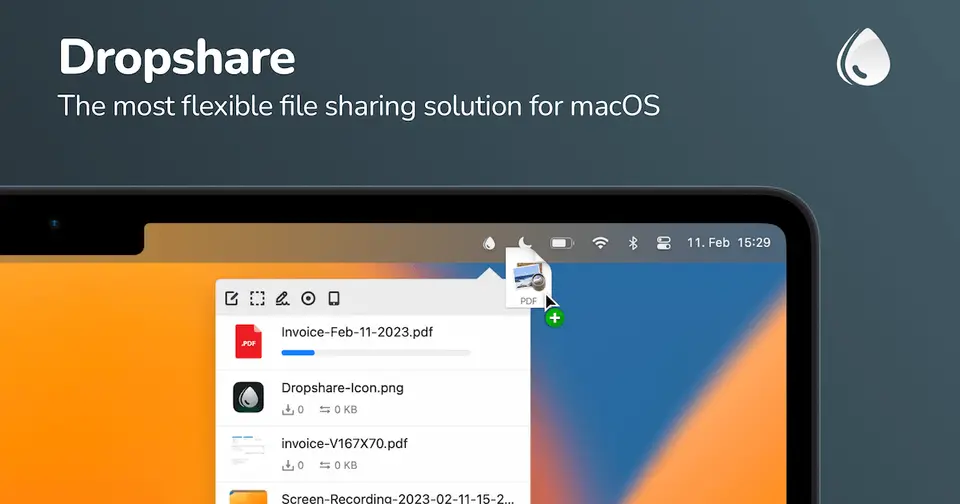
Dropshare is a Mac menu bar app that uploads files, screenshots and recordings to a storage service you choose and hands back a link. It is $39 once, but you must already have somewhere to store the files, and the iOS app is a separate purchase.
Who Dropshare is for
- Fits if you already pay for S3-style storage and want a link on your clipboard after each upload
- Works for Mac users who send screenshots and screen recordings often
Who Dropshare is not for
- Not for you if you have no storage account, as the app does not give you any space
- Tight if you have an old license: a Dropshare 5 license needs an upgrade purchase for version 6
- Watch out: iOS is a separate purchase, included only with Setapp
- Watch out: it needs macOS 12.3 or later, and the $39 is shown with VAT, so US checkout may differ
Why Dropshare gets a 2.4
Five grades, each with its reason. The GPA is their average: an A is 4 points, an F is none.
- BValue for money$39 one-off for one license on up to 3 Macs, less than a year of this category's middle subscription. The price includes VAT, and iOS is bought separately.
- CFree plan and trialA 7-day trial without restrictions, and no free plan. The listing does not say whether the trial wants a card.
- CFeaturesUploads, screenshots, recordings, link pages and encryption across more than 36 providers. But it is a go-between: you bring and pay for the storage, and not every provider works on every platform.
- CEase of useNo store rating is on record. You have to connect a storage account before the first link works.
- BPlatforms and integrationsMac, iPhone and Android apps, with Raycast and Cloudflare R2 listed. They are separate products, and iOS is bought separately.
What these grades rest on. Graded from this listing, whose facts were read from Dropshare's own pages on 13 November 2026. Not based on using the product, and shorter than our full reviews. How we review and grade.
Make Dropshare? Put this grade on your site
Paste this where you want the badge. It links here and follows the grade if it changes. About badges
<a href="https://toolgpa.com/tools/dropshare#review"><img src="https://toolgpa.com/badge/dropshare.svg" alt="Dropshare: 2.4 GPA on ToolGPA" width="196" height="56"></a>Where Dropshare stands among desktop utilities
Dropshare's GPA of 2.4 is higher than 35 of the 186 other desktop utilities we grade, and level with 33.
It stands best on platforms and integrations (B, above 172 of 186) and worst on features (C, above 2).
Each grade against the category
Every bar is all 187 desktop utilities we grade, cut by the letter each got. Dropshare’s own letter is outlined.
- BValue for moneyAbove 28 of 186, level with 26
- CFree plan and trialAbove 8 of 186, level with 66
- CFeaturesAbove 2 of 186, level with 110
- CEase of useAbove 5 of 186, level with 72
- BPlatforms and integrationsAbove 172 of 186, level with 14
Keep Dropshare, or make your own?
Keep it
Nothing Dropshare does is plain enough to make in a weekend. The 6 things listed below take a company.
That makes this kind of software worth paying for, not this one in particular: 118 of the 186 other desktop utilities grade higher.
What you could not
- Storing and serving files for other people.
- Capture tools hooked into the operating system.
- Recording the screen with its sound, and somewhere to keep the video.
- A native app living in the menu bar.
- Apps for macOS, iOS and Android that stay in step with each other.
- AI features, unless you pay a model provider for each request yourself.
What this rests on. Dropshare’s listing: what it does, where it runs, what it plugs into and what it costs. It is a judgement about the kind of software this is. We have not built a replacement for it, and making your own means looking after it too. How we decide, and every tool’s verdict.
What is Dropshare?
Dropshare is a menu bar app for macOS that uploads files, screenshots and screen recordings to a storage service you choose and gives back a shareable link. It supports more than 36 providers, including S3-compatible storage, SFTP and WebDAV. Separate companion apps exist for iOS and Android. The Mac app is a one-off purchase with a trial.
Worth knowing
- The macOS, iOS and Android apps are separate products; iOS is a separate purchase, included with Setapp.
- Requires macOS 12.3 or later, and not every storage provider works on every platform.
- A Dropshare 5 license needs an upgrade purchase for version 6.
- The $39 price is shown with VAT included and may differ in the US checkout.
Key features
- Upload to your own storage
- Sends files straight to the accounts and servers you configure, such as S3-compatible storage, SFTP, FTP, SCP or WebDAV.
- Screenshots and recordings
- Capture and annotate screenshots, or record the screen as 24 or 60 FPS video or a GIF, then upload them.
- Landing pages and link tools
- Customizable HTML landing pages, URL shorteners, filename randomization and expiring or password-protected links.
- Upload encryption
- Files can be encrypted on your Mac before they are sent to object storage and protocol services.
- AI filenames
- Suggests screenshot names using OpenAI's GPT-5 nano, with limited free use per day or your own API key.
Dropshare pricing
As of Nov 13, 2026, Dropshare is a paid product with a free trial, starting at $39 one-off (Personal License, VAT included per the site).
- Starts at
- $39 one-off (Personal License, VAT included per the site)
- Free plan
- None
- Free trial
- 7-day free trial without restrictions
| Plan | Price | What you get |
|---|---|---|
| Personal License | $39one-off, for the Mac app | Free updates for 6.x; one license can be activated on up to 3 Macs. |
| Small Team Bundle | $117one-off, for 3 licenses | Three macOS licenses, with free updates for 6.x. |
Read from dropshare.app on Nov 13, 2026. Prices change, so confirm with Dropshare before you buy.
Ways to pay less
- EducationDiscount for students and education
The pricing section says students and people in education get a discount, claimable through Student App Centre or by request.
Stated on dropshare.app
Works with
Dropshare alternatives
- Dropshare vs Shottr
Free plan · from $12 one-time
- Dropshare vs Gyazo
Free plan · from $6.99/mo
- Dropshare vs Yoink
Free trial · from $8.99 one-time
- Dropshare vs Dropover
Free plan · from $7.99 one-time



Common questions
Does Dropshare have a Windows app?
No Windows app was listed when its pages were read on Nov 13, 2026. Dropshare is listed for macOS, iOS and Android.
Does Dropshare have a Linux app?
No Linux app was listed when its pages were read on Nov 13, 2026. Dropshare is listed for macOS, iOS and Android.
Is Dropshare open source?
Dropshare is not described as open source on its own site, as read on Nov 13, 2026.
Sources for this page
The prices, plans, platforms and features above were read from these pages on Nov 13, 2026.