
Gravity
Single-stream notes app for iPhone, iPad, Mac and Android
What is Gravity?
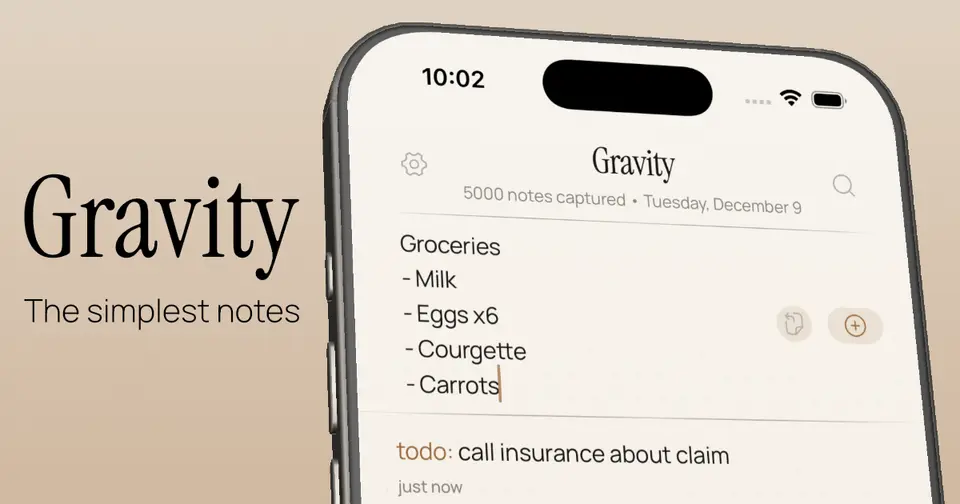
Gravity is a notes app for iPhone, iPad, Mac and Android built on Andrej Karpathy's append-and-review method. Every note goes into one stream with the newest on top, older notes sink as more are added, and a swipe (or the R key on the Mac) brings one that still matters back to the top. Notes are stored on the device with no account, and each platform's app is a separate one-time purchase with no subscription.
Gravity is a paid product, starting at $9.99 one-time per platform. See every plan
Good for
- People who jot quick notes and do not want to file them
- Buyers who would rather pay once than subscribe to a notes app
- Mac users who want a menu bar scratchpad with a global shortcut
Worth knowing
- There is no free version or trial, and the iPhone, Mac and Android apps are separate $9.99 purchases.
- iCloud sync covers iPhone, iPad and Mac only; the Play listing says it is not available on Android.
- There are no folders or tag manager by design, and the developer says he turns those requests down.
- The site lists no Windows, Linux or web version, and the Mac app needs macOS 15 or later.
Key features
- One stream, newest first
- All notes sit in a single list with no folders. New notes go on top and older ones sink; swiping right, or pressing R on the Mac, moves a note back to the top.
- Markdown and checklists
- Headings, bold, italics, lists, links and quotes show formatted, and a line starting with "- [ ]" becomes a checklist that can be ticked from the stream. Notes are saved as plain Markdown text.
- Colon tags and offline search
- Starting a note with a word and a colon, such as todo: or idea:, gives it a color of its own. Search covers every note, archived ones included, and works offline.
- Quick capture
- On the Mac, Option-Space opens a capture panel from any app. On phones, a home screen widget and the share sheet create a note at the top of the stream.
- On-device storage with optional iCloud sync
- Notes are stored on the device with no account and no analytics. iCloud sync between iPhone, iPad and Mac can be turned on; Android backs up to a chosen folder instead.
- Export and command-line tool
- Notes export as JSON or Markdown. A gravity command-line tool for the Mac lets scripts and AI agents list, search, add, edit and archive notes.
Gravity pricing
- Starts at
- $9.99 one-time per platform
- Free plan
- None
- Free trial
- None listed
| Plan | Price | What you get |
|---|---|---|
| Gravity for iPhone and iPad | $9.99one-time purchase (US App Store) | One purchase covers iPhone and iPad, with optional iCloud sync, a Home Screen widget and capture from the share sheet. |
| Gravity for Mac | $9.99one-time purchase (US Mac App Store) | Menu bar app with a system-wide capture shortcut, sold separately from the iPhone app. Requires macOS 15 or later. |
| Gravity for Android | $9.99one-time purchase (US Google Play) | The Android app, sold separately. It has no iCloud sync; notes can be backed up automatically to a folder you choose. |
Read from gravitynotes.app on Oct 9, 2026. Prices change, so confirm with Gravity before you buy.
Works with
Gravity alternatives
- Gravity vs Strflow
Free plan · from $1.49/mo
- Gravity vs Tot
Free plan · from $19.99 one-time
- Gravity vs Antinote
Free trial · from $5 one-time
- Gravity vs Drafts
Free plan · from $1.99/mo
- Gravity vs Google Keep
Free plan · from $7/mo





Common questions
Is Gravity free?
No. Gravity is a paid product, starting at $9.99 one-time per platform.
How much does Gravity cost?
Gravity lists 3 plans. Gravity for iPhone and iPad: $9.99 one-time purchase (US App Store). Gravity for Mac: $9.99 one-time purchase (US Mac App Store). Gravity for Android: $9.99 one-time purchase (US Google Play). Prices were read from gravitynotes.app on Oct 9, 2026.
What platforms does Gravity work on?
Gravity is available on iOS, macOS and Android.
Does Gravity have a Windows app?
No Windows app was listed when its pages were read on Oct 9, 2026. Gravity is listed for iOS, macOS and Android.
Does Gravity have a Linux app?
No Linux app was listed when its pages were read on Oct 9, 2026. Gravity is listed for iOS, macOS and Android.
Is Gravity open source?
Gravity is not described as open source on its own site, as read on Oct 9, 2026.
Does Gravity work offline?
Yes, according to its own site. What works without a connection differs by plan and platform, so check the vendor's page for the detail.
What does Gravity integrate with?
Gravity's listing names iCloud, Claude Code and Codex. A listing names up to eight integrations, so it may connect to more.
Who makes Gravity?
Gravity is made by Tristan Manchester. It dates from 2025.
What are the alternatives to Gravity?
The closest alternatives to Gravity in our directory are Strflow, Tot, Antinote, Drafts and Google Keep. Each one has a side-by-side comparison with Gravity.
Sources for this page
The prices, plans, platforms and features above were read from these pages on Oct 9, 2026.
- gravitynotes.app/notes-app-no-subscription
- gravitynotes.app/
- gravitynotes.app/about
- gravitynotes.app/changelog
- gravitynotes.app/notes-app-for-ai-agents
- apps.apple.com/us/app/gravity-minimal-notes/id6756236079
- apps.apple.com/us/app/gravity-quick-menu-bar-notes/id6757930875?mt=12
- play.google.com/store/apps/details?id=com.gravitynotes.app&hl=en_US&gl=US