The Journey Insider’s Guide
Everything we know about Journey in one document: what it costs, its grades, getting a refund, getting help and what else to look at. Read it here, or keep a copy.
Journey
The Insider’s Guide
Cross-platform diary with maps, mood tracking and guided programs
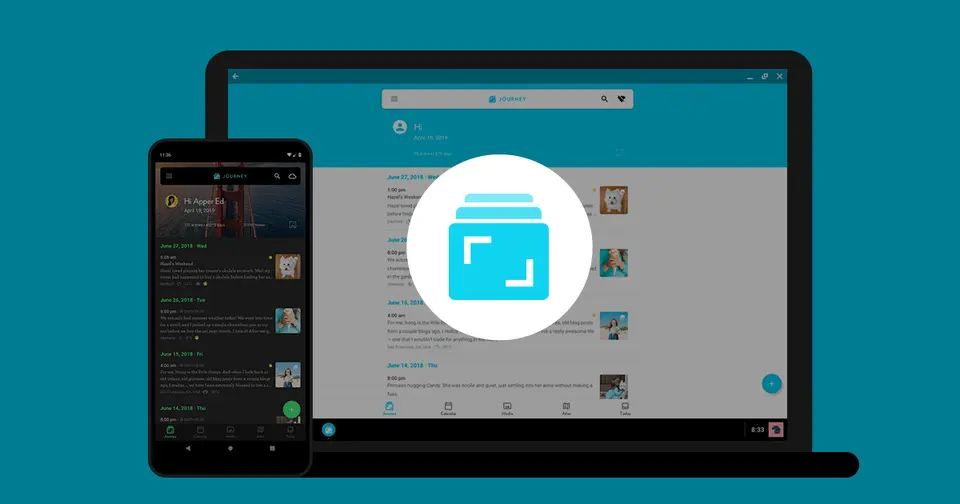
Every plan, grade, refund rule and rival among journaling apps, read from Journey’s own pages.
Made by Two App Studio Pte. Ltd. · checked Oct 5, 2026 · toolgpa.com
Contents
- 01WelcomeWhat it is, who it suits, its grades and the ten things to know first
- 02What it costsEvery plan, the free plan, ways to pay less and how prices have moved
- 03What it doesIts main features, where it runs, what it works with and who makes it
- 04Where it standsIts grades against its category, and whether to keep it or make your own
- 05The alternativesThe tools it is most often weighed against, side by side
- 06Quick answersThe questions people ask about it, each answered in a line or two
- 07About ToolGPAWho made this guide, what else is on the site, and how to cite it
ToolGPA put this guide together from Journey’s own pages, its app-store listings and our grades. Every fact in it is on Journey’s page too, where it is kept up to date. Checked Oct 5, 2026.
Part 01 · Overview
Welcome
What it is, who it suits, its grades and the ten things to know first
2.8
GPA, above 19 of the 35 other journaling apps we grade
Journey is a journal and diary app from Two App Studio for Android, iOS, Mac, Windows, Linux and the web. Entries combine formatted text with photos, video and audio, and can be browsed on a calendar, on a map or as throwbacks to past dates. Journals sync through Google Drive or Journey Cloud Sync, which has optional end-to-end encryption. It is sold as a free version, a one-time Premium license for a single platform, and a Membership that unlocks every platform.
To get you started, here are 9 things to know about Journey, taken from its own pages and our grades.
Coach programs and prompt templates give you a way in.
- 1
Best for a journal on every platform, Linux included
Journey runs on Android, iOS, Mac, Windows, Linux and the web, maps entries by place, and has guided programs, templates and an AI you can ask about past entries.
- 2
Paid plans start at $4.17 a month when paid by the year
As its pricing page puts it: $17.99 one-time per platform, or $49.99 per year for Membership.
- 3
There is a free plan
Free version with no time limit: Google Drive sync, or 70MB and 60 entries on Journey Cloud Sync, limited photo uploads and 10 Odyssey AI questions a day. No desktop app, audio or video.
- 4
It runs on 6 platforms
Web, macOS, Windows, Linux, iOS and Android.
- 5
Multimedia entries
Entries hold photos, videos and audio, with formatting such as tables, checklists and text color. The free version limits photo uploads and has no audio, video or text formatting.
- 6
Atlas, calendar and Throwback
Atlas maps entries and media by tagged location, the calendar shows entries by date, and Throwback resurfaces entries from a week, a month or years ago.
- 7
Sync and end-to-end encryption
Journals sync through Google Drive or Journey Cloud Sync. Journey Cloud Sync has optional end-to-end encryption with a passphrase the company does not store, and a Docker image for a self-hosted sync drive is offered.
- 8
A 2.8 GPA, above 19 of 35
That is against the other journaling apps we grade, on value, the free plan, features, ease of use and platforms.
- 9
Keep it
The plain part of Journey you could make: daily notes, mood tracking and templates. What surrounds it you could not. The 7 things listed below take a company, not a weekend.
Journey at a glance
- Pricing
- Free plan, from $17.99 one-time per platform, or $49.99 per year for Membership
- Free plan
- Yes
- Free trial
- None stated
- Runs on
- Web, macOS, Windows, Linux, iOS, Android
- Made by
- Two App Studio Pte. Ltd.
- Category
- Journaling Apps
- Our grade
- 2.8 GPA, good
- Store rating
- 4.6 on the App Store, 5,067 ratings
The report card
Best for a journal on every platform, Linux included
Journey runs on Android, iOS, Mac, Windows, Linux and the web, maps entries by place, and has guided programs, templates and an AI you can ask about past entries. But the $17.99 one-time Premium covers only the phone platform you bought it on, desktop and web need the $49.99-a-year Membership, and turning on encryption switches off search for good.
| Subject | Grade | Comment |
|---|---|---|
| Value for money | C | Membership is $6.99 a month or $49.99 a year, which is $4.17 a month, exactly the middle for journaling apps here, and it's the only licence that covers desktop and web. Premium at $17.99 once covers one mobile platform only, and Lifetime Membership is $199. |
| Free plan and trial | C | Free never runs out and syncs through your own Google Drive, but the caps come fast: 70MB and 60 entries on Journey Cloud Sync, limited photo uploads, 10 Odyssey AI questions a day, and no desktop app, audio, video or text formatting. |
| Features | B | It covers the whole job: photos, video and audio in entries, tables and checklists, a calendar, an Atlas map, Throwback, 60-plus coach programs, shared journals and entries by email. Two gaps on its own pages: turning encryption on kills search for good, and Membership stops at 10GB and 5,000 entries. |
| Ease of use | B | 4.65 from about 5,100 App Store ratings, below the top band. Coach programs and prompt templates give you a way in. What takes thought is the buying: Premium, Membership, Lifetime and a separate Signature plan all cover different things. |
| Platforms and integrations | A | Android, iOS, Mac, Windows, Linux and the web, which is the lot, and few rivals here manage Linux. It connects to Google Drive, Zapier, WhatsApp, Apple Health, WordPress and Siri Shortcuts, and there's a Docker image for hosting the sync drive yourself. |
An A is worth 4 points, a B 3, a C 2, a D 1 and an F nothing. The GPA is the average of the five.
Who Journey is for
- Fits if you want one journal on your phone, your desktop and the web, Linux included
- Works for travel journals, since entries are tagged by place and shown on a map
Who it is not for
- Tight if you're staying free on Journey Cloud Sync, which stops at 70MB and 60 entries
- Skip it if you want to pay once on desktop, as the $17.99 Premium doesn't cover the desktop or web apps
- Not for you if you need encrypted entries you can still search, since encryption turns search off for good
- Tight if you're staying free, as there's no desktop app, audio, video or formatting, and AI stops at 10 questions a day
- Watch out: Membership stops at 10GB and 5,000 entries, and the Signature plan above it has no public price
Good to know
Good for
- People who want one journal on phone, desktop (including Linux) and web
- Travel journals, with entries tagged by place and shown on a map
- Guided journaling through coach programs and templates
- Buyers who would rather pay once than subscribe
Worth knowing
- The free version has no desktop app access and caps Journey Cloud Sync at 70MB and 60 entries.
- A Premium license covers a single platform; the help center says the Journey Desktop and web apps do not support it.
- Turning on end-to-end encryption disables search, and the vendor says it cannot be reversed.
- Membership stops at 10GB and 5,000 entries; more needs the separate Signature subscription, whose price is not shown publicly.
Part 02 · Pricing
What it costs
Every plan, the free plan, ways to pay less and how prices have moved
$4.17
A month to start, paid by the year. There is a free plan too
Journey has a free plan. Paid plans start at $17.99 one-time per platform, or $49.99 per year for Membership.
Free
$0
Mobile and limited web access, Google Drive sync, 70MB and 60 entries on Journey Cloud Sync, shared journals and limited photo uploads.
Premium
$17.99
one-time purchase per platform (US App Store price)
Unlocks rich text, audio, themes, Throwback and export on the platform it was bought for, Android or iOS. Not supported on the desktop or web apps.
Membership
$6.99
per month, or $49.99 per year
Every platform including desktop and web, 10GB and 5,000 entries on Journey Cloud Sync, all coach programs, custom templates, email entries and Zapier.
Lifetime Membership
$199.00
one-time purchase
The Membership features on every platform for a single payment instead of a subscription.
The free plan
Free version with no time limit: Google Drive sync, or 70MB and 60 entries on Journey Cloud Sync, limited photo uploads and 10 Odyssey AI questions a day. No desktop app, audio or video.
Read from apps.apple.com on Oct 5, 2026.
Ways to pay less
Annual discount
About 40% less with the annual Membership
The US App Store listing prices Membership at $6.99 monthly or $49.99 a year, which works out to about 40% less than twelve monthly payments.
Stated on apps.apple.comLifetime license
Lifetime Membership for a single payment
Journey's membership page offers a lifetime purchase as an alternative to the subscription. The US App Store lists Lifetime Membership at $199.00.
Stated on journey.cloud
What the app costs elsewhere
Each country’s App Store price for “Membership (Annual)”, against $29.99 in the United States, in dollars at the day’s rate. The four cheapest and the four dearest of 11.
| Country | Price there | In dollars | Against the US |
|---|---|---|---|
| Turkey | ₺189,99 | $3.86 | 87% less |
| Brazil | R$ 112,90 | $22.56 | 25% less |
| Indonesia | Rp 429ribu | $23.99 | 20% less |
| Philippines | ₱ 1,590.00 | $25.31 | 16% less |
| Mexico | $589.00 | $32.36 | 8% more |
| Australia | $46.99 | $32.80 | 9% more |
| Germany | 31,99 € | $35.85 | 20% more |
| United Kingdom | £28.49 | $37.66 | 26% more |
Part 03 · Features
What it does
Its main features, where it runs, what it works with and who makes it
6
Places it runs: Web, macOS, Windows, Linux, iOS and Android
Cross-platform diary with maps, mood tracking and guided programs. Here is what it does, as its own site describes it, and what it covers: end-to-end encrypted, AI features, daily notes, templates, mood tracking.
Android, iOS, Mac, Windows, Linux and the web, which is the lot, and few rivals here manage Linux.
- Multimedia entries
- Entries hold photos, videos and audio, with formatting such as tables, checklists and text color. The free version limits photo uploads and has no audio, video or text formatting.
- Atlas, calendar and Throwback
- Atlas maps entries and media by tagged location, the calendar shows entries by date, and Throwback resurfaces entries from a week, a month or years ago.
- Sync and end-to-end encryption
- Journals sync through Google Drive or Journey Cloud Sync. Journey Cloud Sync has optional end-to-end encryption with a passphrase the company does not store, and a Docker image for a self-hosted sync drive is offered.
- Coach programs and templates
- More than 60 guided journaling programs and a set of prompt templates. Free and Premium get limited access; Membership unlocks all programs and custom templates.
- Odyssey AI
- A chat assistant answers questions about your own past entries. Free and Premium accounts can ask 10 questions a day, and Membership raises that to 50.
- Shared journals and web links
- Journals can be shared with other people, and selected entries published as web links that open in a browser. Free accounts get 2 web links, Membership 50.
Where it runs
- Web
- macOS
- Windows
- Linux
- iOS
- Android
What it works with
- Google Drive
- Zapier
- Apple Health
- WordPress
- Ghost
- Tumblr
- Siri Shortcuts
Journey is made by Two App Studio Pte. Ltd.
Part 04 · Standing
Where it stands
Its grades against its category, and whether to keep it or make your own
19/35
Other journaling apps it is graded above
Journey's GPA of 2.8 is higher than 19 of the 35 other journaling apps we grade, and level with 9.
It stands best on platforms and integrations (A, above 33 of 35) and worst on free plan and trial (C, above 2).
Its paid plans start at $4.17 a month when paid by the year, against a middle price of $3.66 for the category: 12 of the 21 others that charge start lower.
On features, ease of use and platforms it scores 3.3 out of 4. Nothing scores higher for less, though at least one tool matches that score at a lower price.
Each grade against the category
Every bar is all 36 journaling apps we grade, cut by the letter each got. Journey’s own letter is outlined.
- CValue for moneyAbove 4 of 35
- CFree plan and trialAbove 2 of 35
- BFeaturesAbove 30 of 35
- BEase of useAbove 3 of 35
- APlatforms and integrationsAbove 33 of 35
Price against what you get
Each dot is one of 29 journaling apps. Further left costs less; higher up scores better on features, ease of use and platforms. Journey is the marked dot.
What paid plans start at, a month (each step along is roughly double) →
Keep it, or make your own?
Whether this is something you could build for yourself with an AI app builder, and what you would give up.
Keep it
The plain part of Journey you could make: daily notes, mood tracking and templates. What surrounds it you could not. The 7 things listed below take a company, not a weekend.
It costs $49.99 a year.
What you could make
- Daily notes, mood tracking and templates: an app builder makes these well.
What you could not
- Apps for macOS, Windows, Linux, iOS and Android that stay in step with each other.
- It plugs into other products, Google Drive, Zapier and WhatsApp among them.
- End-to-end encryption done properly.
- AI features, unless you pay a model provider for each request yourself.
- People on the other end: coaches. No app builder makes those.
- Sharing with other people, which means accounts and invitations.
- The depth: we grade its features B, which means it covers the whole job.
What this rests on. Journey’s listing: what it does, where it runs, what it plugs into and what it costs. It is a judgement about the kind of software this is. We have not built a replacement for it, and making your own means looking after it too. How we decide, and every tool’s verdict.
Part 05 · Alternatives
The alternatives
The tools it is most often weighed against, side by side




Day One, Diarium, Penzu, Diaro and Daybook
The 5 tools Journey is most often weighed against, with where each one differs from it.
- 3.2GPA
Day One
Free plan · from $49.99/yr
Encrypted journal for text, photos, audio and video across devices.
- Only Journey lists a Linux app.
- Only Day One lists a browser extension.
- Journey also covers mood tracking.
- 3.2GPA
Diarium
Free plan · from $14.99 one-time
Private journal with a one-time Pro purchase and your own cloud sync.
- Only Journey lists a web app.
- Only Journey lists a Linux app.
- Journey is end-to-end encrypted, according to its own site.
- 2.8GPA
Penzu
Free plan · from $19.99/yr
Private online journal for the browser, with iOS and Android apps.
- Only Journey lists macOS, Windows and Linux apps.
- Journey is end-to-end encrypted, according to its own site.
- Penzu can be bought with a one-time purchase.
- 3.0GPA
Diaro
Free plan · from $8.99/yr
Diary and notes app that syncs through your own Dropbox.
- Only Journey lists macOS, Windows and Linux apps.
- Journey is end-to-end encrypted, according to its own site.
- Journey also covers templates.
- 2.6GPA
Daybook
Free plan · from $3.49/mo
Cloud-synced diary with guided journals and voice entry.
- Only Journey lists macOS, Windows and Linux apps.
- Journey is end-to-end encrypted, according to its own site.
- Daybook also covers dictation.
Part 06 · Questions
Quick answers
The questions people ask about it, each answered in a line or two
13
Questions, each answered in a line or two
The short version of everything above, for when you only need the answer. Each one is told in full in its part of the guide.
Is Journey free?
Journey has a free plan. Free version with no time limit: Google Drive sync, or 70MB and 60 entries on Journey Cloud Sync, limited photo uploads and 10 Odyssey AI questions a day.
How much does Journey cost?
Journey lists 4 plans. Free: $0.
What platforms does Journey work on?
Journey is available on Web, macOS, Windows, Linux, iOS and Android.
Does Journey offer any discounts?
Journey publicly lists the following: About 40% less with the annual Membership; Lifetime Membership for a single payment.
How is Journey rated?
Journey's iPhone and iPad app averages 4.6 out of 5 from 5,067 ratings on the App Store in the United States, as read on Oct 5, 2026.
Is Journey open source?
Journey is not described as open source on its own site, as read on Oct 5, 2026.
Is Journey end-to-end encrypted?
Journey describes itself as end-to-end encrypted on its own site. Nobody here has audited that.
What does Journey integrate with?
Journey's listing names Google Drive, Zapier, WhatsApp, Apple Health, WordPress, Ghost, Tumblr and Siri Shortcuts.
Who makes Journey?
Journey is made by Two App Studio Pte. Ltd.
What are the alternatives to Journey?
The closest alternatives to Journey in our directory are Day One, Diarium, Penzu, Diaro and Daybook.
How does Journey compare with other journaling apps?
Journey's GPA of 2.8 is higher than 19 of the 35 other journaling apps we grade, and level with 9.
Is Journey good value for money?
ToolGPA grades Journey C for value for money. Its paid plans start at $4.17 a month when paid by the year, against a middle price of $3.66 for the category: 12 of the 21 others that charge start lower.
Could I make my own version of Journey?
The plain part of Journey you could make: daily notes, mood tracking and templates.
Where this guide comes from
The prices, plans, platforms and features were read from Journey’s own pages on Oct 5, 2026, and the grades were given on Oct 10, 2026. Graded from this listing, whose facts were read from Journey's own pages on 5 October 2026, and its App Store rating. Also tested with a demo account on 2026-04-28.
Every tool we list gets five grades, A to F, each with its reason, and a GPA that averages them. How each is decided is at toolgpa.com/grades. This guide is ToolGPA’s own work; it is not made, paid for or approved by Two App Studio Pte. Ltd. Prices change, so check journey.cloud before you buy.
- apps.apple.com/us/app/journey-diary-journal/id1300202543
- journey.cloud
- journey.cloud/membership
- journey.cloud/signature
- journey.cloud/downloads
- support.journey.cloud/en/categories/purchase-payment/articles/journey-license-comparison
- support.journey.cloud/en/categories/purchase-payment/articles/premium-license
- support.journey.cloud/en/categories/purchase-payment/articles/membership-license
- support.journey.cloud/en/categories/purchase-payment/articles/signature-license
- support.journey.cloud/categories/synchronization-cloud/articles/how-does-encryption-work-in-journey
- github.com/Journey-Cloud/self-hosted
Part 07 · About
About ToolGPA
Who made this guide, what else is on the site, and how to cite it
3,189
Tools graded, in 94 categories
ToolGPA grades software the way a school report grades a pupil: five subjects, a letter for each with the reason written beside it, and a GPA that averages them. Prices, plans and platforms are read from each maker’s own pages and dated, so you always know how fresh a figure is.
Every grade, review and ranking on ToolGPA is our own judgement. No company can pay for a grade or change one. Every tool on the site has a guide like this one, free to download and pass on. It all lives at toolgpa.com.
3,189
tools graded
94
categories
426
price changes on record
579
apps priced in 12 countries
What else is on toolgpa.com
- Journey, kept up to dateEverything in this guide, with prices and grades as they are todaytoolgpa.com/tools/journey
- How grades are givenThe rules behind every letter and every GPAtoolgpa.com/grades
- Value chartsWhat each tool costs against what it scores, for every categorytoolgpa.com/charts
- CompareAny two tools side by side, plan by plantoolgpa.com/compare
- Price changesEvery price rise and cut on record, each with its sourcetoolgpa.com/price-changes
- Prices by countryWhat apps cost on the App Store in 12 countriestoolgpa.com/prices-by-country
- Pay lessEvery public discount: yearly billing, students, nonprofitstoolgpa.com/save
- Keep or makeWhich tools are worth paying for, and which you could build yourselftoolgpa.com/keep-or-make
Scan for the live page
Prices and grades as they are today
Quoting this guide?
Please name ToolGPA and link to the live page, so readers can check the figures for themselves:
ToolGPA, "Journey: The Insider's Guide", checked Oct 5, 2026. https://toolgpa.com/tools/journey
Know someone choosing between journaling apps?
Send them this guide: toolgpa.com/tools/journey/guide
ToolGPA elsewhere: youtube.com/@toolgpa
See our other guides
The best-graded journaling apps after Journey, each with an Insider's Guide of its own.
- Journaling Apps Insider's GuideEvery one of the 36 journaling apps we grade, compared
- Apple Journal Insider's GuideApple's free journaling app for iPhone, iPad and Mac3.2 GPA
- Day One Insider's GuideEncrypted journal for text, photos, audio and video across devices3.2 GPA
- Diarium Insider's GuidePrivate journal with a one-time Pro purchase and your own cloud sync3.2 GPA

Choosing software? Every tool graded, every price dated.
Compare tools at toolgpa.com ›Everything in this guide is ToolGPA’s own summary of what Journey’s pages, its app-store listings and public reviews said on the dates shown. Grades are our judgement under the rules at toolgpa.com/grades. Every grade, review and ranking on ToolGPA is our own judgement. No company can pay for a grade or change one. Journey is a trademark of its owner, and this guide is not made, paid for or approved by Two App Studio Pte. Ltd. Prices and plans change: check journey.cloud before you buy.