Notebooks
Writing, documents and tasks organized in nested books
What is Notebooks?
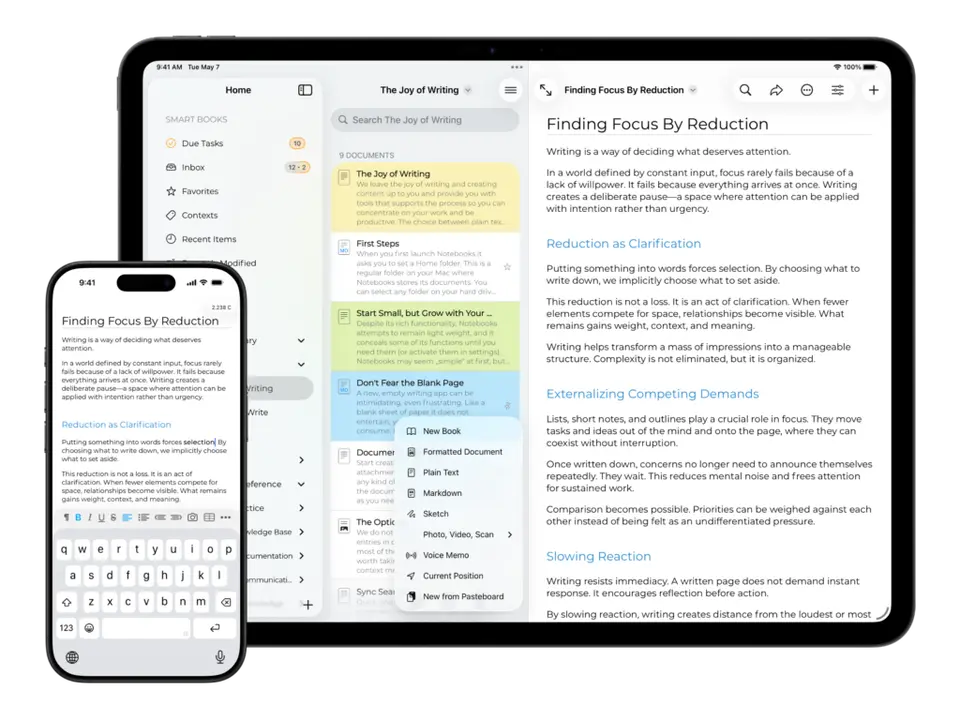
Notebooks is a writing and note-taking app for iPhone, iPad, Mac and Windows from developer Alfons Schmid. Plain text, Markdown and formatted documents sit alongside PDFs and other files in nested books, any of which can be turned into a task list with due dates. Everything is stored as regular files in standard formats and synced through iCloud, Dropbox or WebDAV. Each platform's app is a separate one-time purchase with no subscription.
Notebooks is a paid product with a free trial, starting at $17.99 one-time for iPhone and iPad; $43.99 one-time for Mac. See every plan
Good for
- Writers who want notes, long documents and tasks in one app
- People who prefer one-time purchases to subscriptions
- Users who want their documents kept as regular files they can reach from other apps
Worth knowing
- Each platform is a separate purchase: $17.99 for iPhone and iPad, $19 for Windows and $43.99 for Mac.
- The site offers no Android, Linux or web version.
- On iPhone and iPad, Custom Storage Locations is a $2.99 in-app purchase on top of the app price.
- WebDAV sync has no automatic mode and has to be triggered manually.
Key features
- Text, Markdown and formatted documents
- Write in plain text, Markdown or formatted text with styles, tables, checklists, images and attachments, and convert between the formats at any time.
- Nested books
- Documents and imported files live in books that nest into hierarchies and can be reordered freely. Smart Books collect recent items, favorites and tasks.
- Task lists inside books
- Any book can become a task list and nested books become nested projects, with due dates, alerts and recurring tasks. Tasks can be extracted from documents.
- Links, backlinks and search
- Wiki-style links connect documents, backlinks show where a document is referenced, and full-text search covers documents, PDFs and attachments.
- PDF and eBook export
- Compile one or more documents into a PDF or an eBook at any time; the developer's own handbooks are produced this way.
- Regular files and flexible sync
- Documents are regular files in standard formats, synced through iCloud Drive, Dropbox or WebDAV, or directly between devices over a local Wi-Fi network.
Notebooks pricing
- Starts at
- $17.99 one-time for iPhone and iPad; $43.99 one-time for Mac
- Free plan
- None
- Free trial
- Free trial versions for Mac and Windows; the Windows trial expires after 30 days
| Plan | Price | What you get |
|---|---|---|
| Notebooks for iPhone and iPad | $17.99one-time purchase (US App Store) | The iPhone, iPad and Apple Watch app. Custom Storage Locations is a $2.99 in-app purchase, and optional tips are offered. |
| Notebooks for Windows | $19one-time license | A license file for the Windows app, which shares its files with the iPhone and iPad app through iCloud Drive, Dropbox or WebDAV. |
| Notebooks for Mac | $43.99one-time purchase | Sold directly, with activation on up to five Macs, or through the Mac App Store at the same price. There are no recurring fees. |
Read from apps.apple.com on Oct 6, 2026. Prices change, so confirm with Notebooks before you buy.
Works with
Notebooks alternatives
- Notebooks vs DEVONthink
Free trial · from $99 one-time
- Notebooks vs Keep It
Free trial · from $2.99
- Notebooks vs Obsidian
Free plan · from $4/mo
- Notebooks vs Bear
Free plan · from $2.99/mo
- Notebooks vs NotePlan
Free trial · from $8.33/mo



Common questions
Is Notebooks free?
No, Notebooks is a paid product, but you can try it first. Free trial versions for Mac and Windows; the Windows trial expires after 30 days.
How much does Notebooks cost?
Notebooks lists 3 plans. Notebooks for iPhone and iPad: $17.99 one-time purchase (US App Store). Notebooks for Windows: $19 one-time license. Notebooks for Mac: $43.99 one-time purchase. Prices were read from apps.apple.com on Oct 6, 2026.
What platforms does Notebooks work on?
Notebooks is available on iOS, macOS and Windows.
Does Notebooks have an Android app?
No Android app was listed when its pages were read on Oct 6, 2026. Notebooks is listed for iOS, macOS and Windows.
Does Notebooks have a Linux app?
No Linux app was listed when its pages were read on Oct 6, 2026. Notebooks is listed for iOS, macOS and Windows.
Is Notebooks open source?
Notebooks is not described as open source on its own site, as read on Oct 6, 2026.
What does Notebooks integrate with?
Notebooks's listing names iCloud Drive and Dropbox. A listing names up to eight integrations, so it may connect to more.
Who makes Notebooks?
Notebooks is made by Alfons Schmid. It dates from 2008.
What are the alternatives to Notebooks?
The closest alternatives to Notebooks in our directory are DEVONthink, Keep It, Obsidian, Bear and NotePlan. Each one has a side-by-side comparison with Notebooks.
Sources for this page
The prices, plans, platforms and features above were read from these pages on Oct 6, 2026.
- apps.apple.com/us/app/notebooks-write-and-organize/id1449826029?mt=12
- apps.apple.com/us/app/notebooks-write-and-organize/id1490084838
- checkout.paddle.com/api/2.0/prices?product_ids=546055,864533&customer_country=US
- notebooksapp.com/
- notebooksapp.com/mac/
- notebooksapp.com/ios/
- notebooksapp.com/pc/
- notebooksapp.com/download/
- notebooksapp.com/faq/
- notebooksapp.com/ios/sync-between-devices/
- notebooksapp.com/task-management/