NotePlus review (2026): is the free plan enough?
Native Markdown notes app with kanban boards and AI chat
Black Friday: is there a NotePlus sale?
NotePlus report card
Very good · out of 4.0 · graded Oct 10, 2026
Best for Markdown notes in your own cloud folder, bought once
NotePlus is a Markdown notes app from the TablePlus team, with kanban boards and an AI chat beside your notes, saved in your own iCloud Drive, Google Drive or Dropbox folder with no account. A license is $29 once with a year of updates, then $19 a seat for newer versions. There's no sync of its own, the AI chat needs your own API key, and there's no Android, Linux or web version.
Who NotePlus is for
- Fits if you want plain Markdown files in a cloud folder you already pay for
- Works for buying a license once instead of paying monthly, on a Mac or PC plus an iPhone or iPad
Who NotePlus is not for
- Skip it if you have an Android phone or a Linux machine, as neither is covered, and there's no web version
- Not for you if you want sync handled for you, because there isn't any of its own
- Tight if you want AI without any setup, since the chat needs an API key from a provider
- Watch out: a license includes 1 year of updates, and newer versions after that cost $19 a seat
- Watch out: the FAQ says the free download will have some functions limited in future releases, without saying which
Why NotePlus gets a 3.0
Five grades, each with its reason. The GPA is their average: an A is 4 points, an F is none.
- AValue for moneyBasic is $29 once for 1 Mac or PC plus 2 iPhones or iPads. A year of the middle note app here, at $6 a month, is $72, so you're paying under half a year of that and then it's yours. Updates run out after a year and newer versions need $19 a seat, but the app keeps working.
- BFree plan and trialFree to download and use with no license, and the pricing FAQ says there are no limits at present, so one person could live on it. Not an A, because the same FAQ promises some functions will be limited in future releases without saying which, and Hub already needs a license.
- CFeaturesMarkdown that formats in place, [[links]] between notes, locked notes, kanban boards and Hub for messages from scripts. But the gap the listing names is a big one for a notes app: no sync of its own, so notes only reach another device if the cloud folder carries them. The AI chat needs your own API key too.
- BEase of useNo store rating on record, so we go by the listing: there's no account to create, you point it at a folder and type, and Markdown formats in place with no preview pane to manage. There's nothing to set up.
- BPlatforms and integrationsMac, Windows, iPhone and iPad, with notes carried by iCloud Drive, Google Drive or Dropbox and AI from OpenAI, Anthropic, Gemini, DeepSeek or Ollama. No Android, Linux or web version, and an A wants a desktop app plus the browser and both phones.
What these grades rest on. Graded from this listing, whose facts were read from NotePlus's own pages on 9 October 2026. How we review and grade.
Make NotePlus? Put this grade on your site

Paste this where you want the badge. It links here and follows the grade if it changes. About badges
<a href="https://toolgpa.com/tools/noteplus#review"><img src="https://toolgpa.com/badge/noteplus.svg" alt="NotePlus: 3.0 GPA on ToolGPA" width="196" height="56"></a>Where NotePlus stands among note-taking apps
NotePlus's GPA of 3.0 is higher than 164 of the 169 other note-taking apps we grade, and level with 5.
It stands best on value for money (A, above 99 of 169) and worst on features (C, above 82).
Each grade against the category
Every bar is all 170 note-taking apps we grade, cut by the letter each got. NotePlus’s own letter is outlined.
- AValue for moneyAbove 99 of 169, level with 70
- BFree plan and trialAbove 88 of 169, level with 25
- CFeaturesAbove 82 of 169, level with 62
- BEase of useAbove 117 of 169, level with 50
- BPlatforms and integrationsAbove 121 of 169, level with 43
Keep NotePlus, or make your own?
You could make this
A notes app at its plainest is text in folders with a search box.
What NotePlus does at its core is notes, Markdown, linked notes and kanban boards, and that is the kind of thing an AI app builder makes well. You would give up 3 things, listed below, and little else. It costs $29, paid once. An AI app builder starts at about $20 a month on our listings, and you only need it while you build.
What you could make
- Notes, Markdown, linked notes and kanban boards: an app builder makes these well.
What you could not
- Apps for macOS, Windows and iOS that stay in step with each other.
- It plugs into other products, iCloud Drive, Google Drive and Dropbox among them.
- AI features, unless you pay a model provider for each request yourself.
What this rests on. NotePlus’s listing: what it does, where it runs, what it plugs into and what it costs. It is a judgement about the kind of software this is. We have not built a replacement for it, and making your own means looking after it too. How we decide, and every tool’s verdict.
What is NotePlus?
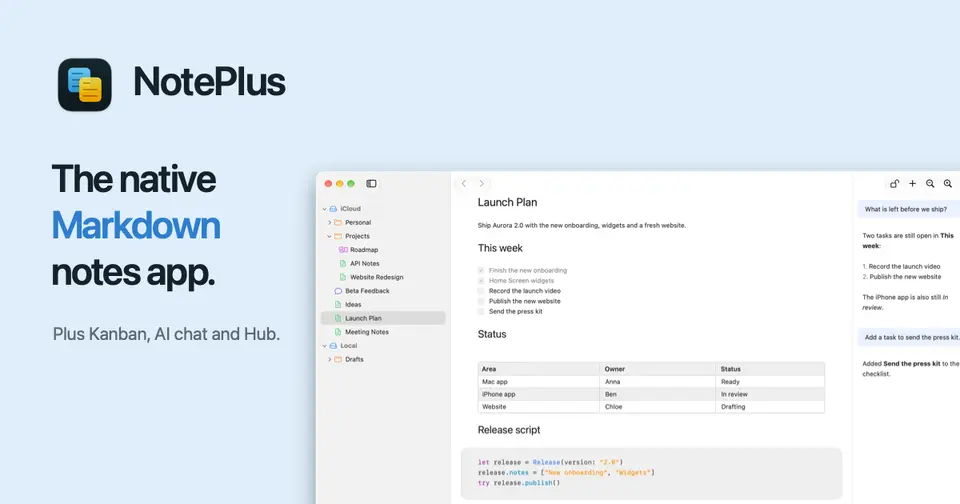
NotePlus is a Markdown notes app for Mac, Windows, iPhone and iPad from the team behind TablePlus. Notes are plain Markdown files kept in a folder you choose, such as iCloud Drive, Google Drive or Dropbox, and are formatted in place as you type, with no account to create. Kanban boards, an AI chat that runs on your own API key and Hub, an inbox for messages posted by scripts and services, sit beside the notes.
Worth knowing
- No Android, Linux or web version: the site lists macOS 12, iOS 15 and Windows 10 (64-bit) or later.
- A license includes 1 year of updates. The app keeps working after that, but moving to newer versions needs a renewal at $19 per seat.
- There is no sync service of its own: notes reach other devices through the cloud folder they are stored in.
- AI chat needs your own API key from a provider, and the site describes themes for Mac, iPhone and iPad only.
Key features
- WYSIWYG Markdown editor
- Markdown is formatted in place as you type, with no separate preview pane. Headings, checklists, tables, code blocks and images are covered, and the file stays plain Markdown.
- Files in your own cloud folder
- Notes are kept in iCloud Drive, Google Drive, Dropbox or any folder that syncs, and that service does the syncing. No NotePlus account is involved.
- Linked notes and secret notes
- Typing two brackets and a name links to another note. A note can be locked with a password, which encrypts it in its file, and unlocked with Touch ID or Face ID.
- Kanban boards
- Boards with columns, cards and colors are saved in the same folder as the notes, and a card is dragged to another column as the work moves along.
- AI chat with your own API key
- A chat window and a sidebar assistant work with OpenAI, Anthropic, Gemini, DeepSeek, Ollama and others. Chats are saved as files, and the assistant can read and update NotePlus items.
- Hub
- Works like an incoming webhook: a script, CI job or service posts text to a hook URL and it arrives in NotePlus with a notification on Mac and iPhone. Hub needs a license.
NotePlus pricing
As of Oct 9, 2026, NotePlus has a free plan, and paid plans start at $29 one-time purchase (Basic license, 1 computer).
- Starts at
- $29 one-time purchase (Basic license, 1 computer)
- Free plan
- Free to download and use without a license. The pricing FAQ says the unlicensed app has no limits at present and that some functions will be limited in future releases. Hub is part of a license.
- Free trial
- None listed
| Plan | Price | What you get |
|---|---|---|
| Free download | $0 | The app without a license. The vendor calls this a free trial and says it has no limits at present, though some functions will be limited in future releases. |
| Basic | $29per license, one-time purchase | For individuals: 1 Mac or Windows PC plus 2 iPhones or iPads, all premium features including Hub, and 1 year of updates and support. |
| Pro | $39per license, one-time purchase | 2 Macs or Windows PCs plus 4 iPhones or iPads, with the same premium features and 1 year of updates and support. |
| Custom | $29per seat, one-time purchase, from 3 seats | For teams and companies. Each seat covers 1 Mac or Windows PC plus 2 iPhones or iPads, with 1 year of updates and support. |
Read from noteplus.com on Oct 9, 2026. Prices change, so confirm with NotePlus before you buy.
Ways to pay less
- Other savingsPro license covers two computers for $39
The pricing page marks the Pro license "Save 35%": it covers 2 Macs or Windows PCs and 4 iPhones or iPads for $39, where a Basic license for one computer costs $29.
Stated on noteplus.com - Education50% education discount on request
The site's Education link goes to the TablePlus team's education plan, which gives students and teachers 50% off on request by email with proof of status. That page was written for TablePlus.
Stated on tableplus.com
Works with
NotePlus alternatives
- NotePlus vs Obsidian
Free plan · from $4/mo
- NotePlus vs Bear
Free plan · from $2.99/mo
- NotePlus vs FSNotes
Free plan · from $4.99 one-time
- NotePlus vs Octarine
Free plan · from $79 one-time
- NotePlus vs MiaoYan
Free plan · from $12.99 one-time




Common questions
Does NotePlus have an Android app?
No Android app was listed when its pages were read on Oct 9, 2026. NotePlus is listed for macOS, Windows and iOS.
Does NotePlus have a Linux app?
No Linux app was listed when its pages were read on Oct 9, 2026. NotePlus is listed for macOS, Windows and iOS.
Is NotePlus open source?
NotePlus is not described as open source on its own site, as read on Oct 9, 2026.
Sources for this page
The prices, plans, platforms and features above were read from these pages on Oct 9, 2026.