
Octarine
Local Markdown notes app with daily notes, views and optional AI
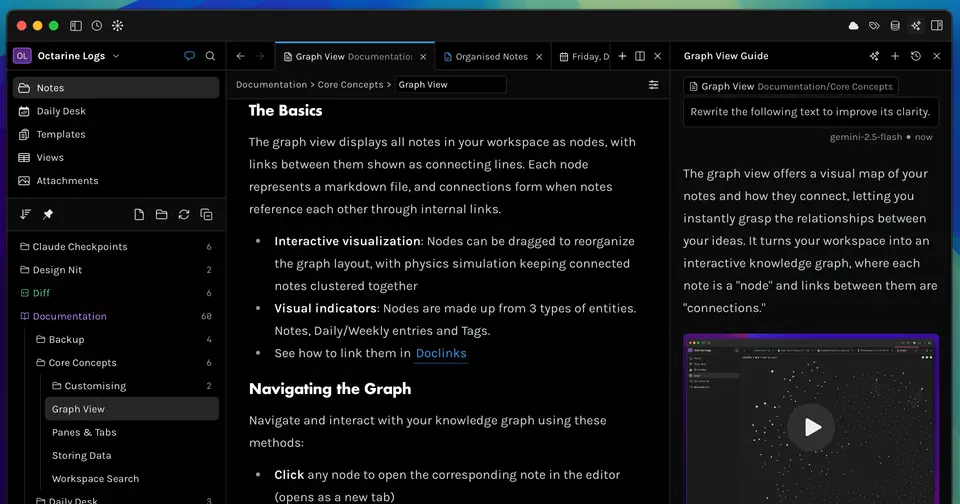
Octarine report card
Very good · out of 4.0 · graded Oct 9, 2026
Best for Markdown notes on a desktop with the extras built in
Octarine is what you'd pick if you like the idea of Obsidian but not the plugin hunt. Daily notes, backlinks, a graph and quick capture come built in, and your notes are plain Markdown files in your own folder. The core app is free. The database-style views and the AI are in a $79 one-time Pro licence, and there's no phone app you can just download yet.
Who Octarine is for
- Great if you want local Markdown files with linking and daily notes ready out of the box
- Handy when you'd rather buy a licence once than pay every month
- Good for people who want AI over their notes on their own key or a local model
Who Octarine is not for
- Skip it if you need your notes on your phone today, as there's only a TestFlight beta for iOS
- Pricey if all you want from Pro is PDF export or more themes, at $79
- Not for you if open source matters, because it's built by one developer and the code isn't open
Why Octarine gets a 3.4
Five grades, each with its reason. The GPA is their average: an A is 4 points, an F is none.
- BValue for moneyPro is $79 once, on 3 devices at a time, with every later Pro feature included. That's about 13 months of a typical $5.99 a month plan here, so just past our line for an A. The docs say the price goes up as Pro features are added, and the AI still needs your own API key.
- AFree plan and trialPersonal is free: the WYSIWYG editor, unlimited workspaces, daily and weekly notes, graph view, full-text search, templates and Mermaid diagrams. The vendor says the core features will always be free. Most people could stay here. You also get 7 days of Pro with the download.
- AFeaturesWikilinks to a note or a single heading, backlinks, a graph, and a Daily Desk that moves yesterday's unfinished tasks into today. A Spotlight-style capture window drops thoughts into an Inbox. Pro adds properties, table and kanban views, note sharing and a chat over your notes.
- BEase of useNo store rating to go on, so a B is our ceiling. It's a normal install, you edit the formatted page directly, and the main features are there without adding plugins. Sync is yours to arrange, through a file-sync service or the built-in Git sync.
- BPlatforms and integrationsMac, Windows and Linux, a browser clipper, and Git sync to GitHub or GitLab. On phones there's only an iOS beta on TestFlight for eligible Pro users, and no Android app is listed. So it's a desktop app for now.
What these grades rest on. Graded from this listing, whose facts were read from Octarine's own pages on 9 October 2026. Not based on using the product, and shorter than our full reviews. How we review and grade.
Make Octarine? Put this grade on your site

Paste this where you want the badge. It links here and follows the grade if it changes. About badges
<a href="https://toolgpa.com/tools/octarine#review"><img src="https://toolgpa.com/badge/octarine.svg" alt="Octarine: 3.4 GPA on ToolGPA" width="196" height="56"></a>What is Octarine?
Octarine is a desktop note-taking app for Mac, Windows and Linux that stores notes as plain Markdown files in a folder you choose. It has a WYSIWYG editor, daily and weekly notes, wikilinks with backlinks and a graph view. The core app is free; a one-time Pro license adds properties, filtered views, note sharing and AI tools that run on your own API key or a local model. It is built by a single developer and is not open source.
Octarine has a free plan. Paid plans start at $79 one-time purchase. See every plan
Good for
- Writers who want Markdown notes kept as local files
- People who prefer a one-time license to a subscription
- Those who want linking, daily notes and views built in, not added as plugins
Worth knowing
- Properties, filtered views, note types, focus mode, note sharing and every AI feature need the $79 Pro license.
- There is no public phone app: an iOS beta runs on TestFlight for eligible Pro users, and no Android app is listed.
- AI features need your own API key or a local model, and syncing relies on a file-sync service or the built-in Git sync.
- Pricing is early-access: the docs say the price goes up as Pro features are added, while earlier buyers keep all future Pro features.
Key features
- Markdown files you keep
- Notes are plain Markdown files in a workspace folder you pick, and core note-taking works offline. Files sync through any file-sync service or the built-in Git sync to GitHub or GitLab.
- Daily Desk
- Daily and weekly notes are part of the free plan, and unfinished tasks from yesterday's note can be moved into today's without copying.
- Links, backlinks and graph
- Wikilinks can point at a note or a single heading and carry an alias. Backlinks and mentions are listed in their own sheet, and a graph view maps the workspace.
- Properties and Views
- On Pro, Note Types start new notes with a set of properties, and Views filter, sort and group notes by any property in a table or kanban layout.
- Quick Capture and Inbox
- A Spotlight-style window opens over any app to take down a thought, which lands in an Inbox to be sorted into notes later.
- Ask Octarine and Writing Assistant
- On Pro, a chat over your notes can create, update and move notes, and an assistant rewrites text inline. Both need your own API key or a local LLM.
Octarine pricing
- Starts at
- $79 one-time purchase
- Free plan
- Personal: the WYSIWYG editor, unlimited workspaces, daily and weekly notes, graph view, full-text search, templates, 4 themes and txt export. The vendor says the core features will always be free.
- Free trial
- 7-day trial of Pro features included with the download
| Plan | Price | What you get |
|---|---|---|
| Personal | $0 | WYSIWYG editor, unlimited workspaces, daily and weekly notes, graph view, full-text search, templates, Mermaid diagrams, 4 themes and txt export. |
| Pro | $79one-time purchase | Adds properties, filtered views, note types, focus mode, note sharing, AI tools, 30+ themes and PDF, HTML and DOCX export. One key works on 3 devices at a time. |
Read from octarine.app on Oct 9, 2026. Prices change, so confirm with Octarine before you buy.
Works with
Octarine alternatives
- Octarine vs Obsidian
Free plan · from $4/mo
- Octarine vs Logseq
Free plan · from $5/mo
- Octarine vs Bear
Free plan · from $2.99/mo
- Octarine vs NotePlan
Free trial · from $8.33/mo
- Octarine vs UpNote
Free plan · from $1.99/mo





Common questions
Is Octarine free?
Octarine has a free plan. Personal: the WYSIWYG editor, unlimited workspaces, daily and weekly notes, graph view, full-text search, templates, 4 themes and txt export. The vendor says the core features will always be free. Paid plans start at $79 one-time purchase.
How much does Octarine cost?
Octarine lists 2 plans. Personal: $0. Pro: $79 one-time purchase. Prices were read from octarine.app on Oct 9, 2026.
What platforms does Octarine work on?
Octarine is available on macOS, Windows and Linux. It also has a browser extension.
Does Octarine have an Android app?
No Android app was listed when its pages were read on Oct 9, 2026. Octarine is listed for macOS, Windows and Linux.
Does Octarine have an iPhone app?
No iPhone app was listed when its pages were read on Oct 9, 2026. Octarine is listed for macOS, Windows and Linux.
Is Octarine open source?
Octarine is not described as open source on its own site, as read on Oct 9, 2026.
What does Octarine integrate with?
Octarine's listing names GitHub, GitLab, iCloud, Dropbox, OneDrive, Google Drive and Syncthing. A listing names up to eight integrations, so it may connect to more.
Does Octarine have a free trial?
Yes. 7-day trial of Pro features included with the download.
Who makes Octarine?
Octarine is made by Rajat Kulkarni.
What are the alternatives to Octarine?
The closest alternatives to Octarine in our directory are Obsidian, Logseq, Bear, NotePlan and UpNote. Each one has a side-by-side comparison with Octarine.
Sources for this page
The prices, plans, platforms and features above were read from these pages on Oct 9, 2026.