
One Commander review (2026): is the free plan enough?
Dual-pane Windows file manager with Miller columns, free for home use
Black Friday: is there a One Commander sale?
One Commander report card
Good · out of 4.0 · graded Nov 13, 2026
Best for a Miller-column file manager on Windows
One Commander is a two-pane Windows file manager with Miller columns, free for home use and $30 one-time for work. Some settings and advanced features stay locked until you pay.
Who One Commander is for
- Fits if you like browsing folders in columns on Windows
- Makes sense if you're a student or school user, since a school licence is $0
Who One Commander is not for
- Not for you if you use it for work on the free plan, as any work, freelance or business use needs the paid Pro licence
- Tight if you want every setting free, because some settings and advanced features are locked
- Watch out: the Microsoft Store version is licensed separately through the Store
- Skip it if you use a Mac or Linux, as it is Windows 10 and 11 only
Why One Commander gets a 2.6
Five grades, each with its reason. The GPA is their average: an A is 4 points, an F is none.
- AValue for money$30 one-time per named user, under a year of the typical utility subscription.
- BFree plan and trialFree Home Use covers personal use with no clock, but some settings and advanced features stay locked.
- BFeaturesMiller columns, preview, themes, File Automator, long paths and notes. The listing shows no gap in the core job.
- CEase of useNo rating on record. The layout and automator take some learning.
- DPlatforms and integrationsWindows 10 and 11 only; the licences don't cover Mac or Linux.
What these grades rest on. Graded from this listing, whose facts were read from Tangible Loop LLC's own pages on 13 November 2026. Not based on using the product, and shorter than our full reviews. How we review and grade.
Make One Commander? Put this grade on your site

Paste this where you want the badge. It links here and follows the grade if it changes. About badges
<a href="https://toolgpa.com/tools/one-commander#review"><img src="https://toolgpa.com/badge/one-commander.svg" alt="One Commander: 2.6 GPA on ToolGPA" width="196" height="56"></a>Where One Commander stands among desktop utilities
One Commander's GPA of 2.6 is higher than 69 of the 186 other desktop utilities we grade, and level with 46.
It stands best on value for money (A, above 55 of 186) and worst on platforms and integrations (D, above 0).
Each grade against the category
Every bar is all 187 desktop utilities we grade, cut by the letter each got. One Commander’s own letter is outlined.
- AValue for moneyAbove 55 of 186, level with 131
- BFree plan and trialAbove 75 of 186, level with 31
- BFeaturesAbove 113 of 186, level with 72
- CEase of useAbove 5 of 186, level with 72
- DPlatforms and integrationsAbove 0 of 186, level with 110
Keep One Commander, or make your own?
Your call
It depends on the utility: a converter or a calculator is an afternoon.
One Commander sits between: not beyond making, and not a weekend's work either. What you would give up is listed below. Whether that is worth the price is your call. At $30, paid once, it costs less than the weekend it would take to replace, which is the argument for keeping it.
What you could not
- A file manager working directly on your disk.
- A real app for Windows. Something home-made would be a web page.
- The depth: we grade its features B, which means it covers the whole job.
What this rests on. One Commander’s listing: what it does, where it runs, what it plugs into and what it costs. It is a judgement about the kind of software this is. We have not built a replacement for it, and making your own means looking after it too. How we decide, and every tool’s verdict.
What is One Commander?
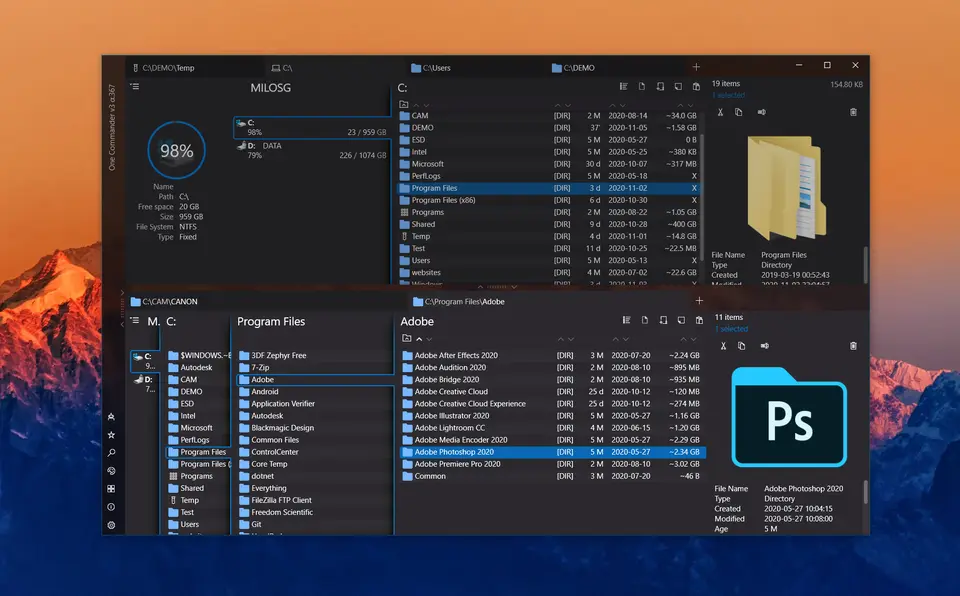
OneCommander is a file manager for Windows 10 and 11 with dual panes, tabs and a Miller-columns view. It is free for home use, and a one-time Pro license is required for commercial use and unlocks extra features.
Worth knowing
- Any work, freelance or business use needs the paid Pro license, even for standard features.
- Windows 10 and 11 only; the vendor says the licenses do not cover macOS or Linux.
- The Microsoft Store version is licensed separately, through the Store.
Key features
- Miller columns
- Column view for deep folder structures, alongside dual-pane and tabbed browsing.
- Built-in preview
- Press Space to preview many file types, with QuickLook and Seer also supported.
- Themes
- Dark and light themes that can be edited as XAML files.
- File Automator
- Regular-expression renaming and batch image conversion are built in.
- Long paths and notes
- Supports paths past 260 characters and lets you add tasks and notes inside any folder.
One Commander pricing
As of Nov 13, 2026, One Commander has a free plan, and paid plans start at $30 one-time, per named user.
- Starts at
- $30 one-time, per named user
- Free plan
- Free Home Use covers personal, non-commercial use; some settings and advanced features stay locked.
- Free trial
- None listed
| Plan | Price | What you get |
|---|---|---|
| Free Home Use | $0 | Core app for personal, non-commercial use; some settings stay locked. |
| Lifetime User License | $30one-time, per named user | Pro features, commercial-use rights and future updates for one person's own PCs. |
| Company License | Custom | Volume licensing for 5 or more users with one shared key; sold through a quote. |
| School License | $0 | Free for school-owned computers on a shared school domain, issued on request. |
Read from onecommander.com on Nov 13, 2026. Prices change, so confirm with One Commander before you buy.
Ways to pay less
- EducationFree license for school-owned computers
School-owned computers on a shared school domain can get a free license on request; personal student devices are not covered.
Stated on onecommander.com
One Commander alternatives
- One Commander vs Total Commander
Free trial · from €42 one-time
- One Commander vs Files
Free plan · from $12.99 one-time
- One Commander vs XYplorer
Free trial · from $34.95 one-time
- One Commander vs Directory Opus
Free trial · from $89 one-time
- One Commander vs Path Finder
Free trial · from $2.95/mo



Common questions
Does One Commander have an Android app?
No Android app was listed when its pages were read on Nov 13, 2026. One Commander is listed for Windows.
Does One Commander have an iPhone app?
No iPhone app was listed when its pages were read on Nov 13, 2026. One Commander is listed for Windows.
Is One Commander open source?
One Commander is not described as open source on its own site, as read on Nov 13, 2026.
Sources for this page
The prices, plans, platforms and features above were read from these pages on Nov 13, 2026.