
Orgro review (2026): is it worth $4.99?
Org Mode file viewer and editor for iPhone, iPad and Android
Black Friday: is there a Orgro sale?
Orgro report card
Fair · out of 4.0 · graded Nov 13, 2026
Best for opening Org Mode files on a phone
Orgro opens Org Mode files from Emacs on an iPhone, iPad or Android phone, and lets you toggle TODOs and edit text. It has no sync of its own and the maker tells you to keep backups.
Who Orgro is for
- Fits if you keep notes in Emacs Org Mode and want to read them on a phone
- Works for people who tick off TODOs and checkboxes while out
Who Orgro is not for
- Skip it if you don't already use Org Mode files
- Not for you if you want sync: the app opens and closes files, with none of its own
- Too light for structured editing, since only checkboxes and TODO keywords are toggled
- Watch out: the FAQ says saving may change parts of a file you didn't edit, so keep backups
Why Orgro gets a 2.2
Five grades, each with its reason. The GPA is their average: an A is 4 points, an F is none.
- AValue for money$4.99 once after a 7-day trial, under a year of the category's middle subscription and below its $12.99 one-time middle.
- CFree plan and trialA 7-day free trial of all features, then the one-time unlock. The pages don't say whether a card is needed, and there is no free plan.
- DFeaturesOne narrow function: view and lightly edit Org files, toggle TODOs and checkboxes. It has no sync, and it only makes sense next to Emacs or other Org tools.
- CEase of useNo store rating on record. You point it at files in cloud storage, and need to know Org Mode.
- CPlatforms and integrationsiPhone, iPad and Android only, opening files from iCloud Drive, Dropbox and Google Drive. No computer or web version.
What these grades rest on. Graded from this listing, whose facts were read from Orgro's own pages on 13 November 2026. Not based on using the product, and shorter than our full reviews. How we review and grade.
Make Orgro? Put this grade on your site
Paste this where you want the badge. It links here and follows the grade if it changes. About badges
<a href="https://toolgpa.com/tools/orgro#review"><img src="https://toolgpa.com/badge/orgro.svg" alt="Orgro: 2.2 GPA on ToolGPA" width="196" height="56"></a>Where Orgro stands among note-taking apps
Orgro's GPA of 2.2 is higher than 18 of the 169 other note-taking apps we grade, and level with 14.
It stands best on value for money (A, above 72 of 169) and worst on features (D, above 0).
Each grade against the category
Every bar is all 170 note-taking apps we grade, cut by the letter each got. Orgro’s own letter is outlined.
- AValue for moneyAbove 72 of 169, level with 97
- CFree plan and trialAbove 13 of 169, level with 69
- DFeaturesAbove 0 of 169, level with 3
- CEase of useAbove 10 of 169, level with 50
- CPlatforms and integrationsAbove 34 of 169, level with 64
Keep Orgro, or make your own?
Your call
A notes app at its plainest is text in folders with a search box.
You could make the core of Orgro for yourself: notes and tasks. What you would give up is listed below. Whether that is worth the price is your call. At $4.99, paid once, it costs less than the weekend it would take to replace, which is the argument for keeping it. Orgro is open source, so there is a third way: take its code and run it yourself.
What you could make
- Notes and tasks: an app builder makes these well.
What you could not
- A real app for iOS and Android. Something home-made would be a web page.
What this rests on. Orgro’s listing: what it does, where it runs, what it plugs into and what it costs. It is a judgement about the kind of software this is. We have not built a replacement for it, and making your own means looking after it too. How we decide, and every tool’s verdict.
What is Orgro?
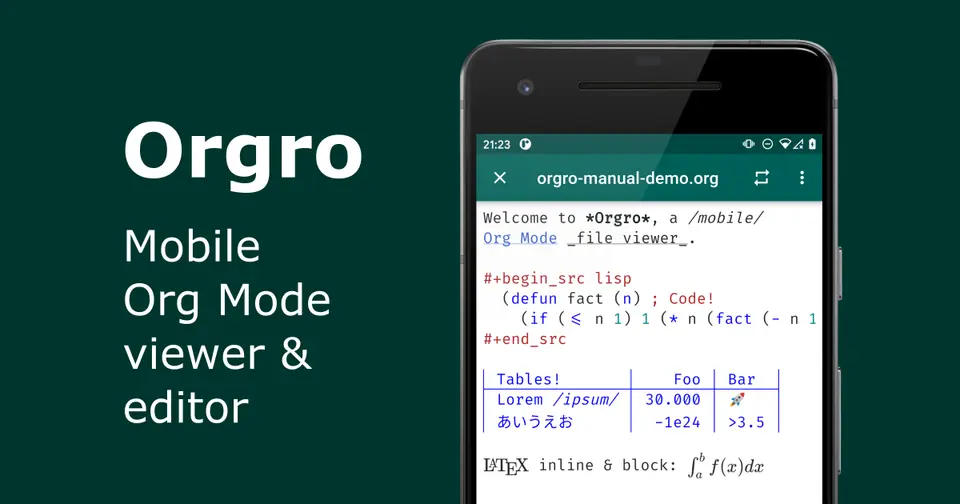
Orgro opens Org Mode files from the Emacs ecosystem on a phone or tablet. It renders tables, LaTeX and syntax highlighting, and lets you toggle TODO states and checkboxes or edit the raw text. It does not sync: you open a file, read or change it, and close it. The code is open source.
Worth knowing
- Orgro has no sync of its own; files are opened from a storage provider and closed again.
- Structured editing is limited to toggling checkboxes and TODO keywords; everything else is raw-text editing.
- The FAQ advises keeping backups, because saving may alter parts of a file you did not edit.
- Links between Org files need a storage location that grants directory permissions, which many third-party apps do not.
Key features
- TODO and checkbox toggling
- Change TODO keywords on headlines and tick list checkboxes, with progress cookies updating.
- Plain-text editing
- Edit the raw Org markup in the app; saving recreates the file from an in-memory copy, which can change non-semantic whitespace.
- Agenda notifications
- Notifications for Org Agenda items, plus capture of text and links through the share sheet or org-capture:// links.
- Emacs-style viewing
- Narrowing, visibility cycling, reader mode, LaTeX rendering, tables and syntax highlighting for Org files.
- Org Crypt and Org Cite
- The App Store listing lists symmetric Org Crypt section decryption and encryption, and Org Cite bibliography support.
Orgro pricing
As of Nov 13, 2026, Orgro is a paid product with a free trial, starting at $4.99 one-time, after a 7-day free trial.
- Starts at
- $4.99 one-time, after a 7-day free trial
- Free plan
- None
- Free trial
- 7-day free trial of all features, then a one-time purchase unlocks the app.
| Plan | Price | What you get |
|---|---|---|
| Full unlock | $4.99one-time, after a 7-day free trial | One-time, permanent unlock of all features, per the App Store listing. The price is the one shown on the Orgro site. |
Read from orgro.org on Nov 13, 2026. Prices change, so confirm with Orgro before you buy.
Works with
- Emacs Org Mode
- iCloud Drive
- Dropbox
- Google Drive
Orgro alternatives
- Orgro vs beorg
Free plan · from $0.99
- Orgro vs Orgzly
Free
- Orgro vs Markor
Free
- Orgro vs Logseq
Free plan · from $5/mo




Common questions
Does Orgro have a Windows app?
No Windows app was listed when its pages were read on Nov 13, 2026. Orgro is listed for iOS and Android.
Does Orgro have a macOS app?
No macOS app was listed when its pages were read on Nov 13, 2026. Orgro is listed for iOS and Android.
Is Orgro open source?
Yes. Orgro is open source, according to its own site.
Does Orgro work offline?
Yes, according to its own site. What works without a connection differs by plan and platform, so check the vendor's page for the detail.
Sources for this page
The prices, plans, platforms and features above were read from these pages on Nov 13, 2026.