The Routine Insider’s Guide
Everything we know about Routine in one document: what it costs, its grades, getting a refund, getting help and what else to look at. Read it here, or keep a copy.
Routine
The Insider’s Guide
Planner combining tasks, calendar and notes, with an AI assistant
Every plan, grade, refund rule and rival among daily planner apps, read from Routine’s own pages.
Made by Routine International Inc. · checked Oct 4, 2026 · toolgpa.com
Contents
- 01WelcomeWhat it is, who it suits, its grades and the ten things to know first
- 02Insider tipsWhat most people miss: ways to pay less, settings worth changing and the catches
- 03What it costsEvery plan, the free plan, ways to pay less and how prices have moved
- 04What it doesIts main features, where it runs, what it works with and who makes it
- 05Where it standsIts grades against its category, and whether to keep it or make your own
- 06The alternativesThe tools it is most often weighed against, side by side
- 07Quick answersThe questions people ask about it, each answered in a line or two
- 08About ToolGPAWho made this guide, what else is on the site, and how to cite it
ToolGPA put this guide together from Routine’s own pages, its app-store listings and our grades. Every fact in it is on Routine’s page too, where it is kept up to date. Checked Oct 4, 2026.
Part 01 · Overview
Welcome
What it is, who it suits, its grades and the ten things to know first
2.8
GPA, above 48 of the 69 other daily planner apps we grade
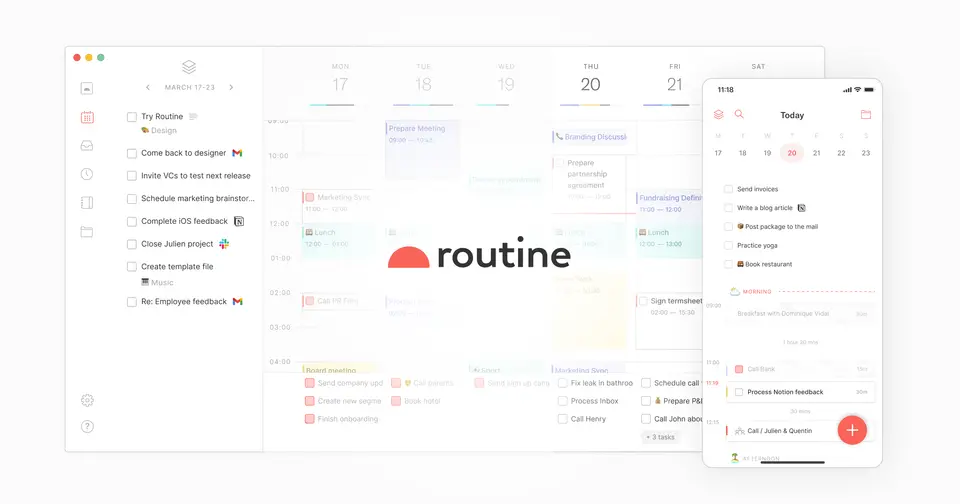
Routine puts tasks, calendar, notes and custom databases in one app, with a planner view for laying out the day. A desktop hotkey opens a dashboard for quick capture, and an AI assistant with voice commands is included on every plan, limited by AI credits. Paid plans add time blocking, AI meeting notes, AI agents and team workspaces.
To get you started, here are 9 things to know about Routine, taken from its own pages and our grades.
No store rating on record, and there's building to do: calendars and apps to connect, databases to shape.
- 1
Best for tasks, calendar and notes in one app
Routine puts tasks, calendar, notes and your own databases in one app, on web, Mac, Windows, Linux, iPhone and Android.
- 2
Paid plans start at $5 a month
As its pricing page puts it: $5 per month, billed yearly.
- 3
There is a free plan
Tasks, calendars and notes, AI assistant and voice commands, offline mode, 3 integrations, 3 custom databases and 250 AI credits.
- 4
It runs on 6 platforms
Web, macOS, Windows, Linux, iOS and Android.
- 5
Planner and calendar
Plan the day in a view that combines tasks with events from connected calendars such as Google Calendar and Microsoft Outlook. Time blocking starts on the Personal plan.
- 6
Dashboard hotkey
A desktop hotkey opens a dashboard for creating tasks quickly and adding context to them without switching apps.
- 7
Universal inbox
Imports tasks, messages and notifications from connected apps and services into one inbox.
- 8
A 2.8 GPA, above 48 of 69
That is against the other daily planner apps we grade, on value, the free plan, features, ease of use and platforms.
- 9
Keep it
To replace Routine you would be making a bot that joins your calls and turns the talk into notes. That is not a weekend's work, with an AI app builder or without one.
Routine at a glance
- Pricing
- Free plan, from $5 per month, billed yearly
- Free plan
- Yes
- Free trial
- None stated
- Runs on
- Web, macOS, Windows, Linux, iOS, Android
- Made by
- Routine International Inc.
- Category
- Daily Planner Apps
- Our grade
- 2.8 GPA, good
The report card
Best for tasks, calendar and notes in one app
Routine puts tasks, calendar, notes and your own databases in one app, on web, Mac, Windows, Linux, iPhone and Android. Paid plans start at $5 a month on yearly billing. But time blocking isn't on the free plan, AI meeting notes and time tracking wait on the $10 plan, free stops at 3 integrations and 250 AI credits, and Routine says its own web app is 30% slower.
| Subject | Grade | Comment |
|---|---|---|
| Value for money | C | Personal is $5 a month billed yearly, just under the $5.99 that sits in the middle of this category, so ordinary money. The catch is what's where: time blocking starts on that plan, and AI meeting notes, agents and time tracking need Professional at $10. |
| Free plan and trial | B | Free forever with tasks, calendars, notes, the AI assistant, voice commands and offline mode. The caps are 3 integrations, 3 custom databases and 250 AI credits, and the thing you'd miss most is time blocking, which starts on Personal. |
| Features | B | It covers the whole job: a planner view that mixes tasks with your calendar, a universal inbox, notes and custom databases of your own design, a hotkey dashboard for quick capture, and an AI assistant on every plan. Professional records meetings without a bot and writes the summary. |
| Ease of use | C | No store rating on record, and there's building to do: calendars and apps to connect, databases to shape. A desktop hotkey lets you add a task without switching apps. Routine's own download page says the web app is 30% slower than the desktop ones and lacks some functionality. |
| Platforms and integrations | A | Web, Mac, Windows, Linux, iPhone and Android, which is the full set and then Linux on top. It connects to Google Calendar, Outlook, Gmail, Slack, Notion, Linear and Asana, and MCP hooks it up to assistants such as ChatGPT and Claude. |
An A is worth 4 points, a B 3, a C 2, a D 1 and an F nothing. The GPA is the average of the five.
Who Routine is for
- Fits if you want tasks, calendar and notes in one app instead of three
- Works for keyboard users who capture tasks with a desktop hotkey
Who it is not for
- Tight if you're staying free, with 3 integrations, 3 custom databases and 250 AI credits
- Skip it if you want time blocking for free, as it starts on the $5 Personal plan
- Not for you if you'd work mostly in the browser, as Routine says the web app is 30% slower and lacks some functions
- Pricey if you want AI meeting notes, agents or time tracking, because those need the $10 Professional plan
- Watch out: the Business plan is $15 per seat a month, billed yearly
Good to know
Good for
- People who want tasks, calendar and notes in a single app
- Capturing tasks quickly from the keyboard on desktop
- Trying a planner on a free plan before paying
Worth knowing
- The Free plan is capped at 3 integrations, 3 custom databases and 250 AI credits.
- Time blocking and time boxing are not part of the Free plan; they start with Personal.
- AI meeting notes, AI agents, automations and time tracking require Professional or higher.
- Routine's download page says the web app is 30% slower than the desktop apps and lacks some functionality.
Part 02 · Tips
Insider tips
What most people miss: ways to pay less, settings worth changing and the catches
7
Things most people miss, each from its own help pages
The things about Routine that are easy to miss until they cost you: ways to pay less, settings worth changing and the catches at renewal or when you leave. Each one is from Routine’s own pages, linked beside it.
Read on Oct 17, 2026. Read from Routine's help centre, pricing page and terms on 17 October 2026. Not tried out: these tips are what its own pages say.
- 1
Shortcut
Type times, lengths and repeats straight into the Console
The Console reads keywords as you type: "at" for a time, "for" a duration, "every" a repeat, "with" a person's email. So "Clean office at 3pm for 1h30" gets scheduled, while a plain "Buy coffee" lands in the Inbox. Use > to pick where it goes.
help.routine.co - 2
Shortcut
Clear the Inbox from the keyboard
Its Inbox guide gives a key for each decision: Cmd/Ctrl+L to schedule, Cmd/Ctrl+P to postpone, Cmd/Ctrl+E to complete and Cmd/Ctrl+Shift+I to discard. Cmd/Ctrl+Shift+A hands it to a teammate.
help.routine.co - 3
Setting
Send time blocks to a calendar of their own
Settings → Calendars lets you pick a separate default calendar for time-blocked tasks, so they don't land in your events calendar, which is where they go otherwise. It's set per device. And hold Option or Alt while dragging to give one task a second block.
help.routine.co - 4
Setting
Set up meeting notes before your first call
Settings → Meetings is where you choose manual recording or automatic detection during calendar events, the transcription language (or auto-detect across up to 10 languages) and your own summary prompt.
help.routine.co - 5
Easy to miss
Make AI automations stop and ask before they act
Add a pause step to an AI automation and it waits for you, showing what it's done and what it plans next. You can edit the step, add instructions or approve it. We'd do this for anything that sends emails or changes records.
help.routine.co - 6
Renewal
There are no refunds, credits included
Routine's terms say fees aren't refundable except where the law says so, and subscriptions, credits and prepaid amounts can't be cancelled for the current billing period once bought. Renewals charge the card on file unless you cancel first.
routine.co - 7
Leaving
Export before you drop to Free, which has no export
The pricing page lists exporting, as Markdown, HTML or PDF, from the Personal plan up. So if you're leaving a paid plan, get your notes and pages out before the period you've paid for runs out.
routine.co
Part 03 · Pricing
What it costs
Every plan, the free plan, ways to pay less and how prices have moved
$5
A month to start. There is a free plan too
Routine has a free plan. Paid plans start at $5 per month, billed yearly.
Free forever with tasks, calendars, notes, the AI assistant, voice commands and offline mode.
Free
$0
Tasks, calendars and notes, AI assistant, voice commands, offline mode, 3 integrations, 3 custom databases and 250 AI credits.
Personal
$5
per month, billed yearly
Adds time blocking, time boxing, event coloring, exporting, unlimited file uploads, 10 integrations, 10 custom databases and 500 AI credits.
Professional
$10
per month, billed yearly
Adds AI meeting notes, AI agents and automations, time tracking, a menu bar widget, unlimited integrations and databases, and 7,000 AI credits.
Business
$15
per seat / month, billed yearly
Adds an organization with workspaces, access control, versioning, consolidated billing, priority support and 10,000 AI credits per seat.
Enterprise
Custom
Adds unlimited history, compliance, audit logs, analytics, user provisioning and a success manager.
The free plan
Tasks, calendars and notes, AI assistant and voice commands, offline mode, 3 integrations, 3 custom databases and 250 AI credits.
Read from routine.co on Oct 4, 2026.
Ways to pay less
Annual discount
Up to 38% off on yearly plans
Routine's pricing page marks its yearly prices as 38% off for Personal and 17% off for Professional and Business.
Stated on routine.coStartups
Startup program: Business plan free for a year
Startups with under $2 million in funding and fewer than 20 employees can apply for the Business plan free for one year, worth up to $2,500.
Stated on routine.co
Part 04 · Features
What it does
Its main features, where it runs, what it works with and who makes it
6
Places it runs: Web, macOS, Windows, Linux, iOS and Android
Planner combining tasks, calendar and notes, with an AI assistant. Here is what it does, as its own site describes it, and what it covers: works offline, AI features, meeting notes, notes, tasks, time blocking, calendar.
Professional records meetings without a bot and writes the summary.
- Planner and calendar
- Plan the day in a view that combines tasks with events from connected calendars such as Google Calendar and Microsoft Outlook. Time blocking starts on the Personal plan.
- Dashboard hotkey
- A desktop hotkey opens a dashboard for creating tasks quickly and adding context to them without switching apps.
- Universal inbox
- Imports tasks, messages and notifications from connected apps and services into one inbox.
- Notes and custom databases
- Notes, a journal and pages sit alongside tasks. Custom databases model your own object types: 3 on Free, 10 on Personal and unlimited from Professional.
- AI meeting notes
- Records meetings without a meeting bot and generates a summary with the transcript and original audio. Requires the Professional plan.
- AI assistant, agents and MCP
- An AI assistant and voice commands are in every plan. AI agents and automations need Professional, and MCP connects Routine to assistants such as ChatGPT and Claude.
Where it runs
- Web
- macOS
- Windows
- Linux
- iOS
- Android
What it works with
- Google Calendar
- Microsoft Outlook
- Gmail
- Slack
- Notion
- Linear
- Asana
Who makes Routine
Routine is made by Routine International Inc., a venture-backed company that describes itself as French and was founded in Paris in 2020. It earns money from subscriptions to its Professional, Business and Enterprise plans, alongside a free plan.
- Founded
- 2020routine.co
- Based
- Paris, Franceroutine.co
- Ownership
- Privately held. Privately held and venture-backed: its About page names Y Combinator, BoxGroup, Target Global, CRV, Preston-Werner Ventures, Market One Capital and Failup Ventures as investors, and no parent company.routine.co
- Funding
- Its About and Press pages say it has raised $4M+. Its own October 2021 announcement describes a $2.7 million pre-seed round, from $6.7 million in commitments, with Y Combinator, BoxGroup, TargetGlobal and angel investors.routine.coroutine.coroutine.co
- Team
- 13 team members, according to its About and Press pagesroutine.co
- Founders and leaders
- Julien Quintard, CEO and co-founderroutine.co
- Quentin Hocquet, CTO and co-founderroutine.co
- Affiliate program
- 40% of all payments from each new Professional or Business upgrade for the first 12 months, with no limit on earnings and a 60-day cookie. Apply by application.routine.co
- Partner program
- Creators program paying $3 for every active install generated, whether the user is on a free or paid plan; payouts once earnings reach $100. Can be combined with the affiliate program.routine.co
- Lately
Read on Oct 18, 2026 from the company’s own pages and from news reports. What is not stated there is left out.
Part 05 · Standing
Where it stands
Its grades against its category, and whether to keep it or make your own
48/69
Other daily planner apps it is graded above
Routine's GPA of 2.8 is higher than 48 of the 69 other daily planner apps we grade, and level with 10.
It stands best on platforms and integrations (A, above 55 of 69) and worst on ease of use (C, above 0).
Its paid plans start at $5 a month, against a middle price of $4.17 for the category: 29 of the 52 others that charge start lower.
On features, ease of use and platforms it scores 3.0 out of 4. 6 tools score higher and cost less.
Each grade against the category
Every bar is all 70 daily planner apps we grade, cut by the letter each got. Routine’s own letter is outlined.
- CValue for moneyAbove 11 of 69
- BFree plan and trialAbove 53 of 69
- BFeaturesAbove 32 of 69
- CEase of useAbove 0 of 69
- APlatforms and integrationsAbove 55 of 69
Price against what you get
Each dot is one of 57 daily planner apps. Further left costs less; higher up scores better on features, ease of use and platforms. Routine is the marked dot.
What paid plans start at, a month (each step along is roughly double) →
Keep it, or make your own?
Whether this is something you could build for yourself with an AI app builder, and what you would give up.
Keep it
To replace Routine you would be making a bot that joins your calls and turns the talk into notes. That is not a weekend's work, with an AI app builder or without one.
It is one of the better ones too: its GPA of 2.8 is higher than 48 of the 69 other daily planner apps we grade. It costs $60 a year.
What you could make
- Tasks, calendar, notes and time blocking: an app builder makes these well.
What you could not
- A bot that joins your calls and turns the talk into notes.
- Apps for macOS, Windows, Linux, iOS and Android that stay in step with each other.
- It plugs into other products, Google Calendar, Microsoft Outlook and Gmail among them.
- AI features, unless you pay a model provider for each request yourself.
- The depth: we grade its features B, which means it covers the whole job.
What this rests on. Routine’s listing: what it does, where it runs, what it plugs into and what it costs. It is a judgement about the kind of software this is. We have not built a replacement for it, and making your own means looking after it too. How we decide, and every tool’s verdict.
Part 06 · Alternatives
The alternatives
The tools it is most often weighed against, side by side





Akiflow, Sunsama, Morgen, Motion and Ellie
The 5 tools Routine is most often weighed against, with where each one differs from it.
- 2.2GPA
Akiflow
Free trial · from $19/mo
Time-blocking planner that pulls tasks from other apps into one inbox.
- Routine has a free plan. Akiflow does not, though it has a free trial.
- Only Routine lists a Linux app.
- Routine also covers meeting notes and notes.
- 2.6GPA
Sunsama
Free trial · from $17/mo
Daily planner with guided planning routines and calendar timeboxing.
- Routine has a free plan. Sunsama does not, though it has a free trial.
- Routine also covers meeting notes and notes.
- Sunsama also covers auto-scheduling, Pomodoro timer and goals.
- 2.4GPA
Morgen
Free trial · from $15/mo
Calendar and daily planner with AI-suggested time blocking.
- Routine has a free plan. Morgen does not, though it has a free trial.
- Routine also covers meeting notes and notes.
- Morgen also covers auto-scheduling and booking links.
- 2.4GPA
Motion
Free trial · from $19/mo
AI work planner that auto-schedules tasks on your calendar.
- Routine has a free plan. Motion does not, though it has a free trial.
- Only Routine lists a Linux app.
- Routine also covers notes and time blocking.
- 2.4GPA
Ellie
Free plan · from $9.99/mo
Daily planner with a brain dump list and calendar timeboxing.
- Only Routine lists Linux and Android apps.
- Ellie can be bought with a one-time purchase.
- Routine also covers meeting notes and notes.
Part 07 · Questions
Quick answers
The questions people ask about it, each answered in a line or two
12
Questions, each answered in a line or two
The short version of everything above, for when you only need the answer. Each one is told in full in its part of the guide.
Is Routine free?
Routine has a free plan. Tasks, calendars and notes, AI assistant and voice commands, offline mode, 3 integrations, 3 custom databases and 250 AI credits.
How much does Routine cost?
Routine lists 5 plans. Free: $0.
What platforms does Routine work on?
Routine is available on Web, macOS, Windows, Linux, iOS and Android.
Does Routine offer any discounts?
Routine publicly lists the following: Up to 38% off on yearly plans; Startup program: Business plan free for a year.
Is Routine open source?
Routine is not described as open source on its own site, as read on Oct 4, 2026.
Does Routine work offline?
Yes, according to its own site. What works without a connection differs by plan and platform, so check the vendor's page for the detail.
What does Routine integrate with?
Routine's listing names Google Calendar, Microsoft Outlook, Gmail, Slack, Notion, Linear and Asana.
Who makes Routine?
Routine is made by a company of the same name. Privately held and venture-backed: its About page names Y Combinator, BoxGroup, Target Global, CRV, Preston-Werner Ventures, Market One Capital and Failup Ventures as investors, and no parent company.
What are the alternatives to Routine?
The closest alternatives to Routine in our directory are Akiflow, Sunsama, Morgen, Motion and Ellie.
How does Routine compare with other daily planner apps?
Routine's GPA of 2.8 is higher than 48 of the 69 other daily planner apps we grade, and level with 10.
Is Routine good value for money?
ToolGPA grades Routine C for value for money. Its paid plans start at $5 a month, against a middle price of $4.17 for the category: 29 of the 52 others that charge start lower.
Could I make my own version of Routine?
To replace Routine you would be making a bot that joins your calls and turns the talk into notes.
Where this guide comes from
The prices, plans, platforms and features were read from Routine’s own pages on Oct 4, 2026, and the grades were given on Oct 10, 2026. Graded from this listing, whose facts were read from Routine's own pages on 4 October 2026. Also tested with a demo account on 2026-04-03.
Every tool we list gets five grades, A to F, each with its reason, and a GPA that averages them. How each is decided is at toolgpa.com/grades. This guide is ToolGPA’s own work; it is not made, paid for or approved by Routine International Inc. Prices change, so check routine.co before you buy.
Part 08 · About
About ToolGPA
Who made this guide, what else is on the site, and how to cite it
3,189
Tools graded, in 94 categories
ToolGPA grades software the way a school report grades a pupil: five subjects, a letter for each with the reason written beside it, and a GPA that averages them. Prices, plans and platforms are read from each maker’s own pages and dated, so you always know how fresh a figure is.
Every grade, review and ranking on ToolGPA is our own judgement. No company can pay for a grade or change one. Every tool on the site has a guide like this one, free to download and pass on. It all lives at toolgpa.com.
3,189
tools graded
94
categories
426
price changes on record
579
apps priced in 12 countries
What else is on toolgpa.com
- Routine, kept up to dateEverything in this guide, with prices and grades as they are todaytoolgpa.com/tools/routine
- How grades are givenThe rules behind every letter and every GPAtoolgpa.com/grades
- Value chartsWhat each tool costs against what it scores, for every categorytoolgpa.com/charts
- CompareAny two tools side by side, plan by plantoolgpa.com/compare
- Price changesEvery price rise and cut on record, each with its sourcetoolgpa.com/price-changes
- Prices by countryWhat apps cost on the App Store in 12 countriestoolgpa.com/prices-by-country
- Pay lessEvery public discount: yearly billing, students, nonprofitstoolgpa.com/save
- Keep or makeWhich tools are worth paying for, and which you could build yourselftoolgpa.com/keep-or-make
Scan for the live page
Prices and grades as they are today
Quoting this guide?
Please name ToolGPA and link to the live page, so readers can check the figures for themselves:
ToolGPA, "Routine: The Insider's Guide", checked Oct 4, 2026. https://toolgpa.com/tools/routine
Know someone choosing between daily planner apps?
Send them this guide: toolgpa.com/tools/routine/guide
ToolGPA elsewhere: youtube.com/@toolgpa
See our other guides
The best-graded daily planner apps after Routine, each with an Insider's Guide of its own.
- Daily Planner Apps Insider's GuideEvery one of the 70 daily planner apps we grade, compared
- Hero Assistant Insider's GuideDaily assistant app combining calendar, to-dos, habits and notes3.4 GPA
- LiveIt Insider's GuidePersonal organizer joining planner, journal, notes and habits3.4 GPA
- Open Sunsama Insider's GuideSelf-hostable daily planner with time blocking and an MCP server3.2 GPA



Choosing software? Every tool graded, every price dated.
Compare tools at toolgpa.com ›Everything in this guide is ToolGPA’s own summary of what Routine’s pages, its app-store listings and public reviews said on the dates shown. Grades are our judgement under the rules at toolgpa.com/grades. Every grade, review and ranking on ToolGPA is our own judgement. No company can pay for a grade or change one. Routine is a trademark of its owner, and this guide is not made, paid for or approved by Routine International Inc. Prices and plans change: check routine.co before you buy.