
TG Pro review (2026): is it worth $10?
Mac temperature monitor with manual and automatic fan control
Black Friday: is there a TG Pro sale?
TG Pro report card
Fair · out of 4.0 · graded Nov 12, 2026
Best for Mac temperatures and fan rules
TG Pro shows Mac temperatures in the menu bar and lets rules or manual speeds run the fans, for $10 once. There is no free plan, fanless Macs only get readings, and manual options depend on the Mac model.
Who TG Pro is for
- Fits if you want to see Mac temperatures and keep fans from running late
- Works for people chasing thermal throttling on heavy work
Who TG Pro is not for
- Skip it if you want a free tool, since there is a 14-day trial and nothing after it
- Watch out: fanless Macs get temperature readings only
- Watch out: manual and Max fan options depend on the Mac model and settings
- Not for you if you use Windows, as it is Mac only
Why TG Pro gets a 2.4
Five grades, each with its reason. The GPA is their average: an A is 4 points, an F is none.
- AValue for money$10 once with no subscription, far under the category's cheaper quarter.
- CFree plan and trialA 14-day trial, and the listing doesn't say a card is needed. There is no free plan after it.
- CFeaturesSensor readings, Auto Boost rules, manual fan speeds, alerts and CSV logs. It does that job fully, but it is a narrow one.
- BEase of useNo rating on record. Install it and temperatures appear in the menu bar.
- DPlatforms and integrationsMac only, on Intel and Apple Silicon. No Windows, phone or web version.
What these grades rest on. Graded from this listing, whose facts were read from Tunabelly Software's own pages on 12 November 2026. Not based on using the product, and shorter than our full reviews. How we review and grade.
Make TG Pro? Put this grade on your site

Paste this where you want the badge. It links here and follows the grade if it changes. About badges
<a href="https://toolgpa.com/tools/tg-pro#review"><img src="https://toolgpa.com/badge/tg-pro.svg" alt="TG Pro: 2.4 GPA on ToolGPA" width="196" height="56"></a>Where TG Pro stands among desktop utilities
TG Pro's GPA of 2.4 is higher than 17 of the 96 other desktop utilities we grade, and level with 17.
It stands best on value for money (A, above 24 of 96) and worst on platforms and integrations (D, above 0).
Each grade against the category
Every bar is all 97 desktop utilities we grade, cut by the letter each got. TG Pro’s own letter is outlined.
- AValue for moneyAbove 24 of 96, level with 72
- CFree plan and trialAbove 4 of 96, level with 37
- CFeaturesAbove 1 of 96, level with 67
- BEase of useAbove 34 of 96, level with 62
- DPlatforms and integrationsAbove 0 of 96, level with 61
Keep TG Pro, or make your own?
Keep it
Nothing TG Pro does is plain enough to make in a weekend. The 3 things listed below take a company.
That makes this kind of software worth paying for, not this one in particular: 62 of the 96 other desktop utilities grade higher. It costs $10, paid once.
What you could not
- Readings from inside the operating system.
- A native app living in the menu bar.
- A real app for macOS. Something home-made would be a web page.
What this rests on. TG Pro’s listing: what it does, where it runs, what it plugs into and what it costs. It is a judgement about the kind of software this is. We have not built a replacement for it, and making your own means looking after it too. How we decide, and every tool’s verdict.
What is TG Pro?
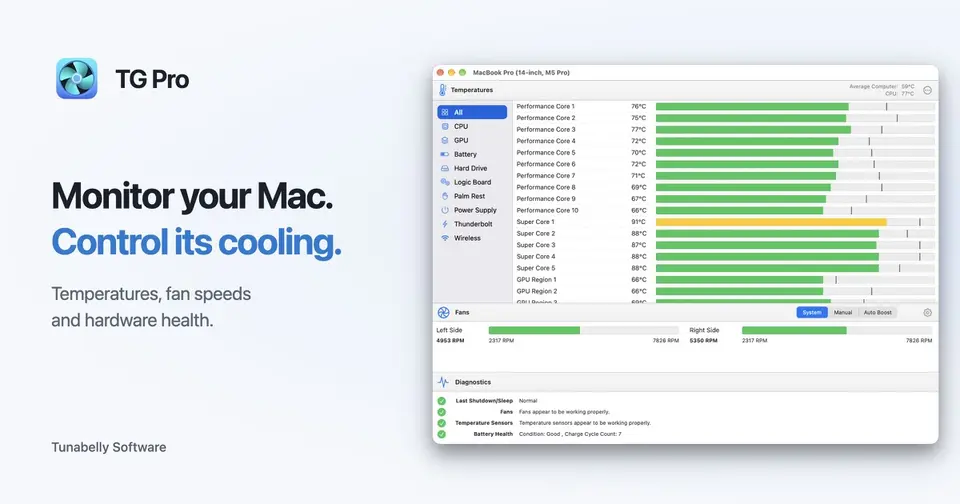
TG Pro reads temperature sensors across a Mac, including CPU cores on Apple Silicon, drives, battery and more, and shows them in the menu bar. On Macs with fans it also sets fan speeds by hand or by rules tied to a sensor's temperature.
Worth knowing
- Mac only; it runs on Intel and Apple Silicon Macs with macOS 10.14 to 27.
- Fanless Macs can monitor temperatures only, since fan controls need a model with fans.
- Manual and Max fan options depend on the Mac model and settings.
- The $10 price is filled in by the page's checkout script, with the static page text showing the same figure.
Key features
- Auto Boost fan rules
- Set a temperature threshold and fan speed for the CPU, GPU, drive or another sensor, and the fans adjust on their own.
- Manual fan speeds
- Set speeds yourself or use Max for immediate cooling. Options depend on the Mac model.
- Sensor readings
- Shows current and highest temperatures for CPU cores, GPU, SMART drive data, battery and other components.
- Menu bar readouts
- Temperatures and fan speeds sit in the menu bar, with per-sensor readings and fan controls in the dropdown.
- Hardware health checks
- Reports fan and sensor status, battery health and the last shutdown or sleep.
- Alerts and CSV logs
- Sends local notifications or email alerts at set temperatures and logs readings to CSV.
TG Pro pricing
As of Nov 12, 2026, TG Pro is a paid product with a free trial, starting at $10 one-time.
- Starts at
- $10 one-time
- Free plan
- None
- Free trial
- 14-day free trial
| Plan | Price | What you get |
|---|---|---|
| TG Pro | $10one-time, no subscription | Shown on the page as 50% off a crossed-out $20, with no end date stated. Covers monitoring, fan control, alerts and logging. |
Read from tunabellysoftware.com on Nov 12, 2026. Prices change, so confirm with TG Pro before you buy.
TG Pro alternatives
- TG Pro vs Macs Fan Control
Free plan · from $14.95 one-time
- TG Pro vs iStat Menus
Free trial · from $11.99 one-time
- TG Pro vs Stats
Free
- TG Pro vs Bartender
Free trial · from $19.99/yr



Common questions
Does TG Pro have an Android app?
No Android app was listed when its pages were read on Nov 12, 2026. TG Pro is listed for macOS.
Does TG Pro have an iPhone app?
No iPhone app was listed when its pages were read on Nov 12, 2026. TG Pro is listed for macOS.
Is TG Pro open source?
TG Pro is not described as open source on its own site, as read on Nov 12, 2026.
Sources for this page
The prices, plans, platforms and features above were read from these pages on Nov 12, 2026.