
Timemator
Automatic time tracking for Mac with a one-time license
What is Timemator?
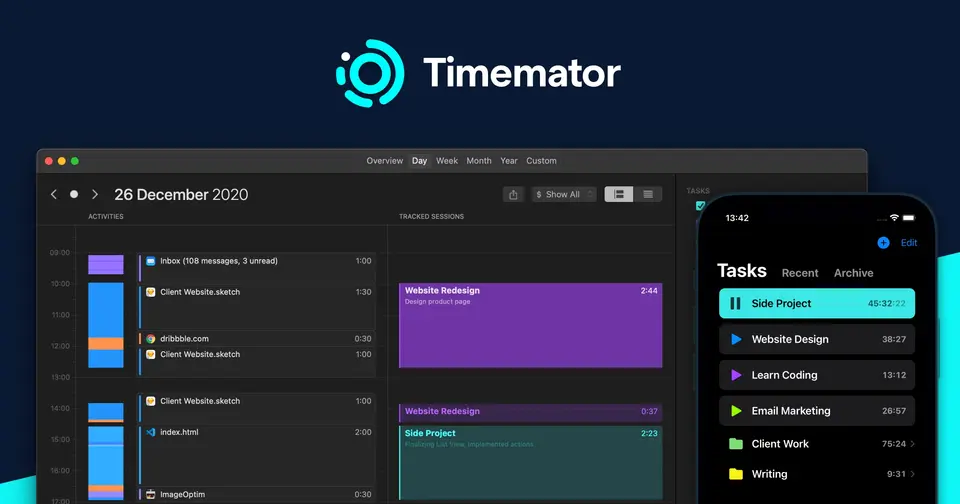
Timemator is a time tracker for freelancers on the Mac, with companion apps for iPhone, iPad and Apple Watch. On the Mac it records activity on a timeline and can start and pause timers by itself, based on rules about the apps and files in use. Tracked time is organized into tasks and folders, priced with hourly rates and exported as reports. Data stays on the user's devices and syncs through iCloud.
Timemator is a paid product with a free trial, starting at $39 one-time for the Mac app; the iOS app is $7.99 one-time, sold separately. See every plan
Good for
- Freelancers on a Mac who forget to start timers
- People who prefer a one-time purchase to a subscription
- Users who want tracked data kept on their own devices
Worth knowing
- The Mac and iOS apps are sold separately, at $39 and $7.99.
- The Activity Timeline and Auto-tracking are marked Mac only; the iOS listing describes manual tracking of hours and tasks.
- There is no Windows, Android or web version, and no team features; Windows and Teams editions appear on the roadmap.
- A Mac license can be active on 2 computers at the same time.
Key features
- Activity Timeline
- On the Mac, Timemator captures what you do during the day so you can go back, review it, and assign the time to projects in a few clicks.
- Auto-tracking
- Rules you define let the Mac app start and pause the timer by itself, for example when a given app or project file is open. You keep manual control.
- Manual timer and sessions
- A start and pause timer works alongside Auto-tracking, and sessions can be added or edited by hand on daily and weekly timelines.
- Tasks, folders and hourly rates
- Tasks are grouped in folders by project, client or both. Setting an hourly rate on a task makes Timemator calculate revenue for the tracked time.
- Reports and export
- Charts compare tracked time by day or month, and sessions can be filtered by date or task. Reports can be exported for clients, and data exports as CSV.
- iCloud Sync and backups
- Tasks, folders, sessions and Auto-tracking rules sync across devices through iCloud. Automatic backups can go to a custom location such as Dropbox.
Timemator pricing
- Starts at
- $39 one-time for the Mac app; the iOS app is $7.99 one-time, sold separately
- Free plan
- None
- Free trial
- 30-day free trial with all features, on both the Mac and iOS apps
| Plan | Price | What you get |
|---|---|---|
| Timemator for iOS | $7.99one-time in-app purchase (Full License) | The iPhone, iPad and Apple Watch app. A free download with a 30-day trial; the Full License unlocks it for good. |
| Timemator for Mac | $39one-time payment | The Mac app with the Activity Timeline and Auto-tracking. Use forever, with activation on 2 computers. |
Read from timemator.com on Oct 6, 2026. Prices change, so confirm with Timemator before you buy.
Ways to pay less
- Lifetime licenseOne-time purchase instead of a subscription
Timemator for Mac is a one-time payment of $39 described as "use forever", and the iOS Full License is a one-time $7.99 in-app purchase.
Stated on timemator.com - EducationStudent discount
The homepage links to a student discount on Timemator, offered through Student App Centre. The discount amount is not stated on the vendor's site.
Stated on timemator.com
Timemator alternatives
- Timemator vs Timing
Free trial · from $9/mo
- Timemator vs Chronoid
Free trial · from $8/mo
- Timemator vs Tyme
Free trial · from $59.99/yr
- Timemator vs Daily
Free trial · from $39.99/yr
- Timemator vs Rize
Free trial · from $9.99/mo


Common questions
Is Timemator free?
No, Timemator is a paid product, but you can try it first. 30-day free trial with all features, on both the Mac and iOS apps.
How much does Timemator cost?
Timemator lists 2 plans. Timemator for iOS: $7.99 one-time in-app purchase (Full License). Timemator for Mac: $39 one-time payment. Prices were read from timemator.com on Oct 6, 2026.
What platforms does Timemator work on?
Timemator is available on macOS and iOS.
Does Timemator offer any discounts?
Timemator publicly lists the following: One-time purchase instead of a subscription; Student discount.
Does Timemator have an Android app?
No Android app was listed when its pages were read on Oct 6, 2026. Timemator is listed for macOS and iOS.
Does Timemator have a Windows app?
No Windows app was listed when its pages were read on Oct 6, 2026. Timemator is listed for macOS and iOS.
Is Timemator open source?
Timemator is not described as open source on its own site, as read on Oct 6, 2026.
Does Timemator work offline?
Yes, according to its own site. What works without a connection differs by plan and platform, so check the vendor's page for the detail.
Does Timemator have a student discount?
Student discount. The homepage links to a student discount on Timemator, offered through Student App Centre. The discount amount is not stated on the vendor's site.
Who makes Timemator?
Timemator is made by Catforce Studio.
What are the alternatives to Timemator?
The closest alternatives to Timemator in our directory are Timing, Chronoid, Tyme, Daily and Rize. Each one has a side-by-side comparison with Timemator.
Sources for this page
The prices, plans, platforms and features above were read from these pages on Oct 6, 2026.