Price against what you get
Best-value screen recording and video tools
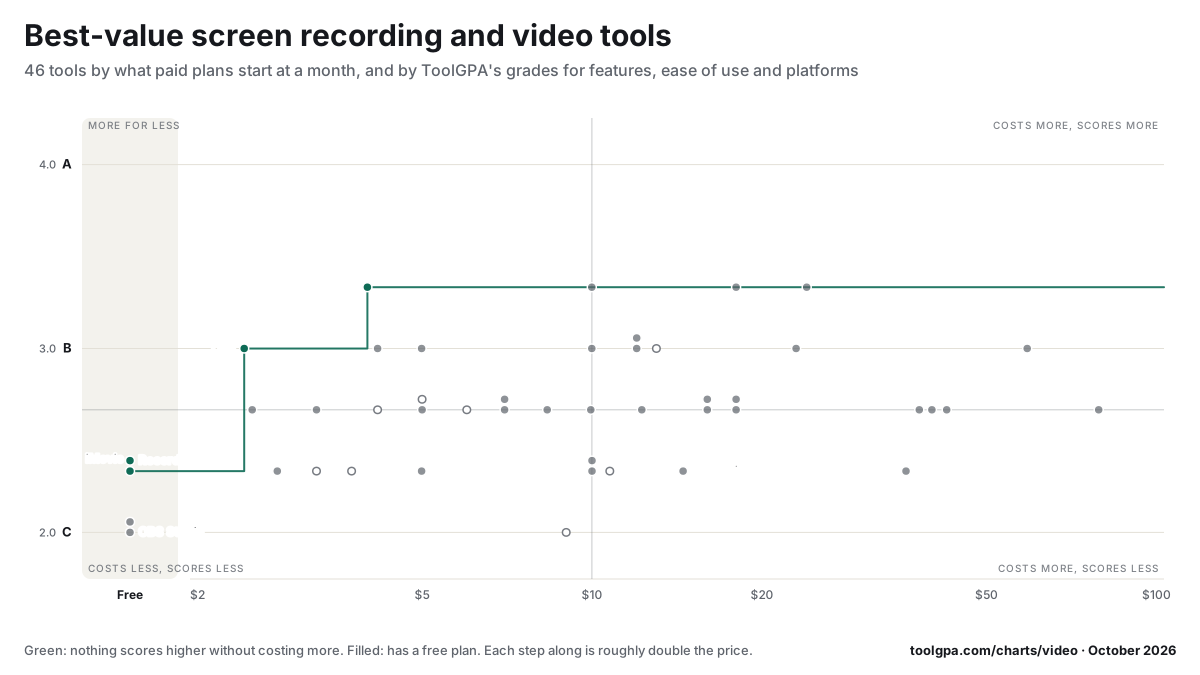
Going by our grades, ScreenPal, Cap, Recordly and iMovie give the most for the money among screen recording and video tools: no tool on this chart scores higher without costing more.
Paid plans start at a middle price of $10 a month across the 42 that charge, from $2.42 (Cap) to $79 (Wistia). 4 more cost nothing at all. 16 of the 46 score above the category's average while starting at or below its middle price. 5 cost more than the middle price and score below the average.
Features, ease of use and platforms, averaged
What paid plans start at, a month (each step along is roughly double) →
- Nothing scores higher without costing more
- The best score at each price
- Has a free plan
- No free plan
Put this chart on your own page
Paste this where you want it. The picture links back here and is redrawn whenever a price or a grade changes. Use it freely, with the link left in.
<a href="https://toolgpa.com/charts/video"><img src="https://toolgpa.com/charts/video/chart.svg" alt="46 screen recording and video tools by starting price and by ToolGPA score" width="1200" height="675" style="max-width:100%;height:auto"></a>The best at every price
Each step is the highest score screen recording and video tools reach at that price or below. Nothing on the chart beats these without costing more.




Paying more for less
The screen recording and video tools that the most others beat on both counts: a higher score and a lower starting price.
- StreamYardStarts at $35.99 a month and scores 2.3 of 4.27 of 45 score higher for lessCCB
- OpusClipStarts at $14.50 a month and scores 2.3 of 4.20 of 45 score higher for lessCCB
- Screen StudioStarts at $9 a month and scores 2.0 of 4.19 of 45 score higher for lessCBD
- Final Cut ProStarts at $10.75 a month when paid by the year for each person and scores 2.3 of 4.16 of 45 score higher for lessBCC
- AirtimeStarts at $10 a month and scores 2.3 of 4.16 of 45 score higher for lessCCB





A high starting price often means a product is sold to companies and has no small plan, and a score is three letters, not the whole product. Read a tool’s own page before ruling it out.
The four quarters
Where the tools fall when the chart is cut at the middle price and the average score.
More for less16
Each scores above the category's average and starts at or below its middle price.
ScreenPal, Riverside, Cap, Wondershare Filmora, Captions, CapCut, Monosnap, Camtasia and 8 more
Costs more, scores more16
Each scores above the average and starts above the middle price.
Loom, HeyGen, Jumpshare, Vimeo, Tella, Adobe Premiere, Vidyard, VEED and 8 more
Costs less, scores less9
Each scores below the average and starts at or below the middle price.
iMovie, Recordly, Bandicam, Camtasia Snagit, Movavi Screen Recorder, ScreenRec, OBS Studio, ScreenToGif and 1 more
Costs more, scores less5
Each scores below the average and starts above the middle price.
All 46 on the chart
Highest score first, then lowest price. The last column counts the tools that score higher and start lower.
| # | Tool | Score | Features, ease, platforms | A month | As its listing states it | Score higher for less |
|---|---|---|---|---|---|---|
| 1 | ScreenPal | 3.3 | BBA | $4 | $4 per month, paid annually (Solo Deluxe) | None |
| 2 | Riverside | 3.3 | BAB | $9.99 | $9.99 per month for Mobile Plus; web plans from $24 per month, billed annually | None |
| 3 | Loom | 3.3 | CAA | $18 | $18 per user / month, billed monthly | None |
| 4 | HeyGen | 3.3 | BAB | $24 | $24 per month, billed annually ($29 billed monthly) | None |
| 5 | Cap | 3.0 | BBB | $2.42 | $29 per year for a Desktop License; Cap Pro is $8.16 per user / month, billed annually | None |
| 6 | Wondershare Filmora | 3.0 | BBB | $4.17 | $49.99 per year (Basic), or $79.99 one-time for a perpetual license | 1 |
| 7 | Captions | 3.0 | CAB | $4.99 | $4.99 per month for Lite (Android only); Basic is $9.99 per month | 1 |
| 8 | CapCut | 3.0 | BBB | $9.99 | $9.99 per month for Standard, as a US App Store in-app purchase | 1 |
| 9 | Jumpshare | 3.0 | BBB | $12 | $12 per user / month, billed annually ($15 billed monthly) | 2 |
| 10 | Vimeo | 3.0 | BBB | $12 | $12 per month, billed annually ($20 billed monthly) | 2 |
| 11 | Tella | 3.0 | BBB | $13 | $13 per user / month, billed yearly ($26 billed monthly) | 2 |
| 12 | Adobe Premiere | 3.0 | ACB | $22.99 | US$22.99 per month, on an annual plan billed monthly | 3 |
| 13 | Vidyard | 3.0 | BCA | $59 | $59 per seat / month, billed annually ($89 billed monthly) | 4 |
| 14 | Monosnap | 2.7 | CBB | $2.50 | $2.5 per month, billed yearly; $3 billed monthly | 1 |
| 15 | Camtasia | 2.7 | BCB | $3.25 | $39 per year, billed yearly (Starter; Editor exports stay watermarked) | 1 |
| 16 | FocuSee | 2.7 | CBB | $4.17 | $49.99 per year for Standard ($19.99 billed monthly) | 2 |
| 17 | Awesome Screenshot | 2.7 | CBB | $5 | $5 per month, billed annually ($60); $6 billed monthly | 4 |
| 18 | Wondershare DemoCreator | 2.7 | BCB | $5 | $29.99 per quarter, $59.99 per year, or $79.99 one-time for a perpetual license | 4 |
| 19 | Droplr | 2.7 | CBB | $6 | $6 per month, billed annually ($72); $8 billed monthly | 4 |
| 20 | Google Vids | 2.7 | CBB | $7 | $7 per user / month with a 1-year commitment (Workspace Business Starter) | 4 |
















Show the other 26
| # | Tool | Score | Features, ease, platforms | A month | As its listing states it | Score higher for less |
|---|---|---|---|---|---|---|
| 21 | Screencastify | 2.7 | CBB | $7 | $7 per user / month, billed annually ($19 billed monthly) | 4 |
| 22 | Clipchamp | 2.7 | BCB | $8.33 | $9.99 per month or $99.99 per year (Microsoft 365 Personal) | 4 |
| 23 | Zight | 2.7 | CBB | $9.95 | $9.95 per user / month, billed annually ($12.95 billed monthly) | 4 |
| 24 | VEED | 2.7 | BCB | $12.25 | $25 per month or $146.99 per year for Creator (US App Store prices) | 8 |
| 25 | Descript | 2.7 | BCB | $16 | $16 per person / month, billed annually ($24 billed monthly) | 9 |
| 26 | Kapwing | 2.7 | BCB | $16 | $16 per member / month, billed annually ($24 billed monthly) | 9 |
| 27 | Synthesia | 2.7 | BCB | $18 | $18 per month, billed yearly ($29 billed monthly) | 9 |
| 28 | Vmaker AI | 2.7 | BCB | $18 | $18 per month, billed yearly ($216); $24 billed monthly | 9 |
| 29 | Supademo | 2.7 | BCB | $38 | $38 per creator / month, billed annually ($50 billed monthly) | 12 |
| 30 | Clueso | 2.7 | BCB | $40 | $40 per month, billed yearly; $50 billed monthly | 12 |
| 31 | Arcade | 2.7 | BCB | $42.50 | $42.50 per seat / month, billed yearly ($50 billed monthly) | 12 |
| 32 | Wistia | 2.7 | BCB | $79 | $79 per month, billed annually ($99 billed monthly), with 3 users | 13 |
| 33 | iMovie | 2.3 | CBC | Free | Free | None |
| 34 | Recordly | 2.3 | CBC | Free | Free | None |
| 35 | Bandicam | 2.3 | CBC | $2.77 | $33.26 per year for 1 PC (Personal Annual), or $53.90 one-time | 2 |
| 36 | Camtasia Snagit | 2.3 | CBC | $3.25 | $39 per user / year, billed yearly | 2 |
| 37 | Movavi Screen Recorder | 2.3 | CBC | $3.75 | $19.99 per month or $44.99 per year (US Mac App Store prices) | 3 |
| 38 | ScreenRec | 2.3 | CBC | $4.99 | $4.99 per month, billed annually ($59.90); $8.32 billed monthly | 6 |
| 39 | Airtime | 2.3 | CCB | $10 | $10 per month, billed annually; $12 billed monthly | 16 |
| 40 | Screenity | 2.3 | CBC | $10 | $10 per month, billed yearly ($120); $14 billed monthly | 16 |
| 41 | Final Cut Pro | 2.3 | BCC | $10.75 | $12.99 per month or $129 per year for Apple Creator Studio | 16 |
| 42 | OpusClip | 2.3 | CCB | $14.50 | $14.50 per month for Pro, billed annually ($174); Starter is $15 monthly | 20 |
| 43 | StreamYard | 2.3 | CCB | $35.99 | $35.99 per month, billed yearly ($44.99 billed monthly) | 27 |
| 44 | OBS Studio | 2.0 | CCC | Free | Free | None |
| 45 | ScreenToGif | 2.0 | CBD | Free | Free | None |
| 46 | Screen Studio | 2.0 | CBD | $9 | $9 per month, billed yearly ($29 billed monthly) | 19 |


















How screen recording and video tools grade
Every bar is all the screen recording and video tools we grade, cut by the letter each got on that count.
- Value for moneyaverage 2.5
- Free plan and trialaverage 2.3
- Featuresaverage 2.5
- Ease of useaverage 2.7
- Platforms and integrationsaverage 2.7
An A is worth 4 and an F nothing. C is the ordinary grade. Every screen recording grade in one table
Not on the chart
Sold for a single payment, or with no public price that can be put as dollars a month. They are graded like the rest.
- Capto$29.99 one-time purchase for a single license
- CleanShot X$35 one-time payment, including one year of updates
- Cursorful$79 per seat, one-time payment
- DaVinci Resolve$94.99 for Studio on iPad (in-app purchase); $295 for the desktop Studio license
- Gifox$14.99 one-time purchase per license, taxes included
- ScreenFlow$199 one-time purchase
- ZencastrNo public price
Common questions
Which screen recording and video tools give the most for the money?
ScreenPal, Cap, Recordly and iMovie. Each is the highest-scoring tool at its price or below: iMovie scores 2.3 out of 4 and is free; Recordly scores 2.3 out of 4 and is free; Cap scores 3.0 out of 4 and starts at $2.42 a month when paid by the year for each person; ScreenPal scores 3.3 out of 4 and starts at $4 a month. This goes by ToolGPA's own grades for features, ease of use and platforms, averaged out of 4, set against the price each tool's paid plans start at.
Which are the best free screen recording and video tools?
Of the 4 screen recording and video tools here with no paid plan at all, iMovie and Recordly score highest, at 2.3 out of 4. 34 more have a free plan beside their paid ones.
Which screen recording and video tools are best for under $5 a month?
ScreenPal, with a score of 3.3 out of 4: the highest among the 17 that start at $5 a month or less. ScreenPal starts at $4 a month.
Which screen recording and video tools are best for under $10 a month?
ScreenPal and Riverside, with a score of 3.3 out of 4: the highest among the 27 that start at $10 a month or less. ScreenPal starts at $4 a month; Riverside starts at $9.99 a month.
Which screen recording and video tools are best for under $20 a month?
ScreenPal, Riverside and Loom, with a score of 3.3 out of 4: the highest among the 38 that start at $20 a month or less. ScreenPal starts at $4 a month; Riverside starts at $9.99 a month; Loom starts at $18 a month for each person.
Which screen recording and video tools cost the most for what they offer?
On this chart, StreamYard (starts at $35.99 a month, scores 2.3 out of 4, and 27 tools score higher for less), OpusClip (starts at $14.50 a month, scores 2.3 out of 4, and 20 tools score higher for less) and Screen Studio (starts at $9 a month, scores 2.0 out of 4, and 19 tools score higher for less). A high starting price often means a product is sold to companies and has no small plan, so check what the price includes before ruling one out.
How much do screen recording and video tools cost?
The middle starting price is $10 a month: half of the 42 screen recording and video tools with a recurring price start below that and half above. 4 of the 53 in this directory have no paid plan, and 34 of those that charge also have a free plan.
How is the score on this chart worked out?
It is the average of three of the five grades ToolGPA gives every tool: features, ease of use, and platforms and integrations, with an A worth 4 and an F worth 0. The other two grades, value for money and the free plan, are about price, so they are left out and price gets an axis of its own. 46 of the 53 screen recording and video tools are on the chart; 7 are left off because they are sold for a single payment or publish no price that can be put as dollars a month.
How this chart is made
- The score is the average of three of a tool’s five grades: features, ease of use, and platforms and integrations. An A is 4 points and an F none. Value for money and the free plan are left out because they are about price, and price has an axis of its own.
- The price is what paid plans start at, in dollars a month, on the cheapest way of paying the listing names. A yearly price is divided by twelve, and a price in another currency is converted. A price for each person is shown for one person.
- A tool with no paid plan sits in the band marked Free. A tool with a free plan beside paid ones is placed at its paid price and drawn as a filled dot.
- The grades are ToolGPA’s own judgement from each vendor’s pages and from public reviews, not from testing, and no vendor can pay for one. How we grade
More charts
- All screen recording and video tools
- Meeting Notes
- AI Assistants
- AI Agents
- AI Research
- App Builders
- Dictation
- Note-Taking
- Writing
- Docs & Wikis
- Whiteboards
- Spreadsheets
- Presentations
- To-Do Lists
- Daily Planners
- Calendar
- Project Management
- CRM
- Team Chat
- Automation
- Forms
- Focus
- Time Tracking
- Habit Trackers
- Journaling
- Read Later
- Utilities
- Browsers
- Passwords
- File Storage