Google Vids review (2026): is the free plan enough?
Google Workspace's AI video creator and editor
Black Friday: is there a Google Vids sale?
Google Vids report card
Fair · out of 4.0 · graded Nov 2, 2026
Best for video for teams already on Google Workspace
Google Vids is the video maker inside Google Workspace: it records your screen, turns a Slides deck into a video, and edits a recording through its transcript. It isn't sold on its own, so business use means Workspace from $7 a user a month on a yearly commitment. You can only create in a desktop browser, no video can run past 30 minutes, and many AI features are English only.
Who Google Vids is for
- Fits if your company is already on Google Workspace and wants video included
- Works for turning a Google Slides deck into a narrated training or onboarding video
Who Google Vids is not for
- Skip it if you want to edit on a phone or tablet, as creating and editing are desktop only
- Not for you if your videos run long, since each one can be at most 30 minutes
- Tight if you lean on AI, because Business Starter gives 10 AI avatars and 200 seconds of AI clips a month
- Watch out: Vids isn't sold alone, and the $7 needs a 1-year commitment, $8.40 without one
- Tight if you're on a free personal account, which gets 50 Gemini credits, 6 generations a month and preset avatars only
Why Google Vids gets a 2.4
Five grades, each with its reason. The GPA is their average: an A is 4 points, an F is none.
- CValue for moneyYou can't buy Vids on its own. It comes with Google Workspace, from $7 a user a month on a 1-year commitment, which is between the lowest quarter and the middle for video tools here. The $7 covers the whole suite, not just this.
- CFree plan and trialBasic Vids is free with a personal Google Account. The AI side is where it bites: 50 Gemini credits a month, up to 6 avatar or clip generations, and preset avatars only.
- CFeaturesScreen recording, editing by transcript, Slides turned into video, templates, stock media and AI avatars and voiceovers in 24 languages. The gaps the listing names: no video can run past 30 minutes, creating only works on desktop, and Google says many AI features are English only.
- BEase of useNo store rating on record, but there's nothing to set up at all: it sits inside the Google account you already have, in a browser, and you edit by changing the transcript like a document.
- BPlatforms and integrationsA web app, nothing else, working with Google Slides, Drive, Photos and YouTube. Creating and editing are desktop browser only, so on a phone all you can do is watch.
What these grades rest on. Graded from this listing, whose facts were read from Google's own pages on 2 November 2026. Not based on using the product, and shorter than our full reviews. How we review and grade.
Make Google Vids? Put this grade on your site

Paste this where you want the badge. It links here and follows the grade if it changes. About badges
<a href="https://toolgpa.com/tools/google-vids#review"><img src="https://toolgpa.com/badge/google-vids.svg" alt="Google Vids: 2.4 GPA on ToolGPA" width="196" height="56"></a>Where Google Vids stands among screen recording and video tools
Google Vids's GPA of 2.4 is higher than 66 of the 133 other screen recording and video tools we grade, and level with 22.
It stands best on ease of use (B, above 87 of 133) and worst on features (C, above 0).
Its paid plans start at $7 a month for each person, against a middle price of $12.25 for the category: 23 of the 88 others that charge start lower.
On features, ease of use and platforms it scores 2.7 out of 4. 5 tools score higher and cost less.
Each grade against the category
Every bar is all 134 screen recording and video tools we grade, cut by the letter each got. Google Vids’s own letter is outlined.
- CValue for moneyAbove 20 of 133, level with 66
- CFree plan and trialAbove 24 of 133, level with 80
- CFeaturesAbove 0 of 133, level with 77
- BEase of useAbove 87 of 133, level with 39
- BPlatforms and integrationsAbove 67 of 133, level with 60
Price against what you get
Each dot is one of 102 screen recording and video tools. Further left costs less, and higher up scores better on features, ease of use and platforms. Point at a dot to see which tool it is.
Features, ease of use and platforms, averaged
What paid plans start at, a month (each step along is roughly double) →
- The best score at each price
- Has a free plan
- No free plan
Keep Google Vids, or make your own?
Keep it
To replace Google Vids you would be making a video editor. That is not a weekend's work, with an AI app builder or without one.
It costs $84 a year.
What you could make
- Templates: an app builder makes this well.
What you could not
- A video editor.
- Recording the screen with its sound, and somewhere to keep the video.
- Speech turned into text you can trust.
- It is priced for each person, which means accounts and billing for a team.
- AI features, unless you pay a model provider for each request yourself.
- What a company asks for before it lets staff use something: roles and permissions.
What this rests on. Google Vids’s listing: what it does, where it runs, what it plugs into and what it costs. It is a judgement about the kind of software this is. We have not built a replacement for it, and making your own means looking after it too. How we decide, and every tool’s verdict.
What is Google Vids?
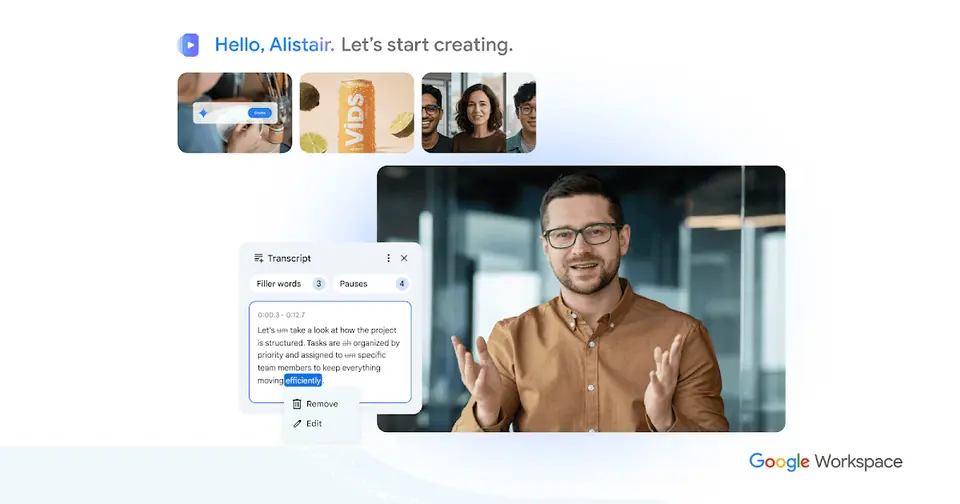
Google Vids is the video creation app in Google Workspace. It records the screen and voice, turns Google Slides into video and lets a recording be edited by changing its text transcript, with templates, stock media and Gemini features that generate clips, avatars and voiceovers. Basic use is free with a Google Account; higher limits come with Workspace plans for business and Google AI plans for consumers.
Worth knowing
- Vids is not sold on its own: business use comes with Google Workspace plans, and consumers get higher limits through Google AI plans.
- Creating and editing work only on desktop; mobile devices can view videos but not edit them.
- Each video can be at most 30 minutes long.
- Gemini features are metered by plan, and Google says many AI features in Vids are available only in English.
Key features
- Recording studio
- Records the screen and audio directly in Vids for walkthroughs and training. A clip made in the recording studio can be up to 30 minutes long.
- Transcript-based editing
- A video is edited by changing its text transcript like a document, then finished with styled captions and transitions instead of a complex timeline.
- Slides to video and templates
- Converts a Google Slides presentation into a video, or starts from a template, with stock media and files added from Google Drive or Google Photos.
- AI avatars and voiceovers
- Scripts AI avatars and voiceovers in 24 languages. Monthly avatar limits depend on the plan, from 10 on Business Starter to 25 on Standard and Plus.
- Gemini video generation
- Generates video clips from a text prompt and animates still images with audio, within a monthly allowance of clip seconds set by the plan.
- Sharing and YouTube export
- Permissions set who can edit, comment or view. Videos play in the browser with automatic captions, and can be exported to YouTube, private by default.
Google Vids pricing
As of Nov 16, 2026, Google Vids has a free plan, and paid plans start at $7 per user / month with a 1-year commitment (Workspace Business Starter).
- Starts at
- $7 per user / month with a 1-year commitment (Workspace Business Starter)
- Free plan
- Basic Vids features are free with a personal Google Account, with 50 Gemini credits a month and up to 6 AI avatar or video clip generations a month, using preset avatars only.
- Free trial
- 14-day Google Workspace trial
| Plan | Price | What you get |
|---|---|---|
| Personal Google Account | $0 | Basic Vids features in a desktop browser, with 50 Gemini credits a month and up to 6 AI avatar or video clip generations, using preset avatars. |
| Business Starter | $7per user / month, 1-year commitment ($8.40 flexible) | Google Workspace suite plan that includes Vids, with 10 AI avatars, 200 seconds of AI video clips and 5 image generations a month. |
| Business Standard | $14per user / month, 1-year commitment ($16.80 flexible) | Suite plan with 2 TB of pooled storage per user. Vids limits rise to 25 AI avatars, 500 seconds of AI video clips and 30 image generations a month. |
| Business Plus | $22per user / month, 1-year commitment ($26.40 flexible) | Suite plan with 5 TB of pooled storage per user, Vault and advanced endpoint management. Vids limits are the same as on Standard. |
| Enterprise | Custom | Suite plans priced through Google sales with no user limit. Vids limits run from 10 to 25 AI avatars a month depending on the edition. |
Read from workspace.google.com on Nov 16, 2026. Prices change, so confirm with Google Vids before you buy.
Ways to pay less
- Other savingsHalf price at first for new customers
Google's US pricing page shows Business Starter at $3.50, Standard at $7 and Plus at $11 per user a month for new customers. Its labels say for 3 months; its footnote says 12 months, first 20 users.
Stated on workspace.google.com - Annual discountSave 16% with a 1-year commitment
Business Starter is $7 per user per month on the Annual/Fixed-Term Plan against $8.40 on the Flexible Plan. Standard drops from $16.80 to $14 and Plus from $26.40 to $22.
Stated on knowledge.workspace.google.com - NonprofitGoogle Workspace for Nonprofits at $0
Eligible nonprofits get Google Workspace for Nonprofits at $0, or Business Standard at $3.50 and Business Plus at $6.16 per user per month on a 1-year commitment.
Stated on google.com - EducationEducation Fundamentals at no charge
Google Workspace for Education Fundamentals, which includes Vids, is available at no charge to qualifying institutions.
Stated on edu.google.com
Works with
- Google Slides
- Google Drive
- Google Photos
- YouTube
Jobs at Google
Any open roles at Google are on its own careers page. We can’t read a count from there, so have a look.
Applications go to Google, not to us.
Google Vids alternatives
- Google Vids vs Clipchamp
Free plan · from $9.99/mo
- Google Vids vs Synthesia
Free plan · from $14/mo
- Google Vids vs HeyGen
Free plan · from $24/mo
- Google Vids vs Descript
Free plan · from $16/mo
- Google Vids vs Loom
Free plan · from $18/mo





Common questions
Does Google Vids have an Android app?
No Android app was listed when its pages were read on Nov 16, 2026. Google Vids is listed for Web.
Does Google Vids have an iPhone app?
No iPhone app was listed when its pages were read on Nov 16, 2026. Google Vids is listed for Web.
Is Google Vids open source?
Google Vids is not described as open source on its own site, as read on Nov 16, 2026.
Sources for this page
The prices, plans, platforms and features above were read from these pages on Nov 16, 2026.
- workspace.google.com/products/vids/
- workspace.google.com/pricing?region=US&hl=en
- knowledge.workspace.google.com/admin/billing/compare-flexible-and-annual-fixed-term-payment-plans
- support.google.com/docs/answer/15609411?hl=en
- support.google.com/docs/answer/16286470?hl=en
- support.google.com/docs/answer/16545758?hl=en
- google.com/nonprofits/offerings/workspace/
- edu.google.com/workspace-for-education/editions/compare-editions/