
OpusClip
AI tool that cuts long videos into captioned short clips
What is OpusClip?
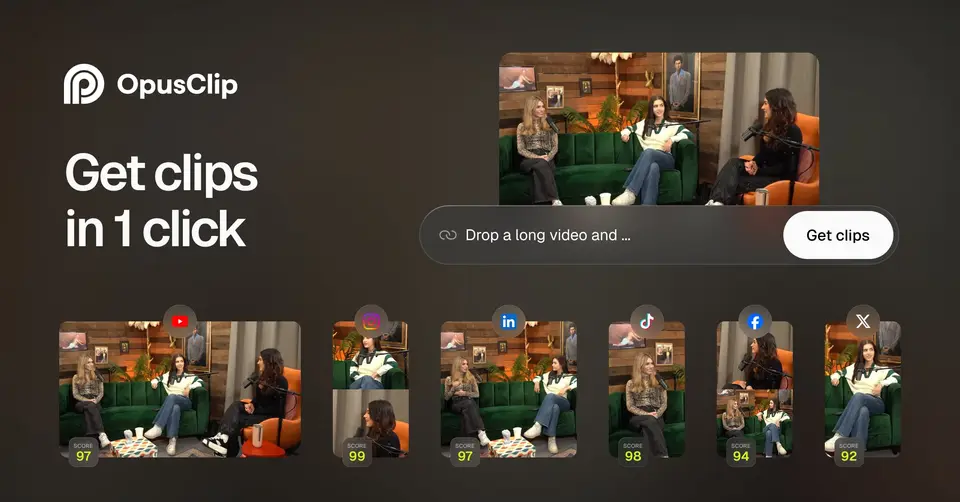
OpusClip takes a long video, from an upload or a link, and uses AI to pick out moments and turn them into short clips with captions and a reframed aspect ratio. Clips can be adjusted in a text and timeline editor, then downloaded or posted to social platforms from a built-in scheduler. Usage is metered in credits, at one credit per minute of source video.
OpusClip has a free plan. Paid plans start at $14.50 per month for Pro, billed annually ($174); Starter is $15 monthly. See every plan
Good for
- Podcasters and streamers cutting long recordings into short clips
- Creators who post the same clips to several social platforms
- Teams automating clipping through an API, MCP or Zapier
Worth knowing
- Free plan clips carry a watermark, cannot be edited and stop being exportable after 3 days.
- Only Pro can be billed annually; Starter is monthly only and has no social scheduler, team workspace or extra aspect ratios.
- Processing uses 1 credit per minute of source video, and a Pro team workspace tops out at 4 seats, reached with 2 packs.
- The mobile app is iOS only, and the help center recommends Chrome for the editor and warns of crashes in Safari 18.2 and later.
Key features
- ClipAnything
- An AI clipping model that finds moments in long videos of any genre, from podcasts to vlogs, gaming and sports. Paid plans give each clip a Virality Score.
- Animated captions
- Adds AI captions in more than 20 languages with emoji and keyword highlights. Custom fonts and speaker-based caption colors are not on the Free or Starter plans.
- AI Reframe
- Resizes a video for each platform and keeps moving subjects centered with object tracking. Free and Starter output 9:16 only; Pro adds 1:1 and 16:9.
- Editor
- Text and timeline-based editing with filler and silence removal, AI B-roll, voice-over and text overlays. The Free plan has no editing.
- Social posting and scheduler
- Starter posts to YouTube, TikTok and Instagram. Pro adds scheduling and X, Facebook, LinkedIn, Pinterest, Threads and Bluesky; each post to X costs 3 credits.
- API, MCP and XML export
- A video editing API, a scheduler API, an MCP connector and a Zapier integration, with limited API access on Pro. Pro also exports projects as XML for Premiere Pro and DaVinci Resolve.
OpusClip pricing
- Starts at
- $14.50 per month for Pro, billed annually ($174); Starter is $15 monthly
- Free plan
- Free forever plan: 60 credits a month, clips rendered at up to 1080p with a watermark, auto reframe and AI captions. No editing, and clips cannot be exported after 3 days.
- Free trial
- Free trial of core Pro features, no credit card required; length not stated and exports are watermarked
| Plan | Price | What you get |
|---|---|---|
| Free | $0 | 60 credits a month, watermarked clips at up to 1080p, auto reframe and AI captions. No editing, and a 3-day export limit. |
| Starter | $15per month, billed monthly (no annual option) | 150 credits a month, AI clipping with Virality Score, animated captions, the editor, 1 brand template and watermark-free export. |
| Pro | $14.50per month, billed annually ($174); $29 billed monthly | 300 credits a month, a team workspace with 2 seats, AI B-roll, the social scheduler, three aspect ratios and export to Premiere Pro and DaVinci Resolve. |
| Business | Custom | Custom credits, seats and social connections, priority processing, full API and custom integrations, dedicated storage and an MSA. |
Read from opus.pro on Oct 6, 2026. Prices change, so confirm with OpusClip before you buy.
Ways to pay less
- Annual discountSave up to 50% with annual billing
The pricing page lists Pro at $14.50 a month when billed annually ($174) against $29 billed monthly. Starter is offered monthly only.
Stated on opus.pro
Works with
OpusClip alternatives
- OpusClip vs Captions
Free plan · from $4.99/mo
- OpusClip vs Descript
Free plan · from $16/mo
- OpusClip vs VEED
Free plan · from $25/mo
- OpusClip vs Kapwing
Free plan · from $16/mo
- OpusClip vs Riverside
Free plan · from $9.99/mo





Common questions
Is OpusClip free?
OpusClip has a free plan. Free forever plan: 60 credits a month, clips rendered at up to 1080p with a watermark, auto reframe and AI captions. No editing, and clips cannot be exported after 3 days. Paid plans start at $14.50 per month for Pro, billed annually ($174); Starter is $15 monthly.
How much does OpusClip cost?
OpusClip lists 4 plans. Free: $0. Starter: $15 per month, billed monthly (no annual option). Pro: $14.50 per month, billed annually ($174); $29 billed monthly. Business: custom pricing. Prices were read from opus.pro on Oct 6, 2026.
What platforms does OpusClip work on?
OpusClip is available on Web and iOS.
Does OpusClip offer any discounts?
OpusClip publicly lists the following: Save up to 50% with annual billing.
Does OpusClip have an Android app?
No Android app was listed when its pages were read on Oct 6, 2026. OpusClip is listed for Web and iOS.
Does OpusClip have a Windows app?
No Windows app was listed when its pages were read on Oct 6, 2026. OpusClip is listed for Web and iOS.
Is OpusClip open source?
OpusClip is not described as open source on its own site, as read on Oct 6, 2026.
Does OpusClip have an API?
Yes. OpusClip offers a public API, according to its own site.
What does OpusClip integrate with?
OpusClip's listing names YouTube, TikTok, Instagram, LinkedIn, Adobe Premiere Pro, DaVinci Resolve, Zapier and Google Drive. A listing names up to eight integrations, so it may connect to more.
Does OpusClip have a free trial?
Yes. Free trial of core Pro features, no credit card required; length not stated and exports are watermarked.
Who makes OpusClip?
OpusClip is made by Opusclip Inc.
What are the alternatives to OpusClip?
The closest alternatives to OpusClip in our directory are Captions, Descript, VEED, Kapwing and Riverside. Each one has a side-by-side comparison with OpusClip.
Sources for this page
The prices, plans, platforms and features above were read from these pages on Oct 6, 2026.
- opus.pro
- opus.pro/pricing
- opus.pro/api
- opus.pro/about
- help.opus.pro/docs/article/plans-and-credits.md
- help.opus.pro/docs/article/how-are-credits-consumed.md
- help.opus.pro/docs/article/features-not-included-free-trial.md
- help.opus.pro/docs/article/payments-and-billing-info.md
- help.opus.pro/docs/article/does-opusclip-have-a-mobile-app.md
- help.opus.pro/docs/article/editor-browser-use-faq.md
- help.opus.pro/docs/article/video-sources-supported.md