
FocuSee
Screen recorder that adds zooms and cursor effects automatically
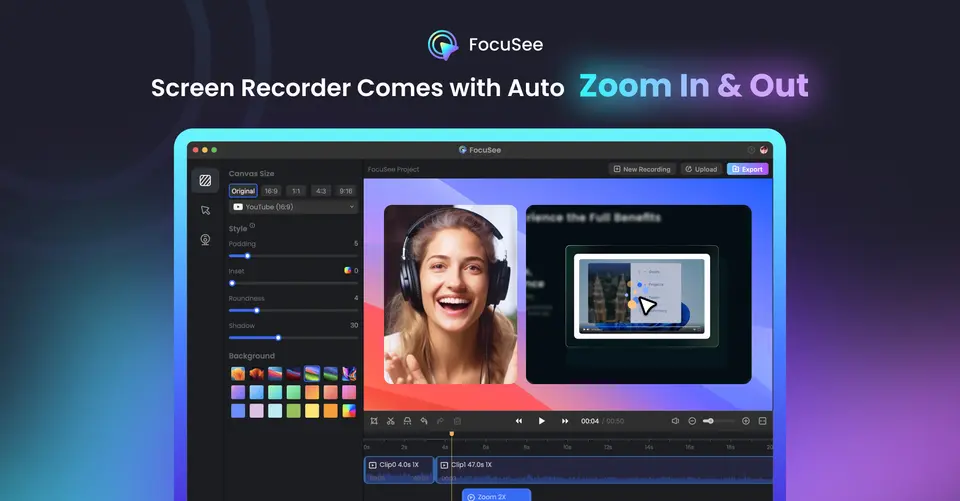
What is FocuSee?
FocuSee is a screen recorder for Windows and Mac from iMobie that edits a recording as soon as it stops: it zooms in on clicks and typing, styles the cursor and arranges the webcam layout without manual keyframing. An editor adds annotations, blur, subtitles and 3D motion, and optional AI tools generate subtitles, clean up audio and cut filler words using credits. A free browser recorder, FocuSee Online, is also available.
FocuSee is a paid product with a free trial, starting at $49.99 per year for Standard ($19.99 billed monthly). See every plan
Good for
- Product demos and tutorials that need zooms without manual editing
- Presenters recording screen and webcam together with a teleprompter
- Buyers who prefer a one-time license to a subscription
Worth knowing
- Standard includes no AI credits: avatars, AI Subtitle, voice enhancement and filler-word removal need credits bought separately or Advanced.
- Subscription credits are valid for one month, and the one-time plan's 1,000 credits expire after a year.
- The one-time purchase covers FocuSee 2.x only; moving to the next major version costs an upgrade fee.
- Licenses are tied to computers (1 on Standard, 3 on Advanced, 5 on the one-time plan), and the free trial allows a single export.
Key features
- Automatic zoom and 3D motion
- Auto zoom follows clicks and typing to emphasize key actions with no manual keyframing, and 3D motion adds tilt and perspective that follows the cursor.
- Cursor styles and annotations
- The cursor fades when it is not needed and can be restyled with click animations and sounds. Annotations include text, shapes, arrows, callouts, spotlights and blur.
- Screen, webcam and audio recording
- Records the screen and webcam with microphone and system audio together, captures keyboard shortcuts and mobile devices, and includes camera layouts and a teleprompter.
- Subtitles
- The editor auto-generates subtitles in 9 languages on every plan. AI Subtitle covers 55+ languages but consumes AI credits.
- AI audio cleanup and smart cut
- AI voice enhancement and automatic removal of silences and filler words draw on AI credits, alongside AI noise reduction and webcam background removal.
- Export, sharing and FocuSee Online
- Exports MP4 or GIF at up to 4K and 60 FPS and shares by link, with 5 GB of cloud storage. FocuSee Online is a free browser recorder with zoom effects and no watermark.
FocuSee pricing
- Starts at
- $49.99 per year for Standard ($19.99 billed monthly)
- Free plan
- None
- Free trial
- Free trial of the standard features, with one free video export at up to 4K
| Plan | Price | What you get |
|---|---|---|
| Standard | $49.99per year, billed yearly ($19.99 billed monthly) | 1 computer, unlimited videos and recording time, 4K 60 FPS export, custom watermark and 5 GB of cloud storage. No AI credits. Crossed-out price $179.99. |
| Advanced | $79.99per year, billed yearly ($24.99 billed monthly) | Up to 3 computers and the AI features, with 300 credits issued each month (3,600 a year). Shown against a crossed-out $359.99. |
| Advanced (One-Time Purchase) | $199.99one-time payment | Up to 5 computers, lifetime access to FocuSee 2.x and 1,000 AI credits valid for one year. Shown against a crossed-out $719.99. |
Read from focusee.imobie.com on Oct 6, 2026. Prices change, so confirm with FocuSee before you buy.
Ways to pay less
- Annual discountYearly billing costs less than monthly
Standard is $49.99 a year against $19.99 a month, and Advanced is $79.99 a year against $24.99 a month.
Stated on focusee.imobie.com - Lifetime licenseOne-time purchase for $199.99
The Advanced one-time purchase gives lifetime access to FocuSee 2.x on up to 5 computers, shown against a crossed-out $719.99. Later major versions cost extra.
Stated on focusee.imobie.com - Education30% off for students, teachers and staff
FocuSee's education page offers 30% off after verifying an edu email address. These plans do not include initial AI credits.
Stated on focusee.imobie.com
FocuSee alternatives
- FocuSee vs Screen Studio
From $9/mo
- FocuSee vs Cap
Free plan · from $29/yr
- FocuSee vs Tella
Free trial · from $13/mo
- FocuSee vs Camtasia
Free plan · from $39/yr
- FocuSee vs Cursorful
Free plan · from $79 one-time





Common questions
Is FocuSee free?
No, FocuSee is a paid product, but you can try it first. Free trial of the standard features, with one free video export at up to 4K.
How much does FocuSee cost?
FocuSee lists 3 plans. Standard: $49.99 per year, billed yearly ($19.99 billed monthly). Advanced: $79.99 per year, billed yearly ($24.99 billed monthly). Advanced (One-Time Purchase): $199.99 one-time payment. Prices were read from focusee.imobie.com on Oct 6, 2026.
What platforms does FocuSee work on?
FocuSee is available on Windows, macOS and Web.
Does FocuSee offer any discounts?
FocuSee publicly lists the following: Yearly billing costs less than monthly; One-time purchase for $199.99; 30% off for students, teachers and staff.
Does FocuSee have an Android app?
No Android app was listed when its pages were read on Oct 6, 2026. FocuSee is listed for Windows, macOS and Web.
Does FocuSee have an iPhone app?
No iPhone app was listed when its pages were read on Oct 6, 2026. FocuSee is listed for Windows, macOS and Web.
Is FocuSee open source?
FocuSee is not described as open source on its own site, as read on Oct 6, 2026.
Does FocuSee have a student discount?
30% off for students, teachers and staff. FocuSee's education page offers 30% off after verifying an edu email address. These plans do not include initial AI credits.
Who makes FocuSee?
FocuSee is made by iMobie Inc. It dates from 2011.
What are the alternatives to FocuSee?
The closest alternatives to FocuSee in our directory are Screen Studio, Cap, Tella, Camtasia and Cursorful. Each one has a side-by-side comparison with FocuSee.
Sources for this page
The prices, plans, platforms and features above were read from these pages on Oct 6, 2026.