
Vmaker AI review (2026): is the free plan enough?
AI video editor, clip maker and screen recorder in one account
Black Friday: is there a Vmaker AI sale?
Vmaker AI report card
Fair · out of 4.0 · graded Oct 10, 2026
Best for an AI editor and screen recorder in one
Vmaker AI puts an AI video editor, a clip maker, a subtitle tool, a screen recorder and AI avatars in one account, and nearly all of it is metered. The free plan watermarks videos and includes no exports. Starter, at $18 a month billed yearly, gives 10 downloads a month before it's $3 each and caps screen recordings at 30 minutes, and 4K export is Enterprise only.
Who Vmaker AI is for
- Fits if you cut podcasts and webinars into captioned short clips
- Works for trainers turning documents and slides into avatar-presented videos
Who Vmaker AI is not for
- Tight if you're staying free: videos are watermarked, there are no exports and screen recordings stop at 1 minute
- Pricey if you export a lot, since Starter includes 10 downloads a month and extras are $3 each
- Skip it if you record long sessions on Starter, as screen recordings are capped at 30 minutes
- Watch out: computer audio and the blur tool need a paid plan, and 4K export, SSO and the brand kit are Enterprise only
- Not for you if you edit on a phone, as no phone app is listed
Why Vmaker AI gets a 2.4
Five grades, each with its reason. The GPA is their average: an A is 4 points, an F is none.
- CValue for moneyStarter is $18 a month billed yearly, the top of this category's normal range against a $10 middle, and it buys 10 watermark-free downloads a month with more at $3 each. Teams at $25 gives 30, and 4K export is Enterprise only.
- CFree plan and trialThe free plan has 600 long-to-short credits and 20 subtitle minutes a month, but videos come out watermarked with no exports included, and screen recordings stop at 1 minute. Caps you meet on day one.
- BFeaturesEditing from a text prompt, a clip maker with AI reframing, subtitles in 35+ languages translated into 100+, a screen and webcam recorder, avatar videos from text or documents, and a hosted player with viewer insights. No gap in the core job, but each part is rationed.
- CEase of useNo store rating on record, and the work is spread across an editor, a clip maker and a recorder with monthly allowances for downloads, credits, subtitle minutes and avatar minutes to keep straight.
- BPlatforms and integrationsWeb, Mac and Windows apps and a Chrome extension, publishing straight to YouTube, Instagram and TikTok. No phone app is listed, and publishing itself is capped by plan.
What these grades rest on. Graded from this listing, whose facts were read from Vmaker AI's own pages on 9 October 2026. Also tested with a demo account on 2026-07-26. How we review and grade.
Make Vmaker AI? Put this grade on your site
Paste this where you want the badge. It links here and follows the grade if it changes. About badges
<a href="https://toolgpa.com/tools/vmaker#review"><img src="https://toolgpa.com/badge/vmaker.svg" alt="Vmaker AI: 2.4 GPA on ToolGPA" width="196" height="56"></a>Where Vmaker AI stands among screen recording and video tools
Vmaker AI's GPA of 2.4 is higher than 66 of the 133 other screen recording and video tools we grade, and level with 22.
It stands best on features (B, above 78 of 133) and worst on ease of use (C, above 2).
Its paid plans start at $18 a month, against a middle price of $12.25 for the category: 60 of the 88 others that charge start lower.
On features, ease of use and platforms it scores 2.7 out of 4. 11 tools score higher and cost less.
Each grade against the category
Every bar is all 134 screen recording and video tools we grade, cut by the letter each got. Vmaker AI’s own letter is outlined.
- CValue for moneyAbove 20 of 133, level with 66
- CFree plan and trialAbove 24 of 133, level with 80
- BFeaturesAbove 78 of 133, level with 53
- CEase of useAbove 2 of 133, level with 84
- BPlatforms and integrationsAbove 67 of 133, level with 60
Price against what you get
Each dot is one of 102 screen recording and video tools. Further left costs less, and higher up scores better on features, ease of use and platforms. Point at a dot to see which tool it is.
Features, ease of use and platforms, averaged
What paid plans start at, a month (each step along is roughly double) →
- The best score at each price
- Has a free plan
- No free plan
Keep Vmaker AI, or make your own?
Keep it
To replace Vmaker AI you would be making a video editor. That is not a weekend's work, with an AI app builder or without one.
It costs $216 a year.
What you could not
- A video editor.
- Audio cleaned up live as you speak.
- Recording the screen with its sound, and somewhere to keep the video.
- Speech turned into text you can trust.
- A real app for macOS and Windows. Something home-made would be a web page.
- AI features, unless you pay a model provider for each request yourself.
- The depth: we grade its features B, which means it covers the whole job.
What this rests on. Vmaker AI’s listing: what it does, where it runs, what it plugs into and what it costs. It is a judgement about the kind of software this is. We have not built a replacement for it, and making your own means looking after it too. How we decide, and every tool’s verdict.
What is Vmaker AI?
Vmaker AI, a product of Animaker, combines an AI video editor, a tool that cuts long videos into short clips, a subtitle generator and a screen and webcam recorder. It can also turn text, audio and documents into videos presented by AI avatars. Most of it is metered: each plan sets monthly limits on downloads, clip-processing credits, subtitle minutes and recording length.
Worth knowing
- The Free plan watermarks videos and includes no exports; the pricing page lists pay-per-download at $3 each.
- Starter includes 10 downloads a month and Teams 30, with further downloads at $3 and $2 each.
- Screen recordings are capped at 1 minute on Free and 30 minutes on Starter, and computer audio and the blur tool need a paid plan.
- Single sign-on, 4K export, the editor brand kit and advanced analytics are Enterprise only.
Key features
- AI video editor
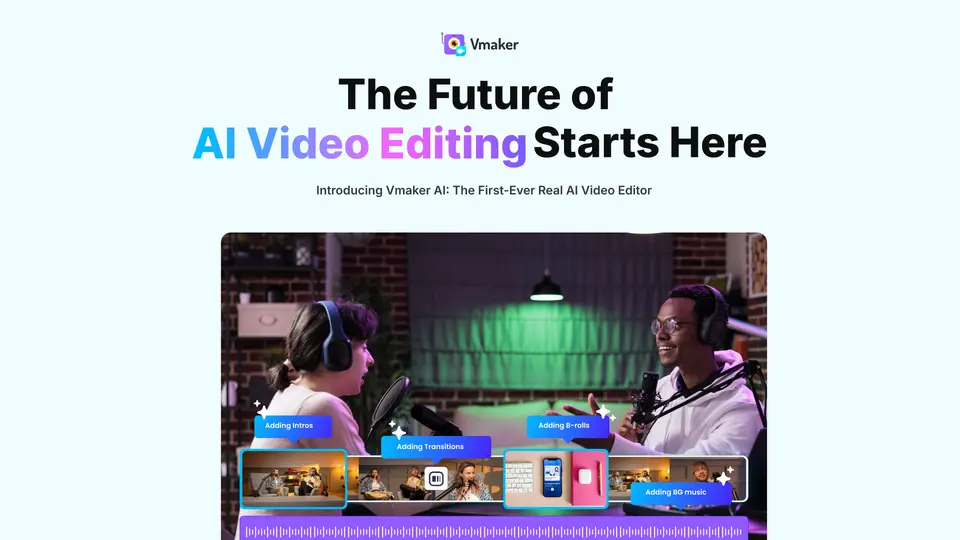
- Edits raw footage from a text prompt, adding subtitles, transitions and B-roll. The Free plan includes 5 Edit with AI credits a month; paid plans list unlimited credits.
- Long-to-short clip maker
- Turns podcasts, webinars and interviews into short clips with AI reframing and animated subtitles. Monthly credits are 600 on Free, 2,000 on Starter and 3,500 on Teams.
- Screen and webcam recorder
- Records the screen and webcam with a Mac app, a Windows app or a Chrome extension. Recordings are capped at 1 minute on Free, 30 minutes on Starter and 4 hours on Teams.
- AI subtitles and translation
- Generates subtitles in more than 35 languages with animated styles and translates them into 100+ languages. Translation and SRT download start on the Starter plan.
- AI avatar videos
- Turns text, audio, documents and slides into videos with AI human avatars. Avatar minutes are 36 a year on Starter and 144 a year on Teams; the Free plan has none.
- Hosting and social publishing
- Videos get a hosted player with embedding and viewer insights. Starter can publish 10 videos a month to YouTube, Instagram and TikTok, and Teams 30.
Vmaker AI pricing
As of Oct 9, 2026, Vmaker AI has a free plan, and paid plans start at $18 per month, billed yearly ($216); $24 billed monthly.
- Starts at
- $18 per month, billed yearly ($216); $24 billed monthly
- Free plan
- 600 long-to-short AI credits (about 60 minutes of processing) and 20 minutes of auto subtitles a month, and 1-minute screen recordings. Videos are watermarked, with no included exports.
- Free trial
- None listed
| Plan | Price | What you get |
|---|---|---|
| Free | $0 | 600 long-to-short credits and 20 subtitle minutes a month, 4 AI avatars, 5 GB of storage and 1-minute screen recordings. Watermarked, with no included exports. |
| Starter | $18per month, billed yearly ($216); $24 billed monthly | 10 watermark-free downloads a month at 1080p, 2,000 long-to-short credits, 60 subtitle minutes, 30-minute screen recordings and 36 avatar minutes a year. |
| Teams | $25per month, billed yearly ($300); $39 billed monthly | 30 downloads a month at 2K, 3,500 long-to-short credits, 120 subtitle minutes, 4-hour screen recordings, video dubbing and a branded video page. |
| Enterprise | Custom | 4K export, videos of up to 3 hours, single sign-on, an editor brand kit, a company-wide shared library, advanced analytics and an account manager. |
Read from vmaker.com on Oct 9, 2026. Prices change, so confirm with Vmaker AI before you buy.
Ways to pay less
- Annual discountLower price with annual billing
The pricing page advertises 25% off annual billing: Starter is $216 a year ($18 a month) against $24 monthly, and Teams is $300 a year ($25 a month) against $39 monthly.
Stated on vmaker.com
Works with
Vmaker AI alternatives
- Vmaker AI vs OpusClip
Free plan · from $14.50/mo
- Vmaker AI vs VEED
Free plan · from $25/mo
- Vmaker AI vs Kapwing
Free plan · from $16/mo
- Vmaker AI vs Descript
Free plan · from $16/mo
- Vmaker AI vs ScreenPal
Free plan · from $4/mo




Common questions
Does Vmaker AI have an Android app?
No Android app was listed when its pages were read on Oct 9, 2026. Vmaker AI is listed for Web, macOS and Windows.
Does Vmaker AI have an iPhone app?
No iPhone app was listed when its pages were read on Oct 9, 2026. Vmaker AI is listed for Web, macOS and Windows.
Is Vmaker AI open source?
Vmaker AI is not described as open source on its own site, as read on Oct 9, 2026.
Sources for this page
The prices, plans, platforms and features above were read from these pages on Oct 9, 2026.