
ScreenPal
Screen recorder, video editor and video hosting in one low-cost suite
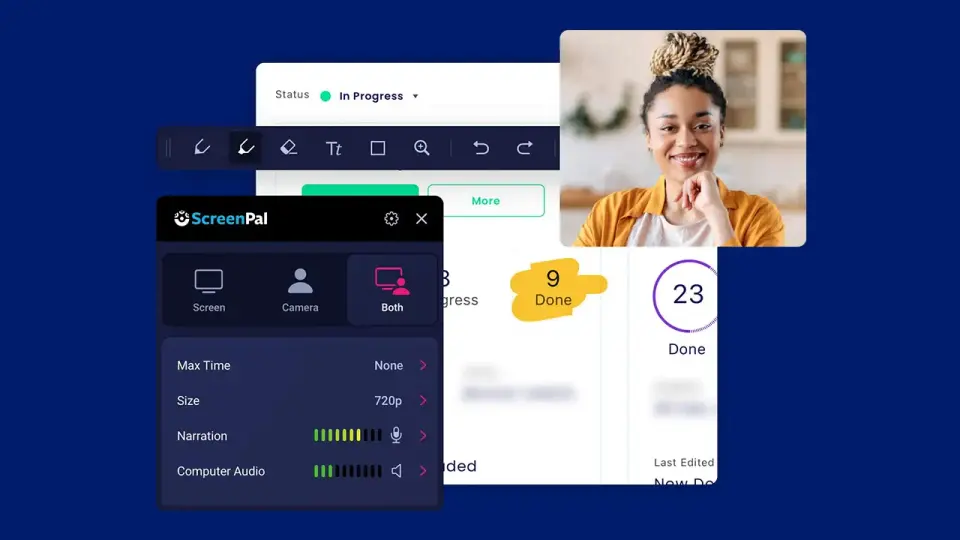
What is ScreenPal?
ScreenPal, previously known as Screencast-O-Matic, is a suite for recording the screen and webcam, editing the result and hosting it for sharing. It also captures and annotates screenshots and can add quizzes, polls and ratings to videos, which makes it common in schools and training teams. Recording apps are available for desktop, phones and Chrome, and the AI tools are reserved for the higher plans.
ScreenPal has a free plan. Paid plans start at $4 per month, paid annually (Solo Deluxe). See every plan
Good for
- Teachers recording lessons and adding quizzes for their LMS
- Individuals who want a recorder, editor and hosting on a small budget
- Trainers and support teams producing tutorial videos
Worth knowing
- The free plan limits each recording to 15 minutes and hosting to 10 videos.
- ScreenPal AI, including text-based editing and the AI video generator, needs Solo Max or a team plan.
- Listed prices are for annual payment; monthly subscriptions are offered at a higher rate.
- Team Business requires at least 3 creators, and SAML SSO and team management are limited to team plans.
Key features
- Screen and webcam recorder
- Record the full screen, a window or any area, with the webcam alone or as picture-in-picture. Draw and zoom while recording; no watermark is added on any plan.
- Video editor
- Cut, crop and combine clips, add text, shapes, animations, overlays, music and voiceover narration, and remove silences. The full editor starts with Solo Deluxe.
- Screenshots and image editing
- Capture screenshots, including scrolling and time-delayed ones, then annotate, blur or highlight them. The image editor with OCR text recognition is listed for Windows and Mac.
- Hosting and channels
- Host videos and images with folders, channels, password and privacy controls, scheduled publishing and custom thumbnails. Hosting is capped at 10 videos on the free plan.
- Interactive video
- Add quizzes, polls and ratings to a video and embed it in a learning management system or website. Free and Deluxe allow 5; Max and team plans are unlimited.
- ScreenPal AI
- Generates titles, summaries, captions, quiz questions and translated transcripts, and adds text-based editing, filler-word removal and an AI video generator. Included in Solo Max and Team Business.
ScreenPal pricing
- Starts at
- $4 per month, paid annually (Solo Deluxe)
- Free plan
- Unlimited recordings of up to 15 minutes each with no watermark, basic video editing, screenshots, 10 hosted videos, 3 channels and 5 video quizzes.
- Free trial
- None listed
| Plan | Price | What you get |
|---|---|---|
| Free | $0 | Recordings up to 15 minutes, basic editing, screenshots, 10 hosted videos, 720p playback and 5 quizzes. |
| Solo Deluxe | $4per month, paid annually | Unlimited recording time and hosting, the full video editor, storyboards, AI speech-to-text captions and standard stock media. |
| Solo Max | $10per month, paid annually | Deluxe plus ScreenPal AI, auto-captions and transcriptions, AI text-to-speech, the AI video generator, premium stock media, 4K playback and unlimited quizzes. |
| Team Business | $8per user / month, paid annually (3 users minimum) | Max features plus collaboration tools, team management, advanced integrations and SAML SSO. The plan card carries a 22% off label. |
Read from screenpal.com on Oct 6, 2026. Prices change, so confirm with ScreenPal before you buy.
Ways to pay less
- EducationEducation plans from $3 a month
ScreenPal's education plans page lists Deluxe Edu at $3 a month and Max Edu at $6 a month, paid annually, against $4 and $10 for the standard Solo plans.
Stated on screenpal.com - Annual discountDiscounted annual subscriptions
ScreenPal's plans FAQ says monthly subscriptions are available for the Solo plans and Team Business and describes the annual subscription pricing as discounted.
Stated on screenpal.com
How people rate the ScreenPal app
4.6
out of 5 for the iPhone and iPad app
- 5 stars82%
- 4 stars8%
- 3 stars3%
- 2 stars2%
- 1 star6%
5,375 ratings on the App Store in the United States, read Oct 6, 2026. It rates the app, not everything the product does. See the listing
Works with
- Zoom
- Microsoft Teams
- Canvas
- Blackboard
- YouTube
- Google Slides
- Outlook
ScreenPal alternatives
- ScreenPal vs Loom
Free plan · from $18/mo
- ScreenPal vs Camtasia
Free plan · from $39/yr
- ScreenPal vs Camtasia Snagit
Free trial · from $39/yr
- ScreenPal vs Screencastify
Free plan · from $7/mo
- ScreenPal vs Vmaker AI
Free plan · from $18/mo





Common questions
Is ScreenPal free?
ScreenPal has a free plan. Unlimited recordings of up to 15 minutes each with no watermark, basic video editing, screenshots, 10 hosted videos, 3 channels and 5 video quizzes. Paid plans start at $4 per month, paid annually (Solo Deluxe).
How much does ScreenPal cost?
ScreenPal lists 4 plans. Free: $0. Solo Deluxe: $4 per month, paid annually. Solo Max: $10 per month, paid annually. Team Business: $8 per user / month, paid annually (3 users minimum). Prices were read from screenpal.com on Oct 6, 2026.
What platforms does ScreenPal work on?
ScreenPal is available on Web, Windows, macOS, iOS and Android. It also has a browser extension.
Does ScreenPal offer any discounts?
ScreenPal publicly lists the following: Education plans from $3 a month; Discounted annual subscriptions.
How is ScreenPal rated?
ScreenPal's iPhone and iPad app averages 4.6 out of 5 from 5,375 ratings on the App Store in the United States, as read on Oct 6, 2026. That is the store's rating of the app, not a score from us.
Does ScreenPal have a Linux app?
No Linux app was listed when its pages were read on Oct 6, 2026. ScreenPal is listed for Web, Windows, macOS, iOS and Android.
Is ScreenPal open source?
ScreenPal is not described as open source on its own site, as read on Oct 6, 2026.
What does ScreenPal integrate with?
ScreenPal's listing names Zoom, Microsoft Teams, Canvas, Blackboard, YouTube, Google Slides, Outlook and LinkedIn. A listing names up to eight integrations, so it may connect to more.
Does ScreenPal have a student discount?
Education plans from $3 a month. ScreenPal's education plans page lists Deluxe Edu at $3 a month and Max Edu at $6 a month, paid annually, against $4 and $10 for the standard Solo plans.
Who makes ScreenPal?
ScreenPal is made by ScreenPal. It dates from 2006.
What are the alternatives to ScreenPal?
The closest alternatives to ScreenPal in our directory are Loom, Camtasia, Camtasia Snagit, Screencastify and Vmaker AI. Each one has a side-by-side comparison with ScreenPal.
Sources for this page
The prices, plans, platforms and features above were read from these pages on Oct 6, 2026. What people say is linked where it appears.