Cap
Open-source screen recorder with instant share links and an editor
What is Cap?
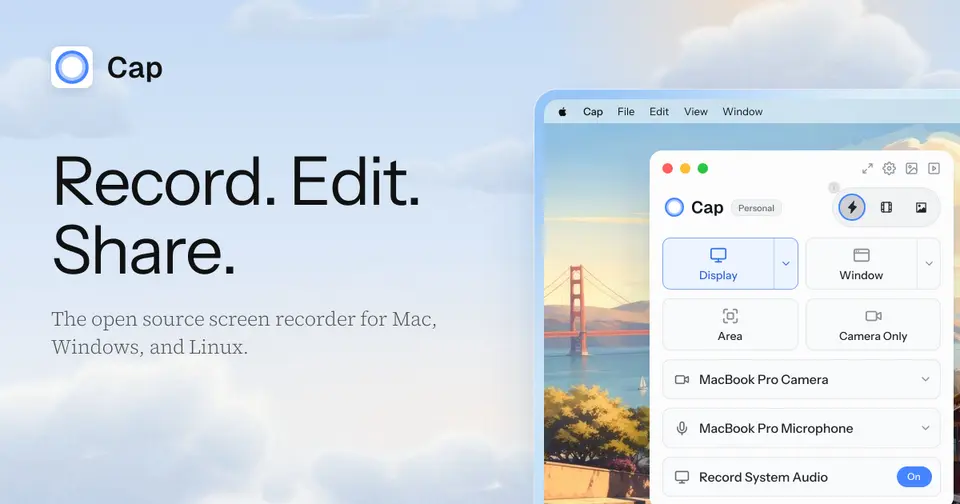
Cap is an open-source screen recorder with three modes. Instant Mode uploads while you record and copies a share link when you stop, Studio Mode records locally in 4K and opens an editor with backgrounds, automatic zoom and cursor effects, and Screenshot Mode captures and styles still images. Recordings can be shared through Cap's cloud, kept in your own S3 bucket or Google Drive, or served from a self-hosted copy of the platform.
Cap has a free plan. Paid plans start at $29 per year for a Desktop License; Cap Pro is $8.16 per user / month, billed annually. See every plan
Good for
- Teams that want an open-source Loom alternative they can self-host
- Developers sending bug reports and async updates as video links
- Product demos and tutorials that need zooms, backgrounds and captions
Worth knowing
- The free version is licensed for personal use only; commercial use needs a Desktop License or Cap Pro.
- Share links on the Free plan and the Desktop License are limited to recordings of up to 5 minutes; unlimited cloud sharing needs Cap Pro.
- AI titles, summaries and chapters, cloud transcriptions, the Loom importer and custom S3 or Google Drive storage are Cap Pro only.
- The Windows build is labeled beta on the download page, and no iOS or Android app is listed.
Key features
- Instant Mode
- Uploads in the background while you record, so a share link is on the clipboard the moment you stop. Viewers watch in a browser with no account or download.
- Studio Mode and editor
- Records locally at up to 4K and 60fps with separate screen, camera and microphone tracks, then opens an editor with backgrounds, automatic zoom, cursor effects, blur masks and scenes.
- Screenshot Mode
- A hotkey captures a window or an area, and the image can be given a background, padding and a shadow before it is copied to the clipboard or shared as a link.
- Share pages
- Each capture gets a page with comments, reactions, a transcript and chapters. Password protection, a custom domain and viewer analytics are part of Cap Pro.
- Cap AI and captions
- Cap Pro generates titles, summaries, clickable chapters and transcriptions for every recording with no usage limit. Studio Mode can also transcribe captions on the device in 19 languages.
- Own storage, self-hosting and agents
- Cap Pro can store recordings in a custom S3 bucket or Google Drive, and the whole platform can be self-hosted. A CLI and local MCP server let AI coding agents record and manage videos.
Cap pricing
- Starts at
- $29 per year for a Desktop License; Cap Pro is $8.16 per user / month, billed annually
- Free plan
- Free for personal use: Studio Mode with the full editor, 4K 60fps export and share links for recordings of up to 5 minutes. Commercial use needs a paid license.
- Free trial
- None listed
| Plan | Price | What you get |
|---|---|---|
| Free | $0 | Personal use only: Studio Mode with the full editor, 4K 60fps export and share links for recordings of up to 5 minutes. |
| Desktop License | $29per license / year, or $58 once for a lifetime license | Commercial use for one user, unlimited local recording and editing, and 20 cloud share links a month of up to 5 minutes each. |
| Cap Pro | $8.16per user / month, billed annually ($12 billed monthly) | Unlimited cloud storage and sharing, AI titles, summaries, chapters and transcripts, custom domain, password protection and viewer analytics. |
| Enterprise | Cap Pro price + add-ons | Cap Pro for large organizations, with optional SAML SSO at a flat $199 a month and a signed BAA at $99 a month per organization. |
Read from cap.so on Oct 6, 2026. Prices change, so confirm with Cap before you buy.
Ways to pay less
- Annual discountSave 32% on Cap Pro with annual billing
The pricing page lists Cap Pro at $8.16 per user a month when billed annually, against $12 per user billed monthly.
Stated on cap.so - Lifetime licenseLifetime Desktop License for $58
The Desktop License can be bought once for $58 as a license that never renews, instead of paying $29 per license each year.
Stated on cap.so - Education30% student discount
Cap's student discount page offers students 30% off any premium plan, applied with a discount code at checkout.
Stated on cap.so
Works with
Cap alternatives
- Cap vs Loom
Free plan · from $18/mo
- Cap vs Screen Studio
From $9/mo
- Cap vs Tella
Free trial · from $13/mo
- Cap vs Screenity
Free plan · from $10/mo




Common questions
Is Cap free?
Cap has a free plan. Free for personal use: Studio Mode with the full editor, 4K 60fps export and share links for recordings of up to 5 minutes. Commercial use needs a paid license. Paid plans start at $29 per year for a Desktop License; Cap Pro is $8.16 per user / month, billed annually.
How much does Cap cost?
Cap lists 4 plans. Free: $0. Desktop License: $29 per license / year, or $58 once for a lifetime license. Cap Pro: $8.16 per user / month, billed annually ($12 billed monthly). Enterprise: Cap Pro price + add-ons. Prices were read from cap.so on Oct 6, 2026.
What platforms does Cap work on?
Cap is available on macOS, Windows and Linux. It also has a browser extension.
Does Cap offer any discounts?
Cap publicly lists the following: Save 32% on Cap Pro with annual billing; Lifetime Desktop License for $58; 30% student discount.
Does Cap have an Android app?
No Android app was listed when its pages were read on Oct 6, 2026. Cap is listed for macOS, Windows and Linux.
Does Cap have an iPhone app?
No iPhone app was listed when its pages were read on Oct 6, 2026. Cap is listed for macOS, Windows and Linux.
Is Cap open source?
Yes. Cap is open source, according to its own site. It can also be run on a server of your own.
What does Cap integrate with?
Cap's listing names Google Drive, Amazon S3, Claude Code, Cursor and Codex. A listing names up to eight integrations, so it may connect to more.
Does Cap have a student discount?
30% student discount. Cap's student discount page offers students 30% off any premium plan, applied with a discount code at checkout.
Who makes Cap?
Cap is made by Cap Software, Inc. It dates from 2023.
What are the alternatives to Cap?
The closest alternatives to Cap in our directory are Loom, Screen Studio, Tella, OBS Studio and Screenity. Each one has a side-by-side comparison with Cap.
Sources for this page
The prices, plans, platforms and features above were read from these pages on Oct 6, 2026.