The ScreenPal Insider’s Guide
Everything we know about ScreenPal in one document: what it costs, its grades, getting a refund, getting help and what else to look at. Read it here, or keep a copy.
ScreenPal
The Insider’s Guide
Screen recorder, video editor and video hosting in one low-cost suite
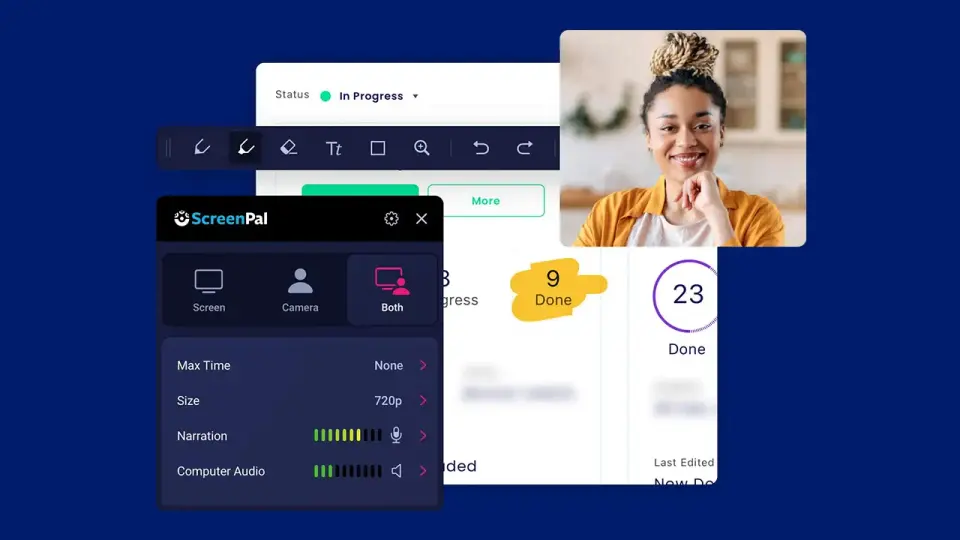
Every plan, grade, refund rule and rival among screen recording and video tools, read from ScreenPal’s own pages.
Made by ScreenPal · checked Oct 9, 2026 · toolgpa.com
Contents
- 01WelcomeWhat it is, who it suits, its grades and the ten things to know first
- 02Insider tipsWhat most people miss: ways to pay less, settings worth changing and the catches
- 03What it costsEvery plan, the free plan, ways to pay less and how prices have moved
- 04What it doesIts main features, where it runs, what it works with and who makes it
- 05Where it standsIts grades against its category, and whether to keep it or make your own
- 06The alternativesThe tools it is most often weighed against, side by side
- 07Quick answersThe questions people ask about it, each answered in a line or two
- 08About ToolGPAWho made this guide, what else is on the site, and how to cite it
ToolGPA put this guide together from ScreenPal’s own pages, its app-store listings and our grades. Every fact in it is on ScreenPal’s page too, where it is kept up to date. Checked Oct 9, 2026.
Part 01 · Overview
Welcome
What it is, who it suits, its grades and the ten things to know first
3.0
GPA, above 45 of the 52 other screen recording and video tools we grade
ScreenPal, previously known as Screencast-O-Matic, is a suite for recording the screen and webcam, editing the result and hosting it for sharing. It also captures and annotates screenshots and can add quizzes, polls and ratings to videos, which makes it common in schools and training teams. Recording apps are available for desktop, phones and Chrome, and the AI tools are reserved for the higher plans.
To get you started, here are 9 things to know about ScreenPal, taken from its own pages and our grades.
You can draw and zoom mid-recording, and there's a Chrome recorder if you'd rather install nothing.
- 1
Best for screen recording, editing and hosting on a small budget
ScreenPal, which used to be Screencast-O-Matic, records your screen and webcam, edits the result and hosts it.
- 2
Paid plans start at $4 a month
As its pricing page puts it: $4 per month, paid annually (Solo Deluxe).
- 3
There is a free plan
Unlimited recordings of up to 15 minutes each with no watermark, basic video editing, screenshots, 10 hosted videos, 3 channels and 5 video quizzes.
- 4
It runs on 5 platforms
Web, Windows, macOS, iOS and Android, with a browser extension too.
- 5
Screen and webcam recorder
Record the full screen, a window or any area, with the webcam alone or as picture-in-picture. Draw and zoom while recording; no watermark is added on any plan.
- 6
Video editor
Cut, crop and combine clips, add text, shapes, animations, overlays, music and voiceover narration, and remove silences. The full editor starts with Solo Deluxe.
- 7
Screenshots and image editing
Capture screenshots, including scrolling and time-delayed ones, then annotate, blur or highlight them. The image editor with OCR text recognition is listed for Windows and Mac.
- 8
A 3.0 GPA, above 45 of 52
That is against the other screen recording and video tools we grade, on value, the free plan, features, ease of use and platforms.
- 9
Keep it
To replace ScreenPal you would be making a video editor. That is not a weekend's work, with an AI app builder or without one.
ScreenPal at a glance
- Pricing
- Free plan, from $4 per month, paid annually (Solo Deluxe)
- Free plan
- Yes
- Free trial
- None stated
- Runs on
- Web, macOS, Windows, iOS, Android, Browser extension
- Made by
- ScreenPal, since 2006
- Category
- Screen Recording & Video
- Our grade
- 3.0 GPA, very good
- Store rating
- 4.6 on the App Store, 5,375 ratings
The report card
Best for screen recording, editing and hosting on a small budget
ScreenPal, which used to be Screencast-O-Matic, records your screen and webcam, edits the result and hosts it. Solo Deluxe is $4 a month paid annually for unlimited recording and hosting, with quizzes and polls you can put in a video. But the free plan stops each recording at 15 minutes and hosts 10 videos, the AI tools need Solo Max at $10, and those prices are for annual billing; monthly costs more.
| Subject | Grade | Comment |
|---|---|---|
| Value for money | B | Solo Deluxe is $4 a month paid annually, which is inside the cheapest quarter of this category, where the middle plan is $10. For that you get unlimited recording and hosting and the full editor. Solo Max, with the AI, is $10. |
| Free plan and trial | C | Free with no watermark, but each recording stops at 15 minutes, hosting at 10 videos, quizzes at 5 and playback at 720p, and those are caps you meet quickly. |
| Features | B | Record screen, window or area with the webcam on top, then cut, crop, add text, music and narration, host it in channels with passwords, and drop quizzes and polls in for an LMS. Screenshots with OCR too. The listing shows no gap in the core job. |
| Ease of use | B | 4.59 from 5,375 App Store ratings, short of the 4.7 an A needs. You can draw and zoom mid-recording, and there's a Chrome recorder if you'd rather install nothing. |
| Platforms and integrations | A | Web, Windows, Mac, iPhone, Android and a Chrome extension, connecting to Zoom, Microsoft Teams, Canvas, Blackboard, YouTube and Google Slides. Only the image editor with text recognition is desktop-only. |
An A is worth 4 points, a B 3, a C 2, a D 1 and an F nothing. The GPA is the average of the five.
Who ScreenPal is for
- Fits if you teach and want to record a lesson with a quiz in it for your LMS
- Works for training or support tutorials if $4 a month, billed annually, is your budget
Who it is not for
- Tight if you're staying free: each recording stops at 15 minutes, hosting at 10 videos and playback at 720p
- Not for you if you want the AI tools or more than 5 quizzes on Solo Deluxe, as both need Solo Max at $10 a month
- Watch out: the $4 and $10 prices are for annual billing, and monthly plans cost more
- Skip it if you're a team of two, because Team Business, with SSO and team management, needs at least 3 users
Good to know
Good for
- Teachers recording lessons and adding quizzes for their LMS
- Individuals who want a recorder, editor and hosting on a small budget
- Trainers and support teams producing tutorial videos
Worth knowing
- The free plan limits each recording to 15 minutes and hosting to 10 videos.
- ScreenPal AI, including text-based editing and the AI video generator, needs Solo Max or a team plan.
- Listed prices are for annual payment; monthly subscriptions are offered at a higher rate.
- Team Business requires at least 3 creators, and SAML SSO and team management are limited to team plans.
Part 02 · Tips
Insider tips
What most people miss: ways to pay less, settings worth changing and the catches
7
Things most people miss, each from its own help pages
The things about ScreenPal that are easy to miss until they cost you: ways to pay less, settings worth changing and the catches at renewal or when you leave. Each one is from ScreenPal’s own pages, linked beside it.
Read on Oct 17, 2026. Read from ScreenPal's help centre (cancelling, refunds, uploads after cancelling, keyboard shortcuts, teleprompter, recording limits and hosting settings) on 17 October 2026. Not tried out: these tips are what its own pages say.
- 1
Leaving
Drop to free and all but your 10 newest videos go to Trash in 24 hours
When a paid plan ends you're back on free hosting, which holds 10 videos. ScreenPal emails you, shows a banner, and gives you 24 hours. Download the ones you want to keep before the plan runs out. Backups, quizzes, analytics and the AI tools go too.
support.screenpal.com - 2
Renewal
No refund unless the law where you live requires one
ScreenPal's billing help says it doesn't refund unless your region requires it, giving the EU's 14 days after upgrading as an example. Cancelling early just stops the next renewal: you keep paid features to the end of the period, then drop to free. Turn auto-renewal off well before the date.
support.screenpal.com - 3
Shortcut
Alt+P pauses a recording, and the editor runs on single letters
In the recorder, Alt+P (Option+P on a Mac) pauses and resumes, and Shift+Alt+D starts draw and zoom. Change them under Preferences before you record. In the editor, C cuts, N narrates, O then B blurs and I then P inserts a pause.
support.screenpal.com - 4
Easy to miss
There's a teleprompter hiding in the recorder's Tools menu
Open Tools in the online or desktop recorder, click Teleprompter and paste your script. You can change the text size and scroll speed, restart from the top or go full screen, so you can read while you record without a second app.
support.screenpal.com - 5
Setting
Recorder stuck at 5 minutes? It has lost your login
If the desktop recorder's Max Time says 00:05:00, it isn't linked to your account, even on a paid plan. Sign in at screenpal.com and relaunch it from Create, Record Video, Desktop Recorder. If it says None and still stops early, your disk is probably full.
support.screenpal.com - 6
Setting
Decide on comments before you upload, not after
Settings, Permissions has "Allow viewers to comment on content", plus a choice to switch comments on for every new upload or leave them off. The same page can hide the publish date on all your videos and images. It's there on the free plan too.
support.screenpal.com - 7
Setting
On Solo Max, choose whether AI runs on every upload
Settings, AI Tools lets you turn ScreenPal AI off, or pick between using it when you decide and having it applied to every new upload. If you'd rather it didn't rename your videos, tick "Prevent AI from Renaming Title" under My Preferences.
support.screenpal.com
Part 03 · Pricing
What it costs
Every plan, the free plan, ways to pay less and how prices have moved
$4
A month to start. There is a free plan too
ScreenPal has a free plan. Paid plans start at $4 per month, paid annually (Solo Deluxe).
For that you get unlimited recording and hosting and the full editor.
Free
$0
Recordings up to 15 minutes, basic editing, screenshots, 10 hosted videos, 720p playback and 5 quizzes.
Solo Deluxe
$4
per month, paid annually
Unlimited recording time and hosting, the full video editor, storyboards, AI speech-to-text captions and standard stock media.
Solo Max
$10
per month, paid annually
Deluxe plus ScreenPal AI, auto-captions and transcriptions, AI text-to-speech, the AI video generator, premium stock media, 4K playback and unlimited quizzes.
Team Business
$8
per user / month, paid annually (3 users minimum)
Max features plus collaboration tools, team management, advanced integrations and SAML SSO. The plan card carries a 22% off label.
The free plan
Unlimited recordings of up to 15 minutes each with no watermark, basic video editing, screenshots, 10 hosted videos, 3 channels and 5 video quizzes.
Read from screenpal.com on Oct 9, 2026.
Ways to pay less
Education
Education plans from $3 a month
ScreenPal's education plans page lists Deluxe Edu at $3 a month and Max Edu at $6 a month, paid annually, against $4 and $10 for the standard Solo plans.
Stated on screenpal.comAnnual discount
Discounted annual subscriptions
ScreenPal's plans FAQ says monthly subscriptions are available for the Solo plans and Team Business and describes the annual subscription pricing as discounted.
Stated on screenpal.com
How its prices have moved
- Mar 8, 2025Solo Deluxe: $3 per month, paid annually → $4 per month, paid annuallyThe archived copy of 8 March 2025 shows Deluxe at $4 a month; the copy before it, of 4 December 2024, shows a regular price of $3 beside a sale price. The price changed between the two.
- Mar 8, 2025Solo Premier: withdrawn (was $6 per month, paid annually)The archived copy of 8 March 2025 shows only Free, Deluxe, Max and Team Business; the copy before it, of 4 December 2024, still shows Solo Premier at a regular $6 a month. The plan was withdrawn between the two.
- Apr 1, 2023Solo Deluxe: $4 per month, paid annually → $3 per month, paid annuallyThe archived copy of 1 April 2023 shows $3 a month; the copy before it, of 6 March 2023 at the former Screencast-O-Matic address, shows $4. The price fell between the two, around the change of name to ScreenPal.
- Nov 16, 2022Solo Max: new, $10 per month, paid annuallyThe archived copy of 16 November 2022 shows a new Solo Max plan at a regular $10 a month, beside a 40% sale price; the copy before it, of 8 July 2022, has no such plan. Both are of the former Screencast-O-Matic address.
- Jul 8, 2022Team Business: $5 per user / month, paid annually (3 users minimum) → $8 per user / month, paid annually (3 users minimum)The archived copy of 8 July 2022 shows Team Business at $8 per user a month; the copy before it, of 5 May 2022, shows it as Business Team at $5. Both are of the former Screencast-O-Matic address.
- Jul 8, 2022Solo Premier: $5.75 per month, paid annually → $6 per month, paid annuallyThe archived copy of 8 July 2022 shows $6 a month; the copy before it, of 5 May 2022, shows $5.75. The price changed between the two. Both are of the former Screencast-O-Matic address.
What the app costs elsewhere
Each country’s App Store price for “Screen Recorder: Deluxe”, against $8.00 in the United States, in dollars at the day’s rate. The four cheapest and the four dearest of 11.
| Country | Price there | In dollars | Against the US |
|---|---|---|---|
| Philippines | ₱ 399.00 | $6.35 | 21% less |
| Canada | $10.00 | $7.03 | 12% less |
| Turkey | ₺349,99 | $7.12 | 11% less |
| Indonesia | Rp 129ribu | $7.21 | 10% less |
| South Africa | R149.99 | $9.07 | 13% more |
| Mexico | $179.00 | $9.84 | 23% more |
| Germany | 9,00 € | $10.09 | 26% more |
| United Kingdom | £8.00 | $10.58 | 32% more |
Part 04 · Features
What it does
Its main features, where it runs, what it works with and who makes it
6
Places it runs: Web, macOS, Windows, iOS, Android and Browser extension
Screen recorder, video editor and video hosting in one low-cost suite. Here is what it does, as its own site describes it, and what it covers: AI features, transcription, templates, screen recording, video editing, screenshots.
The listing shows no gap in the core job.
- Screen and webcam recorder
- Record the full screen, a window or any area, with the webcam alone or as picture-in-picture. Draw and zoom while recording; no watermark is added on any plan.
- Video editor
- Cut, crop and combine clips, add text, shapes, animations, overlays, music and voiceover narration, and remove silences. The full editor starts with Solo Deluxe.
- Screenshots and image editing
- Capture screenshots, including scrolling and time-delayed ones, then annotate, blur or highlight them. The image editor with OCR text recognition is listed for Windows and Mac.
- Hosting and channels
- Host videos and images with folders, channels, password and privacy controls, scheduled publishing and custom thumbnails. Hosting is capped at 10 videos on the free plan.
- Interactive video
- Add quizzes, polls and ratings to a video and embed it in a learning management system or website. Free and Deluxe allow 5; Max and team plans are unlimited.
- ScreenPal AI
- Generates titles, summaries, captions, quiz questions and translated transcripts, and adds text-based editing, filler-word removal and an AI video generator. Included in Solo Max and Team Business.
Where it runs
- Web
- macOS
- Windows
- iOS
- Android
- Browser extension
What it works with
- Zoom
- Microsoft Teams
- Canvas
- Blackboard
- YouTube
- Google Slides
- Outlook
Who makes ScreenPal
ScreenPal is the trading name of Big Nerd Software, LLC, a Seattle company that started in 2006 as Screencast-O-Matic and has since renamed itself and its product. It earns money from Solo and Team subscriptions to its screen recorder, editor and video hosting, alongside a free plan.
- Founded
- 2006screenpal.com
- Based
- Seattle, Washington, with most of the team working remotelyscreenpal.com
- Founders and leaders
- Matt Champagne, CEOscreenpal.com
- Affiliate program
- 30% commission on referred annual and monthly Solo plans, with a 45-day cookie, run through Awin; Awin charges a $5 sign-up fee that is refunded with the first payout.screenpal.com
- Lately
- Version 10.66.0 · Oct 14, 2026
- Version 3.0.30 · Oct 14, 2026
- Version 10.65.0 · Oct 7, 2026
- Version 10.63.0 · Sep 30, 2026
Read on Oct 18, 2026 from the company’s own pages and from news reports. What is not stated there is left out.
Part 05 · Standing
Where it stands
Its grades against its category, and whether to keep it or make your own
45/52
Other screen recording and video tools it is graded above
ScreenPal's GPA of 3.0 is higher than 45 of the 52 other screen recording and video tools we grade, and level with 4.
It stands best on platforms and integrations (A, above 50 of 52) and worst on free plan and trial (C, above 4).
Its paid plans start at $4 a month, against a middle price of $10 for the category: 6 of the 41 others that charge start lower.
On features, ease of use and platforms it scores 3.3 out of 4, and no tool on the category's chart scores higher without costing more.
Each grade against the category
Every bar is all 53 screen recording and video tools we grade, cut by the letter each got. ScreenPal’s own letter is outlined.
- BValue for moneyAbove 31 of 52
- CFree plan and trialAbove 4 of 52
- BFeaturesAbove 26 of 52
- BEase of useAbove 20 of 52
- APlatforms and integrationsAbove 50 of 52
Price against what you get
Each dot is one of 46 screen recording and video tools. Further left costs less; higher up scores better on features, ease of use and platforms. ScreenPal is the marked dot.
What paid plans start at, a month (each step along is roughly double) →
Keep it, or make your own?
Whether this is something you could build for yourself with an AI app builder, and what you would give up.
Keep it
To replace ScreenPal you would be making a video editor. That is not a weekend's work, with an AI app builder or without one.
It is one of the better ones too: its GPA of 3.0 is higher than 45 of the 52 other screen recording and video tools we grade. It costs $48 a year.
What you could make
- Templates: an app builder makes this well.
What you could not
- A video editor.
- Recording the screen with its sound, and somewhere to keep the video.
- Capture tools hooked into the operating system.
- Speech turned into text you can trust.
- Apps for macOS, Windows, iOS and Android that stay in step with each other.
- It plugs into other products, Zoom, Microsoft Teams and Canvas among them.
- AI features, unless you pay a model provider for each request yourself.
- The depth: we grade its features B, which means it covers the whole job.
What this rests on. ScreenPal’s listing: what it does, where it runs, what it plugs into and what it costs. It is a judgement about the kind of software this is. We have not built a replacement for it, and making your own means looking after it too. How we decide, and every tool’s verdict.
Part 06 · Alternatives
The alternatives
The tools it is most often weighed against, side by side





Loom, Camtasia, Camtasia Snagit, Screencastify and Vmaker AI
The 5 tools ScreenPal is most often weighed against, with where each one differs from it.
- 2.8GPA
Loom
Free plan · from $18/mo
Screen and camera recorder for shareable video messages.
- Only ScreenPal lists a web app.
- ScreenPal also covers templates.
- 2.4GPA
Camtasia
Free plan · from $39/yr
Screen recorder and video editor for tutorials and training videos.
- Only ScreenPal lists iOS and Android apps.
- Only ScreenPal lists a browser extension.
- ScreenPal also covers screenshots.
- 2.4GPA
Camtasia Snagit
Free trial · from $39/yr
Screen capture and recording tool with annotation and step guides.
- ScreenPal has a free plan. Camtasia Snagit does not, though it has a free trial.
- Only ScreenPal lists a web app.
- Only ScreenPal lists iOS and Android apps.
- 2.4GPA
Screencastify
Free plan · from $7/mo
Browser-extension screen recorder built for classrooms and teams.
- Only ScreenPal lists Windows, macOS, iOS and Android apps.
- ScreenPal also covers templates and screenshots.
- 2.4GPA
Vmaker AI
Free plan · from $18/mo
AI video editor, clip maker and screen recorder in one account.
- Only ScreenPal lists iOS and Android apps.
- ScreenPal also covers templates and screenshots.
- Vmaker AI also covers noise cancellation.
Part 07 · Questions
Quick answers
The questions people ask about it, each answered in a line or two
14
Questions, each answered in a line or two
The short version of everything above, for when you only need the answer. Each one is told in full in its part of the guide.
Is ScreenPal free?
ScreenPal has a free plan. Unlimited recordings of up to 15 minutes each with no watermark, basic video editing, screenshots, 10 hosted videos, 3 channels and 5 video quizzes.
How much does ScreenPal cost?
ScreenPal lists 4 plans. Free: $0.
What platforms does ScreenPal work on?
ScreenPal is available on Web, Windows, macOS, iOS and Android. It also has a browser extension.
Does ScreenPal offer any discounts?
ScreenPal publicly lists the following: Education plans from $3 a month; Discounted annual subscriptions.
How is ScreenPal rated?
ScreenPal's iPhone and iPad app averages 4.6 out of 5 from 5,375 ratings on the App Store in the United States, as read on Oct 6, 2026.
Does ScreenPal have a Linux app?
No Linux app was listed when its pages were read on Oct 9, 2026. ScreenPal is listed for Web, Windows, macOS, iOS and Android.
Is ScreenPal open source?
ScreenPal is not described as open source on its own site, as read on Oct 9, 2026.
What does ScreenPal integrate with?
ScreenPal's listing names Zoom, Microsoft Teams, Canvas, Blackboard, YouTube, Google Slides, Outlook and LinkedIn.
Does ScreenPal have a student discount?
Education plans from $3 a month. ScreenPal's education plans page lists Deluxe Edu at $3 a month and Max Edu at $6 a month, paid annually, against $4 and $10 for the standard Solo plans.
Who makes ScreenPal?
ScreenPal is made by a company of the same name. The company was founded in 2006.
What are the alternatives to ScreenPal?
The closest alternatives to ScreenPal in our directory are Loom, Camtasia, Camtasia Snagit, Screencastify and Vmaker AI.
How does ScreenPal compare with other screen recording and video tools?
ScreenPal's GPA of 3.0 is higher than 45 of the 52 other screen recording and video tools we grade, and level with 4.
Is ScreenPal good value for money?
ToolGPA grades ScreenPal B for value for money. Its paid plans start at $4 a month, against a middle price of $10 for the category: 6 of the 41 others that charge start lower.
Could I make my own version of ScreenPal?
To replace ScreenPal you would be making a video editor. That is not a weekend's work, with an AI app builder or without one.
Where this guide comes from
The prices, plans, platforms and features were read from ScreenPal’s own pages on Oct 9, 2026, and the grades were given on Oct 10, 2026. Graded from this listing, whose facts were read from ScreenPal's own pages on 9 October 2026, and its App Store rating. Also tested with a demo account on 2026-05-14.
Every tool we list gets five grades, A to F, each with its reason, and a GPA that averages them. How each is decided is at toolgpa.com/grades. This guide is ToolGPA’s own work; it is not made, paid for or approved by ScreenPal. Prices change, so check screenpal.com before you buy.
Part 08 · About
About ToolGPA
Who made this guide, what else is on the site, and how to cite it
3,189
Tools graded, in 94 categories
ToolGPA grades software the way a school report grades a pupil: five subjects, a letter for each with the reason written beside it, and a GPA that averages them. Prices, plans and platforms are read from each maker’s own pages and dated, so you always know how fresh a figure is.
Every grade, review and ranking on ToolGPA is our own judgement. No company can pay for a grade or change one. Every tool on the site has a guide like this one, free to download and pass on. It all lives at toolgpa.com.
3,189
tools graded
94
categories
426
price changes on record
579
apps priced in 12 countries
What else is on toolgpa.com
- ScreenPal, kept up to dateEverything in this guide, with prices and grades as they are todaytoolgpa.com/tools/screenpal
- How grades are givenThe rules behind every letter and every GPAtoolgpa.com/grades
- Value chartsWhat each tool costs against what it scores, for every categorytoolgpa.com/charts
- CompareAny two tools side by side, plan by plantoolgpa.com/compare
- Price changesEvery price rise and cut on record, each with its sourcetoolgpa.com/price-changes
- Prices by countryWhat apps cost on the App Store in 12 countriestoolgpa.com/prices-by-country
- Pay lessEvery public discount: yearly billing, students, nonprofitstoolgpa.com/save
- Keep or makeWhich tools are worth paying for, and which you could build yourselftoolgpa.com/keep-or-make
Scan for the live page
Prices and grades as they are today
Quoting this guide?
Please name ToolGPA and link to the live page, so readers can check the figures for themselves:
ToolGPA, "ScreenPal: The Insider's Guide", checked Oct 9, 2026. https://toolgpa.com/tools/screenpal
Know someone choosing between screen recording and video tools?
Send them this guide: toolgpa.com/tools/screenpal/guide
ToolGPA elsewhere: youtube.com/@toolgpa
See our other guides
The best-graded screen recording and video tools after ScreenPal, each with an Insider's Guide of its own.
- Screen Recording & Video Insider's GuideEvery one of the 53 screen recording and video tools we grade, compared
- DaVinci Resolve Insider's GuideVideo editing, color, effects and audio post-production in one app3.4 GPA
- Zencastr Insider's GuideFree podcast recording, chat-based editing and hosting in one app3.4 GPA
- Cap Insider's GuideOpen-source screen recorder with instant share links and an editor3.2 GPA



Choosing software? Every tool graded, every price dated.
Compare tools at toolgpa.com ›Everything in this guide is ToolGPA’s own summary of what ScreenPal’s pages, its app-store listings and public reviews said on the dates shown. Grades are our judgement under the rules at toolgpa.com/grades. Every grade, review and ranking on ToolGPA is our own judgement. No company can pay for a grade or change one. ScreenPal is a trademark of its owner, and this guide is not made, paid for or approved by ScreenPal. Prices and plans change: check screenpal.com before you buy.