
Berrycast review (2026): is it worth it?
Screen recorder and video messaging for Windows and Mac
Black Friday: is there a Berrycast sale?
Berrycast report card
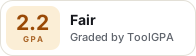
Fair · out of 4.0 · graded Nov 12, 2026
Best for screen recordings on Windows and Mac
Berrycast records your screen on Windows and Mac and shares the video by link, with an AI note taker and a HIPAA option for healthcare teams. We couldn't read its plan prices, and the site names no other platforms.
Who Berrycast is for
- Fits if you record your screen on a Windows or Mac and send it as a link
- Works for healthcare teams that need a signed BAA
Who Berrycast is not for
- Skip it if you want a price first, because we couldn't read the plans
- Not for you if you work from a phone or browser, since only Windows and Mac are named
- Watch out: HIPAA is quoted by email as a flat yearly fee
- Too light for editing, as it records and shares
Why Berrycast gets a 2.2
Five grades, each with its reason. The GPA is their average: an A is 4 points, an F is none.
- CValue for moneyPlan prices load inside the site's app and couldn't be read. Graded in the middle until a number is on record.
- CFree plan and trialListed as a free plan, but its limits couldn't be read, so we assume caps you'll hit.
- CFeaturesScreen recording, link sharing with passwords and expiry, an AI note taker and a HIPAA option. A smaller job than a full video platform.
- BEase of useNo store rating on record, but it's a recorder you install and start with.
- CPlatforms and integrationsDesktop only: Windows and Mac. Links to Teams, Asana and Figma.
What these grades rest on. Graded from this listing, whose facts were read from Berrycast's own pages on 12 November 2026. Its pricing page loaded but showed no plan prices. Not based on using the product, and shorter than our full reviews. How we review and grade.
Make Berrycast? Put this grade on your site
Paste this where you want the badge. It links here and follows the grade if it changes. About badges
<a href="https://toolgpa.com/tools/berrycast#review"><img src="https://toolgpa.com/badge/berrycast.svg" alt="Berrycast: 2.2 GPA on ToolGPA" width="196" height="56"></a>Where Berrycast stands among screen recording and video tools
Berrycast's GPA of 2.2 is higher than 19 of the 84 other screen recording and video tools we grade, and level with 16.
It stands best on ease of use (B, above 51 of 84) and worst on features (C, above 0).
Each grade against the category
Every bar is all 85 screen recording and video tools we grade, cut by the letter each got. Berrycast’s own letter is outlined.
- CValue for moneyAbove 15 of 84, level with 40
- CFree plan and trialAbove 13 of 84, level with 52
- CFeaturesAbove 0 of 84, level with 48
- BEase of useAbove 51 of 84, level with 29
- CPlatforms and integrationsAbove 6 of 84, level with 24
Keep Berrycast, or make your own?
Keep it
To replace Berrycast you would be making a bot that joins your calls and turns the talk into notes. That is not a weekend's work, with an AI app builder or without one.
That makes this kind of software worth paying for, not this one in particular: 49 of the 84 other screen recording and video tools grade higher.
What you could not
- A bot that joins your calls and turns the talk into notes.
- Recording the screen with its sound, and somewhere to keep the video.
- A real app for macOS and Windows. Something home-made would be a web page.
- AI features, unless you pay a model provider for each request yourself.
- What a company asks for before it lets staff use something: HIPAA.
What this rests on. Berrycast’s listing: what it does, where it runs, what it plugs into and what it costs. It is a judgement about the kind of software this is. We have not built a replacement for it, and making your own means looking after it too. How we decide, and every tool’s verdict.
What is Berrycast?
Berrycast is a screen recorder and asynchronous video messaging tool for Windows and macOS, with an AI note taker. It offers a HIPAA package under a signed Business Associate Agreement for healthcare teams. Plan prices are loaded by the site's app and could not be read.
Worth knowing
- Plan prices are not readable from the page text, so none are listed here.
- HIPAA is quoted by email as a flat yearly fee, not per seat.
- The site's pages name Windows and Mac only.
Key features
- Screen recording
- Records the screen and shares the video by link, on Windows and macOS.
- AI note taker
- Listed in the site navigation as a new product.
- HIPAA option
- The site says it signs a BAA with covered entities and sells HIPAA for a flat yearly fee.
- Link controls
- Password-protected links, expiry dates and revocation on the HIPAA page.
Berrycast pricing
We could not confirm Berrycast’s current pricing from its own site, so we are not listing plans here. See berrycast.com for current prices.
Works with
Berrycast alternatives
- Berrycast vs Loom
Free plan · from $18/mo
- Berrycast vs Tella
Free trial · from $13/mo
- Berrycast vs Cap
Free plan · from $29/yr
- Berrycast vs ScreenPal
Free plan · from $4/mo
- Berrycast vs Zight
Free plan · from $9.95/mo





Common questions
Does Berrycast have an Android app?
No Android app was listed when its pages were read on Nov 12, 2026. Berrycast is listed for macOS and Windows.
Does Berrycast have an iPhone app?
No iPhone app was listed when its pages were read on Nov 12, 2026. Berrycast is listed for macOS and Windows.
Is Berrycast open source?
Berrycast is not described as open source on its own site, as read on Nov 12, 2026.
Sources for this page
The prices, plans, platforms and features above were read from these pages on Nov 12, 2026.