
Contexts review (2026): is it worth paying for?
Mac window switcher with search, a sidebar and a better Command-Tab
Black Friday: is there a Contexts sale?
Contexts report card
Fair · out of 4.0 · graded Nov 12, 2026
Best for switching windows by typing
Contexts is a window switcher for the Mac, where you press a key and type a few letters of a window's name. It's $9.99 and has a trial. It doesn't resize or tile windows, and it's Mac only, so look elsewhere for window layouts.
Who Contexts is for
- Fits if you keep many windows open and want to jump by typing
- Works for Mac users with several displays and Spaces
Who Contexts is not for
- Not for you if you want windows snapped to halves or tiles, because it doesn't resize
- Skip it if you're not on a Mac, as no other system is listed
- Watch out: the page doesn't say whether major versions are paid upgrades
- Watch out: only macOS Ventura, Sonoma and Sequoia are named
Why Contexts gets a 2.0
Five grades, each with its reason. The GPA is their average: an A is 4 points, an F is none.
- BValue for money$9.99 per license, below the $16 middle of one-time prices in this category. The page doesn't say whether major versions cost extra.
- CFree plan and trialA free trial download, and the license agreement allows 21 days. No free plan.
- CFeaturesSearch switching, a Command-Tab replacement, a sidebar and a trackpad gesture across displays and Spaces. It switches windows but doesn't arrange them.
- CEase of useNo store rating on record. It's a Mac install, with a shortcut to set and a learning curve for the search.
- DPlatforms and integrationsMac only, on macOS Ventura, Sonoma and Sequoia.
What these grades rest on. Graded from this listing, whose facts were read from Contexts's own pages on 12 November 2026. Not based on using the product, and shorter than our full reviews. How we review and grade.
Make Contexts? Put this grade on your site

Paste this where you want the badge. It links here and follows the grade if it changes. About badges
<a href="https://toolgpa.com/tools/contexts#review"><img src="https://toolgpa.com/badge/contexts.svg" alt="Contexts: 2.0 GPA on ToolGPA" width="196" height="56"></a>Where Contexts stands among window managers and launchers
Contexts's GPA of 2.0 is higher than 0 of the 28 other window managers and launchers we grade, and level with 3.
It stands best on value for money (B, above 3 of 28) and worst on platforms and integrations (D, above 0).
Each grade against the category
Every bar is all 29 window managers and launchers we grade, cut by the letter each got. Contexts’s own letter is outlined.
- BValue for moneyAbove 3 of 28, level with 6
- CFree plan and trialAbove 1 of 28, level with 7
- CFeaturesAbove 1 of 28, level with 18
- CEase of useAbove 3 of 28, level with 13
- DPlatforms and integrationsAbove 0 of 28, level with 22
Keep Contexts, or make your own?
Keep it
To replace Contexts you would be making control over other apps' windows. That is not a weekend's work, with an AI app builder or without one.
That makes this kind of software worth paying for, not this one in particular: 25 of the 28 other window managers and launchers grade higher.
What you could not
- Control over other apps' windows.
- A real app for macOS. Something home-made would be a web page.
What this rests on. Contexts’s listing: what it does, where it runs, what it plugs into and what it costs. It is a judgement about the kind of software this is. We have not built a replacement for it, and making your own means looking after it too. How we decide, and every tool’s verdict.
What is Contexts?
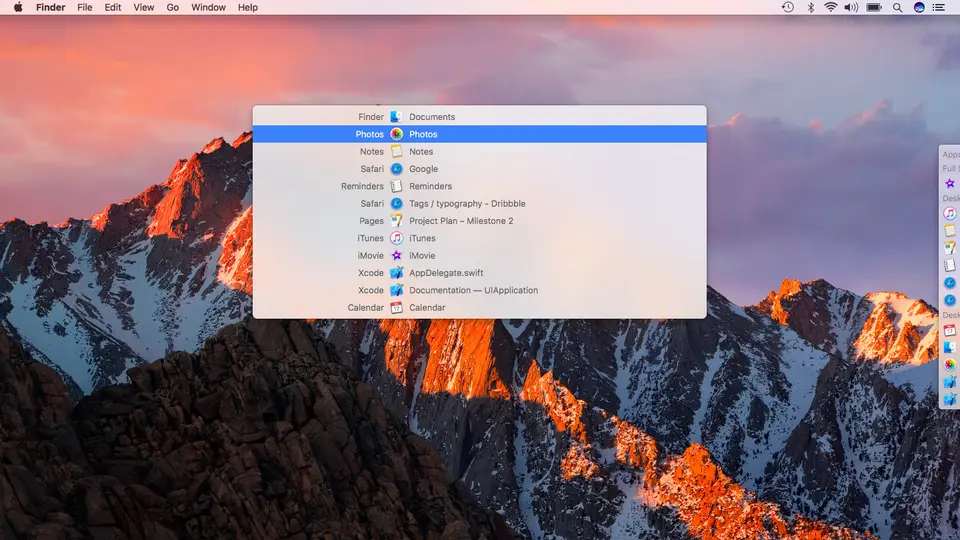
Contexts replaces the Mac's app switcher with one that lists windows rather than apps. Windows can be reached by typing part of a name, through an alternative Command-Tab list, from an auto-hiding sidebar or with a trackpad gesture. It is a one-license Mac utility with a free trial.
Worth knowing
- Mac only, and the page lists macOS Ventura, Sonoma and Sequoia.
- Switches between windows; it does not resize or tile them.
- The page names a license price but does not say whether major versions are paid upgrades.
Key features
- Search switching
- Open a search window with a shortcut, type scattered characters from an app name or window title, and press Return to switch.
- Fast Search
- Hold a modifier key such as Fn, type one or two characters and release to bring the selected window forward.
- Command-Tab replacement
- Lists windows separately rather than apps, with Command-Backquote for the windows of the frontmost app.
- Sidebar
- An auto-hiding list of windows grouped by Space, with Dock-style count badges.
- Trackpad gesture
- Scroll down with two fingers from the top edge of the trackpad to pick a window, then lift to switch.
- Multiple displays and Spaces
- The search window can appear on every display at once, and lists can be filtered by Space.
Contexts pricing
As of Nov 12, 2026, Contexts is a paid product with a free trial, starting at $9.99 per license.
- Starts at
- $9.99 per license
- Free plan
- None
- Free trial
- Free trial download; the license agreement allows a 21-day evaluation period.
| Plan | Price | What you get |
|---|---|---|
| License | $9.99per license | One license for Contexts 3 on macOS Ventura, Sonoma and Sequoia. |
Read from contexts.co on Nov 12, 2026. Prices change, so confirm with Contexts before you buy.
Contexts alternatives
- Contexts vs AltTab
Free plan · from $9.99 one-time
- Contexts vs Raycast
Free plan · from $96/yr
- Contexts vs Moom
Free trial · from $15 one-time




Common questions
Does Contexts have an Android app?
No Android app was listed when its pages were read on Nov 12, 2026. Contexts is listed for macOS.
Does Contexts have an iPhone app?
No iPhone app was listed when its pages were read on Nov 12, 2026. Contexts is listed for macOS.
Is Contexts open source?
Contexts is not described as open source on its own site, as read on Nov 12, 2026.
Sources for this page
The prices, plans, platforms and features above were read from these pages on Nov 12, 2026.