The Day One Insider’s Guide
Everything we know about Day One in one document: what it costs, its grades, getting a refund, getting help and what else to look at. Read it here, or keep a copy.
Day One
The Insider’s Guide
Encrypted journal for text, photos, audio and video across devices
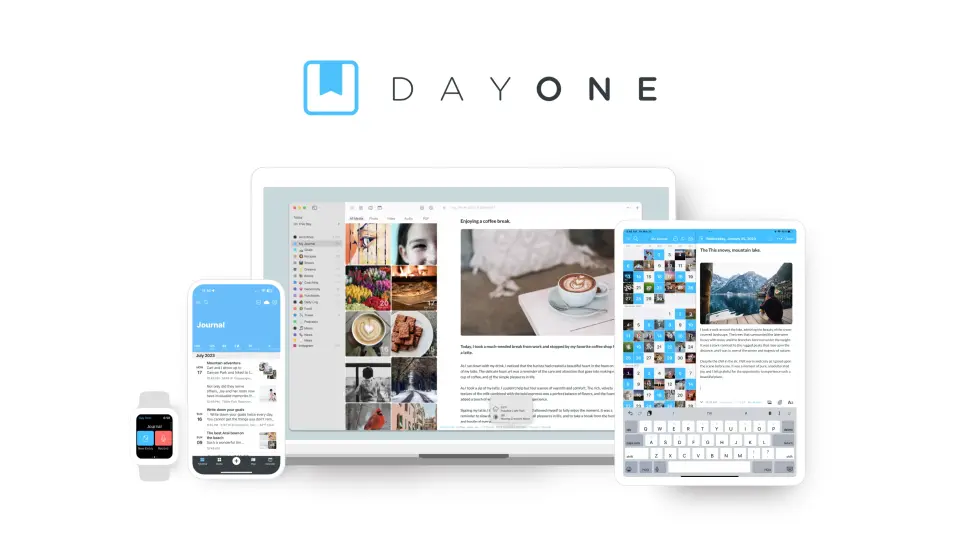
Every plan, grade, refund rule and rival among journaling apps, read from Day One’s own pages.
Made by Automattic Inc. · checked Oct 5, 2026 · toolgpa.com
Contents
- 01WelcomeWhat it is, who it suits, its grades and the ten things to know first
- 02Insider tipsWhat most people miss: ways to pay less, settings worth changing and the catches
- 03What it costsEvery plan, the free plan, ways to pay less and how prices have moved
- 04What it doesIts main features, where it runs, what it works with and who makes it
- 05Where it standsIts grades against its category, and whether to keep it or make your own
- 06After you payGetting your money back, getting out, and getting help
- 07The alternativesThe tools it is most often weighed against, side by side
- 08Quick answersThe questions people ask about it, each answered in a line or two
- 09About ToolGPAWho made this guide, what else is on the site, and how to cite it
ToolGPA put this guide together from Day One’s own pages, its app-store listings and our grades. Every fact in it is on Day One’s page too, where it is kept up to date. Checked Oct 5, 2026.
Part 01 · Overview
Welcome
What it is, who it suits, its grades and the ten things to know first
3.2
GPA, above 32 of the 35 other journaling apps we grade
Day One is a journaling app owned by Automattic, with apps for iPhone, iPad, Apple Watch, Android, Mac and Windows plus a web version. Entries hold text with Markdown formatting, photos, video, audio and drawings, and can be browsed by calendar, map or the On This Day view. The free Basic plan works on one device with one photo per entry; Silver adds sync across devices and more media, and Gold adds AI features such as Daily Chat and entry summaries.
To get you started, here are 10 things to know about Day One, taken from its own pages and our grades.
Entries take photos, video, audio and drawings, and On This Day brings old ones back.
- 1
Best for one journal on every device you own
Day One runs on iPhone, Android, Mac, Windows and the web, with end-to-end encryption even on the free plan.
- 2
Paid plans start at $4.17 a month when paid by the year
As its pricing page puts it: $49.99 per year.
- 3
There is a free plan
Basic plan: unlimited text entries and journals, 1 photo per entry, end-to-end encryption, prompts, templates and web access, used from 1 device.
- 4
It runs on 5 platforms
Web, macOS, Windows, iOS and Android, with a browser extension too.
- 5
Multimedia entries
Entries combine Markdown-formatted text with photos, video, audio recordings, drawings and scanned PDFs. Basic allows 1 photo per entry; Silver and Gold allow 30 media items.
- 6
End-to-end encryption and app lock
Every plan, including the free one, lists end-to-end encryption, passcode protection, biometric lock and secure cloud backup.
- 7
Prompts, templates and streaks
A daily prompt, a prompt gallery, journal templates, reminders and journal streaks are included on all three plans.
- 8
Refunds: 14 days
Buy Silver or Gold on Day One's own site and you have 14 days to get your money back, and the clock restarts at every renewal, which is better than most. Two things keep it off an A: you have to write in with a receipt number rather than click a button, and 14 days is short.
- 9
A 3.2 GPA, above 32 of 35
That is against the other journaling apps we grade, on value, the free plan, features, ease of use and platforms.
- 10
Keep it
The plain part of Day One you could make: daily notes, Markdown and templates. What surrounds it you could not. The 6 things listed below take a company, not a weekend.
Day One at a glance
- Pricing
- Free plan, from $49.99 per year
- Free plan
- Yes
- Free trial
- Free 1-month trial of a paid plan, started inside the app. Eligibility is controlled by the app stores.
- Runs on
- Web, macOS, Windows, iOS, Android, Browser extension
- Made by
- Automattic Inc., since 2011
- Category
- Journaling Apps
- Our grade
- 3.2 GPA, very good
- Store rating
- 4.8 on the App Store, 118,439 ratings
The report card
Best for one journal on every device you own
Day One runs on iPhone, Android, Mac, Windows and the web, with end-to-end encryption even on the free plan. Entries take photos, video, audio and drawings, and On This Day brings old ones back. But the free plan is one device and one photo per entry, paid plans are yearly only from $49.99, and the AI tools are on Gold at $74.99 with daily limits.
| Subject | Grade | Comment |
|---|---|---|
| Value for money | C | Silver is $49.99 a year, which is $4.17 a month, exactly the middle for a journaling app here. There's no monthly plan at all, so it's a year up front, and the AI tools sit on Gold at $74.99, which is $6.25 a month, past the dear end of this category. |
| Free plan and trial | C | Basic gives you unlimited text entries and journals, prompts, templates and end-to-end encryption for nothing. But it's 1 device and 1 photo an entry, so no sync, and that's the cap you'll hit on day one. |
| Features | A | Markdown text with photos, video, audio and transcription, drawings and scanned PDFs, browsed by calendar, map or On This Day, with prompts, templates, streaks and a Daily Chat on Gold. What its rivals here don't match: end-to-end encryption on every plan, free one included. |
| Ease of use | A | 4.83 from about 118,400 App Store ratings. A daily prompt, a prompt gallery and templates come on every plan, so there's always somewhere to start, and reminders and streaks bring you back. |
| Platforms and integrations | A | iPhone, iPad, Apple Watch, Android, Mac, Windows, the web and a browser extension, which is the full set. Silver adds Strava, Zapier and IFTTT. Just remember that journaling from more than one device is itself a paid feature. |
An A is worth 4 points, a B 3, a C 2, a D 1 and an F nothing. The GPA is the average of the five.
Who Day One is for
- Fits if you want one journal across Apple, Android, Windows and the web
- Works for entries that are as much photos, video and voice as writing
Who it is not for
- Tight if you're staying free, as Basic is 1 device and 1 photo per entry
- Skip it if you'd rather pay monthly, as paid plans are yearly only
- Pricey if it's the AI you're after, since that's Gold at $74.99 a year with daily usage limits
- Watch out: video, audio, drawings and collections all need Silver at $49.99 a year
- Not for you if you want to share a plan, as Silver and Gold can't go through Apple Family Sharing
Good to know
Good for
- People who want one journal across Apple, Android, Windows and the web
- Journals that mix writing with photos, video, audio and drawings
- Writers who want end-to-end encryption without paying
Worth knowing
- The free Basic plan is limited to 1 device and 1 photo per entry; video, audio, drawings and collections need Silver.
- Paid plans are sold as annual subscriptions only; Day One's help guides say monthly plans are not offered.
- AI features are limited to Gold at $74.99 per year and have daily usage limits.
- Silver and Gold subscriptions cannot be shared through Apple Family Sharing.
Part 02 · Tips
Insider tips
What most people miss: ways to pay less, settings worth changing and the catches
7
Things most people miss, each from its own help pages
The things about Day One that are easy to miss until they cost you: ways to pay less, settings worth changing and the catches at renewal or when you leave. Each one is from Day One’s own pages, linked beside it.
Read on Oct 17, 2026. Read from Day One's guides (encryption, sync on one device, subscriptions, cancelling, export, keyboard shortcuts and privacy settings) on 17 October 2026. Not tried out: these tips are what its own pages say.
- 1
Privacy
Back up your encryption key, or a lost one locks your journal for good
Day One's encryption FAQ says the key lives on your device and can be backed up to iCloud. Lose it and journals in Day One Sync can't be decrypted. Journals made before version 4.2 aren't end-to-end encrypted at all, so make a new journal and move the entries across.
dayoneapp.com - 2
Setting
Turn on Conceal Content so your list doesn't show what you wrote
It's set per journal and hides entry text in the list, Today and On This Day until you tap the eye icon. On iPhone and Android it's in Settings, Journals, pick the journal, Advanced. On the web and Windows, it's Settings, Journals.
dayoneapp.com - 3
Pay less
Buy on the web if you might want a refund
Day One's help page gives web purchases 14 days from purchase or renewal to ask for a refund, through support with your receipt number and User ID. Apple doesn't do partial refunds, and on Google Play you only have the first 48 hours.
dayoneapp.com - 4
Renewal
Switching off auto-renew on Apple can lose you an old price
Day One says turning off auto-renew counts as cancelling. Switch it back on later and Apple may renew at today's price rather than the one you started on, and Day One can't restore it. Your entries stay either way: they're never deleted when a plan ends.
dayoneapp.com - 5
Pay less
On the free plan you can switch to a new phone once every 30 days
Basic works on one active device. Sign in on another and Day One offers an upgrade or a switch (Switch my Device on phones, Move your journal on a Mac). Its help page says you can change the active device once every 30 days, so a new phone doesn't mean paying.
dayoneapp.com - 6
Shortcut
Cmd+K jumps to any journal or entry on a Mac
In the Mac app, Cmd+K opens Quick Access, where you type to jump to a journal, collection or entry. Cmd+Shift+F searches everything, Cmd+N starts an entry, and Ctrl+Shift+D starts one from the menu bar, a key you can change in Settings.
dayoneapp.com - 7
Leaving
Export as JSON if you want your photos to come with you
Plain text and Markdown exports leave photos out, and CSV keeps only the text and date. JSON can carry photos, video, audio and PDFs, and it's the only format on the web and Windows. On iPhone it's in Settings, Import/Export; on a Mac, File, Export.
dayoneapp.com
Part 03 · Pricing
What it costs
Every plan, the free plan, ways to pay less and how prices have moved
$4.17
A month to start, paid by the year. There is a free plan too
Day One has a free plan. Paid plans start at $49.99 per year.
Basic gives you unlimited text entries and journals, prompts, templates and end-to-end encryption for nothing.
Basic
$0
Unlimited text entries and journals, 1 photo per entry, end-to-end encryption, prompts and templates, on 1 device.
Silver
$49.99
per year (no monthly plan is offered)
30 photos or videos per entry, unlimited devices, audio recording and transcription, drawings, PDF scanning, and Strava, Zapier and IFTTT integrations.
Gold
$74.99
per year (no monthly plan is offered)
Everything in Silver, plus Daily Chat, Go Deeper prompts, entry summaries, title suggestions and image generation.
The free plan
Basic plan: unlimited text entries and journals, 1 photo per entry, end-to-end encryption, prompts, templates and web access, used from 1 device.
Trying it first
Free 1-month trial of a paid plan, started inside the app. Eligibility is controlled by the app stores.
Read from dayoneapp.com on Oct 5, 2026.
Ways to pay less
Education
25% off for students for the first 4 years
Day One's FAQ offers students 25% off paid subscriptions for the first 4 years, after verifying student status with support by student ID or university email.
Stated on dayoneapp.com
How its prices have moved
- Nov 12, 2025Premium: $2.92 per month, billed annually → $4.17 per month, billed annuallyThe archived copy of 12 November 2025 shows Premium at $4.17 a month billed annually; the copy before it, of 12 May 2025, shows $2.92 on the same basis, as every copy back to 2020 does. The price rose between the two.
What the app costs elsewhere
Each country’s App Store price for “Day One Silver”, against $49.99 in the United States, in dollars at the day’s rate. The four cheapest and the four dearest of 11.
| Country | Price there | In dollars | Against the US |
|---|---|---|---|
| India | ₹ 669 | $6.92 | 86% less |
| Indonesia | Rp 240ribu | $13.42 | 73% less |
| Turkey | ₺2.299,99 | $46.77 | 6% less |
| Philippines | ₱ 2,990.00 | $47.60 | about the same |
| Brazil | R$ 299,90 | $59.92 | 20% more |
| South Africa | R999.99 | $60.48 | 21% more |
| United Kingdom | £49.99 | $66.09 | 32% more |
| Germany | 59,99 € | $67.22 | 34% more |
Part 04 · Features
What it does
Its main features, where it runs, what it works with and who makes it
6
Places it runs: Web, macOS, Windows, iOS, Android and Browser extension
Encrypted journal for text, photos, audio and video across devices. Here is what it does, as its own site describes it, and what it covers: end-to-end encrypted, AI features, transcription, Markdown, daily notes, templates.
What its rivals here don't match: end-to-end encryption on every plan, free one included.
- Multimedia entries
- Entries combine Markdown-formatted text with photos, video, audio recordings, drawings and scanned PDFs. Basic allows 1 photo per entry; Silver and Gold allow 30 media items.
- End-to-end encryption and app lock
- Every plan, including the free one, lists end-to-end encryption, passcode protection, biometric lock and secure cloud backup.
- Prompts, templates and streaks
- A daily prompt, a prompt gallery, journal templates, reminders and journal streaks are included on all three plans.
- On This Day, calendar and map views
- On This Day resurfaces entries from the same date in past years, and entries can also be browsed by calendar, map or media.
- Sync across devices
- Silver and Gold sync a journal across an unlimited number of devices. Basic backs up from one active device, with web access included.
- AI reflection tools
- Gold adds Daily Chat for guided reflection, Go Deeper prompts, entry summaries, title suggestions and image generation, each with daily usage limits.
Where it runs
- Web
- macOS
- Windows
- iOS
- Android
- Browser extension
What it works with
- Strava
- Zapier
- IFTTT
- Apple Journaling Suggestions
Who makes Day One
Day One is made by Automattic, the company behind WordPress.com, Tumblr and Pocket Casts, which bought it in 2021. Day One earns money from its Silver and Gold subscriptions; Automattic as a whole earns from paid plans and services across its products.
- Founded
- 2005automattic.com
- Based
- San Francisco, CA, USA (headquarters), with staff working remotelyautomattic.com
- Ownership
- Privately held. Day One has been part of Automattic since June 2021, by its own account. Automattic's press page describes the company as privately held and independent, and names its key investors.automattic.com
- Funding
- Across the whole company: a $288 million primary round in February 2021, a $300 million Series D from Salesforce Ventures in September 2019, $160 million led by Insight Venture Partners in May 2014 and a $29.5 million Series B led by Polaris Ventures in January 2008. TechCrunch reported that Day One was bootstrapped before the 2021 sale, whose terms were not disclosed.ma.tttechcrunch.cominsightpartners.comtechcrunch.com
- Team
- 1,403 Automatticians in 83 countries, across the whole company, according to its careers pageautomattic.com
- Founders and leaders
- Matt Mullenweg, Founder & CEO, Automatticautomattic.com
- Paul Mayne, Founder of Day Onedayoneapp.com
- Hiring
- 12 open roles across the whole company: 4 in sales, 2 each in marketing and customer success, and 1 each in engineering, legal, product and infrastructure; none for Day Oneautomattic.com
- Partner program
- A partnership request form for people who want to help others build a journaling habit with Day One. Requests are reviewed within ten business days; no payment terms are published.dayoneapp.com
- Lately
- Day One Labs Is Back in Silver · Sep 8, 2026
- Introducing Journal Collections · Aug 28, 2026
- Introducing Day One Silver and Gold · Mar 30, 2026
- Introducing Daily Chat · Mar 30, 2026
Read on Oct 18, 2026 from the company’s own pages and from news reports. What is not stated there is left out.
Part 05 · Standing
Where it stands
Its grades against its category, and whether to keep it or make your own
32/35
Other journaling apps it is graded above
Day One's GPA of 3.2 is higher than 32 of the 35 other journaling apps we grade, and level with 3.
It stands best on features (A, above 35 of 35) and worst on free plan and trial (C, above 2).
Its paid plans start at $4.17 a month when paid by the year, against a middle price of $3.66 for the category: 12 of the 21 others that charge start lower.
On features, ease of use and platforms it scores 4.0 out of 4, and no tool on the category's chart scores higher without costing more.
Each grade against the category
Every bar is all 36 journaling apps we grade, cut by the letter each got. Day One’s own letter is outlined.
- CValue for moneyAbove 4 of 35
- CFree plan and trialAbove 2 of 35
- AFeaturesAbove 35 of 35
- AEase of useAbove 19 of 35
- APlatforms and integrationsAbove 33 of 35
Price against what you get
Each dot is one of 29 journaling apps. Further left costs less; higher up scores better on features, ease of use and platforms. Day One is the marked dot.
What paid plans start at, a month (each step along is roughly double) →
Keep it, or make your own?
Whether this is something you could build for yourself with an AI app builder, and what you would give up.
Keep it
The plain part of Day One you could make: daily notes, Markdown and templates. What surrounds it you could not. The 6 things listed below take a company, not a weekend.
It is one of the better ones too: its GPA of 3.2 is higher than 32 of the 35 other journaling apps we grade. It costs $49.99 a year.
What you could make
- Daily notes, Markdown and templates: an app builder makes these well.
What you could not
- Speech turned into text you can trust.
- Apps for macOS, Windows, iOS and Android that stay in step with each other.
- End-to-end encryption done properly.
- AI features, unless you pay a model provider for each request yourself.
- Hooks into the device itself: an Apple Watch app.
- The depth: we grade its features A, which means it covers the whole job.
What this rests on. Day One’s listing: what it does, where it runs, what it plugs into and what it costs. It is a judgement about the kind of software this is. We have not built a replacement for it, and making your own means looking after it too. How we decide, and every tool’s verdict.
Part 06 · Refunds
After you pay
Getting your money back, getting out, and getting help
What happens once you have paid: whether you can get your money back, how to leave, and how to reach a person when something goes wrong. Each is graded from Day One’s own terms and help pages.
Refunds and cancelling
Good · checked Oct 18, 2026
Buy Silver or Gold on Day One's own site and you have 14 days to get your money back, and the clock restarts at every renewal, which is better than most. Two things keep it off an A: you have to write in with a receipt number rather than click a button, and 14 days is short. Buy it in the App Store or on Google Play, as many people will, and the refund is the store's decision. Your journals are never taken away either way.
- Refund window
- 14 days
- How you cancel
- Yourself, in settings
- Getting your money back
The help article on managing a subscription says a subscription bought at dayone.me is refundable within 14 days of purchase or renewal, and that you ask by contacting support with your receipt number and User ID, because the Stripe portal only cancels. App Store refunds go through Apple and Google Play refunds through Google. The terms of use say instead that all fees are non-refundable.
Stated on dayoneapp.com- How to cancel Day One
Where you cancel depends on where you bought it. A subscription from the Day One website is ended by signing in at dayone.me/settings and choosing Manage under the subscription heading, which opens Stripe. One bought in the App Store is managed only through the App Store, and one bought on Google Play only through Google Play. A free trial has to be cancelled at least 24 hours before it ends.
- Open dayone.me/settings in a browser
- Sign in to your Day One account
- Go to Settings
- Under the subscription heading, choose Manage, which opens the Stripe portal
- Cancel the subscription or trial there
- To ask for a refund as well, contact support within 14 days with your receipt number and User ID
- What you keep afterwards
Silver or Gold features run to the end of the year you paid for, then the account returns to the tier it was on before. Day One says your data remains yours forever: entries are never deleted or purged when a subscription ends, on the device or in the cloud. Photos, videos, audio, PDFs and drawings already in your entries stay viewable on any tier; what a lower tier stops is adding new ones.
Stated on dayoneapp.com- Renewals
The terms say a subscription renews automatically for another equal period at the then-current price unless you cancel before the renewal date, and that a subscription started on a discount or coupon renews at the full price. The help article adds that a plan that began with a free trial month renews after 13 months and annually after that. Renewal notices come from the platform that billed you, not from Day One.
Stated on dayoneapp.com
In your favour
- Fourteen days to change your mind on a website purchase, counted from a renewal as well as a first purchase.
- You end it yourself: the Stripe portal from dayone.me/settings, or the store you bought it in.
- Day One says entries are never deleted or purged when a subscription ends.
- Photos, audio, videos and PDFs already in your entries stay viewable on the free tier.
Watch out for
- The 14-day refund is not self-serve: you write in with a receipt number and User ID.
- It only covers website purchases. In the App Store or on Google Play the store decides.
- The terms of use say fees are non-refundable and no prorated refund follows a cancellation, which reads harder than the help article.
- A subscription bought on a discount or a coupon renews at the full price.
Customer support
Ordinary · checked Oct 18, 2026
Email, a set of help guides and a public forum, and Day One says plainly that there is no live chat and no phone line with a person on it. Subscribers are promised priority, but no page says what that buys in time, and the only thing resembling hours is a note that nobody answers at weekends. Email plus documentation with no reply target is where most apps sit.
Ways to get help
Email
The support team answers by email, reached through the form at dayone.me/support. Day One asks for your device, the app version on each device and your Day One User ID.
Stated on dayoneapp.comHelp inside the app
On iOS and Android, Settings then Support then Contact Support opens an email to the team. Subscribers are told to write from the address their subscription is on so the request is treated as priority.
Stated on dayoneapp.comHelp centre
The Help Guides cover features, syncing, importing and exporting, troubleshooting and the whole subscription. Every page has an Ask tab with an AI assistant that answers from those guides, which Day One says is not a live agent.
Stated on dayoneapp.comCommunity or forum
A public forum where users post questions the Help Guides do not answer. The contact page points people there before the support team.
Stated on forums.dayoneapp.com
Not listed on Day One’s pages: live chat, phone.
- When people answer
The contact page says the support team is made of real people and that, to give them time to rest, Day One does not respond to support requests over the weekend. No opening or closing times are given for the weekdays.
Stated on dayoneapp.com- How fast it says it replies
Its pages do not say.
- What depends on your plan
Silver and Gold subscribers are told they have priority support, as long as they write from the address the subscription is on. The page does not say what priority means in hours or in position in the queue, and no plan is offered a different channel.
Stated on dayoneapp.com
In your favour
- Day One says outright that there is no live chat and no phone, so you are not hunting for one.
- Subscribers get priority on the same email queue as everyone else.
- The Help Guides are thorough, and a public forum sits beside them.
- The page tells you exactly what to include so the first reply is not a request for details.
Watch out for
- No reply time is stated: the page asks for patience and cites a high volume of tickets.
- Nobody answers at the weekend, so a Friday problem waits until Monday.
- The Ask tab is an AI assistant working from the guides, not a person.
- Sign in with Apple can hide your replies behind a dead Private Relay address.
What these two grades rest on. Read on 18 October 2026: Day One's terms of use, its guides on viewing, changing or cancelling a Silver or Gold subscription, on what happens when one expires, and on contacting support, its two subscription FAQs, and the public Day One forum. The app is Automattic's, and billing runs through Apple, Google or Stripe. Nobody here cancelled a plan, asked for a refund or contacted its support. They are graded apart from the five that make the GPA. How we grade refunds and support.
Part 07 · Alternatives
The alternatives
The tools it is most often weighed against, side by side


Journey, Diarium, Apple Journal, Penzu and Diarly
The 5 tools Day One is most often weighed against, with where each one differs from it.
- 2.8GPA
Journey
Free plan · from $17.99 one-time
Cross-platform diary with maps, mood tracking and guided programs.
- Only Day One lists a browser extension.
- Only Journey lists a Linux app.
- Day One also covers transcription and Markdown.
- 3.2GPA
Diarium
Free plan · from $14.99 one-time
Private journal with a one-time Pro purchase and your own cloud sync.
- Only Day One lists a web app.
- Only Day One lists a browser extension.
- Day One is end-to-end encrypted, according to its own site.
- 3.2GPA
Apple Journal
Free
Apple's free journaling app for iPhone, iPad and Mac.
- Only Day One lists a web app.
- Only Day One lists Windows and Android apps.
- Only Day One lists a browser extension.
- 2.8GPA
Penzu
Free plan · from $19.99/yr
Private online journal for the browser, with iOS and Android apps.
- Only Day One lists macOS and Windows apps.
- Only Day One lists a browser extension.
- Day One is end-to-end encrypted, according to its own site.
- 2.8GPA
Diarly
Free plan · from $2.99/mo
Private Markdown journal for Mac, iPhone, iPad and Apple Watch.
- Only Day One lists a web app.
- Only Day One lists Windows and Android apps.
- Only Day One lists a browser extension.
Part 08 · Questions
Quick answers
The questions people ask about it, each answered in a line or two
20
Questions, each answered in a line or two
The short version of everything above, for when you only need the answer. Each one is told in full in its part of the guide.
Is Day One free?
Day One has a free plan. Basic plan: unlimited text entries and journals, 1 photo per entry, end-to-end encryption, prompts, templates and web access, used from 1 device.
How much does Day One cost?
Day One lists 3 plans. Basic: $0.
What platforms does Day One work on?
Day One is available on Web, macOS, Windows, iOS and Android. It also has a browser extension.
Does Day One offer any discounts?
Day One publicly lists the following: 25% off for students for the first 4 years.
How is Day One rated?
Day One's iPhone and iPad app averages 4.8 out of 5 from 118,439 ratings on the App Store in the United States, as read on Oct 6, 2026.
Does Day One have a Linux app?
No Linux app was listed when its pages were read on Oct 5, 2026. Day One is listed for Web, macOS, Windows, iOS and Android.
Is Day One open source?
Day One is not described as open source on its own site, as read on Oct 5, 2026.
Is Day One end-to-end encrypted?
Day One describes itself as end-to-end encrypted on its own site. Nobody here has audited that.
What does Day One integrate with?
Day One's listing names Strava, Zapier, IFTTT and Apple Journaling Suggestions.
Does Day One have a student discount?
25% off for students for the first 4 years. Day One's FAQ offers students 25% off paid subscriptions for the first 4 years, after verifying student status with support by student ID or university email.
Does Day One have a free trial?
Yes. Free 1-month trial of a paid plan, started inside the app.
Who makes Day One?
Day One is made by Automattic. Day One has been part of Automattic since June 2021, by its own account.
What are the alternatives to Day One?
The closest alternatives to Day One in our directory are Journey, Diarium, Apple Journal, Penzu and Diarly.
Does Day One give refunds?
The help article on managing a subscription says a subscription bought at dayone.me is refundable within 14 days of purchase or renewal, and that you ask by contacting support with your receipt number and User ID, because the Stripe portal only cancels.
How do I cancel Day One?
Where you cancel depends on where you bought it. A subscription from the Day One website is ended by signing in at dayone.me/settings and choosing Manage under the subscription heading, which opens Stripe.
What happens to my data if I cancel Day One?
Silver or Gold features run to the end of the year you paid for, then the account returns to the tier it was on before.
How do I contact Day One support?
Day One's pages list these ways to get help: email, help inside the app, help centre and community or forum.
How does Day One compare with other journaling apps?
Day One's GPA of 3.2 is higher than 32 of the 35 other journaling apps we grade, and level with 3.
Is Day One good value for money?
ToolGPA grades Day One C for value for money. Its paid plans start at $4.17 a month when paid by the year, against a middle price of $3.66 for the category: 12 of the 21 others that charge start lower.
Could I make my own version of Day One?
The plain part of Day One you could make: daily notes, Markdown and templates.
Where this guide comes from
The prices, plans, platforms and features were read from Day One’s own pages on Oct 5, 2026, and the grades were given on Oct 10, 2026. Graded from this listing, whose facts were read from Day One's own pages on 5 October 2026, and its App Store rating. Also tested with a demo account on 2026-08-30.
Every tool we list gets five grades, A to F, each with its reason, and a GPA that averages them. How each is decided is at toolgpa.com/grades. This guide is ToolGPA’s own work; it is not made, paid for or approved by Automattic Inc. Prices change, so check dayoneapp.com before you buy.
Part 09 · About
About ToolGPA
Who made this guide, what else is on the site, and how to cite it
3,189
Tools graded, in 94 categories
ToolGPA grades software the way a school report grades a pupil: five subjects, a letter for each with the reason written beside it, and a GPA that averages them. Prices, plans and platforms are read from each maker’s own pages and dated, so you always know how fresh a figure is.
Every grade, review and ranking on ToolGPA is our own judgement. No company can pay for a grade or change one. Every tool on the site has a guide like this one, free to download and pass on. It all lives at toolgpa.com.
3,189
tools graded
94
categories
426
price changes on record
579
apps priced in 12 countries
What else is on toolgpa.com
- Day One, kept up to dateEverything in this guide, with prices and grades as they are todaytoolgpa.com/tools/day-one
- How grades are givenThe rules behind every letter and every GPAtoolgpa.com/grades
- Value chartsWhat each tool costs against what it scores, for every categorytoolgpa.com/charts
- CompareAny two tools side by side, plan by plantoolgpa.com/compare
- Price changesEvery price rise and cut on record, each with its sourcetoolgpa.com/price-changes
- Prices by countryWhat apps cost on the App Store in 12 countriestoolgpa.com/prices-by-country
- Pay lessEvery public discount: yearly billing, students, nonprofitstoolgpa.com/save
- Keep or makeWhich tools are worth paying for, and which you could build yourselftoolgpa.com/keep-or-make
Scan for the live page
Prices and grades as they are today
Quoting this guide?
Please name ToolGPA and link to the live page, so readers can check the figures for themselves:
ToolGPA, "Day One: The Insider's Guide", checked Oct 5, 2026. https://toolgpa.com/tools/day-one
Know someone choosing between journaling apps?
Send them this guide: toolgpa.com/tools/day-one/guide
ToolGPA elsewhere: youtube.com/@toolgpa
See our other guides
The best-graded journaling apps after Day One, each with an Insider's Guide of its own.
- Journaling Apps Insider's GuideEvery one of the 36 journaling apps we grade, compared
- Apple Journal Insider's GuideApple's free journaling app for iPhone, iPad and Mac3.2 GPA
- Diarium Insider's GuidePrivate journal with a one-time Pro purchase and your own cloud sync3.2 GPA
- How We Feel Insider's GuideFree emotion check-in journal from a science nonprofit3.2 GPA

Choosing software? Every tool graded, every price dated.
Compare tools at toolgpa.com ›Everything in this guide is ToolGPA’s own summary of what Day One’s pages, its app-store listings and public reviews said on the dates shown. Grades are our judgement under the rules at toolgpa.com/grades. Every grade, review and ranking on ToolGPA is our own judgement. No company can pay for a grade or change one. Day One is a trademark of its owner, and this guide is not made, paid for or approved by Automattic Inc. Prices and plans change: check dayoneapp.com before you buy.