
Day One review (2026): is the free plan enough?
Encrypted journal for text, photos, audio and video across devices
Black Friday: is there a Day One sale?
Our verdict
First of our top three journaling apps
For: Most people
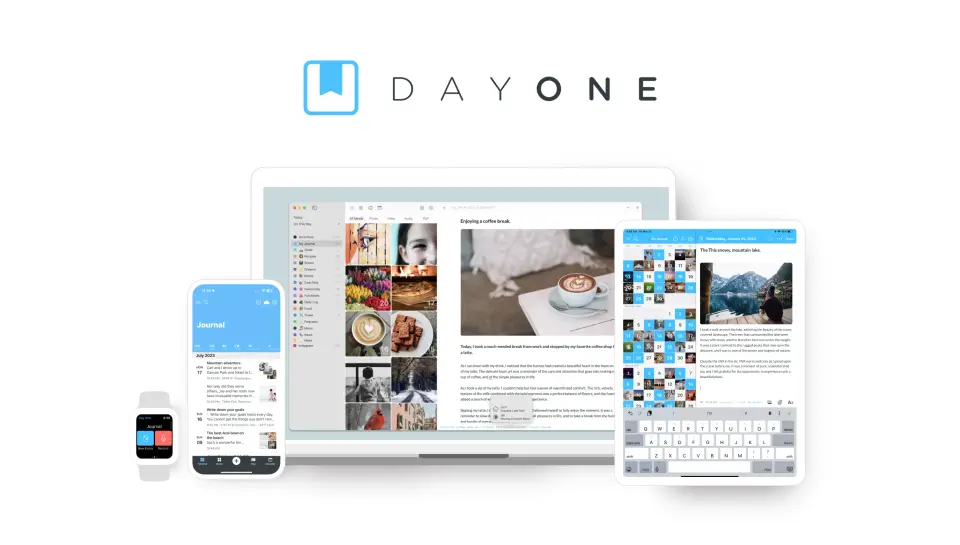
Day One holds text, photos, video, audio and drawings, and lets you look back by calendar, by map or through On This Day. It runs on the web, Mac, Windows, iPhone and Android, and its iPhone and iPad app averages 4.8 from about 118,000 ratings. The free Basic plan covers unlimited text entries and journals with end-to-end encryption, a passcode or biometric lock, prompts and templates. Silver is $49.99 a year and adds sync across unlimited devices, 30 photos or videos per entry, audio recording and drawings. Know the limits: Basic works from 1 device with 1 photo per entry, paid plans are sold by the year with no monthly option, and the AI features need Gold at $74.99 a year.
See all three and how we rankDay One report card
Very good · out of 4.0 · graded Oct 10, 2026
Best for one journal on every device you own
Day One runs on iPhone, Android, Mac, Windows and the web, with end-to-end encryption even on the free plan. Entries take photos, video, audio and drawings, and On This Day brings old ones back. But the free plan is one device and one photo per entry, paid plans are yearly only from $49.99, and the AI tools are on Gold at $74.99 with daily limits.
Who Day One is for
- Fits if you want one journal across Apple, Android, Windows and the web
- Works for entries that are as much photos, video and voice as writing
Who Day One is not for
- Tight if you're staying free, as Basic is 1 device and 1 photo per entry
- Skip it if you'd rather pay monthly, as paid plans are yearly only
- Pricey if it's the AI you're after, since that's Gold at $74.99 a year with daily usage limits
- Watch out: video, audio, drawings and collections all need Silver at $49.99 a year
- Not for you if you want to share a plan, as Silver and Gold can't go through Apple Family Sharing
Why Day One gets a 3.2
Five grades, each with its reason. The GPA is their average: an A is 4 points, an F is none.
- CValue for moneySilver is $49.99 a year, which is $4.17 a month, exactly the middle for a journaling app here. There's no monthly plan at all, so it's a year up front, and the AI tools sit on Gold at $74.99, which is $6.25 a month, past the dear end of this category.
- CFree plan and trialBasic gives you unlimited text entries and journals, prompts, templates and end-to-end encryption for nothing. But it's 1 device and 1 photo an entry, so no sync, and that's the cap you'll hit on day one.
- AFeaturesMarkdown text with photos, video, audio and transcription, drawings and scanned PDFs, browsed by calendar, map or On This Day, with prompts, templates, streaks and a Daily Chat on Gold. What its rivals here don't match: end-to-end encryption on every plan, free one included.
- AEase of use4.83 from about 118,400 App Store ratings. A daily prompt, a prompt gallery and templates come on every plan, so there's always somewhere to start, and reminders and streaks bring you back.
- APlatforms and integrationsiPhone, iPad, Apple Watch, Android, Mac, Windows, the web and a browser extension, which is the full set. Silver adds Strava, Zapier and IFTTT. Just remember that journaling from more than one device is itself a paid feature.
What these grades rest on. Graded from this listing, whose facts were read from Day One's own pages on 5 October 2026, and its App Store rating. Also tested with a demo account on 2026-08-30. How we review and grade.
Make Day One? Put this grade on your site

Paste this where you want the badge. It links here and follows the grade if it changes. About badges
<a href="https://toolgpa.com/tools/day-one#review"><img src="https://toolgpa.com/badge/day-one.svg" alt="Day One: 3.2 GPA on ToolGPA" width="196" height="56"></a>Where Day One stands among journaling apps
Day One's GPA of 3.2 is higher than 37 of the 40 other journaling apps we grade, and level with 3.
It stands best on features (A, above 40 of 40) and worst on free plan and trial (C, above 2).
Its paid plans start at $4.17 a month when paid by the year, against a middle price of $3.99 for the category: 14 of the 24 others that charge start lower.
On features, ease of use and platforms it scores 4.0 out of 4, and no tool on the category's chart scores higher without costing more.
Each grade against the category
Every bar is all 41 journaling apps we grade, cut by the letter each got. Day One’s own letter is outlined.
- CValue for moneyAbove 4 of 40, level with 20
- CFree plan and trialAbove 2 of 40, level with 21
- AFeaturesAbove 40 of 40
- AEase of useAbove 23 of 40, level with 17
- APlatforms and integrationsAbove 38 of 40, level with 2
Price against what you get
Each dot is one of 32 journaling apps. Further left costs less, and higher up scores better on features, ease of use and platforms. Point at a dot to see which tool it is.
Features, ease of use and platforms, averaged
What paid plans start at, a month (each step along is roughly double) →
- The best score at each price
- Has a free plan
- No free plan
Keep Day One, or make your own?
You could make this
A journal at its plainest is dated entries of text and photos.
What Day One does at its core is daily notes, Markdown and templates, and that is the kind of thing an AI app builder makes well. You would give up 6 things, listed below, and little else. It costs $49.99 a year. An AI app builder starts at about $20 a month on our listings, and you only need it while you build.
What you could make
- Daily notes, Markdown and templates: an app builder makes these well.
What you could not
- Speech turned into text you can trust.
- Apps for macOS, Windows, iOS and Android that stay in step with each other.
- End-to-end encryption done properly.
- AI features, unless you pay a model provider for each request yourself.
- Hooks into the device itself: an Apple Watch app.
- The depth: we grade its features A, which means it covers the whole job.
What this rests on. Day One’s listing: what it does, where it runs, what it plugs into and what it costs. It is a judgement about the kind of software this is. We have not built a replacement for it, and making your own means looking after it too. How we decide, and every tool’s verdict.
What is Day One?
Day One is a journaling app owned by Automattic, with apps for iPhone, iPad, Apple Watch, Android, Mac and Windows plus a web version. Entries hold text with Markdown formatting, photos, video, audio and drawings, and can be browsed by calendar, map or the On This Day view. The free Basic plan works on one device with one photo per entry; Silver adds sync across devices and more media, and Gold adds AI features such as Daily Chat and entry summaries.
Worth knowing
- The free Basic plan is limited to 1 device and 1 photo per entry; video, audio, drawings and collections need Silver.
- Paid plans are sold as annual subscriptions only; Day One's help guides say monthly plans are not offered.
- AI features are limited to Gold at $74.99 per year and have daily usage limits.
- Silver and Gold subscriptions cannot be shared through Apple Family Sharing.
Key features
- Multimedia entries
- Entries combine Markdown-formatted text with photos, video, audio recordings, drawings and scanned PDFs. Basic allows 1 photo per entry; Silver and Gold allow 30 media items.
- End-to-end encryption and app lock
- Every plan, including the free one, lists end-to-end encryption, passcode protection, biometric lock and secure cloud backup.
- Prompts, templates and streaks
- A daily prompt, a prompt gallery, journal templates, reminders and journal streaks are included on all three plans.
- On This Day, calendar and map views
- On This Day resurfaces entries from the same date in past years, and entries can also be browsed by calendar, map or media.
- Sync across devices
- Silver and Gold sync a journal across an unlimited number of devices. Basic backs up from one active device, with web access included.
- AI reflection tools
- Gold adds Daily Chat for guided reflection, Go Deeper prompts, entry summaries, title suggestions and image generation, each with daily usage limits.
Day One tips most people miss
Privacy
Back up your encryption key, or a lost one locks your journal for good
Day One's encryption FAQ says the key lives on your device and can be backed up to iCloud. Lose it and journals in Day One Sync can't be decrypted. Journals made before version 4.2 aren't end-to-end encrypted at all, so make a new journal and move the entries across.
dayoneapp.comSetting
Turn on Conceal Content so your list doesn't show what you wrote
It's set per journal and hides entry text in the list, Today and On This Day until you tap the eye icon. On iPhone and Android it's in Settings, Journals, pick the journal, Advanced. On the web and Windows, it's Settings, Journals.
dayoneapp.comPay less
Buy on the web if you might want a refund
Day One's help page gives web purchases 14 days from purchase or renewal to ask for a refund, through support with your receipt number and User ID. Apple doesn't do partial refunds, and on Google Play you only have the first 48 hours.
dayoneapp.comRenewal
Switching off auto-renew on Apple can lose you an old price
Day One says turning off auto-renew counts as cancelling. Switch it back on later and Apple may renew at today's price rather than the one you started on, and Day One can't restore it. Your entries stay either way: they're never deleted when a plan ends.
dayoneapp.comPay less
On the free plan you can switch to a new phone once every 30 days
Basic works on one active device. Sign in on another and Day One offers an upgrade or a switch (Switch my Device on phones, Move your journal on a Mac). Its help page says you can change the active device once every 30 days, so a new phone doesn't mean paying.
dayoneapp.comShortcut
Cmd+K jumps to any journal or entry on a Mac
In the Mac app, Cmd+K opens Quick Access, where you type to jump to a journal, collection or entry. Cmd+Shift+F searches everything, Cmd+N starts an entry, and Ctrl+Shift+D starts one from the menu bar, a key you can change in Settings.
dayoneapp.comLeaving
Export as JSON if you want your photos to come with you
Plain text and Markdown exports leave photos out, and CSV keeps only the text and date. JSON can carry photos, video, audio and PDFs, and it's the only format on the web and Windows. On iPhone it's in Settings, Import/Export; on a Mac, File, Export.
dayoneapp.com
Read on Oct 17, 2026. Read from Day One's guides (encryption, sync on one device, subscriptions, cancelling, export, keyboard shortcuts and privacy settings) on 17 October 2026. Not tried out: these tips are what its own pages say.
Day One pricing
As of Oct 5, 2026, Day One has a free plan, and paid plans start at $49.99 per year.
- Starts at
- $49.99 per year
- Free plan
- Basic plan: unlimited text entries and journals, 1 photo per entry, end-to-end encryption, prompts, templates and web access, used from 1 device.
- Free trial
- Free 1-month trial of a paid plan, started inside the app. Eligibility is controlled by the app stores.
| Plan | Price | What you get |
|---|---|---|
| Basic | $0 | Unlimited text entries and journals, 1 photo per entry, end-to-end encryption, prompts and templates, on 1 device. |
| Silver | $49.99per year (no monthly plan is offered) | 30 photos or videos per entry, unlimited devices, audio recording and transcription, drawings, PDF scanning, and Strava, Zapier and IFTTT integrations. |
| Gold | $74.99per year (no monthly plan is offered) | Everything in Silver, plus Daily Chat, Go Deeper prompts, entry summaries, title suggestions and image generation. |
Read from dayoneapp.com on Oct 5, 2026. Prices change, so confirm with Day One before you buy.
1 price change on recordWhat the app costs in other countries
Ways to pay less
- Education25% off for students for the first 4 years
Day One's FAQ offers students 25% off paid subscriptions for the first 4 years, after verifying student status with support by student ID or university email.
Stated on dayoneapp.com
Day One refunds and cancellation
Good · checked Oct 18, 2026
Buy Silver or Gold on Day One's own site and you have 14 days to get your money back, and the clock restarts at every renewal, which is better than most. Two things keep it off an A: you have to write in with a receipt number rather than click a button, and 14 days is short. Buy it in the App Store or on Google Play, as many people will, and the refund is the store's decision. Your journals are never taken away either way.
- Refund window
- 14 days
- How you cancel
- Yourself, in settings
- Getting your money back
The help article on managing a subscription says a subscription bought at dayone.me is refundable within 14 days of purchase or renewal, and that you ask by contacting support with your receipt number and User ID, because the Stripe portal only cancels. App Store refunds go through Apple and Google Play refunds through Google. The terms of use say instead that all fees are non-refundable.
Stated on dayoneapp.com- How to cancel Day One
Where you cancel depends on where you bought it. A subscription from the Day One website is ended by signing in at dayone.me/settings and choosing Manage under the subscription heading, which opens Stripe. One bought in the App Store is managed only through the App Store, and one bought on Google Play only through Google Play. A free trial has to be cancelled at least 24 hours before it ends.
- Open dayone.me/settings in a browser
- Sign in to your Day One account
- Go to Settings
- Under the subscription heading, choose Manage, which opens the Stripe portal
- Cancel the subscription or trial there
- To ask for a refund as well, contact support within 14 days with your receipt number and User ID
- What you keep afterwards
Silver or Gold features run to the end of the year you paid for, then the account returns to the tier it was on before. Day One says your data remains yours forever: entries are never deleted or purged when a subscription ends, on the device or in the cloud. Photos, videos, audio, PDFs and drawings already in your entries stay viewable on any tier; what a lower tier stops is adding new ones.
Stated on dayoneapp.com- Renewals
The terms say a subscription renews automatically for another equal period at the then-current price unless you cancel before the renewal date, and that a subscription started on a discount or coupon renews at the full price. The help article adds that a plan that began with a free trial month renews after 13 months and annually after that. Renewal notices come from the platform that billed you, not from Day One.
Stated on dayoneapp.com
In your favour
- Fourteen days to change your mind on a website purchase, counted from a renewal as well as a first purchase.
- You end it yourself: the Stripe portal from dayone.me/settings, or the store you bought it in.
- Day One says entries are never deleted or purged when a subscription ends.
- Photos, audio, videos and PDFs already in your entries stay viewable on the free tier.
Watch out for
- The 14-day refund is not self-serve: you write in with a receipt number and User ID.
- It only covers website purchases. In the App Store or on Google Play the store decides.
- The terms of use say fees are non-refundable and no prorated refund follows a cancellation, which reads harder than the help article.
- A subscription bought on a discount or a coupon renews at the full price.
Day One customer support
Ordinary · checked Oct 18, 2026
Email, a set of help guides and a public forum, and Day One says plainly that there is no live chat and no phone line with a person on it. Subscribers are promised priority, but no page says what that buys in time, and the only thing resembling hours is a note that nobody answers at weekends. Email plus documentation with no reply target is where most apps sit.
Ways to get help
Email
The support team answers by email, reached through the form at dayone.me/support. Day One asks for your device, the app version on each device and your Day One User ID.
Stated on dayoneapp.comHelp inside the app
On iOS and Android, Settings then Support then Contact Support opens an email to the team. Subscribers are told to write from the address their subscription is on so the request is treated as priority.
Stated on dayoneapp.comHelp centre
The Help Guides cover features, syncing, importing and exporting, troubleshooting and the whole subscription. Every page has an Ask tab with an AI assistant that answers from those guides, which Day One says is not a live agent.
Stated on dayoneapp.comCommunity or forum
A public forum where users post questions the Help Guides do not answer. The contact page points people there before the support team.
Stated on forums.dayoneapp.com
Not listed on Day One’s pages: live chat, phone.
- When people answer
The contact page says the support team is made of real people and that, to give them time to rest, Day One does not respond to support requests over the weekend. No opening or closing times are given for the weekdays.
Stated on dayoneapp.com- How fast it says it replies
Its pages do not say.
- What depends on your plan
Silver and Gold subscribers are told they have priority support, as long as they write from the address the subscription is on. The page does not say what priority means in hours or in position in the queue, and no plan is offered a different channel.
Stated on dayoneapp.com
In your favour
- Day One says outright that there is no live chat and no phone, so you are not hunting for one.
- Subscribers get priority on the same email queue as everyone else.
- The Help Guides are thorough, and a public forum sits beside them.
- The page tells you exactly what to include so the first reply is not a request for details.
Watch out for
- No reply time is stated: the page asks for patience and cites a high volume of tickets.
- Nobody answers at the weekend, so a Friday problem waits until Monday.
- The Ask tab is an AI assistant working from the guides, not a person.
- Sign in with Apple can hide your replies behind a dead Private Relay address.
What these two grades rest on. Read on 18 October 2026: Day One's terms of use, its guides on viewing, changing or cancelling a Silver or Gold subscription, on what happens when one expires, and on contacting support, its two subscription FAQs, and the public Day One forum. The app is Automattic's, and billing runs through Apple, Google or Stripe. Nobody here cancelled a plan, asked for a refund or contacted its support. They are graded apart from the five that make the GPA. How we grade refunds and support.
How people rate the Day One app
4.8
out of 5 for the iPhone and iPad app
- 5 stars88%
- 4 stars9%
- 3 stars1%
- 2 stars<1%
- 1 star<1%
118,439 ratings on the App Store in the United States, read Oct 6, 2026. It rates the app, not everything the product does. See the listing
Works with
Who makes Day One
Day One is made by Automattic, the company behind WordPress.com, Tumblr and Pocket Casts, which bought it in 2021. Day One earns money from its Silver and Gold subscriptions; Automattic as a whole earns from paid plans and services across its products.
- Founded
- 2005automattic.com
- Based
- San Francisco, CA, USA (headquarters), with staff working remotelyautomattic.com
- Ownership
- Privately held. Day One has been part of Automattic since June 2021, by its own account. Automattic's press page describes the company as privately held and independent, and names its key investors.automattic.com
- Funding
- Across the whole company: a $288 million primary round in February 2021, a $300 million Series D from Salesforce Ventures in September 2019, $160 million led by Insight Venture Partners in May 2014 and a $29.5 million Series B led by Polaris Ventures in January 2008. TechCrunch reported that Day One was bootstrapped before the 2021 sale, whose terms were not disclosed.ma.tttechcrunch.cominsightpartners.comtechcrunch.com
- Team
- 1,403 Automatticians in 83 countries, across the whole company, according to its careers pageautomattic.com
- Founders and leaders
- Matt Mullenweg, Founder & CEO, Automatticautomattic.com
- Paul Mayne, Founder of Day Onedayoneapp.com
- Hiring
- 12 open roles across the whole company: 4 in sales, 2 each in marketing and customer success, and 1 each in engineering, legal, product and infrastructure; none for Day Oneautomattic.com
- Partner program
- A partnership request form for people who want to help others build a journaling habit with Day One. Requests are reviewed within ten business days; no payment terms are published.dayoneapp.com
- Lately
- Day One Labs Is Back in Silver · Sep 8, 2026
- Introducing Journal Collections · Aug 28, 2026
- Introducing Day One Silver and Gold · Mar 30, 2026
- Introducing Daily Chat · Mar 30, 2026
Read on Oct 18, 2026 from the company’s own pages and from news reports. What is not stated there is left out.
Jobs at Automattic
Any open roles at Automattic are on its own careers page. We can’t read a count from there, so have a look.
Applications go to Automattic, not to us.
Day One alternatives
- Day One vs Journey
Free plan · from $17.99 one-time
- Day One vs Diarium
Free plan · from $14.99 one-time
- Day One vs Penzu
Free plan · from $19.99/yr
- Day One vs Diarly
Free plan · from $2.99/mo



Common questions
Does Day One have a Linux app?
No Linux app was listed when its pages were read on Oct 5, 2026. Day One is listed for Web, macOS, Windows, iOS and Android.
Is Day One open source?
Day One is not described as open source on its own site, as read on Oct 5, 2026.
Is Day One end-to-end encrypted?
Day One describes itself as end-to-end encrypted on its own site. Nobody here has audited that.
Sources for this page
The prices, plans, platforms and features above were read from these pages on Oct 5, 2026. What people say is linked where it appears.