
Diarly review (2026): is the free plan enough?
Private Markdown journal for Mac, iPhone, iPad and Apple Watch
Black Friday: is there a Diarly sale?
Diarly report card
Good · out of 4.0 · graded Oct 10, 2026
Best for a Markdown journal across your Apple devices
Diarly is a Markdown journal for Mac, iPhone, iPad and Apple Watch that keeps everything on your devices and in your own iCloud, never on Diarly's servers. Premium is $2.99 a month or $24.99 a year. But it's Apple only, the free version is one journal on one device with no sync, and transcription costs $1.99 a month more.
Who Diarly is for
- Fits if you're all Apple and want your journal on your devices and in your own iCloud
- Works for moving from Day One, Apple Journal or Journey, which all have importers
Who Diarly is not for
- Skip it if you use Windows or Android, as it's built only for Apple devices
- Tight if you're staying free, as that's one journal on one device with no sync
- Not for you if you lose passwords, since encrypted entries can't be recovered if you forget yours
- Pricey if you want audio transcription or OCR, as AI+ is another $1.99 a month on top of Premium
- Watch out: the pricing page shows no amounts, and the App Store lists yearly Premium at both $24.99 and $29.99
Why Diarly gets a 2.8
Five grades, each with its reason. The GPA is their average: an A is 4 points, an F is none.
- BValue for moneyPremium is $2.99 a month or $24.99 a year, which is $2.08 a month and inside the cheapest quarter for journaling apps here. It covers iCloud sync, multiple journals, entry encryption, themes and the AI Assistant. Transcription and OCR are another $1.99 a month as AI+.
- CFree plan and trialFree forever gets one journal with unlimited entries and media. The cap is where it hurts: one device, no sync, and encryption held back for Premium. A 7-day trial lets you see the rest.
- BFeaturesIt covers the whole job: a Markdown editor with slash commands, checklists and tables, entries holding photos, video, drawings and audio, templates that drop in the weather, your calendar and Apple Health, views by timeline, calendar, map and gallery, a mood calendar and importers.
- AEase of use4.73 from about 1,500 App Store ratings. There's no Diarly account to create, so you install it and write, and the Mac version is native with a menu bar and keyboard shortcuts. Importers bring old entries over from Day One, Apple Journal or Journey.
- CPlatforms and integrationsOne family of devices: Mac, iPhone, iPad and Apple Watch, synced through iCloud on Premium. No Windows, Android or web version at all. It works with Apple Health and Siri Shortcuts.
What these grades rest on. Graded from this listing, whose facts were read from Diarly's own pages on 6 October 2026, and its App Store rating. Also tested with a demo account on 2026-08-31. How we review and grade.
Make Diarly? Put this grade on your site
Paste this where you want the badge. It links here and follows the grade if it changes. About badges
<a href="https://toolgpa.com/tools/diarly#review"><img src="https://toolgpa.com/badge/diarly.svg" alt="Diarly: 2.8 GPA on ToolGPA" width="196" height="56"></a>Where Diarly stands among journaling apps
Diarly's GPA of 2.8 is higher than 23 of the 40 other journaling apps we grade, and level with 10.
It stands best on ease of use (A, above 23 of 40) and worst on free plan and trial (C, above 2).
Its paid plans start at $2.08 a month when paid by the year, against a middle price of $3.99 for the category: 2 of the 24 others that charge start lower.
On features, ease of use and platforms it scores 3.0 out of 4. Nothing scores higher for less, though at least one tool matches that score at a lower price.
Each grade against the category
Every bar is all 41 journaling apps we grade, cut by the letter each got. Diarly’s own letter is outlined.
- BValue for moneyAbove 25 of 40, level with 4
- CFree plan and trialAbove 2 of 40, level with 21
- BFeaturesAbove 34 of 40, level with 5
- AEase of useAbove 23 of 40, level with 17
- CPlatforms and integrationsAbove 2 of 40, level with 24
Price against what you get
Each dot is one of 32 journaling apps. Further left costs less, and higher up scores better on features, ease of use and platforms. Point at a dot to see which tool it is.
Features, ease of use and platforms, averaged
What paid plans start at, a month (each step along is roughly double) →
- The best score at each price
- Has a free plan
- No free plan
Keep Diarly, or make your own?
You could make this
A journal at its plainest is dated entries of text and photos.
What Diarly does at its core is daily notes, Markdown, mood tracking and templates, and that is the kind of thing an AI app builder makes well. You would give up 5 things, listed below, and little else. It costs $24.99 a year. An AI app builder starts at about $20 a month on our listings, and you only need it while you build.
What you could make
- Daily notes, Markdown, mood tracking and templates: an app builder makes these well.
What you could not
- Apps for macOS and iOS that stay in step with each other.
- End-to-end encryption done properly.
- AI features, unless you pay a model provider for each request yourself.
- Hooks into the device itself: an Apple Watch app.
- The depth: we grade its features B, which means it covers the whole job.
What this rests on. Diarly’s listing: what it does, where it runs, what it plugs into and what it costs. It is a judgement about the kind of software this is. We have not built a replacement for it, and making your own means looking after it too. How we decide, and every tool’s verdict.
What is Diarly?
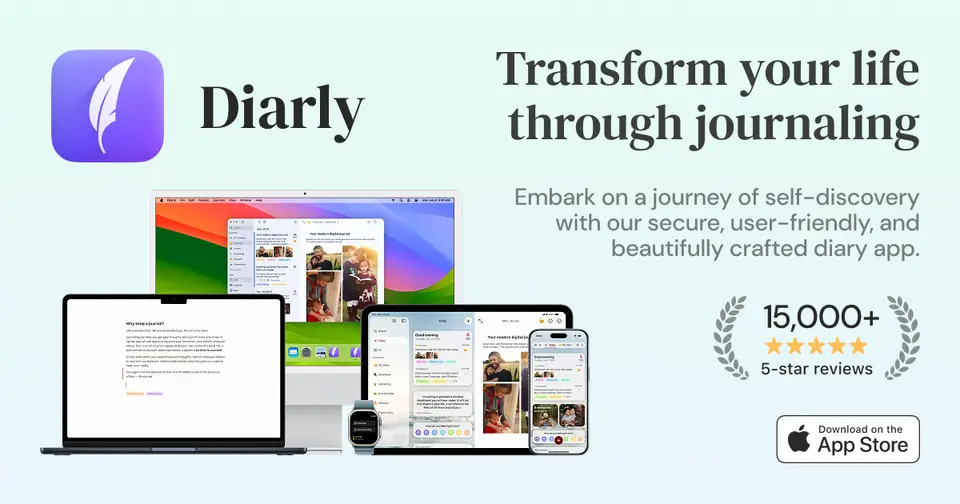
Diarly is a private journal for Mac, iPhone, iPad and Apple Watch built around a Markdown editor. Entries can hold photos, videos, drawings, audio, tags, locations and weather, and can be browsed by timeline, calendar, map or gallery. Journals stay on the device with no Diarly account; Premium syncs them through your own iCloud and adds multiple journals, password encryption of entry text, themes, more export formats and an AI Assistant.
Worth knowing
- Built only for Apple devices: there is no Windows, Android or web version.
- Sync between devices needs Premium and runs through iCloud; the free version keeps one journal on one device.
- Encryption covers the text of entries, needs Premium, and entries cannot be recovered if the encryption password is forgotten.
- The vendor's pricing page shows no amounts; the US App Store lists yearly Premium at both $24.99 and $29.99.
Key features
- Markdown editor
- Entries are written in Markdown with slash commands, checklists, tables and a typewriter mode. The Mac version is a native app with a menu bar and keyboard shortcuts.
- Media and context in entries
- Add photos, videos, drawings, audio recordings, files, tags and map locations. Templates can insert the weather, calendar events and Apple Health details automatically.
- Timeline, calendar, map and gallery
- Browse entries by date on a timeline or calendar, by place on a map or by image in a gallery. On This Day brings back entries from earlier years.
- Mood tracker and insights
- Log moods and emotions inside entries and see how they change in a mood calendar and Insights. Writing goals, streaks and reminders support a daily habit.
- On-device storage and iCloud sync
- Journals are saved on the device and never on Diarly's servers. Premium syncs them through your iCloud Drive and can encrypt entry text with a password only you know.
- AI Assistant and AI+
- Premium includes an OpenAI-powered assistant reached with the /ask command, plus daily affirmations and advice. AI+ is a separate subscription for audio transcription and OCR.
Diarly pricing
As of Oct 6, 2026, Diarly has a free plan, and paid plans start at $2.99 per month, or $24.99 per year (US App Store in-app purchases).
- Starts at
- $2.99 per month, or $24.99 per year (US App Store in-app purchases)
- Free plan
- Free forever: one journal with unlimited entries and media, kept on the device. iCloud sync, multiple journals, encryption, themes and extra export formats need Premium.
- Free trial
- 7-day free trial of Premium.
| Plan | Price | What you get |
|---|---|---|
| Free | $0 | One journal with unlimited entries and media, Markdown editing and export, saved on a single device without sync. |
| Monthly Premium | $2.99per month | iCloud sync across Mac, iPhone, iPad and Apple Watch, multiple journals, entry encryption, themes, more export formats and the AI Assistant. |
| Yearly Premium | $24.99per year | The same Premium features billed yearly. The US App Store lists the promoted yearly plan at $24.99 and a second yearly entry at $29.99. |
| AI+ | $1.99per month | Optional separate subscription that transcribes audio entries into text and extracts text from photos with OCR. |
Read from apps.apple.com on Oct 6, 2026. Prices change, so confirm with Diarly before you buy.
Ways to pay less
- Annual discountYearly Premium saves about 30% over monthly
The US App Store lists Monthly Premium at $2.99 and the yearly plan at $24.99. Twelve monthly payments come to $35.88, so paying yearly saves $10.89.
Stated on apps.apple.com
How people rate the Diarly app
4.7
out of 5 for the iPhone and iPad app
- 5 stars84%
- 4 stars10%
- 3 stars3%
- 2 stars<1%
- 1 star2%
1,461 ratings on the App Store in the United States, read Oct 6, 2026. It rates the app, not everything the product does. See the listing
Works with
Diarly alternatives
- Diarly vs Day One
Free plan · from $49.99/yr
- Diarly vs Diarium
Free plan · from $14.99 one-time
- Diarly vs Journey
Free plan · from $17.99 one-time
- Diarly vs Stoic
Free plan · from $6.99



Common questions
Does Diarly have an Android app?
No Android app was listed when its pages were read on Oct 6, 2026. Diarly is listed for macOS and iOS.
Does Diarly have a Windows app?
No Windows app was listed when its pages were read on Oct 6, 2026. Diarly is listed for macOS and iOS.
Is Diarly open source?
Diarly is not described as open source on its own site, as read on Oct 6, 2026.
Is Diarly end-to-end encrypted?
Diarly describes itself as end-to-end encrypted on its own site. Nobody here has audited that.
Sources for this page
The prices, plans, platforms and features above were read from these pages on Oct 6, 2026. What people say is linked where it appears.
- apps.apple.com/us/app/diarly-diary-private-journal/id1387167765
- diarly.app
- diarly.app/pricing
- diarly.app/help/what-is-diarly
- diarly.app/help/privacy-and-security
- diarly.app/help/works-with-icloud
- diarly.app/help/using-diarly-on-multiple-devices
- diarly.app/help/ai-assistant
- diarly.app/help/integrating-apple-health
- diarly.app/help/how-to-import-journals
- diarly.app/help/siri-shortcuts