
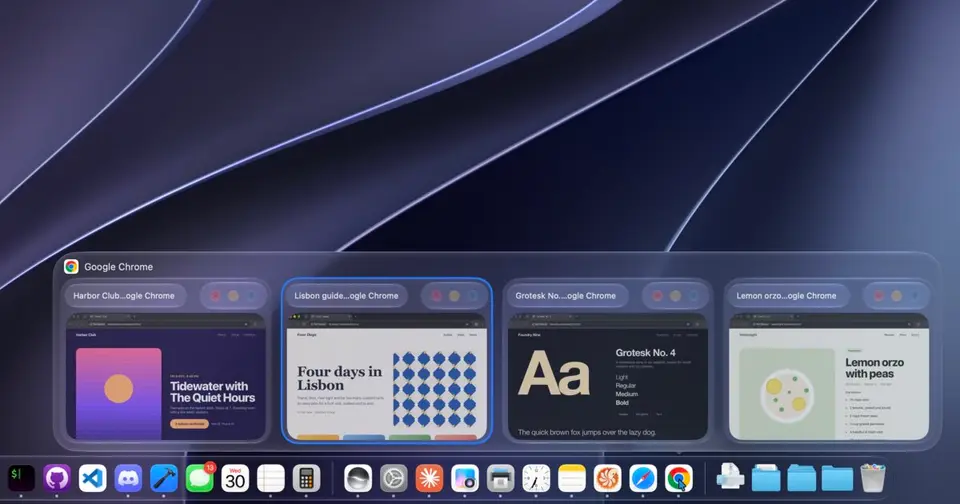
What is DockDoor?
DockDoor is a free, open-source macOS app that shows previews of an app's open windows when you point at its Dock icon, much like the Windows taskbar. It also adds an Option-Tab switcher that lists every window, shows windows above the built-in Command-Tab switcher, and has optional gestures and Dock widgets. Every feature is free under GPL-3.0. DockDoor Pro, a separate $20 app from the same developer, replaces the Dock entirely.
DockDoor is free to use. See every plan
Good for
- People coming from Windows who miss taskbar previews and Alt+Tab
- Mac users who keep many windows of the same app open
- Anyone who wants a free utility with no analytics or tracking
Worth knowing
- macOS only: it needs macOS 13 Ventura or later, and the Liquid Glass look needs macOS 26 or later.
- It requires both the Accessibility and Screen Recording permissions to find windows and draw their previews.
- The FAQ says a few apps built with unusual UI frameworks may show fewer windows or skip some actions.
- Per-display Docks, profiles and the widget library belong to DockDoor Pro, a separate $20 app, not to this one.
Key features
- Window previews on Dock icons
- Pointing at an app in the Dock shows all of its open windows, including minimized and hidden ones and those on other Spaces and displays, as thumbnails, a list of titles or large previews.
- Window controls on each preview
- Buttons on a preview close, minimize or quit without switching apps, and further buttons close or minimize every window of that app at once.
- Option-Tab window switcher
- Holding Option and pressing Tab lists every open window, not just every app. Typing searches the list, and Command with W, M or Q closes, minimizes or quits.
- Windows in Command-Tab
- While Command-Tab is held, DockDoor shows the highlighted app's windows above the built-in app switcher so a specific window can be picked.
- Folder Pop and music controls
- Hovering a Dock folder lists its contents for opening or dragging, and hovering an app that is playing audio shows a player, with synced lyrics for Spotify and Apple Music.
- AppleScript and command line
- AppleScript commands open the switcher or a preview, focus, close, center or snap windows, and return lists of apps and windows as JSON for scripts.
DockDoor pricing
- Starts at
- Free
- Free plan
- Every feature is free, with no trial, subscription or paywall. DockDoor Pro, a separate app from the same developer that replaces the Dock, is a $20 one-time purchase.
- Free trial
- None listed
| Plan | Price | What you get |
|---|---|---|
| DockDoor | $0 | Dock previews, the Option-Tab window switcher, Command-Tab previews, gestures and widgets. Open source under GPL-3.0 and funded by donations. |
Read from dockdoor.net on Oct 9, 2026. Prices change, so confirm with DockDoor before you buy.
Works with
- AppleScript
- Parall
- BetterTouchTool
- Karabiner-Elements
- Logitech Options+
- Spotify
- Apple Music
DockDoor alternatives
- DockDoor vs AltTab
Free plan · from $9.99 one-time
- DockDoor vs Swish
Free trial · from $16 one-time



Common questions
Is DockDoor free?
Yes. DockDoor is free to use. Every feature is free, with no trial, subscription or paywall. DockDoor Pro, a separate app from the same developer that replaces the Dock, is a $20 one-time purchase.
How much does DockDoor cost?
DockDoor lists one plan. DockDoor: $0. Prices were read from dockdoor.net on Oct 9, 2026.
What platforms does DockDoor work on?
DockDoor is available on macOS.
Does DockDoor have an Android app?
No Android app was listed when its pages were read on Oct 9, 2026. DockDoor is listed for macOS.
Does DockDoor have an iPhone app?
No iPhone app was listed when its pages were read on Oct 9, 2026. DockDoor is listed for macOS.
Is DockDoor open source?
Yes. DockDoor is open source, according to its own site.
Does DockDoor work offline?
Yes, according to its own site. What works without a connection differs by plan and platform, so check the vendor's page for the detail.
What does DockDoor integrate with?
DockDoor's listing names AppleScript, Parall, BetterTouchTool, Karabiner-Elements, Logitech Options+, Spotify and Apple Music. A listing names up to eight integrations, so it may connect to more.
Who makes DockDoor?
DockDoor is made by Ethan Bills.
What are the alternatives to DockDoor?
The closest alternatives to DockDoor in our directory are AltTab, Swish and Rectangle. Each one has a side-by-side comparison with DockDoor.
Sources for this page
The prices, plans, platforms and features above were read from these pages on Oct 9, 2026.