The Google Drive Insider’s Guide
Everything we know about Google Drive in one document: what it costs, its grades, getting a refund, getting help and what else to look at. Read it here, or keep a copy.
Google Drive
The Insider’s Guide
Cloud storage tied to Google Docs, Gmail and Photos
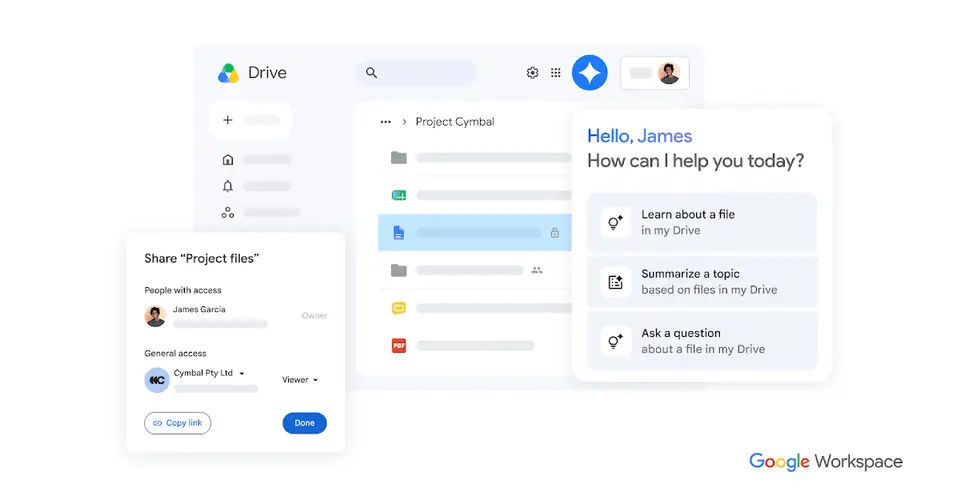
Every plan, grade, refund rule and rival among file storage and sync services, read from Google Drive’s own pages.
Made by Google · checked Oct 9, 2026 · toolgpa.com
Contents
- 01WelcomeWhat it is, who it suits, its grades and the ten things to know first
- 02Insider tipsWhat most people miss: ways to pay less, settings worth changing and the catches
- 03What it costsEvery plan, the free plan, ways to pay less and how prices have moved
- 04What it doesIts main features, where it runs, what it works with and who makes it
- 05Where it standsIts grades against its category, and whether to keep it or make your own
- 06After you payGetting your money back, getting out, and getting help
- 07The alternativesThe tools it is most often weighed against, side by side
- 08Quick answersThe questions people ask about it, each answered in a line or two
- 09About ToolGPAWho made this guide, what else is on the site, and how to cite it
ToolGPA put this guide together from Google Drive’s own pages, its app-store listings and our grades. Every fact in it is on Google Drive’s page too, where it is kept up to date. Checked Oct 9, 2026.
Part 01 · Overview
Welcome
What it is, who it suits, its grades and the ten things to know first
3.6
GPA, above 17 of the 17 other file storage and sync services we grade
Google Drive is Google's cloud storage service for storing, syncing and sharing files. Every Google account includes 15 GB shared across Drive, Gmail and Google Photos, and Docs, Sheets and Slides files can be edited together in the browser. Individuals add storage through Google One plans, while businesses get pooled storage, shared drives and admin controls through Google Workspace.
To get you started, here are 10 things to know about Google Drive, taken from its own pages and our grades.
Drop a file in, send a link, pick view, comment or edit.
- 1
Best for files you share and edit with other people
If you'd rather not hang email, photos and files on one account, look elsewhere.
- 2
Paid plans start at $1.99 a month
As its pricing page puts it: $1.99 per month for 100 GB (US App Store price).
- 3
There is a free plan
15 GB of storage with every Google account, shared across Google Drive, Gmail and Google Photos.
- 4
It runs on 5 platforms
Web, macOS, Windows, iOS and Android.
- 5
Drive for desktop
A desktop app for Windows and macOS keeps Drive files up to date on the computer. Google's help center says there is no desktop version for Linux and points to the web app instead.
- 6
Editing Docs, Office files and PDFs
Google Docs, Sheets and Slides, Microsoft Office files and PDFs can be edited and organized in place, and Google says more than 100 other file types can be opened.
- 7
Sharing permissions
Files are shared with edit, comment or view permissions. Owners can also block certain actions. Setting an expiration date on someone's access is limited to eligible work or school accounts.
- 8
Refunds: no set window
Drive's paid storage is a Google One plan, and Google's policy for it is blunt: in most countries the money does not come back, and the space you bought is yours for the term whether you use it or not. Against that, you cancel yourself in the storage settings in four clicks, you keep the plan to the end of the billing cycle and the account drops to the free 15 GB rather than closing.
- 9
A 3.6 GPA, above 17 of 17
That is against the other file storage and sync services we grade, on value, the free plan, features, ease of use and platforms.
- 10
Keep it
To replace Google Drive you would be making files kept in step across devices without losing one. That is not a weekend's work, with an AI app builder or without one.
Google Drive at a glance
- Pricing
- Free plan, from $1.99 per month for 100 GB (US App Store price)
- Free plan
- Yes
- Free trial
- Google Workspace business plans can be tried at no cost for 14 days
- Runs on
- Web, macOS, Windows, iOS, Android
- Made by
- Category
- File Storage & Sync
- Our grade
- 3.6 GPA, excellent
- Store rating
- 4.8 on the App Store, 7,843,574 ratings
The report card
Best for files you share and edit with other people
Google Drive is cloud storage that comes with every Google account: 15 GB free, with Docs, Sheets and Slides built in. That 15 GB is shared with Gmail and Google Photos, a full account can stop email arriving, deleted files are gone after 30 days, there's no Linux app, and shared drives, expiring links and encryption need certain work plans. If you'd rather not hang email, photos and files on one account, look elsewhere.
| Subject | Grade | Comment |
|---|---|---|
| Value for money | A | $1.99 a month for 100 GB, where the lowest quarter of this category starts at $3.99 and the middle is $5. You can split that 100 GB with five other people. Then it's $2.99 for 200 GB and $9.99 for 2 TB, which comes bundled with Gemini extras whether you want them or not. |
| Free plan and trial | B | 15 GB with every Google account, three times what OneDrive or iCloud hand out, and Docs, Sheets and Slides come with it. Gmail and Google Photos eat from the same 15 GB, so a big inbox shrinks your Drive, and a full account can hold up your email. |
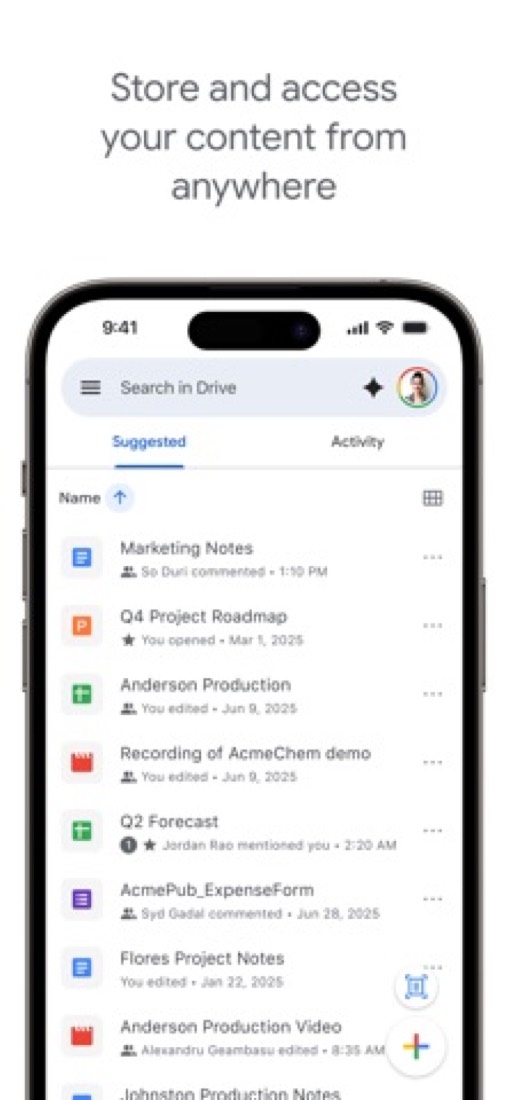
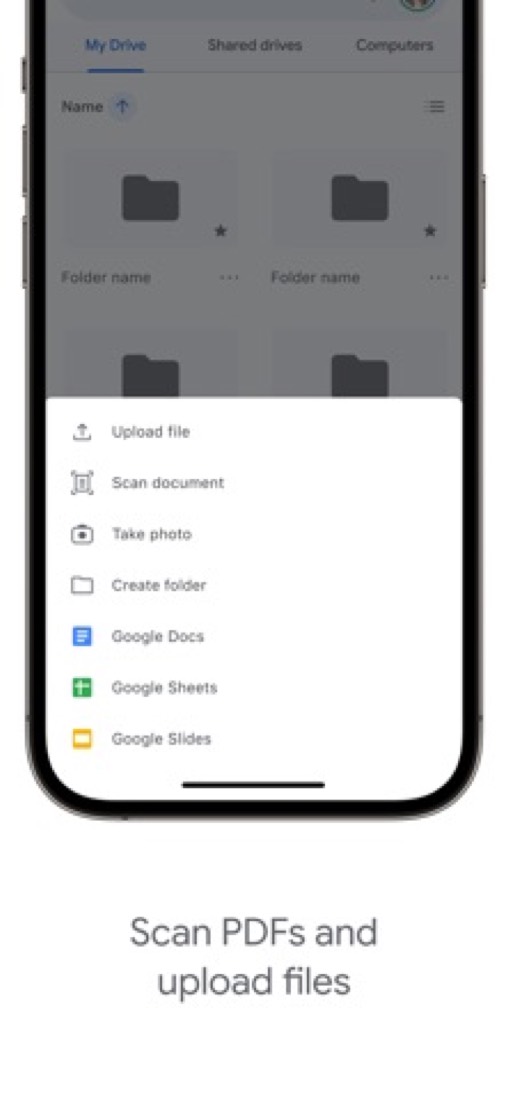
| Features | B | Storage, link sharing, editing Docs, Office files and PDFs where they sit, and scanning paper from the phone app. Shared drives and client-side encryption are premium Workspace features, and expiring access needs a work or school account. |
| Ease of use | A | 4.78 from about 7.8 million App Store ratings, the top of this category at any volume. Got a Google account? You're already signed up. Drop a file in, send a link, pick view, comment or edit. |
| Platforms and integrations | A | Web, Mac, Windows, iPhone and Android, a documented API that many other apps save into, and hook-ups with Slack, Zoom, Salesforce and Atlassian. There's no Linux desktop app: Linux gets the website only. |
An A is worth 4 points, a B 3, a C 2, a D 1 and an F nothing. The GPA is the average of the five.
Who Google Drive is for
- Fits if you already use Gmail and Google Docs, since your files sit next to them
- Works for two or three people who need to edit the same spreadsheet at once
Who it is not for
- Tight if Gmail and Google Photos already fill most of your 15 GB, since a full account can hold up your email
- Not for you if you're on Linux and want a folder that syncs, as there's no desktop app
- Skip it if you need shared drives, client-side encryption or expiring links, which need certain work or school plans
- Watch out: 2 TB comes bundled as Google AI Plus at $9.99 with Gemini extras, and deleted files are gone after 30 days
- Not for you if you'd rather not have email, photos and files all hanging on one account
Good to know
Good for
- People who already use Gmail, Google Docs and Google Photos
- Teams that co-edit documents, spreadsheets and slides in the browser
- Organizations standardizing on Google Workspace
Worth knowing
- The free 15 GB is shared with Gmail and Google Photos, so mail and photo backups count against it.
- There is no Drive for desktop app for Linux; Google directs Linux users to Drive on the web.
- Shared drives, client-side encryption and third-party app integrations are premium features of some Workspace Business and Enterprise plans.
- Business plans are sold separately through Google Workspace, with pooled storage of 30 GB per user on Starter and 2 TB per user on Standard.
What people say
- 4.8on the App Store, from 7,843,574 ratings
What they like
- Reviewers say they reach the same files from an iPhone, a Mac and a Windows computer, and from whichever machine they happen to sign in on.
- Commenters describe other apps and their own small projects using Drive as the place to keep or sync files.
What they don’t
- Commenters are wary of keeping important files with Google, saying a problem with the account can lock them out with nobody to contact, which they say of Google accounts in general.
10 App Store reviews, seven of them more than three years old, and about 15 Hacker News comments from September and October 2026, most of which mention it in passing
Part 02 · Tips
Insider tips
What most people miss: ways to pay less, settings worth changing and the catches
7
Things most people miss, each from its own help pages
The things about Google Drive that are easy to miss until they cost you: ways to pay less, settings worth changing and the catches at renewal or when you leave. Each one is from Google Drive’s own pages, linked beside it.
Read on Oct 17, 2026. Read from Google's Drive Help (storage, stream and mirror, offline, shortcuts, ownership, blocking) and Google One Help (purchase and cancellation policy) on 17 October 2026. Not tried out: these tips are what its own pages say.
- 1
Pay less
Only files you own count, so check Storage before you upgrade
Google's help page says only the files you own count towards your storage, so things people share with you are free. Click Storage in Drive's left-hand menu and your files are listed biggest first. Clearing a few old videos there can save you buying the next plan up.
support.google.com - 2
Setting
Pick stream or mirror in Drive for desktop on day one
Streaming keeps files in the cloud and uses very little space on your computer, downloading each one when you open it. Mirroring keeps a full copy on the computer as well, so everything works offline. Change it in Drive for desktop under Settings → Preferences → Folders from Drive.
support.google.com - 3
Setting
Turn on offline mode before you need it on a train
In Chrome or Edge, install the Google Docs Offline extension, then tick the offline box at drive.google.com/drive/settings. Your recent Docs, Sheets and Slides then open and edit with no connection, and sync back later. It doesn't work in a private window.
support.google.com - 4
Shortcut
Alt+C then T makes a new Doc without touching the New button
On Windows, Alt+C then T creates a Google Doc, then S for a Sheet, P for Slides and U to upload. On a Mac it's Control+C then the same letter. / jumps to search, and Ctrl+/ (Command+/ on a Mac) shows every shortcut Drive has.
support.google.com - 5
Renewal
Storage plans renew on their own and usually can't be refunded
Google One's policy page says storage plans are set to renew automatically, and in most countries a purchase isn't refundable. Cancel and you drop to the free 15 GB at the start of the next month of your plan. If a renewal payment fails, you get 7 days to fix it.
support.google.com - 6
Leaving
Hand files to someone else's account, and they take the storage too
In a file's Share menu, pick Transfer ownership next to a person you've already shared with. Once they accept, it counts against their storage, not yours. Folders work too, but the files inside stay yours. You can't move ownership from a personal account to a work or school one.
support.google.com - 7
Privacy
Block a stranger who keeps sharing junk with you
Right-click a file in Drive and choose Report or block, then Block. Google's help page says they can't share files with you after that, and neither of you can open the other's files. Your list of blocked people lives in your Google Account under People & sharing → Blocked.
support.google.com
Part 03 · Pricing
What it costs
Every plan, the free plan, ways to pay less and how prices have moved
$1.99
A month to start. There is a free plan too
Google Drive has a free plan. Paid plans start at $1.99 per month for 100 GB (US App Store price).
15 GB
$0
Included with every Google account. The 15 GB is shared across Drive, Gmail and Google Photos.
Basic (100 GB)
$1.99
per month (price on the US App Store listing)
100 GB across Drive, Gmail and Google Photos, with the option to share storage with up to 5 other people.
200 GB
$2.99
per month (price on the US App Store listing)
200 GB of storage, listed as an in-app purchase on the Google Drive listing in the US App Store.
Google AI Plus (400 GB)
$4.99
per month (price on Google's US Gemini plans page)
Google AI Plus at its smaller storage level: 400 GB with twice the Gemini app limits of a free account and Gemini in Gmail.
Google AI Plus (2 TB)
$9.99
per month (price on the US App Store listing)
The same Google AI Plus plan with 2 TB of storage. Google's help page says Plus is sold with either 400 GB or 2 TB.
Google AI Pro (5 TB)
$19.99
per month (price on Google's US Gemini plans page)
5 TB of storage with four times the Gemini app limits of a free account, Gemini in Gmail and Docs, and YouTube Premium Lite.
The free plan
15 GB of storage with every Google account, shared across Google Drive, Gmail and Google Photos.
Trying it first
Google Workspace business plans can be tried at no cost for 14 days
Read from apps.apple.com on Oct 9, 2026.
Ways to pay less
Annual discount
Save up to 16% with annual billing
Google One's plans page offers a monthly or annual toggle and states a saving of up to 16% on annual billing. Workspace lists a 16% saving for a one-year commitment.
Stated on one.google.comNonprofit
Free Workspace edition for verified nonprofits
Google Workspace for Nonprofits costs $0 per user with 100 TB shared across all users. Business Standard is discounted to $3.50 per user / month on a one-year commitment.
Stated on google.comEducation
Free Workspace edition for qualifying schools
Google Workspace for Education Fundamentals is available at no cost to qualifying institutions and includes 100 TB of pooled storage shared by the organization.
Stated on edu.google.comBy country
Lower price shown to buyers in India
On 9 October 2026 Google One's plans page showed Basic (100 GB) at ₹130 a month to a reader in India. A copy of the US page from 5 October lists that plan at $1.99 a month.
Stated on one.google.com
What the app costs elsewhere
Each country’s App Store price for “100 GB”, against $1.99 in the United States, in dollars at the day’s rate. The four cheapest and the four dearest of 11.
| Country | Price there | In dollars | Against the US |
|---|---|---|---|
| India | ₹ 149 | $1.54 | 23% less |
| Turkey | ₺84,99 | $1.73 | 13% less |
| Canada | $2.49 | $1.75 | 12% less |
| Indonesia | Rp 32ribu | $1.79 | 10% less |
| South Africa | R34.99 | $2.12 | 6% more |
| Mexico | $39.00 | $2.14 | 8% more |
| Germany | 1,99 € | $2.23 | 12% more |
| United Kingdom | £1.79 | $2.37 | 19% more |
Part 04 · Features
What it does
Its main features, where it runs, what it works with and who makes it
5
Places it runs: Web, macOS, Windows, iOS and Android
Cloud storage tied to Google Docs, Gmail and Photos. Here is what it does, as its own site describes it, and what it covers: public API, AI features, real-time collaboration, AI search, file sync, file sharing.
Storage, link sharing, editing Docs, Office files and PDFs where they sit, and scanning paper from the phone app.
- Drive for desktop
- A desktop app for Windows and macOS keeps Drive files up to date on the computer. Google's help center says there is no desktop version for Linux and points to the web app instead.
- Editing Docs, Office files and PDFs
- Google Docs, Sheets and Slides, Microsoft Office files and PDFs can be edited and organized in place, and Google says more than 100 other file types can be opened.
- Sharing permissions
- Files are shared with edit, comment or view permissions. Owners can also block certain actions. Setting an expiration date on someone's access is limited to eligible work or school accounts.
- Shared drives
- Team-owned spaces for storing and managing files together. Google marks shared drives as a premium feature of some Workspace Business and Enterprise plans.
- Gemini in Drive
- AI Overviews return cited answers from stored files, and Ask Gemini draws on Drive, Gmail, Calendar and Chat. On Workspace, Gemini in Drive starts at the Standard plan.
- Security and admin controls
- Ransomware detection in Drive for desktop, client-side encryption, Vault and data loss prevention policies are offered on some Workspace Business and Enterprise plans.
Where it runs
- Web
- macOS
- Windows
- iOS
- Android
What it works with
- Slack
- Zoom
- Salesforce
- Atlassian
- SAP
- Gmail
Google Drive is made by Google.
Part 05 · Standing
Where it stands
Its grades against its category, and whether to keep it or make your own
17/17
Other file storage and sync services it is graded above
Google Drive's GPA of 3.6 is higher than 17 of the 17 other file storage and sync services we grade.
It stands best on ease of use (A, above 13 of 17) and worst on features (B, above 7).
Its paid plans start at $1.99 a month, against a middle price of $4.17 for the category: 5 of the 16 others that charge start lower.
On features, ease of use and platforms it scores 3.7 out of 4. Nothing scores higher for less, though at least one tool matches that score at a lower price.
Each grade against the category
Every bar is all 18 file storage and sync services we grade, cut by the letter each got. Google Drive’s own letter is outlined.
- AValue for moneyAbove 11 of 17
- BFree plan and trialAbove 13 of 17
- BFeaturesAbove 7 of 17
- AEase of useAbove 13 of 17
- APlatforms and integrationsAbove 7 of 17
Price against what you get
Each dot is one of 18 file storage and sync services. Further left costs less; higher up scores better on features, ease of use and platforms. Google Drive is the marked dot.
What paid plans start at, a month (each step along is roughly double) →
Keep it, or make your own?
Whether this is something you could build for yourself with an AI app builder, and what you would give up.
Keep it
To replace Google Drive you would be making files kept in step across devices without losing one. That is not a weekend's work, with an AI app builder or without one.
It is one of the better ones too: its GPA of 3.6 is higher than 17 of the 17 other file storage and sync services we grade. It costs $23.88 a year.
What you could not
- Files kept in step across devices without losing one.
- A search engine with an AI model behind it.
- Storing and serving files for other people.
- Apps for macOS, Windows, iOS and Android that stay in step with each other.
- Several people working in it at the same moment.
- It plugs into other products, Slack, Zoom and Salesforce among them, and has an API.
- What a company asks for before it lets staff use something: roles and permissions.
- The depth: we grade its features B, which means it covers the whole job.
What this rests on. Google Drive’s listing: what it does, where it runs, what it plugs into and what it costs. It is a judgement about the kind of software this is. We have not built a replacement for it, and making your own means looking after it too. How we decide, and every tool’s verdict.
Part 06 · Refunds
After you pay
Getting your money back, getting out, and getting help
What happens once you have paid: whether you can get your money back, how to leave, and how to reach a person when something goes wrong. Each is graded from Google Drive’s own terms and help pages.
Refunds and cancelling
Ordinary · checked Oct 18, 2026
Drive's paid storage is a Google One plan, and Google's policy for it is blunt: in most countries the money does not come back, and the space you bought is yours for the term whether you use it or not. Against that, you cancel yourself in the storage settings in four clicks, you keep the plan to the end of the billing cycle and the account drops to the free 15 GB rather than closing. That is the ordinary deal, so a C.
- Refund window
- No set window
- How you cancel
- Yourself, in settings
- Getting your money back
Google's purchase, cancellation and refund policies page says that in most countries or regions Google storage plan purchases are non-refundable, and that the storage bought is yours for the length of the subscription even if you cancel. It sends Play Store buyers to Google Play's refund policies and App Store buyers to Apple, and makes an exception for members in Israel, who may cancel at once for a prorated refund.
Stated on support.google.com- How to cancel Google Drive
A Drive storage plan is cancelled from the Google storage settings page: sign in, click Cancel under the plan and confirm. A Google One membership can also be cancelled from the Settings menu of the Google One app, and one bought through the App Store is cancelled in the App Store's subscriptions list. Google says a confirmation email follows.
- Go to the Google storage settings page
- Sign in to the Google Account that bought the storage
- Under your plan, click Cancel
- Read the changes to your storage that cancelling will cause
- Click Cancel plan to confirm
- What you keep afterwards
Google says the storage and benefits last to the end of the billing cycle, then each person keeps the default 15 GB at no charge and loses the member benefits, including access to Google experts. Over that 15 GB, Gmail stops sending and receiving, Drive stops syncing and uploading, and nobody can edit or copy your files. A separate page says content may be deleted after two years over quota.
Stated on support.google.com- Renewals
Google says a storage purchase is set by default to renew automatically at the end of the subscription. If the renewal payment fails, a seven-day grace period is added so payment details can be updated, with no loss of access during it. The pages read promise no reminder before a renewal, and the same page says purchases are non-refundable in most countries.
Stated on support.google.com
In your favour
- You cancel yourself on the storage settings page, in four clicks, with nobody to write to.
- The space you paid for lasts to the end of the billing cycle, so cancelling early costs you nothing extra.
- Nothing is thrown away on cancellation: the account drops back to the free 15 GB and the files stay.
- If a renewal payment fails, Google gives a seven-day grace period instead of cutting you off.
Watch out for
- In most countries the money does not come back, so a year paid up front is a year spent.
- Cancel while you are over 15 GB and Gmail stops sending and receiving until you clear the space.
- Over quota for two years or more and Google says all of your content may be deleted.
- Plans renew on their own, and no page we read promises a warning before the charge.
Customer support
Good · checked Oct 18, 2026
Pay for storage and you can reach a person: Google says a Google One member can contact its support by chat, by phone or by email from the Help section of the app. That is more than most storage sells. What is missing is any statement of hours or of how fast it aims to reply, so there is no telling how long you would wait, and that keeps it off an A.
Ways to get help
Live chat
Google says a Google One member can reach Google One support by chat, opened from Help, then Contact us, in the Google One app. It lists membership management, using Google One features and understanding storage as the kinds of issues covered.
Stated on support.google.comPhone
The same article says a member can reach Google One support by a phone call, requested through Help, then Contact us, in the Google One app rather than by dialling a published number.
Stated on support.google.comEmail
The article lists email as the third way a Google One member can reach support, again started from Help, then Contact us, in the app.
Stated on support.google.comHelp centre
Google Drive Help, open to anyone without signing in, with articles on using Drive, storage, sharing and billing, alongside the Google One help centre that covers plans and cancellation.
Stated on support.google.comCommunity or forum
The Google Drive Community, a public forum where users post questions and other users answer. Google One's help pages point free users to the help community as the next step.
Stated on support.google.com
- When people answer
Its pages do not say.
- How fast it says it replies
Its pages do not say.
- What depends on your plan
The support article is addressed to Google One members, so chat, phone and email come with a paid storage plan. The cancellation article says that when a membership ends you and your family members lose access to extra member benefits and to Google experts through the app and website. Free users are pointed to the help centre and the community.
Stated on support.google.com
In your favour
- Paying for storage gets you a person by chat, phone or email, which is rare at a couple of dollars a month.
- Family members sharing the membership get the same access to Google experts.
- The help centre is large, free to read and honest about what cancelling and going over quota do.
Watch out for
- No page states support hours or how quickly Google aims to reply.
- Live help is a member benefit: cancel and it goes with the extra storage.
- You start support from inside the Google One app, not from a public contact page.
- Free users of Drive get the help centre and a user forum, and nothing more.
What these two grades rest on. Read on 18 October 2026: Google's purchase, cancellation and refund policies for storage plans, its article on cancelling a Google One membership, its article on getting help from Google One support, the Google Drive help centre and the Drive community. Drive's paid storage is sold as Google One, so this is Google's policy for that account-wide plan. Nobody here cancelled a plan or contacted its support. They are graded apart from the five that make the GPA. How we grade refunds and support.
Part 07 · Alternatives
The alternatives
The tools it is most often weighed against, side by side





Dropbox, Microsoft OneDrive, iCloud, Box and Proton Drive
The 5 tools Google Drive is most often weighed against, with where each one differs from it.
- 2.8GPA
Dropbox
Free plan · from $9.99/mo
Cloud storage and file sync with transfer and signing tools.
- Only Dropbox lists a Linux app.
- Google Drive also covers AI search.
- Dropbox also covers documents.
- 3.4GPA
Microsoft OneDrive
Free plan · from $1.99/mo
Microsoft's cloud storage, bundled with Microsoft 365 plans.
- Google Drive also covers AI search.
- 2.8GPA
iCloud
Free plan · from $0.99/mo
Apple's storage and sync service for photos, files and backups.
- Only Google Drive lists an Android app.
- Google Drive also covers AI search.
- 2.8GPA
Box
Free plan · from $5/mo
Business content storage with e-signatures, workflows and AI.
- Google Drive also covers AI search.
- Box also covers workflow automation.
- 2.6GPA
Proton Drive
Free plan · from $3.99/mo
End-to-end encrypted cloud storage from the maker of Proton Mail.
- Proton Drive is open source and end-to-end encrypted, according to its own site.
- Google Drive also covers AI search.
- Proton Drive also covers documents and spreadsheets.
Part 08 · Questions
Quick answers
The questions people ask about it, each answered in a line or two
21
Questions, each answered in a line or two
The short version of everything above, for when you only need the answer. Each one is told in full in its part of the guide.
Is Google Drive free?
Google Drive has a free plan. 15 GB of storage with every Google account, shared across Google Drive, Gmail and Google Photos.
How much does Google Drive cost?
Google Drive lists 6 plans. 15 GB: $0.
What platforms does Google Drive work on?
Google Drive is available on Web, macOS, Windows, iOS and Android.
Does Google Drive offer any discounts?
Google Drive publicly lists the following: Save up to 16% with annual billing; Free Workspace edition for verified nonprofits; Free Workspace edition for qualifying schools; Lower price shown to buyers in India.
How is Google Drive rated?
Google Drive's iPhone and iPad app averages 4.8 out of 5 from 7,843,574 ratings on the App Store in the United States, as read on Oct 7, 2026.
Is Google Drive any good?
We have not tested Google Drive, so this is what reviewers say. Often praised: Reviewers say they reach the same files from an iPhone, a Mac and a Windows computer, and from whichever machine they happen to sign in on.
Does Google Drive have a Linux app?
No Linux app was listed when its pages were read on Oct 9, 2026. Google Drive is listed for Web, macOS, Windows, iOS and Android.
Is Google Drive open source?
Google Drive is not described as open source on its own site, as read on Oct 9, 2026.
Does Google Drive have an API?
Yes. Google Drive offers a public API, according to its own site.
What does Google Drive integrate with?
Google Drive's listing names Slack, Zoom, Salesforce, Atlassian, SAP and Gmail.
Does Google Drive have a student discount?
Free Workspace edition for qualifying schools. Google Workspace for Education Fundamentals is available at no cost to qualifying institutions and includes 100 TB of pooled storage shared by the organization.
Does Google Drive have a free trial?
Yes. Google Workspace business plans can be tried at no cost for 14 days.
Who makes Google Drive?
Google Drive is made by Google.
What are the alternatives to Google Drive?
The closest alternatives to Google Drive in our directory are Dropbox, Microsoft OneDrive, iCloud, Box and Proton Drive.
Does Google Drive give refunds?
Google's purchase, cancellation and refund policies page says that in most countries or regions Google storage plan purchases are non-refundable, and that the storage bought is yours for the length of the subscription even if you cancel.
How do I cancel Google Drive?
A Drive storage plan is cancelled from the Google storage settings page: sign in, click Cancel under the plan and confirm.
What happens to my data if I cancel Google Drive?
Google says the storage and benefits last to the end of the billing cycle, then each person keeps the default 15 GB at no charge and loses the member benefits, including access to Google experts.
How do I contact Google Drive support?
Google Drive's pages list these ways to get help: live chat, phone, email, help centre and community or forum.
How does Google Drive compare with other file storage and sync services?
Google Drive's GPA of 3.6 is higher than 17 of the 17 other file storage and sync services we grade.
Is Google Drive good value for money?
ToolGPA grades Google Drive A for value for money. Its paid plans start at $1.99 a month, against a middle price of $4.17 for the category: 5 of the 16 others that charge start lower.
Could I make my own version of Google Drive?
To replace Google Drive you would be making files kept in step across devices without losing one.
Where this guide comes from
The prices, plans, platforms and features were read from Google Drive’s own pages on Oct 9, 2026, and the grades were given on Oct 10, 2026. Based on Google's Drive product page, its Google One and Workspace pricing pages and Drive help pages as of 9 October 2026, its App Store reviews and Hacker News threads about it. Also tested with a demo account on 2026-06-03.
Every tool we list gets five grades, A to F, each with its reason, and a GPA that averages them. How each is decided is at toolgpa.com/grades. This guide is ToolGPA’s own work; it is not made, paid for or approved by Google. Prices change, so check workspace.google.com before you buy.
- apps.apple.com/us/app/google-drive/id507874739
- apps.apple.com/us/app/google-one/id1451784328
- workspace.google.com/products/drive/
- one.google.com/about/plans
- web.archive.org/web/20261004021435/https://one.google.com/about/plans
- web.archive.org/web/20261005091113/https://one.google.com/about/plans
- gemini.google/us/subscriptions/?hl=en
- support.google.com/googleone/answer/16548195?hl=en
- support.google.com/drive/answer/2494822?hl=en
- workspace.google.com/pricing
- support.google.com/drive/answer/2375082?hl=en
- developers.google.com/workspace/drive/api/guides/about-sdk
- google.com/nonprofits/offerings/workspace/
- edu.google.com/intl/ALL_us/workspace-for-education/editions/compare-editions/
Part 09 · About
About ToolGPA
Who made this guide, what else is on the site, and how to cite it
3,189
Tools graded, in 94 categories
ToolGPA grades software the way a school report grades a pupil: five subjects, a letter for each with the reason written beside it, and a GPA that averages them. Prices, plans and platforms are read from each maker’s own pages and dated, so you always know how fresh a figure is.
Every grade, review and ranking on ToolGPA is our own judgement. No company can pay for a grade or change one. Every tool on the site has a guide like this one, free to download and pass on. It all lives at toolgpa.com.
3,189
tools graded
94
categories
426
price changes on record
579
apps priced in 12 countries
What else is on toolgpa.com
- Google Drive, kept up to dateEverything in this guide, with prices and grades as they are todaytoolgpa.com/tools/google-drive
- How grades are givenThe rules behind every letter and every GPAtoolgpa.com/grades
- Value chartsWhat each tool costs against what it scores, for every categorytoolgpa.com/charts
- CompareAny two tools side by side, plan by plantoolgpa.com/compare
- Price changesEvery price rise and cut on record, each with its sourcetoolgpa.com/price-changes
- Prices by countryWhat apps cost on the App Store in 12 countriestoolgpa.com/prices-by-country
- Pay lessEvery public discount: yearly billing, students, nonprofitstoolgpa.com/save
- Keep or makeWhich tools are worth paying for, and which you could build yourselftoolgpa.com/keep-or-make
Scan for the live page
Prices and grades as they are today
Quoting this guide?
Please name ToolGPA and link to the live page, so readers can check the figures for themselves:
ToolGPA, "Google Drive: The Insider's Guide", checked Oct 9, 2026. https://toolgpa.com/tools/google-drive
Know someone choosing between file storage and sync services?
Send them this guide: toolgpa.com/tools/google-drive/guide
ToolGPA elsewhere: youtube.com/@toolgpa
See our other guides
The best-graded file storage and sync services after Google Drive, each with an Insider's Guide of its own.
- File Storage & Sync Insider's GuideEvery one of the 18 file storage and sync services we grade, compared
- Filen Insider's GuideEnd-to-end encrypted cloud storage from Germany with open source apps3.4 GPA
- Microsoft OneDrive Insider's GuideMicrosoft's cloud storage, bundled with Microsoft 365 plans3.4 GPA
- IDrive Insider's GuideCloud backup for many devices in one account, with a sync folder3.2 GPA


Choosing software? Every tool graded, every price dated.
Compare tools at toolgpa.com ›Everything in this guide is ToolGPA’s own summary of what Google Drive’s pages, its app-store listings and public reviews said on the dates shown. Grades are our judgement under the rules at toolgpa.com/grades. Every grade, review and ranking on ToolGPA is our own judgement. No company can pay for a grade or change one. Google Drive is a trademark of its owner, and this guide is not made, paid for or approved by Google. Prices and plans change: check workspace.google.com before you buy.