The Habitify Insider’s Guide
Everything we know about Habitify in one document: what it costs, its grades, getting a refund, getting help and what else to look at. Read it here, or keep a copy.
Habitify
The Insider’s Guide
Cross-platform habit tracker with health-data sync and an API
Every plan, grade, refund rule and rival among habit trackers, read from Habitify’s own pages.
Made by Unstatic Co., Ltd · checked Oct 9, 2026 · toolgpa.com
Contents
- 01WelcomeWhat it is, who it suits, its grades and the ten things to know first
- 02Insider tipsWhat most people miss: ways to pay less, settings worth changing and the catches
- 03What it costsEvery plan, the free plan, ways to pay less and how prices have moved
- 04What it doesIts main features, where it runs, what it works with and who makes it
- 05Where it standsIts grades against its category, and whether to keep it or make your own
- 06After you payGetting your money back, getting out, and getting help
- 07The alternativesThe tools it is most often weighed against, side by side
- 08Quick answersThe questions people ask about it, each answered in a line or two
- 09About ToolGPAWho made this guide, what else is on the site, and how to cite it
ToolGPA put this guide together from Habitify’s own pages, its app-store listings and our grades. Every fact in it is on Habitify’s page too, where it is kept up to date. Checked Oct 9, 2026.
Part 01 · Overview
Welcome
What it is, who it suits, its grades and the ten things to know first
2.8
GPA, above 25 of the 43 other habit trackers we grade
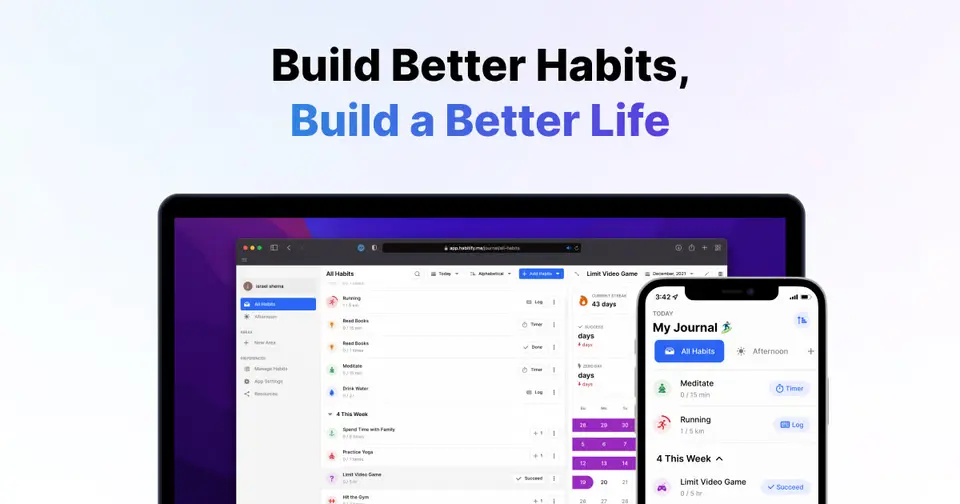
Habitify is a habit tracker for iOS, Android, macOS, Apple Watch and the web. Habits are scheduled across the day with reminders, and progress is shown through a calendar, streaks and completion rates. The free plan is limited to 3 active habits; the paid Plus and Pro plans remove that limit, and Pro adds health-data sync, calendar integrations, automation and API access.
To get you started, here are 10 things to know about Habitify, taken from its own pages and our grades.
Your habits are set out across the day rather than in one long list, so you can see what's next without digging.
- 1
Best for one habit tracker on every device you own
Habitify runs the same on iPhone, Android, Mac, Apple Watch and the web, and connects to Apple Health, Fitbit, Strava, calendars, Zapier and an API.
- 2
Paid plans start at $2.50 a month when paid by the year
As its pricing page puts it: $29.99 per year for Plus; Pro is $8.99 per month or $49.99 per year (App Store).
- 3
There is a free plan
Up to 3 active habits at a time with 1 reminder per habit, text notes with a mood log, a countdown timer and cross-platform sync.
- 4
It runs on 4 platforms
Web, macOS, iOS and Android.
- 5
Daily schedule and reminders
Habits are laid out across the day with reminders. Free allows 1 reminder per habit; Plus adds unlimited reminders by time, location or habit stack.
- 6
Progress tracking
A calendar, streak counts and completion rates show how consistently each habit is being kept.
- 7
Timers, notes and mood log
A countdown timer and text notes with a mood log are free. Pro adds Pomodoro and stopwatch timers with background sound, and notes with images.
- 8
Refunds: 7 days
Most people buy Habitify inside the iPhone or Android app, and then Apple or Google decides whether you get your money back; Habitify says plainly that it has no control over it. Buy on the website and there is a 7-day refund, but you have to email the invoice and the cancellation itself runs through Paddle, the company that takes the payment.
- 9
A 2.8 GPA, above 25 of 43
That is against the other habit trackers we grade, on value, the free plan, features, ease of use and platforms.
- 10
Keep it
The plain part of Habitify you could make: habit tracking and Pomodoro timer. What surrounds it you could not. The 5 things listed below take a company, not a weekend.
Habitify at a glance
- Pricing
- Free plan, from $29.99 per year for Plus; Pro is $8.99 per month or $49.99 per year (App Store)
- Free plan
- Yes
- Free trial
- 7-day free trial of Habitify Pro
- Runs on
- Web, macOS, iOS, Android
- Made by
- Unstatic Co., Ltd
- Category
- Habit Trackers
- Our grade
- 2.8 GPA, good
- Store rating
- 4.6 on the App Store, 7,138 ratings
The report card
Best for one habit tracker on every device you own
Habitify runs the same on iPhone, Android, Mac, Apple Watch and the web, and connects to Apple Health, Fitbit, Strava, calendars, Zapier and an API. The pricing is the fiddly part: free stops at 3 habits with 1 reminder each, Plus is annual only, health sync, calendar links and the API all wait for Pro at $49.99 a year, and the vendor's web page shows different prices from the App Store.
| Subject | Grade | Comment |
|---|---|---|
| Value for money | C | Plus is $29.99 a year, $2.50 a month, which is ordinary for this category: the cheapest quarter starts at $1.99 and the middle is $3.33. The parts people want most, health sync, calendars and the API, need Pro at $49.99 a year, and $8.99 if you pay monthly. |
| Free plan and trial | C | Free for good, with sync across your devices. But it's 3 active habits at a time and 1 reminder each. A morning run, reading and water, and you're full. |
| Features | B | It covers the whole job: habits laid out across the day, reminders by time, location or habit stack, streaks, a calendar, completion rates, notes with a mood log, timers, challenges with friends, checklists and off mode. Plus is annual-only, and checklists, off mode and health and calendar sync sit on Pro. |
| Ease of use | B | 4.6 on the App Store from about 7,100 ratings, a shade under the 4.7 an A needs. Your habits are set out across the day rather than in one long list, so you can see what's next without digging. |
| Platforms and integrations | A | iPhone, Android, Mac, Apple Watch and the web, connected to Apple Health, Health Connect, Fitbit, Strava, Google and Apple Calendar, Zapier and IFTTT, with an API and a documented MCP connector for ChatGPT and Claude on Pro. |
An A is worth 4 points, a B 3, a C 2, a D 1 and an F nothing. The GPA is the average of the five.
Who Habitify is for
- Fits if you want one tracker shared across iPhone, Android, Mac and the web
- Works for habits confirmed by health or fitness data, or wired up with Zapier, IFTTT or an API, on Pro
Who it is not for
- Tight if you stay free, with 3 active habits and 1 reminder for each
- Pricey if you pay for Pro by the month, at $8.99 against $49.99 for the year
- Skip it if you want health or calendar sync, checklists or the API on Plus, as all need Pro
- Watch out: Plus is annual only, and the Family plan is described as iOS only
- Watch out: the vendor's web page shows a single Premium plan at $2.49 a month or $59.99 once, unlike the App Store prices
Good to know
Good for
- One habit tracker shared across iPhone, Android, Mac and the web
- Habits that can be confirmed from health or fitness data
- Students, who get 50% off the first year of Pro Annual
Worth knowing
- The free plan allows 3 active habits and 1 reminder per habit.
- Plus is annual only and leaves out checklists, off mode, calendar and health sync, automation and API access, which need Pro.
- Prices here are US App Store prices; the vendor's web pricing page shows a single Premium plan at $2.49 a month billed annually or $59.99 once.
- The Family subscription is described as iOS only.
Part 02 · Tips
Insider tips
What most people miss: ways to pay less, settings worth changing and the catches
7
Things most people miss, each from its own help pages
The things about Habitify that are easy to miss until they cost you: ways to pay less, settings worth changing and the catches at renewal or when you leave. Each one is from Habitify’s own pages, linked beside it.
Read on Oct 17, 2026. Read from Habitify's help centre (subscriptions, the 12-month commitment, cancelling, refunds, exporting, Off Mode, Shake to Undo and habit stacking) on 17 October 2026. Not tried out: these tips are what its own pages say.
- 1
Renewal
The monthly Pro option on iPhone can lock you into 12 payments
Outside the US and Singapore, iOS 26.4 and later offer Pro paid monthly with a 12-month commitment. Habitify's help page says cancelling early doesn't stop the remaining payments, it only stops a new 12 months starting. Check which option you're tapping.
intercom.help - 2
Renewal
Cancel your old plan before you buy Lifetime
Its help centre says buying Lifetime doesn't cancel a monthly or yearly subscription, so you can end up paying for both. Cancel the renewing plan first in the App Store or Google Play. Deleting your account doesn't cancel it either.
intercom.help - 3
Leaving
Paid on the website? You get 7 days for a full refund
Habitify's refund page says web purchases are paid to Habitify directly, with a full refund within 7 days of paying. Buy in the iPhone or Android app and it's Apple's or Google's refund rules instead, and Habitify has no say.
intercom.help - 4
Leaving
Export the full backup, not just the CSV
Settings, then Import / Export, offers a .csv of your check-ins or a full .sqlite backup with every habit, reminder, note, mood log and streak. The CSV is only the basic log, so take the backup if you might come back or move on.
intercom.help - 5
Setting
Plan a Time Off before a holiday so your streaks survive
Off Mode, a Pro feature, is under Settings, Data, Off Mode, then Plan new Time Off. It mutes reminders and marks habits as on vacation, so streaks are kept. You can't set it for past dates, and for a single day the help page says to just skip your habits.
intercom.help - 6
Shortcut
Shake your phone to undo a wrong check-in
Shake to Undo reverses your last log, and a second shake undoes the one before that. It only remembers while you stay put, though: close the app or move to another screen and you'll have to delete the entry from the log history by hand.
intercom.help - 7
Easy to miss
Habit stacking can fire on a skip or a fail, not just a done
A stacking reminder nudges you about one habit when another is marked Completed, Skipped or Failed, straight away or after a delay. So 'remind me to run if I skip swimming' works. It's in a habit's Edit screen, under Reminder, then Habit Stacking.
intercom.help
Part 03 · Pricing
What it costs
Every plan, the free plan, ways to pay less and how prices have moved
$2.50
A month to start, paid by the year. There is a free plan too
Habitify has a free plan. Paid plans start at $29.99 per year for Plus; Pro is $8.99 per month or $49.99 per year (App Store).
Free for good, with sync across your devices.
Free
$0
Up to 3 active habits, 1 reminder per habit, text notes with a mood log and a countdown timer.
Plus
$29.99
per year (annual billing only)
Unlimited habits, unlimited reminders by time, location or habit stack, and custom areas.
Pro
$49.99
per year, or $8.99 per month
Everything in Plus, plus checklists, off mode, Pomodoro and stopwatch timers, calendar and health sync, Zapier, IFTTT, NFC tags and API access.
Pro Family
$89.99
per year
A yearly Pro subscription shared through family sharing, which the vendor describes as iOS only.
Pro Lifetime
$119.99
one-time purchase
Habitify Pro paid for once, with no renewal.
The free plan
Up to 3 active habits at a time with 1 reminder per habit, text notes with a mood log, a countdown timer and cross-platform sync.
Trying it first
7-day free trial of Habitify Pro
Read from apps.apple.com on Oct 9, 2026.
Ways to pay less
Annual discount
Pro costs about 54% less when billed yearly
The App Store listing shows Pro at $8.99 monthly or $49.99 yearly, about 54% less than 12 monthly payments ($107.88).
Stated on apps.apple.comEducation
Student Program: 50% off Pro Annual for a year
Students anywhere in the world with a school-issued email address can claim 50% off the Habitify Pro Annual plan for the first year from the app's Upgrade tab.
Stated on intercom.helpLifetime license
Pro Lifetime for a single payment
The App Store listing includes Habitify Pro Lifetime at $119.99 as a one-time purchase instead of a subscription.
Stated on apps.apple.com
What the app costs elsewhere
Each country’s App Store price for “Habitify Pro Monthly”, against $8.99 in the United States, in dollars at the day’s rate. The four cheapest and the four dearest of 11.
| Country | Price there | In dollars | Against the US |
|---|---|---|---|
| Indonesia | Rp 119ribu | $6.66 | 26% less |
| Philippines | ₱ 449.00 | $7.15 | 20% less |
| India | ₹ 699 | $7.23 | 20% less |
| Turkey | ₺399,99 | $8.13 | 10% less |
| Canada | $12.99 | $9.13 | about the same |
| United Kingdom | £6.99 | $9.24 | about the same |
| Brazil | R$ 49,90 | $9.97 | 11% more |
| Australia | $16.00 | $11.17 | 24% more |
Part 04 · Features
What it does
Its main features, where it runs, what it works with and who makes it
4
Places it runs: Web, macOS, iOS and Android
Cross-platform habit tracker with health-data sync and an API. Here is what it does, as its own site describes it, and what it covers: public API, AI features, Pomodoro timer, habit tracking.
Plus is annual-only, and checklists, off mode and health and calendar sync sit on Pro.
- Daily schedule and reminders
- Habits are laid out across the day with reminders. Free allows 1 reminder per habit; Plus adds unlimited reminders by time, location or habit stack.
- Progress tracking
- A calendar, streak counts and completion rates show how consistently each habit is being kept.
- Timers, notes and mood log
- A countdown timer and text notes with a mood log are free. Pro adds Pomodoro and stopwatch timers with background sound, and notes with images.
- Health and fitness sync
- Habits can be linked to data from Apple Health, Health Connect, Fitbit and Strava. Health app sync is listed as a Pro feature.
- Challenges with friends
- Friends can compete in habit challenges, and there are monthly leaderboard challenges.
- API, automation and AI tools
- Pro includes API access and Zapier and IFTTT connections. The help center also documents an MCP connector for AI assistants such as ChatGPT and Claude.
Where it runs
- Web
- macOS
- iOS
- Android
What it works with
- Apple Health
- Health Connect
- Fitbit
- Strava
- Google Calendar
- Apple Calendar
- Zapier
- IFTTT
Who makes Habitify
Habitify is made by Unstatic Co., Ltd, a company in Hanoi, Vietnam. It earns money from its paid Plus and Pro plans, sold as yearly, monthly and lifetime purchases, and from per-user licences for teams.
- Based
- Hanoi, Vietnamhabitify.me
- Team
- A team of 20 in 2020, according to an interview with its growth lead that the company republished on its bloghabitify.me
- Founders and leaders
- Tiep Vu Van, Authorized Managing Directorhabitify.me
- Lately
- Habi AI 1.1: Smarter Conversations Anywhere · Oct 12, 2026
- Habitify Android 49.0.0: See Your Whole Week at a Glance · Oct 9, 2026
- Habitify iOS 49.0.0: Improvements & Bug Fixes · Sep 27, 2026
- Habitify Android 48.2.0: Improvements & Bug Fixes · Sep 23, 2026
Read on Oct 18, 2026 from the company’s own pages and from news reports. What is not stated there is left out.
Part 05 · Standing
Where it stands
Its grades against its category, and whether to keep it or make your own
25/43
Other habit trackers it is graded above
Habitify's GPA of 2.8 is higher than 25 of the 43 other habit trackers we grade, and level with 11.
It stands best on platforms and integrations (A, above 43 of 43) and worst on free plan and trial (C, above 3).
Its paid plans start at $2.50 a month when paid by the year, against a middle price of $2.50 for the category: 12 of the 28 others that charge start lower.
On features, ease of use and platforms it scores 3.3 out of 4, and no tool on the category's chart scores higher without costing more.
Each grade against the category
Every bar is all 44 habit trackers we grade, cut by the letter each got. Habitify’s own letter is outlined.
- CValue for moneyAbove 4 of 43
- CFree plan and trialAbove 3 of 43
- BFeaturesAbove 23 of 43
- BEase of useAbove 12 of 43
- APlatforms and integrationsAbove 43 of 43
Price against what you get
Each dot is one of 32 habit trackers. Further left costs less; higher up scores better on features, ease of use and platforms. Habitify is the marked dot.
What paid plans start at, a month (each step along is roughly double) →
Keep it, or make your own?
Whether this is something you could build for yourself with an AI app builder, and what you would give up.
Keep it
The plain part of Habitify you could make: habit tracking and Pomodoro timer. What surrounds it you could not. The 5 things listed below take a company, not a weekend.
It costs $29.99 a year.
What you could make
- Habit tracking and Pomodoro timer: an app builder makes these well.
What you could not
- Apps for macOS, iOS and Android that stay in step with each other.
- It plugs into other products, Apple Health, Health Connect and Fitbit among them, and has an API.
- AI features, unless you pay a model provider for each request yourself.
- Hooks into the device itself: an Apple Watch app.
- The depth: we grade its features B, which means it covers the whole job.
What this rests on. Habitify’s listing: what it does, where it runs, what it plugs into and what it costs. It is a judgement about the kind of software this is. We have not built a replacement for it, and making your own means looking after it too. How we decide, and every tool’s verdict.
Part 06 · Refunds
After you pay
Getting your money back, getting out, and getting help
What happens once you have paid: whether you can get your money back, how to leave, and how to reach a person when something goes wrong. Each is graded from Habitify’s own terms and help pages.
Refunds and cancelling
Ordinary · checked Oct 18, 2026
Most people buy Habitify inside the iPhone or Android app, and then Apple or Google decides whether you get your money back; Habitify says plainly that it has no control over it. Buy on the website and there is a 7-day refund, but you have to email the invoice and the cancellation itself runs through Paddle, the company that takes the payment. A short window you must write in for, and a cancellation handled by a third party, keeps this at the ordinary C.
- Refund window
- 7 days
- How you cancel
- By writing to them
- Getting your money back
Habitify says a subscription bought on the website is paid to it directly and can be refunded in full within 7 days of the payment date, by emailing support with the invoice. A subscription bought in the iOS or Android app is paid to Apple or Google, whose refund policies apply, and Habitify says it has no control over that decision. Its terms also give consumers a 7-day right to withdraw from a web purchase.
Stated on intercom.help- How to cancel Habitify
For a subscription bought on the website or desktop app, Habitify says payments run through Paddle and tells you to open the Paddle receipt email, use its help link, ask in the chat there and follow the cancellation link Paddle sends. It will help within 24 hours if you forward the invoice instead. Its terms describe a Cancel subscription item in the web app's settings. An app subscription is cancelled in the store.
- Find the Paddle receipt email sent after the payment
- Open the help link in that email to reach your Paddle purchases
- Find the Habitify subscription and select Get Help
- Ask to cancel in the chat that opens
- Follow the cancellation link Paddle sends back
- What you keep afterwards
The terms say a cancellation takes effect the day after the last day of the current subscription period, when the account drops to the free plan, and that subscribing again restores the earlier status. They add that deleting the account is a separate step and that all data is then deleted irrevocably. Habitify warns that deleting the account does not cancel a subscription on its own.
Stated on habitify.me- Renewals
The terms say a paid subscription runs for at least the term chosen and renews automatically unless it is cancelled within 24 hours of the end of that period. On iOS there is also a Pro plan paid in 12 monthly instalments: cancelling before the commitment ends does not stop the remaining payments, though it does stop the next 12-month commitment. Apple emails before each of those charges.
Stated on habitify.me
In your favour
- A website purchase can be refunded in full within 7 days of the payment date.
- The terms also give consumers a 7-day right to withdraw from a web purchase without a reason.
- App Store and Google Play subscriptions are cancelled in the store, in a few taps.
- After cancelling you keep the plan to the end of the period and then drop to the free account.
Watch out for
- Subscribe in the app and Apple or Google decides the refund: Habitify says it has no control over it.
- The web refund is not a button: you email the invoice and wait for the team to review it.
- Cancelling a web subscription means asking Paddle, the payment company, for a cancellation link.
- The iOS Pro plan paid monthly over 12 months keeps billing after you cancel until all 12 are paid.
Customer support
Ordinary · checked Oct 18, 2026
A small team with a decent help centre: 26 articles on subscriptions alone, a message box in the app's settings and an email address for anything else. What is missing is any statement of when anyone is at a desk or how long a reply takes, beyond a promise to help cancel a web subscription within 24 hours of being sent the invoice. Articles and a message box with no stated hours is a C.
Ways to get help
Email
Writing to the support team, which Habitify asks you to do for a refund on a website purchase, attaching the invoice and the reason for the request. The same address is given for general questions.
Stated on intercom.helpHelp inside the app
A message to the team from the app, under Settings and then Send us a message, which Habitify's help articles give as the first way to reach it with a question.
Stated on intercom.helpHelp centre
The Habitify help centre, open without signing in, with collections on getting started, managing an account and its data, subscriptions, app settings, habit tracking and the website and desktop apps.
Stated on intercom.helpCommunity or forum
A public feedback and roadmap site where users post suggestions and see what the team is working on. Habitify's help articles point there for ideas rather than for support questions.
Stated on feedback.habitify.me
Not listed on Habitify’s pages: live chat, phone.
- When people answer
Its pages do not say.
- How fast it says it replies
The only timing Habitify commits to on these pages is for cancelling a web subscription: it says that if you forward the payment invoice, it will check and help you cancel within 24 hours. No general reply time is given for other questions, and no page states support hours.
Stated on intercom.help- What depends on your plan
Its pages do not say.
In your favour
- The help centre is detailed for an app this size, with 26 articles on subscriptions alone.
- Free and paying users get the same routes in: the message box in the app and email.
- Habitify says it will help cancel a web subscription within 24 hours if you send the invoice.
Watch out for
- No support hours are published anywhere, and no general reply time either.
- There is no phone line and no live chat with a person on any plan.
- Nothing says that paying more buys faster help.
- For an App Store or Google Play subscription, billing problems go to the store first.
What these two grades rest on. Read on 18 October 2026: Habitify's terms of use, its help articles on getting a refund, on cancelling a subscription and on the iOS Pro plan with a 12-month commitment, the subscription section of its help centre and its public feedback site. Its terms and its newer help article differ on how a website subscription is cancelled. Nobody here cancelled a plan or contacted its support. They are graded apart from the five that make the GPA. How we grade refunds and support.
Part 07 · Alternatives
The alternatives
The tools it is most often weighed against, side by side




Streaks, Habitica, Griply and TickTick
The 4 tools Habitify is most often weighed against, with where each one differs from it.
- 2.4GPA
Streaks
From $5.99 one-time
Habit tracker for Apple devices built around daily streaks.
- Habitify has a free plan. Streaks does not.
- Only Habitify lists a web app.
- Only Habitify lists an Android app.
- 3.4GPA
Habitica
Free plan · from $4.99/mo
Habit and task tracker that works like a role-playing game.
- Only Habitify lists a macOS app.
- Habitica is open source, according to its own site.
- Habitify also covers Pomodoro timer.
- 2.4GPA
Griply
Free plan · from $4.16/mo
Goal planner that links goals to habits, tasks and time blocks.
- Only Griply lists a Windows app.
- Habitify also covers Pomodoro timer.
- Griply also covers tasks, time blocking, calendar and goals.
- 3.4GPA
TickTick
Free plan · from $49.99/yr
To-do list with a calendar, habit tracker and Pomodoro timer built in.
- Only TickTick lists Windows and Linux apps.
- Only TickTick lists a browser extension.
- TickTick also covers tasks, natural-language input, calendar and kanban boards.
Part 08 · Questions
Quick answers
The questions people ask about it, each answered in a line or two
21
Questions, each answered in a line or two
The short version of everything above, for when you only need the answer. Each one is told in full in its part of the guide.
Is Habitify free?
Habitify has a free plan. Up to 3 active habits at a time with 1 reminder per habit, text notes with a mood log, a countdown timer and cross-platform sync.
How much does Habitify cost?
Habitify lists 5 plans. Free: $0.
What platforms does Habitify work on?
Habitify is available on Web, macOS, iOS and Android.
Does Habitify offer any discounts?
Habitify publicly lists the following: Pro costs about 54% less when billed yearly; Student Program: 50% off Pro Annual for a year; Pro Lifetime for a single payment.
How is Habitify rated?
Habitify's iPhone and iPad app averages 4.6 out of 5 from 7,138 ratings on the App Store in the United States, as read on Oct 5, 2026.
Does Habitify have a Windows app?
No Windows app was listed when its pages were read on Oct 9, 2026. Habitify is listed for Web, macOS, iOS and Android.
Does Habitify have a Linux app?
No Linux app was listed when its pages were read on Oct 9, 2026. Habitify is listed for Web, macOS, iOS and Android.
Is Habitify open source?
Habitify is not described as open source on its own site, as read on Oct 9, 2026.
Does Habitify have an API?
Yes. Habitify offers a public API, according to its own site.
What does Habitify integrate with?
Habitify's listing names Apple Health, Health Connect, Fitbit, Strava, Google Calendar, Apple Calendar, Zapier and IFTTT.
Does Habitify have a student discount?
Student Program: 50% off Pro Annual for a year. Students anywhere in the world with a school-issued email address can claim 50% off the Habitify Pro Annual plan for the first year from the app's Upgrade tab.
Does Habitify have a free trial?
Yes. 7-day free trial of Habitify Pro.
Who makes Habitify?
Habitify is made by Unstatic Co., Ltd.
What are the alternatives to Habitify?
The closest alternatives to Habitify in our directory are Streaks, Habitica, Griply and TickTick.
Does Habitify give refunds?
Habitify says a subscription bought on the website is paid to it directly and can be refunded in full within 7 days of the payment date, by emailing support with the invoice.
How do I cancel Habitify?
For a subscription bought on the website or desktop app, Habitify says payments run through Paddle and tells you to open the Paddle receipt email, use its help link, ask in the chat there and follow the cancellation link Paddle sends.
What happens to my data if I cancel Habitify?
The terms say a cancellation takes effect the day after the last day of the current subscription period, when the account drops to the free plan, and that subscribing again restores the earlier status.
How do I contact Habitify support?
Habitify's pages list these ways to get help: email, help inside the app, help centre and community or forum.
How does Habitify compare with other habit trackers?
Habitify's GPA of 2.8 is higher than 25 of the 43 other habit trackers we grade, and level with 11.
Is Habitify good value for money?
ToolGPA grades Habitify C for value for money. Its paid plans start at $2.50 a month when paid by the year, against a middle price of $2.50 for the category: 12 of the 28 others that charge start lower.
Could I make my own version of Habitify?
The plain part of Habitify you could make: habit tracking and Pomodoro timer.
Where this guide comes from
The prices, plans, platforms and features were read from Habitify’s own pages on Oct 9, 2026, and the grades were given on Oct 10, 2026. Graded from this listing, whose facts were read from Habitify's own pages on 4 October 2026, and its App Store rating. Also tested with a demo account on 2026-06-25.
Every tool we list gets five grades, A to F, each with its reason, and a GPA that averages them. How each is decided is at toolgpa.com/grades. This guide is ToolGPA’s own work; it is not made, paid for or approved by Unstatic Co., Ltd. Prices change, so check habitify.me before you buy.
- apps.apple.com/us/app/habitify-habit-tracker/id1111447047
- habitify.me
- habitify.me/pricing
- habitify.me/terms-of-use
- intercom.help/habitify-app/en/articles/6113487-explore-habitify-plans-free-plus-and-pro
- intercom.help/habitify-app/en/articles/7826150-how-to-purchase-habitify-plans
- intercom.help/habitify-app/en/articles/14468919-the-habitify-student-program
- intercom.help/habitify-app/en/collections/6079144-manage-subscription
- intercom.help/habitify-app/en/collections/3410423-integrations
Part 09 · About
About ToolGPA
Who made this guide, what else is on the site, and how to cite it
3,189
Tools graded, in 94 categories
ToolGPA grades software the way a school report grades a pupil: five subjects, a letter for each with the reason written beside it, and a GPA that averages them. Prices, plans and platforms are read from each maker’s own pages and dated, so you always know how fresh a figure is.
Every grade, review and ranking on ToolGPA is our own judgement. No company can pay for a grade or change one. Every tool on the site has a guide like this one, free to download and pass on. It all lives at toolgpa.com.
3,189
tools graded
94
categories
426
price changes on record
579
apps priced in 12 countries
What else is on toolgpa.com
- Habitify, kept up to dateEverything in this guide, with prices and grades as they are todaytoolgpa.com/tools/habitify
- How grades are givenThe rules behind every letter and every GPAtoolgpa.com/grades
- Value chartsWhat each tool costs against what it scores, for every categorytoolgpa.com/charts
- CompareAny two tools side by side, plan by plantoolgpa.com/compare
- Price changesEvery price rise and cut on record, each with its sourcetoolgpa.com/price-changes
- Prices by countryWhat apps cost on the App Store in 12 countriestoolgpa.com/prices-by-country
- Pay lessEvery public discount: yearly billing, students, nonprofitstoolgpa.com/save
- Keep or makeWhich tools are worth paying for, and which you could build yourselftoolgpa.com/keep-or-make
Scan for the live page
Prices and grades as they are today
Quoting this guide?
Please name ToolGPA and link to the live page, so readers can check the figures for themselves:
ToolGPA, "Habitify: The Insider's Guide", checked Oct 9, 2026. https://toolgpa.com/tools/habitify
Know someone choosing between habit trackers?
Send them this guide: toolgpa.com/tools/habitify/guide
ToolGPA elsewhere: youtube.com/@toolgpa
See our other guides
The best-graded habit trackers after Habitify, each with an Insider's Guide of its own.
- Habit Trackers Insider's GuideEvery one of the 44 habit trackers we grade, compared
- Finch Insider's GuideSelf-care app that ties daily goals to a virtual pet bird3.4 GPA
- Habitica Insider's GuideHabit and task tracker that works like a role-playing game3.4 GPA
- Disciplined Insider's GuideMinimal habit tracker built around daily streaks3.0 GPA


Choosing software? Every tool graded, every price dated.
Compare tools at toolgpa.com ›Everything in this guide is ToolGPA’s own summary of what Habitify’s pages, its app-store listings and public reviews said on the dates shown. Grades are our judgement under the rules at toolgpa.com/grades. Every grade, review and ranking on ToolGPA is our own judgement. No company can pay for a grade or change one. Habitify is a trademark of its owner, and this guide is not made, paid for or approved by Unstatic Co., Ltd. Prices and plans change: check habitify.me before you buy.