
Habitify review (2026): is the free plan enough?
Cross-platform habit tracker with health-data sync and an API
Black Friday: is there a Habitify sale?
Our verdict
First of our top three habit trackers
For: Most people
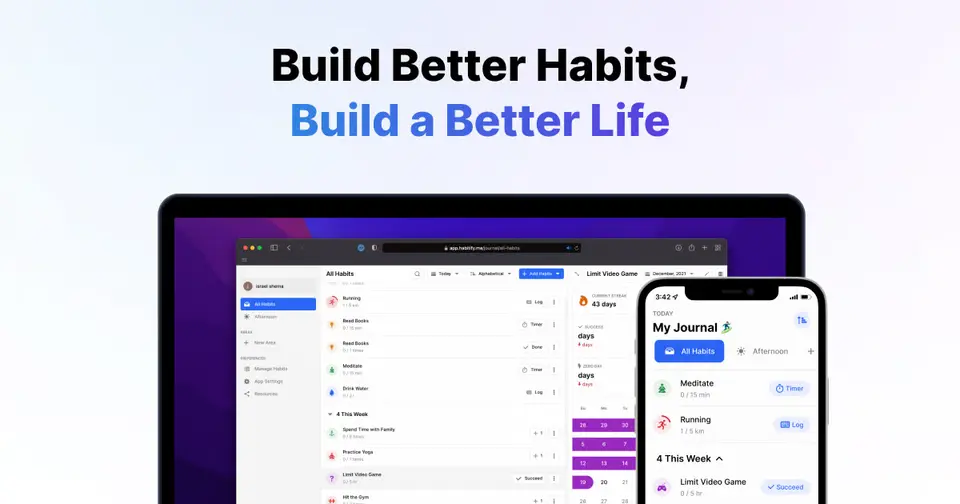
Habitify lays habits out across the day with reminders and shows how consistently you keep them through a calendar, streak counts and completion rates. It runs on iPhone, Android, Mac and the web, and the free plan syncs between them. On the US App Store, Plus is $29.99 a year for unlimited habits, and Pro is $49.99 a year with calendar and health app sync, automation and API access. Its iPhone and iPad app averages 4.6 from about 7,100 ratings. Know the limits: the free plan stops at 3 active habits and 1 reminder per habit, Plus is sold by the year only, and the vendor's web pricing page shows a different offer, a single Premium plan at $2.49 a month billed annually or $59.99 once.
See all three and how we rankHabitify report card
Good · out of 4.0 · graded Oct 10, 2026
Best for one habit tracker on every device you own
Habitify runs the same on iPhone, Android, Mac, Apple Watch and the web, and connects to Apple Health, Fitbit, Strava, calendars, Zapier and an API. The pricing is the fiddly part: free stops at 3 habits with 1 reminder each, Plus is annual only, health sync, calendar links and the API all wait for Pro at $49.99 a year, and the vendor's web page shows different prices from the App Store.
Who Habitify is for
- Fits if you want one tracker shared across iPhone, Android, Mac and the web
- Works for habits confirmed by health or fitness data, or wired up with Zapier, IFTTT or an API, on Pro
Who Habitify is not for
- Tight if you stay free, with 3 active habits and 1 reminder for each
- Pricey if you pay for Pro by the month, at $8.99 against $49.99 for the year
- Skip it if you want health or calendar sync, checklists or the API on Plus, as all need Pro
- Watch out: Plus is annual only, and the Family plan is described as iOS only
- Watch out: the vendor's web page shows a single Premium plan at $2.49 a month or $59.99 once, unlike the App Store prices
Why Habitify gets a 2.8
Five grades, each with its reason. The GPA is their average: an A is 4 points, an F is none.
- CValue for moneyPlus is $29.99 a year, $2.50 a month, which is ordinary for this category: the cheapest quarter starts at $1.99 and the middle is $3.33. The parts people want most, health sync, calendars and the API, need Pro at $49.99 a year, and $8.99 if you pay monthly.
- CFree plan and trialFree for good, with sync across your devices. But it's 3 active habits at a time and 1 reminder each. A morning run, reading and water, and you're full.
- BFeaturesIt covers the whole job: habits laid out across the day, reminders by time, location or habit stack, streaks, a calendar, completion rates, notes with a mood log, timers, challenges with friends, checklists and off mode. Plus is annual-only, and checklists, off mode and health and calendar sync sit on Pro.
- BEase of use4.6 on the App Store from about 7,100 ratings, a shade under the 4.7 an A needs. Your habits are set out across the day rather than in one long list, so you can see what's next without digging.
- APlatforms and integrationsiPhone, Android, Mac, Apple Watch and the web, connected to Apple Health, Health Connect, Fitbit, Strava, Google and Apple Calendar, Zapier and IFTTT, with an API and a documented MCP connector for ChatGPT and Claude on Pro.
What these grades rest on. Graded from this listing, whose facts were read from Habitify's own pages on 4 October 2026, and its App Store rating. Also tested with a demo account on 2026-06-25. How we review and grade.
Make Habitify? Put this grade on your site

Paste this where you want the badge. It links here and follows the grade if it changes. About badges
<a href="https://toolgpa.com/tools/habitify#review"><img src="https://toolgpa.com/badge/habitify.svg" alt="Habitify: 2.8 GPA on ToolGPA" width="196" height="56"></a>Where Habitify stands among habit trackers
Habitify's GPA of 2.8 is higher than 42 of the 64 other habit trackers we grade, and level with 12.
It stands best on platforms and integrations (A, above 64 of 64) and worst on free plan and trial (C, above 5).
Its paid plans start at $2.50 a month when paid by the year, against a middle price of $3.33 for the category: 13 of the 38 others that charge start lower.
On features, ease of use and platforms it scores 3.3 out of 4, and no tool on the category's chart scores higher without costing more.
Each grade against the category
Every bar is all 65 habit trackers we grade, cut by the letter each got. Habitify’s own letter is outlined.
- CValue for moneyAbove 6 of 64, level with 31
- CFree plan and trialAbove 5 of 64, level with 39
- BFeaturesAbove 40 of 64, level with 21
- BEase of useAbove 22 of 64, level with 24
- APlatforms and integrationsAbove 64 of 64
Price against what you get
Each dot is one of 44 habit trackers. Further left costs less, and higher up scores better on features, ease of use and platforms. Point at a dot to see which tool it is.
Features, ease of use and platforms, averaged
What paid plans start at, a month (each step along is roughly double) →
- The best score at each price
- Has a free plan
- No free plan
Keep Habitify, or make your own?
You could make this
A habit tracker at its plainest is a list of habits, a tick for each day and a count of the streak.
What Habitify does at its core is habit tracking and Pomodoro timer, and that is the kind of thing an AI app builder makes well. You would give up 5 things, listed below, and little else. It costs $29.99 a year. An AI app builder starts at about $20 a month on our listings, and you only need it while you build.
What you could make
- Habit tracking and Pomodoro timer: an app builder makes these well.
What you could not
- Apps for macOS, iOS and Android that stay in step with each other.
- It plugs into other products, Apple Health, Health Connect and Fitbit among them, and has an API.
- AI features, unless you pay a model provider for each request yourself.
- Hooks into the device itself: an Apple Watch app.
- The depth: we grade its features B, which means it covers the whole job.
What this rests on. Habitify’s listing: what it does, where it runs, what it plugs into and what it costs. It is a judgement about the kind of software this is. We have not built a replacement for it, and making your own means looking after it too. How we decide, and every tool’s verdict.
What is Habitify?
Habitify is a habit tracker for iOS, Android, macOS, Apple Watch and the web. Habits are scheduled across the day with reminders, and progress is shown through a calendar, streaks and completion rates. The free plan is limited to 3 active habits; the paid Plus and Pro plans remove that limit, and Pro adds health-data sync, calendar integrations, automation and API access.
Worth knowing
- The free plan allows 3 active habits and 1 reminder per habit.
- Plus is annual only and leaves out checklists, off mode, calendar and health sync, automation and API access, which need Pro.
- Prices here are US App Store prices; the vendor's web pricing page shows a single Premium plan at $2.49 a month billed annually or $59.99 once.
- The Family subscription is described as iOS only.
Key features
- Daily schedule and reminders
- Habits are laid out across the day with reminders. Free allows 1 reminder per habit; Plus adds unlimited reminders by time, location or habit stack.
- Progress tracking
- A calendar, streak counts and completion rates show how consistently each habit is being kept.
- Timers, notes and mood log
- A countdown timer and text notes with a mood log are free. Pro adds Pomodoro and stopwatch timers with background sound, and notes with images.
- Health and fitness sync
- Habits can be linked to data from Apple Health, Health Connect, Fitbit and Strava. Health app sync is listed as a Pro feature.
- Challenges with friends
- Friends can compete in habit challenges, and there are monthly leaderboard challenges.
- API, automation and AI tools
- Pro includes API access and Zapier and IFTTT connections. The help center also documents an MCP connector for AI assistants such as ChatGPT and Claude.
Habitify tips most people miss
Renewal
The monthly Pro option on iPhone can lock you into 12 payments
Outside the US and Singapore, iOS 26.4 and later offer Pro paid monthly with a 12-month commitment. Habitify's help page says cancelling early doesn't stop the remaining payments, it only stops a new 12 months starting. Check which option you're tapping.
intercom.helpRenewal
Cancel your old plan before you buy Lifetime
Its help centre says buying Lifetime doesn't cancel a monthly or yearly subscription, so you can end up paying for both. Cancel the renewing plan first in the App Store or Google Play. Deleting your account doesn't cancel it either.
intercom.helpLeaving
Paid on the website? You get 7 days for a full refund
Habitify's refund page says web purchases are paid to Habitify directly, with a full refund within 7 days of paying. Buy in the iPhone or Android app and it's Apple's or Google's refund rules instead, and Habitify has no say.
intercom.helpLeaving
Export the full backup, not just the CSV
Settings, then Import / Export, offers a .csv of your check-ins or a full .sqlite backup with every habit, reminder, note, mood log and streak. The CSV is only the basic log, so take the backup if you might come back or move on.
intercom.helpSetting
Plan a Time Off before a holiday so your streaks survive
Off Mode, a Pro feature, is under Settings, Data, Off Mode, then Plan new Time Off. It mutes reminders and marks habits as on vacation, so streaks are kept. You can't set it for past dates, and for a single day the help page says to just skip your habits.
intercom.helpShortcut
Shake your phone to undo a wrong check-in
Shake to Undo reverses your last log, and a second shake undoes the one before that. It only remembers while you stay put, though: close the app or move to another screen and you'll have to delete the entry from the log history by hand.
intercom.helpEasy to miss
Habit stacking can fire on a skip or a fail, not just a done
A stacking reminder nudges you about one habit when another is marked Completed, Skipped or Failed, straight away or after a delay. So 'remind me to run if I skip swimming' works. It's in a habit's Edit screen, under Reminder, then Habit Stacking.
intercom.help
Read on Oct 17, 2026. Read from Habitify's help centre (subscriptions, the 12-month commitment, cancelling, refunds, exporting, Off Mode, Shake to Undo and habit stacking) on 17 October 2026. Not tried out: these tips are what its own pages say.
Habitify pricing
As of Nov 9, 2026, Habitify has a free plan, and paid plans start at $29.99 per year for Plus; Pro is $8.99 per month or $49.99 per year (App Store).
- Starts at
- $29.99 per year for Plus; Pro is $8.99 per month or $49.99 per year (App Store)
- Free plan
- Up to 3 active habits at a time with 1 reminder per habit, text notes with a mood log, a countdown timer and cross-platform sync.
- Free trial
- 7-day free trial of Habitify Pro
| Plan | Price | What you get |
|---|---|---|
| Free | $0 | Up to 3 active habits, 1 reminder per habit, text notes with a mood log and a countdown timer. |
| Plus | $29.99per year (annual billing only) | Unlimited habits, unlimited reminders by time, location or habit stack, and custom areas. |
| Pro | $49.99per year, or $8.99 per month | Everything in Plus, plus checklists, off mode, Pomodoro and stopwatch timers, calendar and health sync, Zapier, IFTTT, NFC tags and API access. |
| Pro Family | $89.99per year | A yearly Pro subscription shared through family sharing, which the vendor describes as iOS only. |
| Pro Lifetime | $119.99one-time purchase | Habitify Pro paid for once, with no renewal. |
Read from apps.apple.com on Nov 9, 2026. Prices change, so confirm with Habitify before you buy.
Ways to pay less
- Annual discountPro costs about 54% less when billed yearly
The App Store listing shows Pro at $8.99 monthly or $49.99 yearly, about 54% less than 12 monthly payments ($107.88).
Stated on apps.apple.com - EducationStudent Program: 50% off Pro Annual for a year
Students anywhere in the world with a school-issued email address can claim 50% off the Habitify Pro Annual plan for the first year from the app's Upgrade tab.
Stated on intercom.help - Lifetime licensePro Lifetime for a single payment
The App Store listing includes Habitify Pro Lifetime at $119.99 as a one-time purchase instead of a subscription.
Stated on apps.apple.com
Habitify refunds and cancellation
Ordinary · checked Oct 18, 2026
Most people buy Habitify inside the iPhone or Android app, and then Apple or Google decides whether you get your money back; Habitify says plainly that it has no control over it. Buy on the website and there is a 7-day refund, but you have to email the invoice and the cancellation itself runs through Paddle, the company that takes the payment. A short window you must write in for, and a cancellation handled by a third party, keeps this at the ordinary C.
- Refund window
- 7 days
- How you cancel
- By writing to them
- Getting your money back
Habitify says a subscription bought on the website is paid to it directly and can be refunded in full within 7 days of the payment date, by emailing support with the invoice. A subscription bought in the iOS or Android app is paid to Apple or Google, whose refund policies apply, and Habitify says it has no control over that decision. Its terms also give consumers a 7-day right to withdraw from a web purchase.
Stated on intercom.help- How to cancel Habitify
For a subscription bought on the website or desktop app, Habitify says payments run through Paddle and tells you to open the Paddle receipt email, use its help link, ask in the chat there and follow the cancellation link Paddle sends. It will help within 24 hours if you forward the invoice instead. Its terms describe a Cancel subscription item in the web app's settings. An app subscription is cancelled in the store.
- Find the Paddle receipt email sent after the payment
- Open the help link in that email to reach your Paddle purchases
- Find the Habitify subscription and select Get Help
- Ask to cancel in the chat that opens
- Follow the cancellation link Paddle sends back
- What you keep afterwards
The terms say a cancellation takes effect the day after the last day of the current subscription period, when the account drops to the free plan, and that subscribing again restores the earlier status. They add that deleting the account is a separate step and that all data is then deleted irrevocably. Habitify warns that deleting the account does not cancel a subscription on its own.
Stated on habitify.me- Renewals
The terms say a paid subscription runs for at least the term chosen and renews automatically unless it is cancelled within 24 hours of the end of that period. On iOS there is also a Pro plan paid in 12 monthly instalments: cancelling before the commitment ends does not stop the remaining payments, though it does stop the next 12-month commitment. Apple emails before each of those charges.
Stated on habitify.me
In your favour
- A website purchase can be refunded in full within 7 days of the payment date.
- The terms also give consumers a 7-day right to withdraw from a web purchase without a reason.
- App Store and Google Play subscriptions are cancelled in the store, in a few taps.
- After cancelling you keep the plan to the end of the period and then drop to the free account.
Watch out for
- Subscribe in the app and Apple or Google decides the refund: Habitify says it has no control over it.
- The web refund is not a button: you email the invoice and wait for the team to review it.
- Cancelling a web subscription means asking Paddle, the payment company, for a cancellation link.
- The iOS Pro plan paid monthly over 12 months keeps billing after you cancel until all 12 are paid.
Habitify customer support
Ordinary · checked Oct 18, 2026
A small team with a decent help centre: 26 articles on subscriptions alone, a message box in the app's settings and an email address for anything else. What is missing is any statement of when anyone is at a desk or how long a reply takes, beyond a promise to help cancel a web subscription within 24 hours of being sent the invoice. Articles and a message box with no stated hours is a C.
Ways to get help
Email
Writing to the support team, which Habitify asks you to do for a refund on a website purchase, attaching the invoice and the reason for the request. The same address is given for general questions.
Stated on intercom.helpHelp inside the app
A message to the team from the app, under Settings and then Send us a message, which Habitify's help articles give as the first way to reach it with a question.
Stated on intercom.helpHelp centre
The Habitify help centre, open without signing in, with collections on getting started, managing an account and its data, subscriptions, app settings, habit tracking and the website and desktop apps.
Stated on intercom.helpCommunity or forum
A public feedback and roadmap site where users post suggestions and see what the team is working on. Habitify's help articles point there for ideas rather than for support questions.
Stated on feedback.habitify.me
Not listed on Habitify’s pages: live chat, phone.
- When people answer
Its pages do not say.
- How fast it says it replies
The only timing Habitify commits to on these pages is for cancelling a web subscription: it says that if you forward the payment invoice, it will check and help you cancel within 24 hours. No general reply time is given for other questions, and no page states support hours.
Stated on intercom.help- What depends on your plan
Its pages do not say.
In your favour
- The help centre is detailed for an app this size, with 26 articles on subscriptions alone.
- Free and paying users get the same routes in: the message box in the app and email.
- Habitify says it will help cancel a web subscription within 24 hours if you send the invoice.
Watch out for
- No support hours are published anywhere, and no general reply time either.
- There is no phone line and no live chat with a person on any plan.
- Nothing says that paying more buys faster help.
- For an App Store or Google Play subscription, billing problems go to the store first.
What these two grades rest on. Read on 18 October 2026: Habitify's terms of use, its help articles on getting a refund, on cancelling a subscription and on the iOS Pro plan with a 12-month commitment, the subscription section of its help centre and its public feedback site. Its terms and its newer help article differ on how a website subscription is cancelled. Nobody here cancelled a plan or contacted its support. They are graded apart from the five that make the GPA. How we grade refunds and support.
How people rate the Habitify app
4.6
out of 5 for the iPhone and iPad app
7,138 ratings on the App Store in the United States, read Oct 5, 2026. It rates the app, not everything the product does. See the listing
Works with
- Apple Health
- Health Connect
- Fitbit
- Strava
- Google Calendar
- Apple Calendar
- Zapier
- IFTTT
Who makes Habitify
Habitify is made by Unstatic Co., Ltd, a company in Hanoi, Vietnam. It earns money from its paid Plus and Pro plans, sold as yearly, monthly and lifetime purchases, and from per-user licences for teams.
- Based
- Hanoi, Vietnamhabitify.me
- Team
- A team of 20 in 2020, according to an interview with its growth lead that the company republished on its bloghabitify.me
- Founders and leaders
- Tiep Vu Van, Authorized Managing Directorhabitify.me
- Lately
- Habi AI 1.1: Smarter Conversations Anywhere · Oct 12, 2026
- Habitify Android 49.0.0: See Your Whole Week at a Glance · Oct 9, 2026
- Habitify iOS 49.0.0: Improvements & Bug Fixes · Sep 27, 2026
- Habitify Android 48.2.0: Improvements & Bug Fixes · Sep 23, 2026
Read on Oct 18, 2026 from the company’s own pages and from news reports. What is not stated there is left out.
Habitify alternatives
- Habitify vs Streaks
From $5.99 one-time
- Habitify vs Habitica
Free plan · from $4.99/mo
- Habitify vs Griply
Free plan · from $4.16/mo
- Habitify vs TickTick
Free plan · from $49.99/yr




Featured in
Common questions
Does Habitify have a Windows app?
No Windows app was listed when its pages were read on Nov 9, 2026. Habitify is listed for Web, macOS, iOS and Android.
Does Habitify have a Linux app?
No Linux app was listed when its pages were read on Nov 9, 2026. Habitify is listed for Web, macOS, iOS and Android.
Is Habitify open source?
Habitify is not described as open source on its own site, as read on Nov 9, 2026.
Does Habitify have an API?
Yes. Habitify offers a public API, according to its own site.
Sources for this page
The prices, plans, platforms and features above were read from these pages on Nov 9, 2026. What people say is linked where it appears.
- apps.apple.com/us/app/habitify-habit-tracker/id1111447047
- habitify.me
- habitify.me/pricing
- habitify.me/terms-of-use
- intercom.help/habitify-app/en/articles/6113487-explore-habitify-plans-free-plus-and-pro
- intercom.help/habitify-app/en/articles/7826150-how-to-purchase-habitify-plans
- intercom.help/habitify-app/en/articles/14468919-the-habitify-student-program
- intercom.help/habitify-app/en/collections/6079144-manage-subscription
- intercom.help/habitify-app/en/collections/3410423-integrations