
Table Habit review (2026): is it any good?
Free, open-source habit tracker with scoring and WebDAV sync
Our verdict
Third of our top three habit trackers
For: People who want a free tracker with no account, on phone and desktop
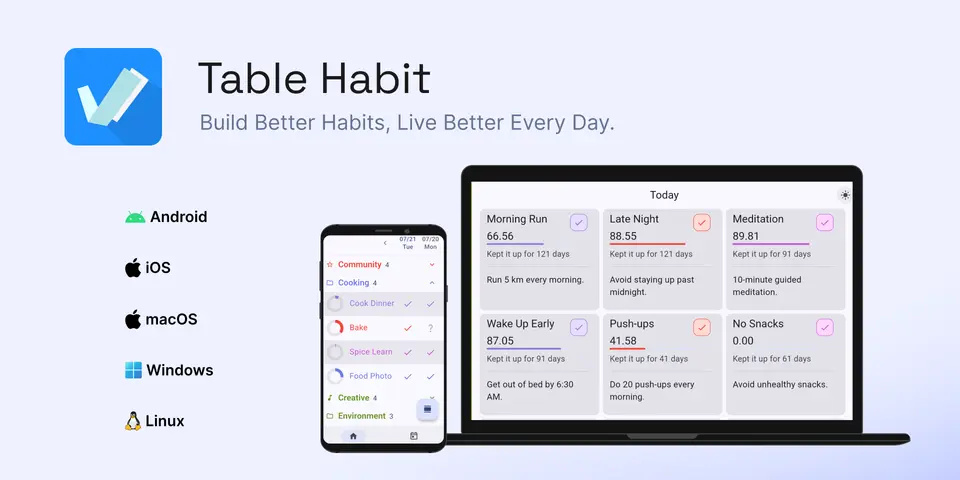
Table Habit is a free, open-source habit tracker with every feature on Android, iPhone, Mac, Windows and Linux and no ads, in-app purchases or account. Each habit earns a score that rises as you keep to it, for habits to build and habits to avoid, with a check-in heatmap and charts on each habit's page. It works offline, and devices can sync through a WebDAV server such as Nextcloud or Koofr. It is third because it asks more of you than the two above: that server is the only way to sync and you provide it yourself, home screen widgets are not yet released, and there is no web version. It is a one-person project supported by donations.
See all three and how we rankTable Habit report card
Very good · out of 4.0 · graded Oct 10, 2026
Best for a free tracker that scores effort, not just streaks
Table Habit is a free, open-source habit tracker for Android, iOS, macOS, Windows and Linux. Each habit gets a score out of 100 on a curve, and a half-done day costs less than a missed one. But sync needs a WebDAV server you supply, home screen widgets aren't released, there's no web version, the scoring model takes learning, and it's a one-person project on donations.
Who Table Habit is for
- Fits if you want one free tracker on your phone and your desktop, Linux included
- Works for people who already run Nextcloud or another WebDAV server for sync
Who Table Habit is not for
- Skip it if you want sync with no setup, as you have to provide the WebDAV server
- Not for you if you live by home screen widgets, which aren't released yet
- Skip it if you want to check in from a browser, as there's no web version
- Watch out: the user guide is written for the Android app, with other platforms noted separately
- Watch out: the README calls it a one-person indie project supported by donations
Why Table Habit gets a 3.0
Five grades, each with its reason. The GPA is their average: an A is 4 points, an F is none.
- AValue for moneyFree, with no ads and no in-app purchases, on all five platforms, where this category's cheapest quarter starts at $1.99 a month. The README calls it a one-person indie project supported by donations.
- AFree plan and trialEvery feature is free on Android, iOS, macOS, Windows and Linux, with no account and no cap. It's Apache 2.0 open source with no paid tier.
- CFeaturesThe scoring: up to 100 per habit on a curve, bonus points for going past your goal, a short day costing less than a miss, rules like X times in a rolling Y days, heatmaps and score graphs. But the listing names two gaps: widgets are still in progress, and sync needs a WebDAV server you supply.
- CEase of useNo store rating on record, and there's a model to learn: a daily goal plus an extra goal, bonus points to a limit, Target Days and a curve-based score instead of a plain streak. Sync means supplying a server, and the user guide is written for the Android app.
- BPlatforms and integrationsAndroid, iOS, macOS, Windows and Linux, so phone and desktop are both covered. No web version, no API, and it talks only to Nextcloud, Koofr or your own WebDAV server, plus a Loop Habit Tracker CSV import.
What these grades rest on. Graded from this listing, whose facts were read from Table Habit's own pages on 6 October 2026. Also tested with a demo account on 2026-03-10. How we review and grade.
Make Table Habit? Put this grade on your site

Paste this where you want the badge. It links here and follows the grade if it changes. About badges
<a href="https://toolgpa.com/tools/table-habit#review"><img src="https://toolgpa.com/badge/table-habit.svg" alt="Table Habit: 3.0 GPA on ToolGPA" width="196" height="56"></a>Where Table Habit stands among habit trackers
Table Habit's GPA of 3.0 is higher than 55 of the 64 other habit trackers we grade, and level with 5.
It stands best on free plan and trial (A, above 52 of 64) and worst on features (C, above 0).
Table Habit has no paid plan.
On features, ease of use and platforms it scores 2.3 out of 4. Nothing scores higher for less, though at least one tool matches that score at a lower price.
Each grade against the category
Every bar is all 65 habit trackers we grade, cut by the letter each got. Table Habit’s own letter is outlined.
- AValue for moneyAbove 47 of 64, level with 17
- AFree plan and trialAbove 52 of 64, level with 12
- CFeaturesAbove 0 of 64, level with 39
- CEase of useAbove 0 of 64, level with 21
- BPlatforms and integrationsAbove 46 of 64, level with 17
Price against what you get
Each dot is one of 44 habit trackers. Further left costs less, and higher up scores better on features, ease of use and platforms. Point at a dot to see which tool it is.
Features, ease of use and platforms, averaged
What paid plans start at, a month (each step along is roughly double) →
- The best score at each price
- Has a free plan
- No free plan
Keep Table Habit, or make your own?
Your call
A habit tracker at its plainest is a list of habits, a tick for each day and a count of the streak.
Table Habit is free, so making your own saves no money. Make it only if you want it built your way.
What you could make
- Habit tracking and goals: an app builder makes these well.
What you could not
- Apps for macOS, Windows, Linux, iOS and Android that stay in step with each other.
What this rests on. Table Habit’s listing: what it does, where it runs, what it plugs into and what it costs. It is a judgement about the kind of software this is. We have not built a replacement for it, and making your own means looking after it too. How we decide, and every tool’s verdict.
What is Table Habit?
Table Habit is a free, open-source habit tracker for Android, iOS, macOS, Windows and Linux, developed by Fries_I23 under the Apache 2.0 license. Rather than counting streaks alone, it gives each habit a score that rises along a curve as you keep to it, and it tracks both habits to build and habits to avoid. It works offline with no account, and devices sync through a WebDAV server such as Nextcloud or Koofr.
Worth knowing
- Home screen widgets for Android and iOS are marked as in progress on the roadmap and are not yet released.
- Sync works only through a WebDAV server that you provide; other sync backends are listed as planned.
- There is no web version, and the user guide is written for the Android app with other platforms noted separately.
- The README describes it as a one-person indie project supported by donations.
Key features
- Habit score
- Each habit earns a score up to 100 from a curve-based algorithm. A Target Days setting fixes the minimum number of days needed to reach the full score.
- Positive and negative habits
- A habit has a daily goal and an extra goal. Going over the goal earns bonus points up to a limit, falling short costs less than a miss, and a skipped day costs nothing.
- Completion rules
- A habit can be due daily, on any X days per week, on any X days per month, or X times within a rolling window of Y days.
- WebDAV sync
- Devices sync through a WebDAV server such as Nextcloud, Koofr or one you host yourself, so no vendor account or vendor cloud is involved.
- Heatmaps and growth charts
- A habit's detail page has a check-in heatmap, a bar chart of check-ins and a score graph that can be grouped by day, week, month or year.
- Groups, import and export
- Habits can be grouped, colored, reordered by dragging and checked in as a batch. Data exports and imports as JSON, and Loop Habit Tracker data can be imported from CSV.
Table Habit tips most people miss
Setting
Give Table Habit its own Nextcloud app password
The sync guide says to make a dedicated app password in Nextcloud (Profile, Settings, Security) and enter your server as your-server/remote.php/dav/files/your-user. That goes in Settings, Sync Options, Sync Server. Then tap the refresh button by Sync Now.
github.comSetting
On Koofr, sync into a folder of your own, not the root
The guide says not to point Table Habit at Koofr's root directory. Make a folder and use an address like app.koofr.net/dav/Koofr/your-folder-name/ with a Koofr application password. If you hit error 429, Koofr's own WebDAV help covers it.
github.comEasy to miss
A blank day counts as a miss, so mark days off as skipped
The user guide says a day you haven't checked in scores the same as not done. A skip costs nothing. So if you're ill or away, mark those days skipped rather than leaving them empty, or your score drops for no good reason.
github.comShortcut
Long-press to check in a batch of habits at once
Long-press a habit to enter Selection Mode, pick the others, then tap the button at the bottom right for Batch Check-in. Pick the date with the arrows, set skipped, done, over-done or not done, and save.
github.comEasy to miss
Fix past days from the heatmap, not the main table
Open a habit and tap the button at the bottom right for Heatmap Check-in mode. You can change any day's status there by tapping or long-pressing it, which is quicker than hunting back through the main table.
github.comLeaving
A JSON export is a copy, not a sync
You can export selected habits as JSON from Selection Mode and import them in Settings. The user guide warns that imported habits come in as new habits, so it isn't a way to keep two devices in step. WebDAV sync is.
github.comEasy to miss
Deleting a group keeps the habits that were in it
Turn grouping on from the main menu (the three dots) and manage groups in Settings, Groups. Deleting a group doesn't delete its habits, they just move to Uncategorized. In Selection Mode you can move a bunch of habits to another group in one go.
github.com
Read on Oct 17, 2026. Read from Table Habit's GitHub README and wiki (the user guide and the WebDAV sync guide) on 17 October 2026. Not tried out: these tips are what its own pages say.
Table Habit pricing
As of Oct 6, 2026, Table Habit is free to use.
- Starts at
- Free
- Free plan
- Everything is free: every feature on Android, iOS, macOS, Windows and Linux, with no ads, no in-app purchases and no account.
- Free trial
- None listed
| Plan | Price | What you get |
|---|---|---|
| Table Habit | $0 | The complete app on all five platforms, licensed under Apache 2.0, with no ads, in-app purchases or sign-up. |
Read from github.com on Oct 6, 2026. Prices change, so confirm with Table Habit before you buy.
Works with
- Nextcloud
- Koofr
- Loop Habit Tracker
Who makes Table Habit
Table Habit is an Apache 2.0 open-source project run by the GitHub developer Fries_I23, whose README calls it a one-person indie project. The app is free with no ads or in-app purchases, and the README asks users to support it through Buy Me A Coffee, Alipay or WeChat Pay.
- Ownership
- Community project. An open-source project under the Apache 2.0 license with no company behind it; its README describes it as a one-person indie project, hosted under the developer's own GitHub account.github.com
- Team
- A one-person indie project, according to its README, with translations from volunteers on Weblategithub.com
- Founders and leaders
- Fries_I23, Developergithub.com
- Lately
- v1.27.13+202 · Oct 10, 2026
- v1.27.9+198 · Sep 20, 2026
- v1.27.6+195 · Sep 7, 2026
- v1.27.3+192 · Aug 29, 2026
Read on Oct 18, 2026 from the company’s own pages and from news reports. What is not stated there is left out.
Table Habit alternatives
- Table Habit vs Habo
Free plan · from $1.99/mo
- Table Habit vs Beaver Habit Tracker
Free plan · from $9.90 one-time
- Table Habit vs HabitKit
Free plan · from $0.99/mo




Common questions
Is Table Habit open source?
Yes. Table Habit is open source, according to its own site.
Does Table Habit work offline?
Yes, according to its own site. What works without a connection differs by plan and platform, so check the vendor's page for the detail.
Sources for this page
The prices, plans, platforms and features above were read from these pages on Oct 6, 2026.