The Laxis Insider’s Guide
Everything we know about Laxis in one document: what it costs, its grades, getting a refund, getting help and what else to look at. Read it here, or keep a copy.
Laxis
The Insider’s Guide
AI meeting notetaker bundled with a voice dictation keyboard
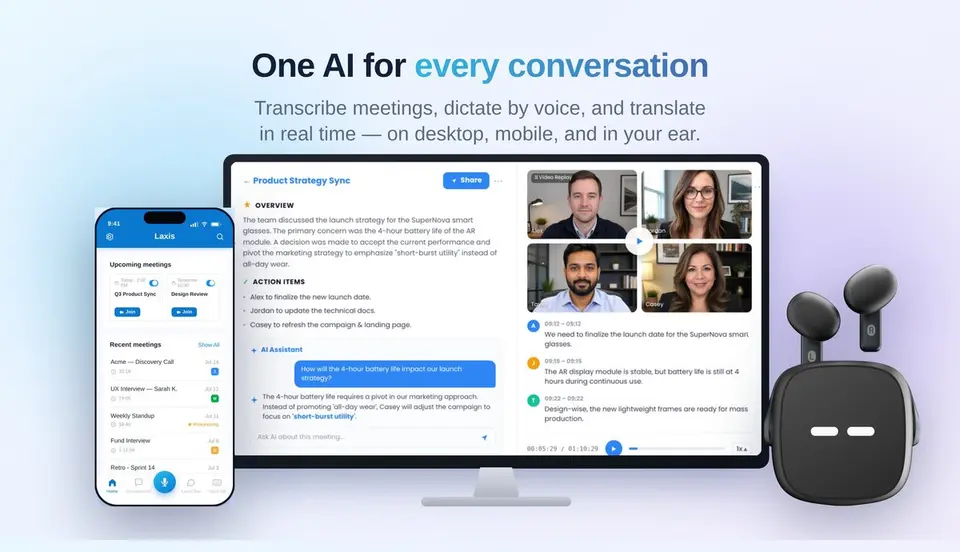
Every plan, grade, refund rule and rival among AI meeting note takers, read from Laxis’s own pages.
Made by Laxis, Inc. · checked Oct 9, 2026 · toolgpa.com
Contents
- 01WelcomeWhat it is, who it suits, its grades and the ten things to know first
- 02What it costsEvery plan, the free plan, ways to pay less and how prices have moved
- 03What it doesIts main features, where it runs, what it works with and who makes it
- 04Where it standsIts grades against its category, and whether to keep it or make your own
- 05The alternativesThe tools it is most often weighed against, side by side
- 06Quick answersThe questions people ask about it, each answered in a line or two
- 07About ToolGPAWho made this guide, what else is on the site, and how to cite it
ToolGPA put this guide together from Laxis’s own pages, its app-store listings and our grades. Every fact in it is on Laxis’s page too, where it is kept up to date. Checked Oct 9, 2026.
Part 01 · Overview
Welcome
What it is, who it suits, its grades and the ten things to know first
2.8
GPA, above 32 of the 48 other AI meeting note takers we grade
Laxis records and transcribes online meetings, phone calls and in-person conversations, then merges the transcript with your own notes into a summary with action items. Meetings can be captured from the desktop with no bot, by an assistant bot or from an uploaded file. Every plan also includes a Voice Keyboard for dictating into any app, which draws on the same monthly minutes.
To get you started, here are 9 things to know about Laxis, taken from its own pages and our grades.
No rating on record, but nothing much to set up: record from the desktop, invite the bot through your calendar, or drop a file in.
- 1
Best for meeting notes and dictation in one subscription
Laxis is a meeting notetaker and a voice keyboard for dictating into any app, and it folds the notes you type during a meeting into the summary.
- 2
Paid plans start at $9.99 a month
As its pricing page puts it: $9.99 per month, billed yearly.
- 3
There is a free plan
Basic plan: 300 transcription minutes a month shared with dictation, recordings up to 45 minutes, meeting summaries, search and 30 days of conversation history.
- 4
It runs on 5 platforms
Web, macOS, Windows, iOS and Android, with a browser extension too.
- 5
Three ways to capture
Record from the desktop with no bot in the meeting, invite an assistant bot through calendar events, or upload existing audio and video. It covers Zoom, Google Meet and Teams.
- 6
Summaries built on your notes
Laxis combines the notes you type during a meeting with the transcript, so the summary, action items and topics reflect what you marked as important.
- 7
AI Chat and search
Search across every recorded conversation on any plan. AI Chat, which answers questions from past meetings, starts on Premium.
- 8
A 2.8 GPA, above 32 of 48
That is against the other AI meeting note takers we grade, on value, the free plan, features, ease of use and platforms.
- 9
Keep it
To replace Laxis you would be making a bot that joins your calls and turns the talk into notes. That is not a weekend's work, with an AI app builder or without one.
Laxis at a glance
- Pricing
- Free plan, from $9.99 per month, billed yearly
- Free plan
- Yes
- Free trial
- 14-day free trial of Premium, no credit card required; accounts then move to the free Basic plan
- Runs on
- Web, macOS, Windows, iOS, Android, Browser extension
- Made by
- Laxis, Inc., since 2020
- Category
- AI Meeting Notes
- Our grade
- 2.8 GPA, good
The report card
Best for meeting notes and dictation in one subscription
Laxis is a meeting notetaker and a voice keyboard for dictating into any app, and it folds the notes you type during a meeting into the summary. Premium is $9.99 a month on the yearly plan for 2,000 minutes. Dictation and meetings share one pot of minutes, free recordings stop at 45 minutes, and unlimited transcription and CRM sync wait for Business at $19.99.
| Subject | Grade | Comment |
|---|---|---|
| Value for money | C | Premium is $9.99 a month on the yearly plan, bang on this category's middle, or $15.99 monthly, for 2,000 minutes a month. Unlimited transcription, CRM sync and Zapier wait on Business at $19.99, which is the dear end. |
| Free plan and trial | C | Basic gives 300 minutes a month with summaries, search and export, but dictation eats the same minutes, each recording stops at 45 minutes and meetings are archived after 30 days. |
| Features | B | It covers the job: record from the desktop with no bot, send a bot through your calendar, or upload a file, and the summary folds in the notes you typed. The Voice Keyboard comes on every plan. AI Chat, the AI Writer and live translation all start at Premium, CRM sync at Business. |
| Ease of use | B | No rating on record, but nothing much to set up: record from the desktop, invite the bot through your calendar, or drop a file in. |
| Platforms and integrations | A | Web, Mac, Windows, iPhone, Android and a browser extension. Premium adds an MCP connector, and Business pushes notes to HubSpot and Salesforce and reaches 7,000-plus apps through Zapier. The API is Enterprise only. |
An A is worth 4 points, a B 3, a C 2, a D 1 and an F nothing. The GPA is the average of the five.
Who Laxis is for
- Fits if you want meeting notes and dictation on one subscription
- Works for people who type their own notes in meetings and want them worked into the summary
Who it is not for
- Tight if you stay on Basic: 300 minutes a month, 45 minutes a recording and meetings archived after 30 days
- Skip it if you dictate all day and sit in meetings too, as both draw on the same monthly minutes
- Pricey if you want unlimited transcription, CRM sync or Zapier, since those are Business at $19.99 a month yearly ($29.99 monthly)
- Tight if you stay on Premium, which caps you at 2,000 minutes a month and 2 hours a recording
- Watch out: in-app purchases on iPhone or Android are billed by Apple or Google and may differ, and the API is Enterprise only
Good to know
Good for
- People who want meeting notes and dictation in one subscription
- Sales teams that sync call notes to HubSpot or Salesforce
- Recording phone calls and in-person conversations as well as online meetings
Worth knowing
- Basic allows 300 minutes a month across meetings and dictation, stops recordings at 45 minutes and archives meetings after 30 days.
- Premium is capped at 2,000 minutes a month and 2 hours per recording. Unlimited transcription needs Business.
- CRM automation, Zapier integrations, video replay and team admin are limited to Business and Enterprise.
- Website prices are in USD. Purchases made inside the iOS or Android apps are billed by Apple or Google and may differ.
Part 02 · Pricing
What it costs
Every plan, the free plan, ways to pay less and how prices have moved
$9.99
A month to start. There is a free plan too
Laxis has a free plan. Paid plans start at $9.99 per month, billed yearly.
Basic
$0
300 transcription minutes a month, 45 minutes per recording, summaries, search, export and 30 days of conversation history.
Premium
$9.99
per month, billed yearly ($15.99 billed monthly)
2,000 minutes a month, 2-hour recordings, unlimited storage, AI Chat, AI Writer with 40+ templates, live translation and an MCP connector.
Business
$19.99
per month, billed yearly ($29.99 billed monthly)
Unlimited transcription, 4-hour recordings, CRM automation, 7,000+ app integrations, team admin, priority support and unlimited dictation.
Enterprise
Custom
Custom transcription volume, API and SSO integration, org-wide deployment with MDM support, private AI models and a dedicated account manager.
The free plan
Basic plan: 300 transcription minutes a month shared with dictation, recordings up to 45 minutes, meeting summaries, search and 30 days of conversation history.
Trying it first
14-day free trial of Premium, no credit card required; accounts then move to the free Basic plan
Read from laxis.com on Oct 9, 2026.
Ways to pay less
Annual discount
Save up to 38% with yearly billing
Laxis labels yearly billing as saving up to 38%. Premium drops from $15.99 to $9.99 a month and Business from $29.99 to $19.99 a month.
Stated on laxis.comNonprofit
Special pricing for non-profits
The pricing FAQ says non-profits can contact Laxis's partnership team to apply for specialized pricing. The amount is not published.
Stated on laxis.comEducation
Special pricing for educational institutions
The same FAQ extends specialized pricing to educational institutions on application to the partnership team. The amount is not published.
Stated on laxis.com
What the app costs elsewhere
Each country’s App Store price for “Premium Monthly”, against $15.99 in the United States, in dollars at the day’s rate. The four cheapest and the four dearest of 11.
| Country | Price there | In dollars | Against the US |
|---|---|---|---|
| Turkey | ₺264,99 | $5.39 | 66% less |
| Philippines | ₱ 799.00 | $12.72 | 20% less |
| Indonesia | Rp 249ribu | $13.93 | 13% less |
| Canada | $20.49 | $14.40 | 10% less |
| Brazil | R$ 89,90 | $17.96 | 12% more |
| Germany | 16,99 € | $19.04 | 19% more |
| United Kingdom | £14.49 | $19.16 | 20% more |
| Mexico | $399.00 | $21.92 | 37% more |
Part 03 · Features
What it does
Its main features, where it runs, what it works with and who makes it
6
Places it runs: Web, macOS, Windows, iOS, Android and Browser extension
AI meeting notetaker bundled with a voice dictation keyboard. Here is what it does, as its own site describes it, and what it covers: AI features, meeting notes, transcription, dictation, chat assistant, templates.
AI Chat, the AI Writer and live translation all start at Premium, CRM sync at Business.
- Three ways to capture
- Record from the desktop with no bot in the meeting, invite an assistant bot through calendar events, or upload existing audio and video. It covers Zoom, Google Meet and Teams.
- Summaries built on your notes
- Laxis combines the notes you type during a meeting with the transcript, so the summary, action items and topics reflect what you marked as important.
- AI Chat and search
- Search across every recorded conversation on any plan. AI Chat, which answers questions from past meetings, starts on Premium.
- AI Writer and templates
- From Premium, turns a transcript into a finished document such as a follow-up email or a MEDDIC sales report, using more than 40 templates.
- Voice Keyboard
- Dictates into any app and removes filler words and repetition. It is included on every plan and uses the same pool of monthly minutes as meetings.
- CRM and app sync
- The Business plan pushes notes and action items into HubSpot and Salesforce and connects to 7,000+ apps through Zapier.
Where it runs
- Web
- macOS
- Windows
- iOS
- Android
- Browser extension
What it works with
- Zoom
- Google Meet
- Microsoft Teams
- HubSpot
- Salesforce
- Slack
- Notion
- Zapier
Laxis is made by Laxis, Inc., and has been around since 2020.
Part 04 · Standing
Where it stands
Its grades against its category, and whether to keep it or make your own
32/48
Other AI meeting note takers it is graded above
Laxis's GPA of 2.8 is higher than 32 of the 48 other AI meeting note takers we grade, and level with 5.
It stands best on platforms and integrations (A, above 30 of 48) and worst on free plan and trial (C, above 5).
Its paid plans start at $9.99 a month, against a middle price of $10 for the category: 21 of the 47 others that charge start lower.
On features, ease of use and platforms it scores 3.3 out of 4. 5 tools score higher and cost less.
Each grade against the category
Every bar is all 49 AI meeting note takers we grade, cut by the letter each got. Laxis’s own letter is outlined.
- CValue for moneyAbove 13 of 48
- CFree plan and trialAbove 5 of 48
- BFeaturesAbove 10 of 48
- BEase of useAbove 20 of 48
- APlatforms and integrationsAbove 30 of 48
Price against what you get
Each dot is one of 48 AI meeting note takers. Further left costs less; higher up scores better on features, ease of use and platforms. Laxis is the marked dot.
What paid plans start at, a month (each step along is roughly double) →
Keep it, or make your own?
Whether this is something you could build for yourself with an AI app builder, and what you would give up.
Keep it
To replace Laxis you would be making a bot that joins your calls and turns the talk into notes. That is not a weekend's work, with an AI app builder or without one.
It is one of the better ones too: its GPA of 2.8 is higher than 32 of the 48 other AI meeting note takers we grade. It costs $119.88 a year.
What you could make
- Templates: an app builder makes this well.
What you could not
- A bot that joins your calls and turns the talk into notes.
- An AI model, which you can rent by the request but not make.
- Dictation that types into any app on your computer.
- Speech turned into text you can trust.
- Apps for macOS, Windows, iOS and Android that stay in step with each other.
- It plugs into other products, Zoom, Google Meet and Microsoft Teams among them.
- Sharing with other people, which means accounts and invitations.
- The depth: we grade its features B, which means it covers the whole job.
What this rests on. Laxis’s listing: what it does, where it runs, what it plugs into and what it costs. It is a judgement about the kind of software this is. We have not built a replacement for it, and making your own means looking after it too. How we decide, and every tool’s verdict.
Part 05 · Alternatives
The alternatives
The tools it is most often weighed against, side by side





Otter.ai, Fireflies.ai, Fathom, Granola and Notta
The 5 tools Laxis is most often weighed against, with where each one differs from it.
- 3.0GPA
Otter.ai
Free plan · from $8.33/mo
Live meeting transcription with summaries and AI chat.
- Laxis also covers dictation and templates.
- 3.2GPA
Fireflies.ai
Free plan · from $10/mo
Meeting notetaker that records, transcribes and summarizes calls.
- Laxis also covers templates.
- 2.8GPA
Fathom
Free plan · from $15/mo
AI notetaker for Zoom, Google Meet and Teams with a free plan.
- Only Laxis lists a web app.
- Only Laxis lists an Android app.
- Only Laxis lists a browser extension.
- 3.0GPA
Granola
Free plan · from $14/mo
AI notepad that transcribes meetings from device audio, no bot.
- Only Laxis lists a web app.
- Only Laxis lists a browser extension.
- Laxis also covers dictation.
- 2.6GPA
Notta
Free plan · from $8.17/mo
AI notetaker and transcription for meetings, files and recordings.
- Laxis also covers dictation and templates.
- Notta also covers screen recording.
Part 06 · Questions
Quick answers
The questions people ask about it, each answered in a line or two
14
Questions, each answered in a line or two
The short version of everything above, for when you only need the answer. Each one is told in full in its part of the guide.
Is Laxis free?
Laxis has a free plan. Basic plan: 300 transcription minutes a month shared with dictation, recordings up to 45 minutes, meeting summaries, search and 30 days of conversation history.
How much does Laxis cost?
Laxis lists 4 plans. Basic: $0.
What platforms does Laxis work on?
Laxis is available on Web, macOS, Windows, iOS and Android. It also has a browser extension.
Does Laxis offer any discounts?
Laxis publicly lists the following: Save up to 38% with yearly billing; Special pricing for non-profits; Special pricing for educational institutions.
Does Laxis have a Linux app?
No Linux app was listed when its pages were read on Oct 9, 2026. Laxis is listed for Web, macOS, Windows, iOS and Android.
Is Laxis open source?
Laxis is not described as open source on its own site, as read on Oct 9, 2026.
What does Laxis integrate with?
Laxis's listing names Zoom, Google Meet, Microsoft Teams, HubSpot, Salesforce, Slack, Notion and Zapier.
Does Laxis have a student discount?
Special pricing for educational institutions. The same FAQ extends specialized pricing to educational institutions on application to the partnership team.
Does Laxis have a free trial?
Yes. 14-day free trial of Premium, no credit card required; accounts then move to the free Basic plan.
Who makes Laxis?
Laxis is made by Laxis, Inc. It dates from 2020.
What are the alternatives to Laxis?
The closest alternatives to Laxis in our directory are Otter.ai, Fireflies.ai, Fathom, Granola and Notta.
How does Laxis compare with other AI meeting note takers?
Laxis's GPA of 2.8 is higher than 32 of the 48 other AI meeting note takers we grade, and level with 5.
Is Laxis good value for money?
ToolGPA grades Laxis C for value for money. Its paid plans start at $9.99 a month, against a middle price of $10 for the category: 21 of the 47 others that charge start lower.
Could I make my own version of Laxis?
To replace Laxis you would be making a bot that joins your calls and turns the talk into notes.
Where this guide comes from
The prices, plans, platforms and features were read from Laxis’s own pages on Oct 9, 2026, and the grades were given on Oct 10, 2026. Graded from this listing, whose facts were read from Laxis's own pages on 5 October 2026. Also tested with a demo account on 2026-04-11.
Every tool we list gets five grades, A to F, each with its reason, and a GPA that averages them. How each is decided is at toolgpa.com/grades. This guide is ToolGPA’s own work; it is not made, paid for or approved by Laxis, Inc. Prices change, so check laxis.com before you buy.
Part 07 · About
About ToolGPA
Who made this guide, what else is on the site, and how to cite it
3,189
Tools graded, in 94 categories
ToolGPA grades software the way a school report grades a pupil: five subjects, a letter for each with the reason written beside it, and a GPA that averages them. Prices, plans and platforms are read from each maker’s own pages and dated, so you always know how fresh a figure is.
Every grade, review and ranking on ToolGPA is our own judgement. No company can pay for a grade or change one. Every tool on the site has a guide like this one, free to download and pass on. It all lives at toolgpa.com.
3,189
tools graded
94
categories
426
price changes on record
579
apps priced in 12 countries
What else is on toolgpa.com
- Laxis, kept up to dateEverything in this guide, with prices and grades as they are todaytoolgpa.com/tools/laxis
- How grades are givenThe rules behind every letter and every GPAtoolgpa.com/grades
- Value chartsWhat each tool costs against what it scores, for every categorytoolgpa.com/charts
- CompareAny two tools side by side, plan by plantoolgpa.com/compare
- Price changesEvery price rise and cut on record, each with its sourcetoolgpa.com/price-changes
- Prices by countryWhat apps cost on the App Store in 12 countriestoolgpa.com/prices-by-country
- Pay lessEvery public discount: yearly billing, students, nonprofitstoolgpa.com/save
- Keep or makeWhich tools are worth paying for, and which you could build yourselftoolgpa.com/keep-or-make
Scan for the live page
Prices and grades as they are today
Quoting this guide?
Please name ToolGPA and link to the live page, so readers can check the figures for themselves:
ToolGPA, "Laxis: The Insider's Guide", checked Oct 9, 2026. https://toolgpa.com/tools/laxis
Know someone choosing between AI meeting note takers?
Send them this guide: toolgpa.com/tools/laxis/guide
ToolGPA elsewhere: youtube.com/@toolgpa
See our other guides
The best-graded AI meeting note takers after Laxis, each with an Insider's Guide of its own.
- AI Meeting Notes Insider's GuideEvery one of the 49 AI meeting note takers we grade, compared
- HyNote Insider's GuideAI note taker for meetings, audio, PDFs and videos3.4 GPA
- Wave AI Insider's GuideAI note taker and recorder for meetings, calls and lectures3.4 GPA
- Fireflies.ai Insider's GuideMeeting notetaker that records, transcribes and summarizes calls3.2 GPA


Choosing software? Every tool graded, every price dated.
Compare tools at toolgpa.com ›Everything in this guide is ToolGPA’s own summary of what Laxis’s pages, its app-store listings and public reviews said on the dates shown. Grades are our judgement under the rules at toolgpa.com/grades. Every grade, review and ranking on ToolGPA is our own judgement. No company can pay for a grade or change one. Laxis is a trademark of its owner, and this guide is not made, paid for or approved by Laxis, Inc. Prices and plans change: check laxis.com before you buy.