
Minutes AI review (2026): is it worth paying for?
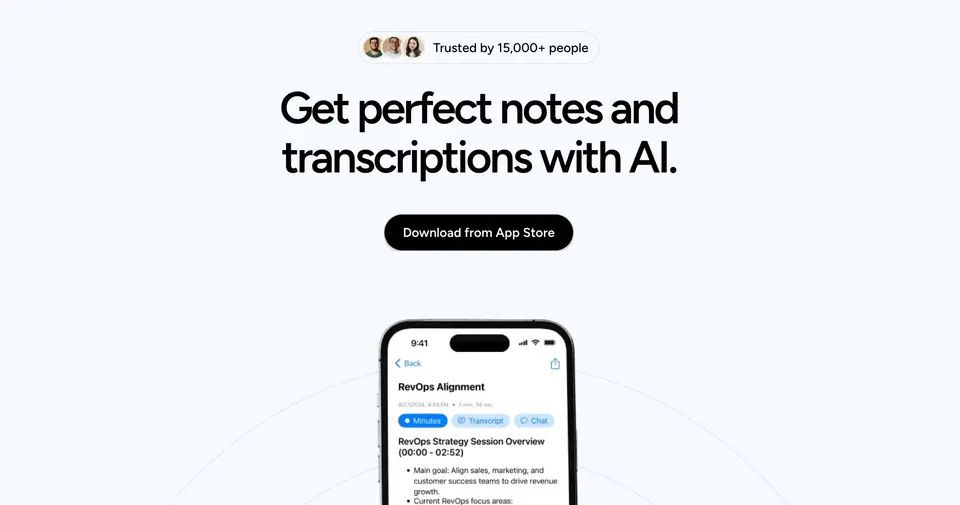
Recorder app that turns audio into transcripts and formatted notes
Black Friday: is there a Minutes AI sale?
Minutes AI report card
Fair · out of 4.0 · graded Oct 10, 2026
Best for turning a recording into notes and a summary
Minutes AI records meetings, lectures and interviews on a phone, tablet or Mac and turns them into a transcript with speakers labeled, notes with headings and a summary. It has 4.9 from about 14,000 App Store ratings. There's no pricing page, the App Store lists $14.99 and $99.99 without saying what period each covers, the trial's length isn't stated, and YouTube is the only connection.
Who Minutes AI is for
- Fits if you record meetings, lectures or interviews on your phone and want them written up
- Works for turning a YouTube video or an old audio file into notes
Who Minutes AI is not for
- Not for you if you want a free plan, because there isn't one and the trial's length isn't published
- Skip it if you want to know the price before you download, as the site has no pricing page and the store shows no billing period
- Too light for teams that want notes sent to a CRM or a chat app, since YouTube is the only connection listed
- Not for you if you're on Windows or want a web version, as neither is mentioned
- Watch out: the enterprise plan goes through a contact form, with no features or price published
Why Minutes AI gets a 2.4
Five grades, each with its reason. The GPA is their average: an A is 4 points, an F is none.
- CValue for moneyThe only purchase is Unlimited Access, listed on the US App Store at $14.99 and $99.99 with no period against either. Read $14.99 as a month, which is what the terms' note about monthly billing points to, and that's ordinary money for this category, at the dear end of ordinary.
- DFree plan and trialThere's no free plan at all. A trial is offered inside the apps, but neither the site nor either store listing says how long it runs, so there's nothing on record you can plan around.
- CFeaturesIt does the basics of this job: one-tap recording with a live transcript and labelled speakers, notes with headings and bullets, a summary, and a chat about any recording. Uploaded files and YouTube links work too. The gap is the listing's own: YouTube is the only connection named, so notes leave as PDFs or email.
- AEase of use4.9 from about 14,000 App Store ratings, the top band. Recording starts with one tap and the notes come out already formatted, so there's nothing to set up first.
- BPlatforms and integrationsBoth phones plus a Mac app that syncs with a calendar and takes notes from the computer's audio. No Windows and no web version is mentioned, and YouTube is the only integration listed, which is what keeps it off an A.
What these grades rest on. Graded from this listing, whose facts were read from Minutes AI's own pages on 6 October 2026, and its App Store rating. Also tested with a demo account on 2026-03-21. How we review and grade.
Make Minutes AI? Put this grade on your site

Paste this where you want the badge. It links here and follows the grade if it changes. About badges
<a href="https://toolgpa.com/tools/minutes-ai#review"><img src="https://toolgpa.com/badge/minutes-ai.svg" alt="Minutes AI: 2.4 GPA on ToolGPA" width="196" height="56"></a>Where Minutes AI stands among AI meeting note takers
Minutes AI's GPA of 2.4 is higher than 48 of the 89 other AI meeting note takers we grade, and level with 11.
It stands best on ease of use (A, above 81 of 89) and worst on free plan and trial (D, above 12).
Each grade against the category
Every bar is all 90 AI meeting note takers we grade, cut by the letter each got. Minutes AI’s own letter is outlined.
- CValue for moneyAbove 21 of 89, level with 57
- DFree plan and trialAbove 12 of 89, level with 6
- CFeaturesAbove 1 of 89, level with 45
- AEase of useAbove 81 of 89, level with 8
- BPlatforms and integrationsAbove 16 of 89, level with 50
Keep Minutes AI, or make your own?
Keep it
To replace Minutes AI you would be making a bot that joins your calls and turns the talk into notes. That is not a weekend's work, with an AI app builder or without one.
What you could not
- A bot that joins your calls and turns the talk into notes.
- Speech turned into text you can trust.
- An AI model, which you rent by the request and build your app around.
- Apps for macOS, iOS and Android that stay in step with each other.
What this rests on. Minutes AI’s listing: what it does, where it runs, what it plugs into and what it costs. It is a judgement about the kind of software this is. We have not built a replacement for it, and making your own means looking after it too. How we decide, and every tool’s verdict.
What is Minutes AI?
Minutes AI records meetings, lectures and interviews on a phone, tablet or Mac and turns the audio into a speaker-labeled transcript, formatted notes and a summary. Audio can also come from an uploaded file or a YouTube link, and a chat answers questions about any recording. Paid access is sold in the apps as a purchase called Unlimited Access, and an enterprise plan is available on request.
Worth knowing
- The site has no pricing page: the US App Store lists Unlimited Access at $14.99 and $99.99 without saying which billing period each covers.
- Apps are listed for iOS, macOS and Android only; no Windows or web version is mentioned.
- The enterprise plan is handled through a contact form, with no published features or price.
- No connections to CRM, chat or task apps are listed; notes leave the app as PDFs, emails or texts.
Key features
- Live recording and transcription
- Recording starts with one tap and produces a live, word-for-word transcript with labeled speakers. You can list uncommon names, terms and acronyms for the app to listen for.
- Formatted notes and summaries
- Each recording is turned into notes with headings and bullets of the key points, plus a summary. The text can be edited and searched for words from the audio.
- Chat with a recording
- Ask questions about a recording, pull out key points or list action items, for example which figures a speaker quoted on a slide.
- File upload and YouTube import
- Besides the built-in recorder, the app accepts audio files (mp3, mp4, mpeg, mpga, m4a, wav and webm) and pasted YouTube links.
- Separate transcript and note languages
- The homepage cites support for more than 50 languages. Transcription and summary languages are set separately, so audio in Spanish can produce notes in English.
- Export and sharing
- Notes can be shared as formatted PDFs, emails and texts. The Mac app syncs with a calendar and takes notes from the computer's audio.
Minutes AI pricing
As of Nov 2, 2026, Minutes AI is a paid product with a free trial, starting at $14.99 (Unlimited Access; billing period not shown on the store listing).
- Starts at
- $14.99 (Unlimited Access; billing period not shown on the store listing)
- Free plan
- None
- Free trial
- A free trial is offered in the apps; its length is not stated on the site or the store listings
| Plan | Price | What you get |
|---|---|---|
| Unlimited Access | $14.99 or $99.99billing period not shown on the store listing | The app's only in-app purchase, listed at two prices on the US App Store. The terms of use say subscriptions are typically billed monthly. |
| Enterprise | Custom | Requested through a form linked from the homepage; no features or prices are published for it. |
Read from apps.apple.com on Nov 2, 2026. Prices change, so confirm with Minutes AI before you buy.
How people rate the Minutes AI app
4.9
out of 5 for the iPhone and iPad app
- 5 stars92%
- 4 stars5%
- 3 stars1%
- 2 stars<1%
- 1 star<1%
14,010 ratings on the App Store in the United States, read Oct 6, 2026. It rates the app, not everything the product does. See the listing
Works with
Minutes AI alternatives
- Minutes AI vs Otter.ai
Free plan · from $8.33/mo
- Minutes AI vs Summary AI
Free trial · from $8.99
- Minutes AI vs Cue
Free trial · from $99.99/yr
- Minutes AI vs VOMO
Free trial · from $1.92
- Minutes AI vs Notta
Free plan · from $8.17/mo



Common questions
Does Minutes AI have a Windows app?
No Windows app was listed when its pages were read on Nov 2, 2026. Minutes AI is listed for macOS, iOS and Android.
Does Minutes AI have a Linux app?
No Linux app was listed when its pages were read on Nov 2, 2026. Minutes AI is listed for macOS, iOS and Android.
Is Minutes AI open source?
Minutes AI is not described as open source on its own site, as read on Nov 2, 2026.
Sources for this page
The prices, plans, platforms and features above were read from these pages on Nov 2, 2026. What people say is linked where it appears.