Soulver
Notepad calculator for Mac, iPad and iPhone with an answer column
What is Soulver?
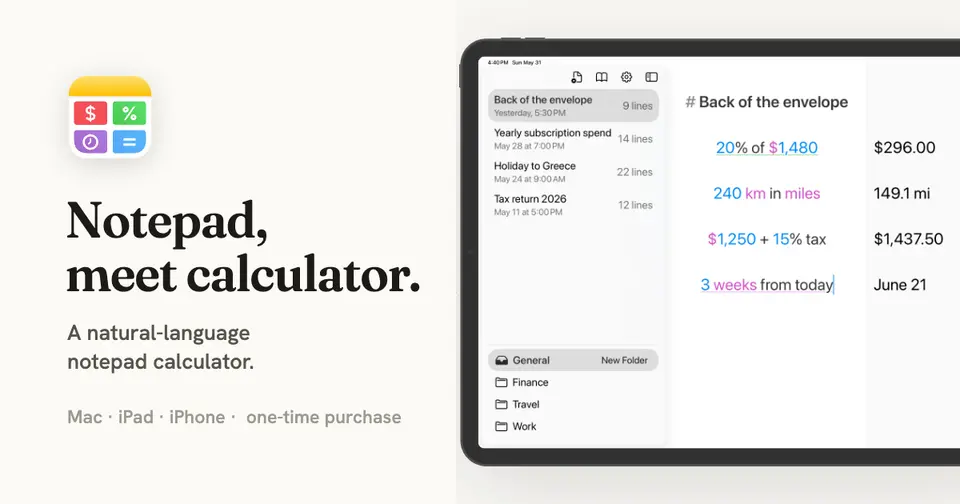
Soulver is a notepad calculator for Mac, iPad and iPhone from Acqualia Software. You write a problem line by line in words and numbers, and the answer to each line appears in a column beside it. It recognizes currencies, units, dates, percentages and variables, and is sold as a one-time purchase with a 60-day trial instead of a subscription.
Soulver is a paid product with a free trial, starting at $15 one-time (iPhone only), or $59 one-time for Mac, iPad and iPhone. See every plan
Good for
- Working through multi-step sums with notes beside the numbers
- People with a Mac, iPad and iPhone who want one purchase for all three
- Trip budgets, quotes and split expenses that mix dates, currencies and totals
Worth knowing
- Apple platforms only: it requires macOS 14, iPadOS 17 or iOS 17 or later, and the site lists no Windows, Android or web version.
- There is no free plan. After the 60-day trial, sheets can still be viewed and exported, but creating and editing them requires a purchase.
- Access to 150k+ stocks, Wolfram|Alpha queries and advanced weather data costs a separate $26 a year on the App Store.
- Major versions are paid upgrades, which the vendor says have averaged seven years apart; Soulver 3 owners get Soulver 4 at half price.
Key features
- Answer column
- A sheet works like a notepad: write words and numbers on a line and the answer appears alongside it as you type, with a floating total for the whole sheet at the bottom.
- Line references, variables and subtotals
- An answer can be referenced on later lines and updates when earlier lines change. Multi-word variables, subtotals and totals of every line carrying a tag are supported.
- Currencies, units and dates
- Recognizes 190 currencies, more than 200 units, percentages, calendar and clock-time math and time zones, with functions for sales tax, loans, interest and inflation.
- Live data
- Pulls live and historical currency and stock prices and weather into a sheet. Access to 150k+ stocks and inline Wolfram|Alpha queries needs the optional data services subscription.
- iCloud sync and export
- Sheets sync through iCloud across Mac, iPad and iPhone with automatic backups. They are plain text and can be exported to PDF, printed or sent as a styled HTML email.
- Automation and command line
- A Shortcuts action, URL schemes, macOS Services and an Alfred workflow connect Soulver to other tools. A free standalone command-line tool can create and edit sheets.
Soulver pricing
- Starts at
- $15 one-time (iPhone only), or $59 one-time for Mac, iPad and iPhone
- Free plan
- None
- Free trial
- 60-day free trial with no account and no automatic charge; sheets become read-only afterwards
| Plan | Price | What you get |
|---|---|---|
| Soulver (iPhone only) | $15one-time purchase | The iPhone version on its own, for buyers who do not need the Mac or iPad apps. |
| Soulver (Mac, iPad and iPhone) | $59one-time purchase on the App Store | One purchase covers all three platforms, with 190 currencies and 8 tech stocks included. The vendor gives free updates between major releases. |
| Data services subscription | $26per year, optional add-on | Knowledge Assistant, Live Stocks & Advanced Weather: 150k+ stock tickers, inline Wolfram|Alpha queries and advanced weather data. |
| Setapp | $15per month, through a Setapp membership | Soulver as one of about 260 apps in the Setapp catalog. The data services subscription is complimentary for Setapp users. |
Read from documentation.soulver.app on Oct 9, 2026. Prices change, so confirm with Soulver before you buy.
Ways to pay less
- Other savingsHalf-price upgrade from Soulver 3
Buyers of Soulver 3 on the App Store get Soulver 4 for $29 instead of $59, and a registered direct-download copy of Soulver 3 on the same Mac unlocks the same 50% discount.
Stated on documentation.soulver.app
How people rate the Soulver app
4.9
out of 5 for the iPhone and iPad app
- 5 stars96%
- 4 stars2%
- 3 stars<1%
- 2 stars<1%
- 1 star1%
431 ratings on the App Store in the United States, read Oct 9, 2026. It rates the app, not everything the product does. See the listing
Works with
- Alfred
- Wolfram|Alpha
- Apple Shortcuts
- iCloud
Soulver alternatives
- Soulver vs Numi
Free plan · from $29.99 one-time
- Soulver vs Antinote
Free trial · from $5 one-time
- Soulver vs Raycast
Free plan · from $96/yr
- Soulver vs LaunchBar
Free plan · from €35 one-time





Common questions
Is Soulver free?
No, Soulver is a paid product, but you can try it first. 60-day free trial with no account and no automatic charge; sheets become read-only afterwards.
How much does Soulver cost?
Soulver lists 4 plans. Soulver (iPhone only): $15 one-time purchase. Soulver (Mac, iPad and iPhone): $59 one-time purchase on the App Store. Data services subscription: $26 per year, optional add-on. Setapp: $15 per month, through a Setapp membership. Prices were read from documentation.soulver.app on Oct 9, 2026.
What platforms does Soulver work on?
Soulver is available on macOS and iOS.
Does Soulver offer any discounts?
Soulver publicly lists the following: Half-price upgrade from Soulver 3.
How is Soulver rated?
Soulver's iPhone and iPad app averages 4.9 out of 5 from 431 ratings on the App Store in the United States, as read on Oct 9, 2026. That is the store's rating of the app, not a score from us.
Does Soulver have an Android app?
No Android app was listed when its pages were read on Oct 9, 2026. Soulver is listed for macOS and iOS.
Does Soulver have a Windows app?
No Windows app was listed when its pages were read on Oct 9, 2026. Soulver is listed for macOS and iOS.
Is Soulver open source?
Soulver is not described as open source on its own site, as read on Oct 9, 2026.
What does Soulver integrate with?
Soulver's listing names Alfred, Wolfram|Alpha, Apple Shortcuts and iCloud. A listing names up to eight integrations, so it may connect to more.
Who makes Soulver?
Soulver is made by Acqualia Software. It dates from 2005.
What are the alternatives to Soulver?
The closest alternatives to Soulver in our directory are Numi, Antinote, Heynote, Raycast and LaunchBar. Each one has a side-by-side comparison with Soulver.
Sources for this page
The prices, plans, platforms and features above were read from these pages on Oct 9, 2026. What people say is linked where it appears.
- soulver.app/
- documentation.soulver.app/
- documentation.soulver.app/whats-new-in-soulver-4.md
- documentation.soulver.app/documentation/live-data/live-and-historical-stock-prices.md
- documentation.soulver.app/documentation/live-data/knowledge-assistant.md
- documentation.soulver.app/documentation/integrations.md
- documentation.soulver.app/documentation/integrations/alfred-and-raycast.md
- documentation.soulver.app/documentation/integrations/command-line-tool-automator-and-services.md
- documentation.soulver.app/llms.txt
- apps.apple.com/us/app/soulver-4/id1508732804