The Superhuman Mail Insider’s Guide
Everything we know about Superhuman Mail in one document: what it costs, its grades, getting a refund, getting help and what else to look at. Read it here, or keep a copy.
Superhuman Mail
The Insider’s Guide
Keyboard-driven email client for Gmail and Outlook with built-in AI

Every plan, grade, refund rule and rival among email apps, read from Superhuman Mail’s own pages.
Made by Superhuman Platform Inc. · checked Oct 4, 2026 · toolgpa.com
Contents
- 01WelcomeWhat it is, who it suits, its grades and the ten things to know first
- 02Insider tipsWhat most people miss: ways to pay less, settings worth changing and the catches
- 03What it costsEvery plan, the free plan, ways to pay less and how prices have moved
- 04What it doesIts main features, where it runs, what it works with and who makes it
- 05Where it standsIts grades against its category, and whether to keep it or make your own
- 06After you payGetting your money back, getting out, and getting help
- 07The alternativesThe tools it is most often weighed against, side by side
- 08Quick answersThe questions people ask about it, each answered in a line or two
- 09About ToolGPAWho made this guide, what else is on the site, and how to cite it
ToolGPA put this guide together from Superhuman Mail’s own pages, its app-store listings and our grades. Every fact in it is on Superhuman Mail’s page too, where it is kept up to date. Checked Oct 4, 2026.
Part 01 · Overview
Welcome
What it is, who it suits, its grades and the ten things to know first
2.2
GPA, above 9 of the 51 other email apps we grade
Superhuman Mail is an email client that sits on top of an existing Gmail or Outlook account. It splits the inbox into focused tabs, leans on keyboard shortcuts and adds AI drafting, summaries and labels, plus team features such as shared threads and comments. It is now one product in the wider Superhuman suite, which also includes Grammarly, Docs and the Go assistant. Mail is sold on its own per-member plans and is also part of the suite's Business plan.
To get you started, here are 9 things to know about Superhuman Mail, taken from its own pages and our grades.
If email isn't most of your day, look elsewhere.
- 1
Best for people who live in their inbox
Superhuman Mail is a keyboard-driven email app that sits on top of a Gmail or Outlook account and splits the inbox into tabs.
- 2
Paid plans start at $25 a month for each person
As its pricing page puts it: $25 per member / month, billed annually ($30 billed monthly).
- 3
It runs on 5 platforms
Web, macOS, Windows, iOS and Android, with a browser extension too.
- 4
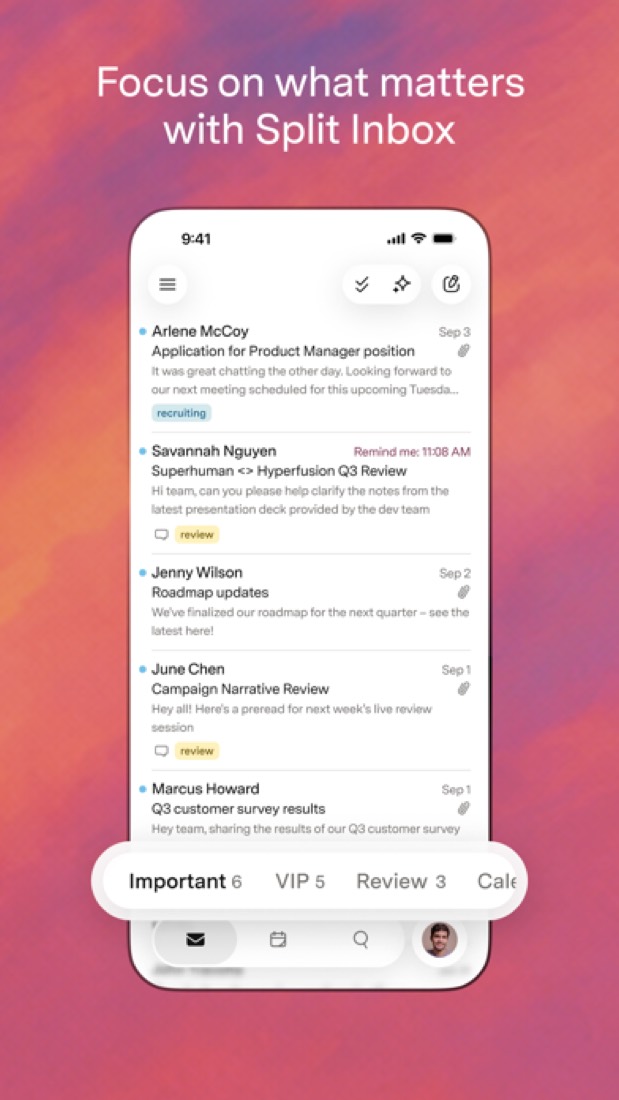
Split Inbox
Divides the inbox into separate tabs, for example mail from teammates, VIPs or specific tools, so each stream can be worked through on its own.
- 5
Keyboard shortcuts and Snippets
Most actions have a keyboard shortcut, and Snippets insert saved phrases, paragraphs or whole emails as you type.
- 6
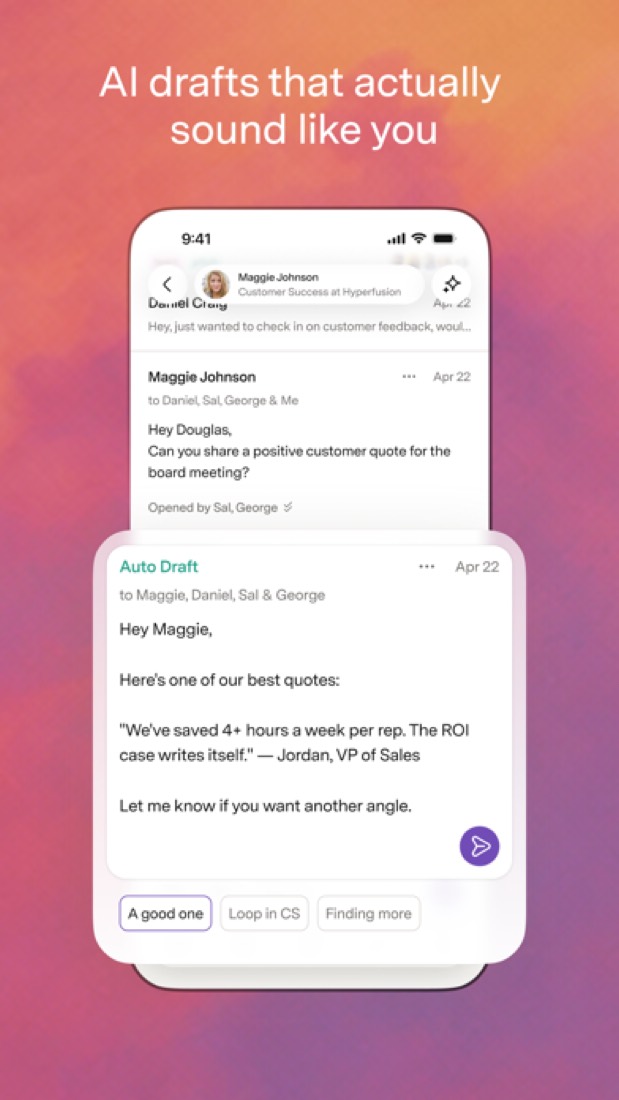
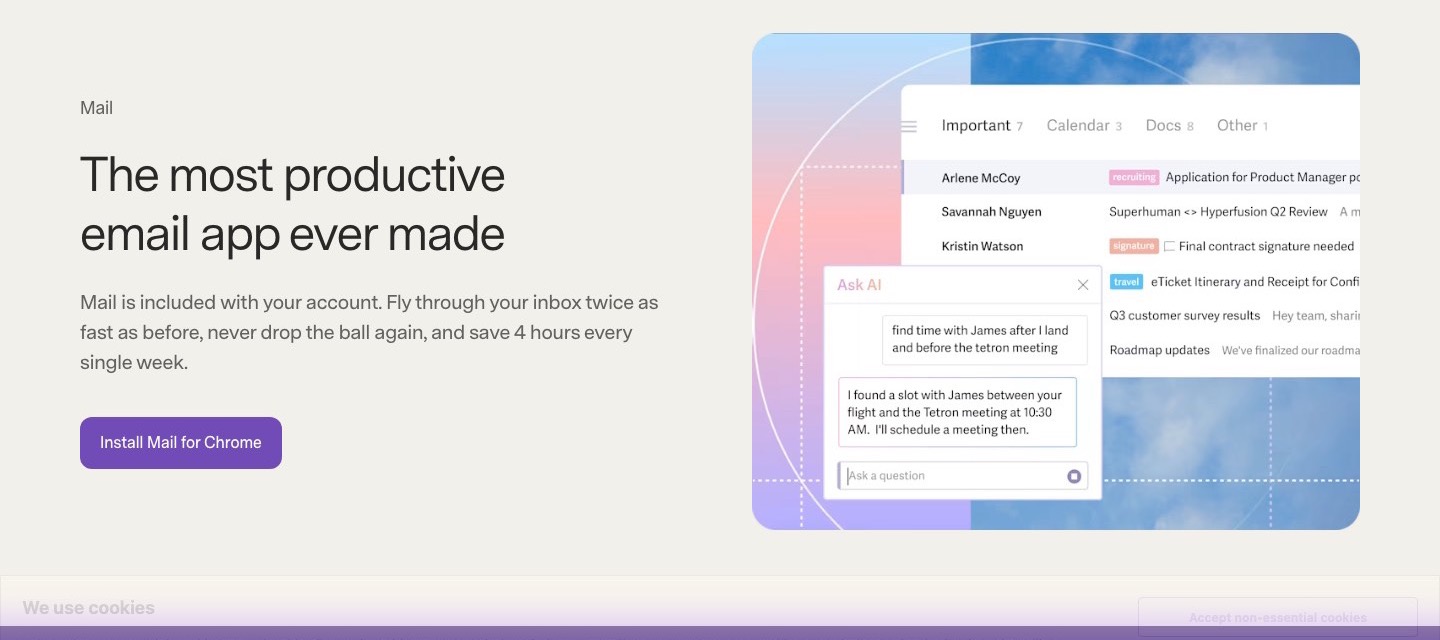
Superhuman AI
Write with AI, Instant Reply, Auto Summarize and Auto Labels are on every plan. Auto Drafts, Ask AI and the Mail MCP server need Business or Enterprise.
- 7
Refunds: no set window
Superhuman's terms are blunt: no refunds, and no credit for a period you only partly used. Pay for a year, change your mind in month two, and the money's gone.
- 8
A 2.2 GPA, above 9 of 51
That is against the other email apps we grade, on value, the free plan, features, ease of use and platforms.
- 9
Keep it
To replace Superhuman Mail you would be making an email client: sending, receiving, threading and searching years of mail. That is not a weekend's work, with an AI app builder or without one.
Superhuman Mail at a glance
- Pricing
- Paid, from $25 per member / month, billed annually ($30 billed monthly)
- Free plan
- No
- Free trial
- None stated
- Runs on
- Web, macOS, Windows, iOS, Android, Browser extension
- Made by
- Superhuman Platform Inc.
- Category
- Email Apps
- Our grade
- 2.2 GPA, fair
- Store rating
- 4.6 on the App Store, 3,689 ratings
The report card
Best for people who live in their inbox
Superhuman Mail is a keyboard-driven email app that sits on top of a Gmail or Outlook account and splits the inbox into tabs. It's $25 a member a month on yearly billing or $30 monthly, with no free plan and no trial mentioned, Auto Drafts and Ask AI need Business at $33, and it doesn't work with any other email provider. If email isn't most of your day, look elsewhere.
| Subject | Grade | Comment |
|---|---|---|
| Value for money | D | $25 a member a month on yearly billing, $30 monthly, which is exactly where this category's dearest tenth begins, against an $8 middle. Unless email is most of your job that's hard to justify, and Auto Drafts and Ask AI need $33. |
| Free plan and trial | F | There isn't one. No free plan, and the pricing page doesn't mention a trial, so you pay to find out. |
| Features | B | Split Inbox, a shortcut for everything, Snippets, no-reply reminders, snooze, send later, AI writing and summaries, shared threads and a calendar with booking links. Auto Drafts, Ask AI and the CRM hook-ups sit on Business, and both plans stop at 25 seats. |
| Ease of use | B | 4.6 from about 3,700 App Store ratings, just under our bar for the top mark. One reviewer says the shortcuts took ten minutes to learn, but you do have to learn its way of doing things before it's any quicker. |
| Platforms and integrations | A | Mac, Windows, iPhone, Android and a Chrome extension for the web, with HubSpot, Salesforce, Pipedrive, Zoom, Meet and Teams wired in and an MCP server on Business. It's only for Gmail and Outlook accounts, mind. |
An A is worth 4 points, a B 3, a C 2, a D 1 and an F nothing. The GPA is the average of the five.
Who Superhuman Mail is for
- Fits if you get a high volume of email on Gmail or Outlook and want to work through it from the keyboard
- Works for teams that share and comment on threads instead of forwarding them
Who it is not for
- Skip it if you get twenty emails a day, as Gmail's own app costs nothing
- Tight if you want to try before you buy: there's no free plan and the pricing page mentions no trial
- Pricey if you mainly want AI drafts or CRM links, since Auto Drafts, Ask AI and HubSpot need Business at $33
- Not for you if your email isn't on Gmail or Outlook, as no other providers are listed
- Watch out: both plans stop at 25 seats, SSO and SCIM are Enterprise only, and Enterprise has no published price
Good to know
Good for
- People on Gmail or Outlook who work through a high volume of email
- Teams that want to share and comment on threads instead of forwarding them
- Sales teams on HubSpot, Salesforce or Pipedrive (Business plan and up)
Worth knowing
- There is no free plan, and the pricing page does not mention a free trial.
- Built for Gmail and Outlook accounts; the vendor lists no other email providers.
- Auto Drafts, Ask AI and the HubSpot, Salesforce and Pipedrive integrations are not included in Starter.
- Starter and Business stop at 25 seats; single sign-on and SCIM are Enterprise only.
Part 02 · Tips
Insider tips
What most people miss: ways to pay less, settings worth changing and the catches
7
Things most people miss, each from its own help pages
The things about Superhuman Mail that are easy to miss until they cost you: ways to pay less, settings worth changing and the catches at renewal or when you leave. Each one is from Superhuman Mail’s own pages, linked beside it.
Read on Oct 17, 2026. Read from Superhuman's help centre (account structure, Mail for Startups, the annual plan, the suite billing FAQ, reminders, read statuses and signatures) on 17 October 2026. Not tried out: these tips are what its own pages say.
- 1
Pay less
One subscription covers all of your own email addresses
Superhuman's account help says Mail is priced per person, not per address. Add your personal Gmail to your work seat with Cmd+K, Add Account, as long as you're the one using every address. It suggests staying under 10. A partner or colleague needs a seat of their own.
help.superhuman.com - 2
Pay less
Startups can get a year of the Business plan free
Superhuman Mail for Startups gives 12 months of the Business plan free for up to 5 people. You must have raised no more than $10M, have fewer than 50 employees, be linked to one of its approved VC or accelerator partners, and not be a Mail customer already.
help.superhuman.com - 3
Renewal
Cancelling a yearly plan? Ask about a refund for the rest of it
The terms call payments non-refundable, but the annual plan help page says that if you cancel, you can keep Mail to the end of the year or be refunded the remainder and lose access. Ask support in writing. Yearly plans renew on the date you first signed up.
help.superhuman.com - 4
Pay less
Moving to the suite? Use the same email or you'll pay for Mail twice
Its billing FAQ says an individual Mail subscription can be converted to a Superhuman Business suite plan at superhuman.com/plans, with a pro-rated refund for the unused Mail time. Buy the suite with a different email and Mail keeps billing separately. Mail discounts and credits don't carry over.
help.superhuman.com - 5
Shortcut
Press H and an email comes back if nobody replies
H, or Cmd+K then Remind Me, takes a thread out of your inbox and brings it back at the time you type. Reminders default to "if no reply", so an answer cancels it; press Tab while setting one for "regardless". G then H lists every reminder you've set.
help.superhuman.com - 6
Privacy
Stop other senders seeing when you open their emails
Superhuman can show its users when their emails are opened, on what device and how often, and other tools track you the same way. To block it, press Cmd+K (Ctrl+K on Windows), open Image Settings and choose Block all known tracking pixels.
help.superhuman.com - 7
Setting
Take the "Sent via Superhuman" link out of your signature
Superhuman puts a Sent via Superhuman link in your signature, and if someone signs up through it you both get a month free. Rather not have it on client emails? Press Cmd+K (Ctrl+K), Signatures and untick Include Sent via Superhuman. On a phone, type Signatures in Superhuman Command.
help.superhuman.com
Part 03 · Pricing
What it costs
Every plan, the free plan, ways to pay less and how prices have moved
$25
A month to start, for each person
Superhuman Mail is a paid product, starting at $25 per member / month, billed annually ($30 billed monthly).
No free plan, and the pricing page doesn't mention a trial, so you pay to find out.
Starter
$25
per member / month, billed annually ($30 billed monthly)
Split Inbox, Snippets, core AI writing and summaries, calendar and booking links, and team sharing. Up to 25 seats.
Business
$33
per member / month, billed annually ($40 billed monthly)
Everything in Starter, plus Auto Drafts, Ask AI, the Mail MCP server, CRM integrations and Recent Opens. Up to 25 seats.
Enterprise
Custom
Everything in Business, plus single sign-on, SCIM provisioning, audit logs, team analytics and unlimited seats.
Read from superhuman.com on Oct 4, 2026.
Ways to pay less
Annual discount
17% off with annual billing
The pricing page shows 17% off for annual billing: Starter is $25 per member a month billed annually against $30 billed monthly, and Business is $33 against $40.
Stated on superhuman.com
How its prices have moved
- Sep 6, 2024Business: new, $33 per member / month, billed annually at $396The archived copy of 6 September 2024 lists Business beside Starter, with $480 a year crossed out as the monthly rate; the copy of 14 August 2024 lists Growth there instead. Business appeared between the two.
- Sep 6, 2024Growth: withdrawn (was $30 per user / month, billed monthly, marked down from $45)The archived copy of 14 August 2024 still lists Growth; the copy of 6 September 2024 does not, and has Business in its place. The price given is from the copy of 23 January 2024, the last to state its billing basis.
Part 04 · Features
What it does
Its main features, where it runs, what it works with and who makes it
6
Places it runs: Web, macOS, Windows, iOS, Android and Browser extension
Keyboard-driven email client for Gmail and Outlook with built-in AI. Here is what it does, as its own site describes it, and what it covers: works offline, AI features, keyboard-first, calendar, booking links, email client.
It's only for Gmail and Outlook accounts, mind.
- Split Inbox
- Divides the inbox into separate tabs, for example mail from teammates, VIPs or specific tools, so each stream can be worked through on its own.
- Keyboard shortcuts and Snippets
- Most actions have a keyboard shortcut, and Snippets insert saved phrases, paragraphs or whole emails as you type.
- Superhuman AI
- Write with AI, Instant Reply, Auto Summarize and Auto Labels are on every plan. Auto Drafts, Ask AI and the Mail MCP server need Business or Enterprise.
- Reminders, snooze and send later
- Set a follow-up reminder that fires if nobody replies by a chosen time, snooze threads until they are needed and schedule when a message is sent.
- Shared conversations and comments
- Share a live view of a thread with teammates, comment on it, work on shared drafts and see when a colleague is already replying.
- Calendar and scheduling
- See the day's or week's calendar next to an email, create events, share availability and send booking links, with Zoom, Google Meet and Microsoft Teams links.
Where it runs
- Web
- macOS
- Windows
- iOS
- Android
- Browser extension
What it works with
- Gmail
- Outlook
- HubSpot
- Salesforce
- Pipedrive
- Zoom
- Google Meet
- Microsoft Teams
Superhuman Mail is made by Superhuman Platform Inc.
Part 05 · Standing
Where it stands
Its grades against its category, and whether to keep it or make your own
9/51
Other email apps it is graded above
Superhuman Mail's GPA of 2.2 is higher than 9 of the 51 other email apps we grade, and level with 9.
It stands best on platforms and integrations (A, above 41 of 51) and worst on free plan and trial (F, above 0).
Its paid plans start at $25 a month for each person, against a middle price of $4.99 for the category: 41 of the 45 others that charge start lower.
On features, ease of use and platforms it scores 3.3 out of 4. 1 tool scores higher and costs less.
Each grade against the category
Every bar is all 52 email apps we grade, cut by the letter each got. Superhuman Mail’s own letter is outlined.
- DValue for moneyAbove 0 of 51
- FFree plan and trialAbove 0 of 51
- BFeaturesAbove 30 of 51
- BEase of useAbove 32 of 51
- APlatforms and integrationsAbove 41 of 51
Price against what you get
Each dot is one of 50 email apps. Further left costs less; higher up scores better on features, ease of use and platforms. Superhuman Mail is the marked dot.
What paid plans start at, a month (each step along is roughly double) →
Keep it, or make your own?
Whether this is something you could build for yourself with an AI app builder, and what you would give up.
Keep it
To replace Superhuman Mail you would be making an email client: sending, receiving, threading and searching years of mail. That is not a weekend's work, with an AI app builder or without one.
That makes this kind of software worth paying for, not this one in particular: 33 of the 51 other email apps grade higher. It costs $300 a year.
What you could make
- Calendar: an app builder makes this well.
What you could not
- An email client: sending, receiving, threading and searching years of mail.
- Booking pages that read and write other people's calendars and send the emails.
- Apps for macOS, Windows, iOS and Android that stay in step with each other.
- It is priced for each person, which means accounts and billing for a team.
- It plugs into other products, Gmail, Outlook and HubSpot among them.
- AI features, unless you pay a model provider for each request yourself.
- The depth: we grade its features B, which means it covers the whole job.
What this rests on. Superhuman Mail’s listing: what it does, where it runs, what it plugs into and what it costs. It is a judgement about the kind of software this is. We have not built a replacement for it, and making your own means looking after it too. How we decide, and every tool’s verdict.
Part 06 · Refunds
After you pay
Getting your money back, getting out, and getting help
What happens once you have paid: whether you can get your money back, how to leave, and how to reach a person when something goes wrong. Each is graded from Superhuman Mail’s own terms and help pages.
Refunds and cancelling
Ordinary · checked Oct 12, 2026
Superhuman's terms are blunt: no refunds, and no credit for a period you only partly used. Pay for a year, change your mind in month two, and the money's gone. You can cancel at any time and keep what you paid for to the end of the cycle, which is the ordinary deal, so it's a C. We'd start on monthly billing.
- Refund window
- No set window
- How you cancel
- Yourself, in settings
- Getting your money back
The terms say that, to the fullest extent the law allows, all payments are non-refundable and payment obligations non-cancelable, with no refunds or credits for partly used subscription periods or unused capacity. Extra generative AI capacity bought on top of a plan is not refunded when the subscription expires or ends.
Stated on superhuman.com- How to cancel Superhuman Mail
The terms say a subscription can be cancelled at any time, following a how-to page on the Customer Care site, and that you can write to the Customer Care team if you need help cancelling. They add that mandatory local laws on cancellation rights are not overridden.
Stated on superhuman.com- What you keep afterwards
After cancelling you keep the paid subscription to the end of the current billing cycle, except for services billed by usage. The account is then converted to a free subscription and all future payments are cancelled. Content can be exported or deleted at any time while you have an account. A deleted account cannot be reactivated and its content cannot be retrieved.
Stated on superhuman.com- Renewals
A paid subscription renews automatically for periods of the same length as the first, at the fees current at the time, unless you cancel. Fee changes are announced in advance and apply from the next billing cycle. The terms mention no reminder before a renewal and make no exception to the no-refund rule for one.
Stated on superhuman.com
In your favour
- You can cancel at any time, and the terms say so in plain words.
- After cancelling you keep the paid plan to the end of the billing cycle.
- The terms say you can export or delete your content at any time while you have an account.
- A price rise comes with advance notice and only applies from your next billing cycle.
Watch out for
- No refunds, and no credit for a partly used period, unless the law where you live says otherwise.
- Plans renew by themselves at whatever the price is by then, and the terms mention no reminder.
- Delete the account and it's gone for good: it can't be reactivated and its content can't be retrieved.
- Extra AI capacity you buy isn't refunded when the subscription ends.
Customer support
Ordinary · checked Oct 12, 2026
Starter and Business get support by email, and that's the whole list. Nothing we could read says when the team works or how fast it answers. Video calls, priority support and a named success manager are kept for Enterprise. Email plus a help centre is the ordinary arrangement, so it's a C, though at $25 a member we'd hoped for a stated reply time.
Ways to get help
Email
The plan comparison lists technical support by email on Starter and Business, and by email and video call on Enterprise.
Stated on superhuman.comAccount manager
Enterprise lists a Customer Success Manager and dedicated account management. Starter and Business list neither.
Stated on superhuman.comHelp centre
A help centre for Superhuman Mail, linked from the contact page, which says each product has its own.
Stated on superhuman.com
Not listed on Superhuman Mail’s pages: live chat, phone.
- When people answer
Its pages do not say.
- How fast it says it replies
Its pages do not say.
- What depends on your plan
Technical support is by email on Starter and Business, and by email and video call on Enterprise. Enterprise also lists priority support, a Customer Success Manager and dedicated account management. Productivity coaching is in a group on Starter, a private group on Business and priority one-to-one on Enterprise.
Stated on superhuman.com
In your favour
- Every paid plan includes technical support by email.
- Even Starter comes with group productivity coaching, and Business gets a private group.
Watch out for
- No page we could read says when support works or how fast it replies.
- Video-call support, priority support and a success manager are Enterprise only.
What these two grades rest on. Read on 12 October 2026: Superhuman's terms of service, its Mail pricing page with the plan comparison, and its contact page. Its help centre turned our reader away, so the cancelling steps and anything it says about support hours were not read. Nobody here cancelled a plan or contacted its support. They are graded apart from the five that make the GPA. How we grade refunds and support.
Part 07 · Alternatives
The alternatives
The tools it is most often weighed against, side by side





Shortwave, Spark Mail, Missive, HEY and Mimestream
The 5 tools Superhuman Mail is most often weighed against, with where each one differs from it.
- 2.6GPA
Shortwave
Free plan · from $18/mo
AI email client for Gmail with an assistant, filters and split inbox.
- Shortwave has a free plan. Superhuman Mail does not.
- Only Superhuman Mail lists a browser extension.
- Superhuman Mail also covers calendar and booking links.
- 3.0GPA
Spark Mail
Free plan · from $8.25/mo
Email client with a unified smart inbox, AI tools and team features.
- Spark Mail has a free plan. Superhuman Mail does not.
- Only Superhuman Mail lists a web app.
- Only Superhuman Mail lists a browser extension.
- 2.6GPA
Missive
Free trial · from $14/mo
Team email client with shared inboxes, internal chat and rules.
- Only Superhuman Mail lists a browser extension.
- Superhuman Mail also covers calendar and booking links.
- Missive also covers tasks, shared inbox and workflow automation.
- 2.4GPA
HEY
Free trial · from $99/yr
Email service and calendar with sender screening, from 37signals.
- Only Superhuman Mail lists a browser extension.
- Only HEY lists a Linux app.
- Superhuman Mail also covers booking links.
- 2.0GPA
Mimestream
Free trial · from $49.99/yr
Native Mac email client built on the Gmail API.
- Only Superhuman Mail lists a web app.
- Only Superhuman Mail lists Windows, iOS and Android apps.
- Only Superhuman Mail lists a browser extension.
Part 08 · Questions
Quick answers
The questions people ask about it, each answered in a line or two
18
Questions, each answered in a line or two
The short version of everything above, for when you only need the answer. Each one is told in full in its part of the guide.
Is Superhuman Mail free?
No. Superhuman Mail is a paid product, starting at $25 per member / month, billed annually ($30 billed monthly).
How much does Superhuman Mail cost?
Superhuman Mail lists 3 plans. Starter: $25 per member / month, billed annually ($30 billed monthly).
What platforms does Superhuman Mail work on?
Superhuman Mail is available on Web, macOS, Windows, iOS and Android. It also has a browser extension.
Does Superhuman Mail offer any discounts?
Superhuman Mail publicly lists the following: 17% off with annual billing.
How is Superhuman Mail rated?
Superhuman Mail's iPhone and iPad app averages 4.6 out of 5 from 3,689 ratings on the App Store in the United States, as read on Oct 6, 2026.
Does Superhuman Mail have a Linux app?
No Linux app was listed when its pages were read on Oct 4, 2026. Superhuman Mail is listed for Web, macOS, Windows, iOS and Android.
Is Superhuman Mail open source?
Superhuman Mail is not described as open source on its own site, as read on Oct 4, 2026.
Does Superhuman Mail work offline?
Yes, according to its own site. What works without a connection differs by plan and platform, so check the vendor's page for the detail.
What does Superhuman Mail integrate with?
Superhuman Mail's listing names Gmail, Outlook, HubSpot, Salesforce, Pipedrive, Zoom, Google Meet and Microsoft Teams.
Who makes Superhuman Mail?
Superhuman Mail is made by Superhuman Platform Inc.
What are the alternatives to Superhuman Mail?
The closest alternatives to Superhuman Mail in our directory are Shortwave, Spark Mail, Missive, HEY and Mimestream.
Does Superhuman Mail give refunds?
The terms say that, to the fullest extent the law allows, all payments are non-refundable and payment obligations non-cancelable, with no refunds or credits for partly used subscription periods or unused capacity.
How do I cancel Superhuman Mail?
The terms say a subscription can be cancelled at any time, following a how-to page on the Customer Care site, and that you can write to the Customer Care team if you need help cancelling.
What happens to my data if I cancel Superhuman Mail?
After cancelling you keep the paid subscription to the end of the current billing cycle, except for services billed by usage.
How do I contact Superhuman Mail support?
Superhuman Mail's pages list these ways to get help: email, account manager and help centre.
How does Superhuman Mail compare with other email apps?
Superhuman Mail's GPA of 2.2 is higher than 9 of the 51 other email apps we grade, and level with 9.
Is Superhuman Mail good value for money?
ToolGPA grades Superhuman Mail D for value for money. Its paid plans start at $25 a month for each person, against a middle price of $4.99 for the category: 41 of the 45 others that charge start lower.
Could I make my own version of Superhuman Mail?
To replace Superhuman Mail you would be making an email client: sending, receiving, threading and searching years of mail.
Where this guide comes from
The prices, plans, platforms and features were read from Superhuman Mail’s own pages on Oct 4, 2026, and the grades were given on Oct 10, 2026. Based on Superhuman's Mail, plans and apps pages as of 8 October 2026, its App Store reviews and Hacker News threads about it. Also tested with a demo account on 2026-04-06.
Every tool we list gets five grades, A to F, each with its reason, and a GPA that averages them. How each is decided is at toolgpa.com/grades. This guide is ToolGPA’s own work; it is not made, paid for or approved by Superhuman Platform Inc. Prices change, so check superhuman.com before you buy.
Part 09 · About
About ToolGPA
Who made this guide, what else is on the site, and how to cite it
3,189
Tools graded, in 94 categories
ToolGPA grades software the way a school report grades a pupil: five subjects, a letter for each with the reason written beside it, and a GPA that averages them. Prices, plans and platforms are read from each maker’s own pages and dated, so you always know how fresh a figure is.
Every grade, review and ranking on ToolGPA is our own judgement. No company can pay for a grade or change one. Every tool on the site has a guide like this one, free to download and pass on. It all lives at toolgpa.com.
3,189
tools graded
94
categories
426
price changes on record
579
apps priced in 12 countries
What else is on toolgpa.com
- Superhuman Mail, kept up to dateEverything in this guide, with prices and grades as they are todaytoolgpa.com/tools/superhuman
- How grades are givenThe rules behind every letter and every GPAtoolgpa.com/grades
- Value chartsWhat each tool costs against what it scores, for every categorytoolgpa.com/charts
- CompareAny two tools side by side, plan by plantoolgpa.com/compare
- Price changesEvery price rise and cut on record, each with its sourcetoolgpa.com/price-changes
- Prices by countryWhat apps cost on the App Store in 12 countriestoolgpa.com/prices-by-country
- Pay lessEvery public discount: yearly billing, students, nonprofitstoolgpa.com/save
- Keep or makeWhich tools are worth paying for, and which you could build yourselftoolgpa.com/keep-or-make
Scan for the live page
Prices and grades as they are today
Quoting this guide?
Please name ToolGPA and link to the live page, so readers can check the figures for themselves:
ToolGPA, "Superhuman Mail: The Insider's Guide", checked Oct 4, 2026. https://toolgpa.com/tools/superhuman
Know someone choosing between email apps?
Send them this guide: toolgpa.com/tools/superhuman/guide
ToolGPA elsewhere: youtube.com/@toolgpa
See our other guides
The best-graded email apps after Superhuman Mail, each with an Insider's Guide of its own.
- Email Apps Insider's GuideEvery one of the 52 email apps we grade, compared
- Microsoft Outlook Insider's GuideMicrosoft's email and calendar app for desktop, mobile and web3.6 GPA
- BlueMail Insider's GuideCross-platform email client with a unified inbox and built-in AI3.2 GPA
- Thunderbird Insider's GuideFree, open-source email app for Windows, macOS, Linux and Android3.2 GPA



Choosing software? Every tool graded, every price dated.
Compare tools at toolgpa.com ›Everything in this guide is ToolGPA’s own summary of what Superhuman Mail’s pages, its app-store listings and public reviews said on the dates shown. Grades are our judgement under the rules at toolgpa.com/grades. Every grade, review and ranking on ToolGPA is our own judgement. No company can pay for a grade or change one. Superhuman Mail is a trademark of its owner, and this guide is not made, paid for or approved by Superhuman Platform Inc. Prices and plans change: check superhuman.com before you buy.