Chunk review (2026): is it worth $29.99?
Menu bar time-blocking app for Mac, sold as a one-time license
Black Friday: is there a Chunk sale?
Chunk report card
Fair · out of 4.0 · graded Oct 10, 2026
Best for time blocking from the Mac menu bar
Chunk is a time-blocking app that lives in your Mac's menu bar. Drag tasks onto a timeline and it syncs both ways with Apple, Google and Outlook calendars. You pay $29.99 once, with no subscription. But it's Mac only for now, the iPhone app will cost $8.99 more when it lands, there's no free plan, and a license bought direct can't be refunded.
Who Chunk is for
- Fits if you time-block on a Mac around Google, Outlook or Apple calendars
- Works for anyone who'd rather pay $29.99 once than subscribe
Who Chunk is not for
- Skip it if you need your plan on your phone today, as the iPhone app isn't out yet
- Watch out: the iPhone app will be a separate $8.99 purchase, not part of the Mac license
- Not for you if you want a free plan, because access stops when the 7-day trial ends
- Skip it if you might want your money back, since a license bought direct from Chunk is a final sale
- Not for you if you're on Windows, Linux or Android, as the vendor says there's no version for them
Why Chunk gets a 2.4
Five grades, each with its reason. The GPA is their average: an A is 4 points, an F is none.
- AValue for money$29.99 once for a lifetime license on 2 Macs, future updates included. Planners here charge $5.99 a month in the middle, so you're even inside five months and then it's yours. A family license for up to 6 Macs is $59.99.
- CFree plan and trialNo free plan at all. You get 7 days with every feature on 1 Mac and no card asked for, and then it stops unless you buy a license.
- BFeaturesIt does the whole planning job on a Mac: its own lists and Apple Reminders in one column, dragged onto a day, week or month timeline, two-way sync with Apple, Google and Outlook, reusable day templates, a follow-through dashboard, PDF and CSV export. The MCP server for Claude is an odd extra.
- CEase of useNo store rating on record for it. And there's setup before it earns its keep: calendars to connect and template lists to build. The menu bar panel, Cmd+/ and the countdown on the current block are quick once you're going.
- DPlatforms and integrationsmacOS 12 or later and nothing else. The vendor says there's no Windows, Linux or Android version, and the iPhone app is still marked coming soon, as a separate $8.99 purchase when it lands.
What these grades rest on. Graded from this listing, whose facts were read from Chunk's own pages on 6 October 2026. Also tested with a demo account on 2026-08-02. How we review and grade.
Make Chunk? Put this grade on your site

Paste this where you want the badge. It links here and follows the grade if it changes. About badges
<a href="https://toolgpa.com/tools/chunk#review"><img src="https://toolgpa.com/badge/chunk.svg" alt="Chunk: 2.4 GPA on ToolGPA" width="196" height="56"></a>Where Chunk stands among daily planner apps
Chunk's GPA of 2.4 is higher than 18 of the 75 other daily planner apps we grade, and level with 18.
It stands best on value for money (A, above 57 of 75) and worst on platforms and integrations (D, above 0).
Each grade against the category
Every bar is all 76 daily planner apps we grade, cut by the letter each got. Chunk’s own letter is outlined.
- AValue for moneyAbove 57 of 75, level with 18
- CFree plan and trialAbove 6 of 75, level with 49
- BFeaturesAbove 38 of 75, level with 32
- CEase of useAbove 0 of 75, level with 41
- DPlatforms and integrationsAbove 0 of 75, level with 7
Keep Chunk, or make your own?
You could make this
A daily planner at its plainest is today's tasks laid along a timeline.
What Chunk does at its core is time blocking, tasks and calendar, and that is the kind of thing an AI app builder makes well. You would give up 4 things, listed below, and little else. It costs $29.99, paid once. An AI app builder starts at about $20 a month on our listings, and you only need it while you build.
What you could make
- Time blocking, tasks and calendar: an app builder makes these well.
What you could not
- A native app living in the menu bar.
- A real app for macOS. Something home-made would be a web page.
- It plugs into other products, Apple Calendar, Google Calendar and Outlook Calendar among them.
- The depth: we grade its features B, which means it covers the whole job.
What this rests on. Chunk’s listing: what it does, where it runs, what it plugs into and what it costs. It is a judgement about the kind of software this is. We have not built a replacement for it, and making your own means looking after it too. How we decide, and every tool’s verdict.
What is Chunk?
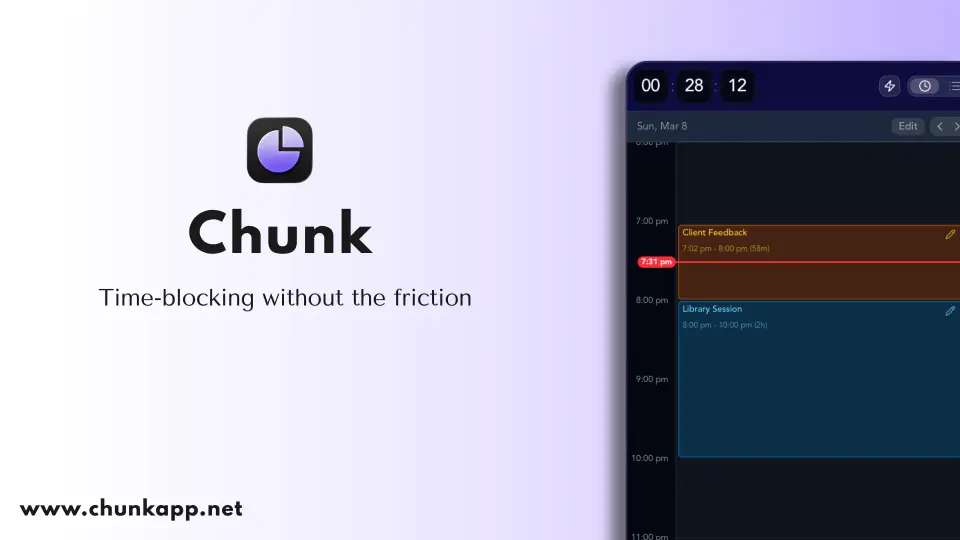
Chunk is a time-blocking app for macOS that opens from the menu bar. Tasks from its own lists and from Apple Reminders are dragged onto a day, week or month timeline that syncs both ways with Apple, Google and Outlook calendars, and a countdown in the menu bar tracks the block in progress. It is sold as a one-time license after a 7-day trial, and the schedule is stored on the Mac.
Worth knowing
- Chunk runs on macOS 12 or later only; the vendor says there is no Windows, Linux or Android version.
- The iPhone app is listed as coming soon and will be a separate $8.99 one-time purchase, not part of the Mac license.
- There is no free plan: access stops when the 7-day trial ends unless a license is bought.
- A Mac license bought directly from Chunk is a final sale and is not refundable.
Key features
- Menu bar panel
- Opens from the menu bar or with Cmd+/ and floats above other windows, fullscreen apps included. A countdown for the current block stays in the menu bar.
- Day, week and month timeline
- Drag on the timeline to create a block or drop a task from a list. Views cover one, three or five days, a week or a month, with PDF and CSV export.
- Two-way calendar sync
- Google, Outlook and Apple Calendar events sit beside your blocks, and moving or resizing one in Chunk writes the change back. A lock toggle makes them read-only.
- Task lists and templates
- Smart lists, custom lists and Apple Reminders share one searchable column. Recurring template lists store a reusable day to apply whole or block by block.
- Analytics
- A dashboard compares 7, 30 and 90-day ranges for planned hours, completed tasks, follow-through and how consistently recurring routines were kept.
- Local MCP server for Claude
- An optional MCP server runs on the Mac and lets Claude Desktop read the schedule and create, edit or delete events, tasks and templates.
Chunk pricing
As of Oct 6, 2026, Chunk is a paid product with a free trial, starting at $29.99 one-time (Lifetime License, 2 Macs).
- Starts at
- $29.99 one-time (Lifetime License, 2 Macs)
- Free plan
- None
- Free trial
- 7-day free trial with every feature on 1 Mac, no credit card required
| Plan | Price | What you get |
|---|---|---|
| Lifetime License | $29.99one-time purchase | Permanent access on 2 Macs with all current features, future updates and priority support. |
| Family Package | $59.99one-time purchase | One family license that activates on up to 6 Macs, with future updates and priority support. |
Read from chunkapp.net on Oct 6, 2026. Prices change, so confirm with Chunk before you buy.
Ways to pay less
- Lifetime licenseLifetime license for a single payment
Chunk for Mac is sold only as a one-time purchase: $29.99 for 2 Macs or $59.99 for a family license on up to 6 Macs, with future updates included.
Stated on chunkapp.net
Works with
Chunk alternatives
- Chunk vs Structured
Free plan · from $2.99/mo
- Chunk vs TimeBloc
Free plan · from $19.99
- Chunk vs TimeFinder
Free plan · from $7.99
- Chunk vs Akiflow
Free trial · from $19/mo
- Chunk vs Sunsama
Free trial · from $17/mo




Common questions
Does Chunk have an Android app?
No Android app was listed when its pages were read on Oct 6, 2026. Chunk is listed for macOS.
Does Chunk have an iPhone app?
No iPhone app was listed when its pages were read on Oct 6, 2026. Chunk is listed for macOS.
Is Chunk open source?
Chunk is not described as open source on its own site, as read on Oct 6, 2026.
Does Chunk work offline?
Yes, according to its own site. What works without a connection differs by plan and platform, so check the vendor's page for the detail.
Sources for this page
The prices, plans, platforms and features above were read from these pages on Oct 6, 2026.