The Goodnotes Insider’s Guide
Everything we know about Goodnotes in one document: what it costs, its grades, getting a refund, getting help and what else to look at. Read it here, or keep a copy.
Goodnotes
The Insider’s Guide
Handwritten notes, PDF markup and whiteboards with an AI assistant
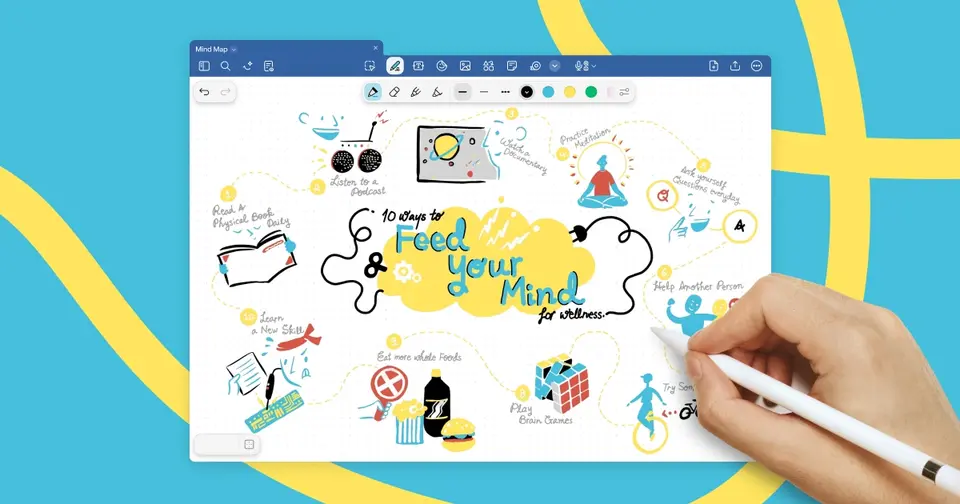
Every plan, grade, refund rule and rival among note-taking apps, read from Goodnotes’s own pages.
Made by Goodnotes Limited · checked Oct 5, 2026 · toolgpa.com
Contents
- 01WelcomeWhat it is, who it suits, its grades and the ten things to know first
- 02What it costsEvery plan, the free plan, ways to pay less and how prices have moved
- 03What it doesIts main features, where it runs, what it works with and who makes it
- 04Where it standsIts grades against its category, and whether to keep it or make your own
- 05After you payGetting your money back, getting out, and getting help
- 06The alternativesThe tools it is most often weighed against, side by side
- 07Quick answersThe questions people ask about it, each answered in a line or two
- 08About ToolGPAWho made this guide, what else is on the site, and how to cite it
ToolGPA put this guide together from Goodnotes’s own pages, its app-store listings and our grades. Every fact in it is on Goodnotes’s page too, where it is kept up to date. Checked Oct 5, 2026.
Part 01 · Overview
Welcome
What it is, who it suits, its grades and the ten things to know first
3.6
GPA, above 144 of the 147 other note-taking apps we grade
Goodnotes is a handwriting-first note-taking app that started on iPad and now also runs on iPhone, Mac, Android, Windows and the web. Notebooks, whiteboards, typed text documents and annotated PDFs sit in one library, with audio recording and an AI assistant that reads handwriting as well as typed text. A free plan covers up to three files; paid plans are yearly subscriptions, with a one-time purchase option on Apple devices.
To get you started, here are 10 things to know about Goodnotes, taken from its own pages and our grades.
Writing by hand and still being able to search it is the thing reviewers keep naming.
- 1
Best for handwritten notes and PDF markup on an iPad
Goodnotes is a handwriting app that started on iPad: you write in a notebook or onto a PDF and can still search what you wrote, from $11.99 a year.
- 2
Paid plans start at $1 a month when paid by the year
As its pricing page puts it: $11.99 per year (Essential).
- 3
There is a free plan
Free forever: up to 3 files in total across notebooks, whiteboards and text documents, 100 MB of storage, a 5 MB import limit, 20 minutes of audio recording and watermarked exports.
- 4
It runs on 5 platforms
iOS, macOS, Android, Windows and Web.
- 5
Handwritten notebooks
Notebooks mix handwriting, typed text, images and stickers on customizable paper templates. Handwriting stays searchable and can be converted to text.
- 6
PDF annotation
Imported PDFs are highlighted and marked up by hand, searched alongside notes, and keep their table of contents for navigating long documents.
- 7
Whiteboards and text documents
An infinite-canvas whiteboard for diagrams and mind maps and typed text documents with inline blocks sit in the same library as notebooks.
- 8
Refunds: no set window
No money-back guarantee here. Goodnotes promises a refund only where your own country's law gives you a withdrawal right, or where the app store you bought from decides to give you one.
- 9
A 3.6 GPA, above 144 of 147
That is against the other note-taking apps we grade, on value, the free plan, features, ease of use and platforms.
- 10
Keep it
The plain part of Goodnotes you could make: notes. What surrounds it you could not. The 8 things listed below take a company, not a weekend.
Goodnotes at a glance
- Pricing
- Free plan, from $11.99 per year (Essential)
- Free plan
- Yes
- Free trial
- 7-day free trial on Essential and Pro; 30-day free trial on Teams.
- Runs on
- Web, macOS, Windows, iOS, Android
- Made by
- Goodnotes Limited, since 2011
- Category
- Note-Taking Apps
- Our grade
- 3.6 GPA, excellent
- Store rating
- 4.7 on the App Store, 459,990 ratings
The report card
Best for handwritten notes and PDF markup on an iPad
Goodnotes is a handwriting app that started on iPad: you write in a notebook or onto a PDF and can still search what you wrote, from $11.99 a year. The free plan stops at 3 files, 100 MB and watermarked exports, syncing one library across Apple and non-Apple devices needs Pro at $35.99, the Android, Windows and web versions lack iPad features, and more AI is $9.99 a month.
| Subject | Grade | Comment |
|---|---|---|
| Value for money | A | Essential is $11.99 a year, about $1 a month, and Pro is $35.99, about $3, against a category middle of $6 every month. On Apple devices there's also a one-time Special Edition at $35.99. The dear bit is the AI Pass add-on, at $9.99 a month. |
| Free plan and trial | C | Free for ever, and small with it: 3 files in total, 100 MB of storage, 20 minutes of audio recording and a watermark on every export. Enough to see whether you like the pen feel, nowhere near a term of lectures. Essential and Pro have a 7-day trial. |
| Features | A | It does the whole job, and one thing its rivals don't: the AI answers questions from your own handwriting and cites the page it took the answer from. Around that, searchable handwriting, PDF markup, an infinite whiteboard, typed documents and audio recorded in step with your writing. Typed text is the weak bit. |
| Ease of use | A | 4.72 from about 460,000 App Store ratings, above the 4.7 from 1,000 ratings an A needs. Writing by hand and still being able to search it is the thing reviewers keep naming. |
| Platforms and integrations | A | iPhone, iPad, Mac, Android, Windows and the web, with Google Drive, Dropbox, OneDrive and Google Calendar hooked in. Two catches: one library synced across Apple and non-Apple devices needs Pro, and Goodnotes says the non-iPad versions don't have every feature. |
An A is worth 4 points, a B 3, a C 2, a D 1 and an F nothing. The GPA is the average of the five.
Who Goodnotes is for
- Fits if you take notes by hand on an iPad with an Apple Pencil
- Works for marking up PDFs like lecture slides, contracts and reports
Who it is not for
- Tight if you're never paying, because the Free plan stops at 3 files, 100 MB, 20 minutes of audio and watermarked exports
- Skip it if you mostly type, as reviewers who like everything else describe the text tool as clunky
- Not for you if you'd use it mainly on Android or Windows, where Goodnotes says the full feature set isn't offered
- Watch out: one library synced across Apple and non-Apple devices needs Pro at $35.99 a year, and AI Pass is $9.99 a month on top
- Watch out: the one-time Special Edition is Apple only, has limited AI and can't use Goodnotes Cloud
Good to know
Good for
- Handwritten notes on an iPad with Apple Pencil
- Marking up PDFs such as contracts, reports and lecture slides
- Students who want audio synced to their lecture notes
- K-12 schools using iPads, where Goodnotes Education is free
Worth knowing
- The Free plan stops at 3 files in total, 100 MB of storage and 20 minutes of audio recording, and its exports carry a watermark.
- Keeping one library in sync between Apple and non-Apple devices needs Goodnotes Cloud, which is included only from Pro.
- Goodnotes says the Android, Windows and web versions do not offer the full range of features available on iPad.
- Essential, Pro and Teams are priced per year, and AI Pass is a separate $9.99 per month add-on for more AI credits.
What people say
- 4.7on the App Store, from 459,990 ratings
What they like
- Writing notes by hand on an iPad and still being able to search them is the combination reviewers and commenters keep naming.
- Importing PDFs and writing straight onto them with the Pencil is a use that reviewers and commenters describe again and again.
What they don’t
- A reviewer and two commenters are uneasy about how far their notes depend on the app, from files that cannot be edited elsewhere to fear of losing notes kept in an older version.
- Typed text is the weak spot for several otherwise happy reviewers, who describe the text tool as clunky, limited in formatting or prone to glitches.
10 App Store reviews, all four or five stars and seven of them more than three years old, and about 14 Hacker News comments from October 2024 to August 2026
Part 02 · Pricing
What it costs
Every plan, the free plan, ways to pay less and how prices have moved
$1
A month to start, paid by the year. There is a free plan too
Goodnotes has a free plan. Paid plans start at $11.99 per year (Essential).
Enough to see whether you like the pen feel, nowhere near a term of lectures.
Free
$0
Up to 3 files, 100 MB of storage, 20 minutes of audio recording, limited sharing and limited Goodnotes AI usage.
Essential
$11.99
per year
Unlimited files and audio recording, 5 GB of storage, exports without a watermark, basic Goodnotes AI and Google Calendar integration.
Pro
$35.99
per year
Adds cross-platform library sync, private link sharing, hosting real-time collaboration, Drive integration and advanced AI including meeting notes.
Special Edition
$35.99
one-time purchase, Apple devices only (US App Store)
Unlimited note-taking on Apple devices without a subscription. Limited Goodnotes AI and not eligible for Goodnotes Cloud.
Teams
$120
per seat / year
Everything in Pro, plus SAML SSO, domain control, consolidated billing and user and admin management.
Enterprise
Custom
For 25 seats and above: AI permissions, the Microsoft Intune App SDK, dedicated account support and custom contracts.
The free plan
Free forever: up to 3 files in total across notebooks, whiteboards and text documents, 100 MB of storage, a 5 MB import limit, 20 minutes of audio recording and watermarked exports.
Trying it first
7-day free trial on Essential and Pro; 30-day free trial on Teams.
Read from goodnotes.com on Oct 5, 2026.
Ways to pay less
Education
Goodnotes Education is free for K-12 schools
K-12 schools get Goodnotes Education at no cost, with no trial period, including its classroom tools for teachers and students. It currently works only on Apple devices.
Stated on goodnotes.comLifetime license
Special Edition one-time purchase on Apple devices
Special Edition unlocks unlimited note-taking on Apple devices without a subscription and is listed at $35.99 on the US App Store. Availability varies by region.
Stated on goodnotes.com
How its prices have moved
- Oct 21, 2025Teams: new, $10 per seat / month, billed annually ($120 a year)The archived copy of 21 October 2025 adds a Teams plan with SSO, domain control and consolidated billing; the copy before it, of 9 July 2025, had no team plan at all.
- Oct 21, 2025Pro: new, $35.99 per yearThe archived copy of 21 October 2025 adds Pro above Essential at $35.99 a year; the copy before it, of 9 July 2025, listed only the three Goodnotes 6 plans and no Pro tier.
- Oct 21, 2025Essential: All Platforms Yearly, $9.99 per year → Essential, $11.99 per yearThe copy of 21 October 2025 renames the all-platforms subscription Essential at $11.99 a year, and its own questions say Goodnotes 6 subscribers were moved onto it; the July 2024 copy showed All Platforms Yearly at $9.99.
- Oct 21, 2025Special Edition: Apple One-time Payment, $29.99 one-time purchase → Special Edition, $35.99 one-time purchaseThe copy of 21 October 2025 renames the Apple-only one-time purchase Special Edition and shows $35.99; the July 2024 copy showed Apple One-time Payment at $29.99.
- Oct 21, 2025Android & Windows Yearly: withdrawn (was $6.99 per year)The cheaper Android and Windows only subscription is gone from the copy of 21 October 2025; the copy of 9 July 2025 still listed it, and the July 2024 copy priced it at $6.99 a year.
- Jul 12, 2024All Platforms Yearly: new, $9.99 per yearThe archived copy of 12 July 2024 sells Goodnotes 6 as a yearly subscription covering every platform; the copy before it, of 12 July 2023, sold Goodnotes 5 outright and said there was no subscription.
What the app costs elsewhere
Each country’s App Store price for “Essential (Yearly)”, against $11.99 in the United States, in dollars at the day’s rate. The four cheapest and the four dearest of 11.
| Country | Price there | In dollars | Against the US |
|---|---|---|---|
| Turkey | ₺449,00 | $9.13 | 24% less |
| Philippines | ₱ 599.00 | $9.54 | 20% less |
| India | ₹ 999 | $10.33 | 14% less |
| Canada | $15.49 | $10.89 | 9% less |
| Australia | $17.99 | $12.56 | about the same |
| South Africa | R239.99 | $14.52 | 21% more |
| Germany | 13,00 € | $14.57 | 21% more |
| United Kingdom | £11.99 | $15.85 | 32% more |
Part 03 · Features
What it does
Its main features, where it runs, what it works with and who makes it
5
Places it runs: Web, macOS, Windows, iOS and Android
Handwritten notes, PDF markup and whiteboards with an AI assistant. Here is what it does, as its own site describes it, and what it covers: works offline, one-time purchase, AI features, real-time collaboration, transcription, notes, whiteboard.
Around that, searchable handwriting, PDF markup, an infinite whiteboard, typed documents and audio recorded in step with your writing.
- Handwritten notebooks
- Notebooks mix handwriting, typed text, images and stickers on customizable paper templates. Handwriting stays searchable and can be converted to text.
- PDF annotation
- Imported PDFs are highlighted and marked up by hand, searched alongside notes, and keep their table of contents for navigating long documents.
- Whiteboards and text documents
- An infinite-canvas whiteboard for diagrams and mind maps and typed text documents with inline blocks sit in the same library as notebooks.
- Audio recording and meeting notes
- Audio is recorded in sync with what you write. On Pro, Goodnotes AI for Meetings transcribes and summarizes discussions and links notes to calendar events.
- Goodnotes AI
- An in-app assistant answers questions from handwriting, typed text and PDFs, with citations back to the source page. AI credits vary by plan; AI Pass adds about 12 times more.
- Sharing and real-time collaboration
- Every plan can share documents by link. Essential can join real-time collaborative documents, and Pro can host them and share by private link.
Where it runs
- Web
- macOS
- Windows
- iOS
- Android
What it works with
- iCloud
- Google Drive
- Dropbox
- OneDrive
- Google Calendar
- Microsoft Outlook
- Apple Calendar
- Microsoft Intune
Who makes Goodnotes
Goodnotes is made by Goodnotes, a privately held company headquartered in London with offices in Hong Kong and Singapore. It earns money from paid plans for its note-taking apps, business subscriptions and a marketplace for digital stationery, and says it has over 25 million monthly active users.
- Founded
- 2011goodnotes.com
- Based
- Headquartered in London, remote-friendly, with offices in Hong Kong and Singaporegoodnotes.com
- Ownership
- Privately held. Privately held. Its About page says Goodnotes began as a one-person project that was bootstrapped and profitable from day one, and TechCrunch reported a $6 million seed investment from Race Capital in 2020.goodnotes.com
- Funding
- Goodnotes says on its About page that it was bootstrapped and profitable from day one. TechCrunch reported in January 2024 that the company had taken a $6 million seed investment from Race Capital in 2020 and that founder Steven Chan said it had no plans to raise again. No month was given for the seed round.goodnotes.comtechcrunch.com
- Team
- 300+ employees in 30+ countries, as its press page statesgoodnotes.com
- Founders and leaders
- Steven Chan, Founder & CEOgoodnotes.com
- Hiring
- 4 open roles on its job board: two in data and insights in Singapore and London, an AI consultancy director in London and a software engineer in Londonjob-boards.greenhouse.io
- Lately
Read on Oct 18, 2026 from the company’s own pages and from news reports. What is not stated there is left out.
Part 04 · Standing
Where it stands
Its grades against its category, and whether to keep it or make your own
144/147
Other note-taking apps it is graded above
Goodnotes's GPA of 3.6 is higher than 144 of the 147 other note-taking apps we grade, and level with 2.
It stands best on features (A, above 135 of 147) and worst on free plan and trial (C, above 7).
Its paid plans start at $1 a month when paid by the year, against a middle price of $5.83 for the category: 1 of the 66 others that charge start lower.
On features, ease of use and platforms it scores 4.0 out of 4, and no tool on the category's chart scores higher without costing more.
Each grade against the category
Every bar is all 148 note-taking apps we grade, cut by the letter each got. Goodnotes’s own letter is outlined.
- AValue for moneyAbove 62 of 147
- CFree plan and trialAbove 7 of 147
- AFeaturesAbove 135 of 147
- AEase of useAbove 133 of 147
- APlatforms and integrationsAbove 128 of 147
Price against what you get
Each dot is one of 103 note-taking apps. Further left costs less; higher up scores better on features, ease of use and platforms. Goodnotes is the marked dot.
What paid plans start at, a month (each step along is roughly double) →
Keep it, or make your own?
Whether this is something you could build for yourself with an AI app builder, and what you would give up.
Keep it
The plain part of Goodnotes you could make: notes. What surrounds it you could not. The 8 things listed below take a company, not a weekend.
It is one of the better ones too: its GPA of 3.6 is higher than 144 of the 147 other note-taking apps we grade. It costs $11.99 a year.
What you could make
- Notes: an app builder makes this well.
What you could not
- An endless canvas that stays smooth with hundreds of things on it.
- Speech turned into text you can trust.
- Apps for macOS, Windows, iOS and Android that stay in step with each other.
- Several people working in it at the same moment.
- It plugs into other products, iCloud, Google Drive and Dropbox among them.
- AI features, unless you pay a model provider for each request yourself.
- Hooks into the device itself: handwriting.
- The depth: we grade its features A, which means it covers the whole job.
What this rests on. Goodnotes’s listing: what it does, where it runs, what it plugs into and what it costs. It is a judgement about the kind of software this is. We have not built a replacement for it, and making your own means looking after it too. How we decide, and every tool’s verdict.
Part 05 · Refunds
After you pay
Getting your money back, getting out, and getting help
What happens once you have paid: whether you can get your money back, how to leave, and how to reach a person when something goes wrong. Each is graded from Goodnotes’s own terms and help pages.
Refunds and cancelling
Ordinary · checked Oct 18, 2026
No money-back guarantee here. Goodnotes promises a refund only where your own country's law gives you a withdrawal right, or where the app store you bought from decides to give you one. Against that, leaving is easy: four taps in the app, the plan runs to the end of what you paid for, and your notebooks stay readable on the free plan. Ordinary terms, handled tidily, so a C.
- Refund window
- No set window
- How you cancel
- Yourself, in settings
- Getting your money back
The terms say you may be entitled to a refund in two cases only: where you exercise a statutory right of withdrawal within 14 days (or whatever period your law requires) of subscribing, or where the app store's own terms entitle you to one, in which case the store processes it. The help article adds that Apple alone decides App Store refunds, and that for other purchases you send the receipt through a refund form.
Stated on goodnotes.com- How to cancel Goodnotes
A subscription is cancelled in the Goodnotes app under Manage Account, then Subscription, then Manage Subscription, then Cancel Subscription. The article warns that the app must be installed from the store you subscribed through, and that deleting the account or the app does not stop the renewal. An App Store subscription is cancelled in Apple's Settings and a Google Play one in the Play app.
- Open the Goodnotes menu at the top right of the library
- Tap your name to open Manage Account
- Select Subscription, then Manage Subscription
- Select Cancel Subscription and follow the prompts
- What you keep afterwards
You stay on the paid plan until it expires, then the account returns to the free plan and your documents become read-only. The next time you try to edit, Goodnotes asks you to pick three documents to keep editable, and the article says that choice cannot be changed afterwards. The rest stay viewable. The terms add that Goodnotes Cloud data is deleted after two years of dormancy, with reminders sent first.
Stated on support.goodnotes.com- Renewals
The terms say a subscription renews automatically unless you cancel before the next renewal period, and that it renews at the rate in force at the time rather than the price you first paid. The help article says to cancel at least one day before the renewal date, notes that a Samsung premium subscription does not auto-renew at all, and says Goodnotes shows when access is due to end and gives an in-app reminder.
Stated on goodnotes.com
In your favour
- You cancel it yourself inside the app, in four taps, with nobody to write to.
- The plan runs to the end of the period you paid for, and Goodnotes gives an in-app reminder before access ends.
- Your notebooks are not taken away: three stay editable on the free plan and the rest remain readable.
Watch out for
- There is no money-back guarantee: the terms promise a refund only where your local law or the app store gives you one.
- Bought it in the App Store and Apple decides, with Goodnotes saying there is little it can do if Apple refuses.
- It renews at the price in force at renewal, not the one you signed up at, so check before the date.
- Back on free, the three editable documents you pick are locked in and cannot be swapped later.
Customer support
Ordinary · checked Oct 18, 2026
Written help in quantity, a set of forms sorted by what has gone wrong, a Report an issue button inside the app and a Discord server. What is missing is any statement of when anyone is at their desk or how long a reply takes, and there is no phone line and no live chat. That is the ordinary arrangement for a note-taking app, so a C.
Ways to get help
Contact form or ticket
Goodnotes routes contacts through separate forms by subject: app crashes, account or subscription problems, other bugs, refund and cancellation requests, takedown requests and EU or UK withdrawal requests.
Stated on support.goodnotes.comHelp inside the app
On iOS and macOS you can tap your profile icon and then Report an issue, with a box to send diagnostic data along. Teams and Enterprise admins can raise a ticket from a Help and Support button in the Admin Console.
Stated on go.goodnotes.comHelp centre
A searchable help centre covering Goodnotes on iOS, Android, Windows and web, with sections on payment and subscriptions, sync and backup, note-taking and troubleshooting, plus a separate set for GoodNotes 5. It is open without signing in.
Stated on support.goodnotes.comCommunity or forum
Goodnotes runs a public Discord server, linked from its own site along with the community guidelines, where users talk to each other about the app.
Stated on goodnotes.com
Not listed on Goodnotes’s pages: live chat, phone.
- When people answer
Its pages do not say.
- How fast it says it replies
Its pages do not say.
- What depends on your plan
The business support site covers Teams and Enterprise only and sends Essential and Pro users to the general help centre instead. The pricing page's comparison table has a Support section listing prioritised customer support and, separately, dedicated account support, but which plans those ticks belong to could not be read from the page.
Stated on goodnotes.com
In your favour
- The forms are sorted by problem, so a refund request does not sit in the same queue as a bug report.
- You can report a problem from inside the app and attach diagnostic data in the same step.
- The help centre is open to everyone, free plan included, with plenty on billing and cancelling.
Watch out for
- No page says when the support team works or how quickly it aims to reply.
- There is no phone number and no live chat for anybody.
- Teams and Enterprise have their own support site, and individual plans are pointed away from it.
- The pricing table mentions prioritised support without making clear who gets it.
What these two grades rest on. Read on 18 October 2026: Goodnotes' terms and conditions, its help articles on refunds, cancelling on Android, Windows and web, cancelling on iPhone or iPad and contacting technical support, the help centre itself, the Discord page, the business support site and the pricing comparison table. The help centre turns plain readers away, so it was read in a browser. Nobody here cancelled a plan or contacted its support. They are graded apart from the five that make the GPA. How we grade refunds and support.
Part 06 · Alternatives
The alternatives
The tools it is most often weighed against, side by side



Notability, Noteshelf, CollaNote, Microsoft OneNote and Apple Notes
The 5 tools Goodnotes is most often weighed against, with where each one differs from it.
- 3.4GPA
Notability
Free plan · from $14.99/yr
Handwritten notes with synced audio, transcripts and AI study tools.
- Goodnotes also covers whiteboard.
- Notability also covers templates.
- 2.8GPA
Noteshelf
Free plan · from $7.99 one-time
Handwritten note-taking and PDF annotation for stylus devices.
- Only Goodnotes lists a web app.
- Goodnotes also covers transcription and whiteboard.
- Noteshelf also covers templates.
- 3.0GPA
CollaNote
Free plan · from $13.90 one-time
Handwriting and PDF markup notes for iPad, iPhone and Mac.
- Only Goodnotes lists a web app.
- Only Goodnotes lists Android and Windows apps.
- Goodnotes also covers whiteboard.
- 3.8GPA
Microsoft OneNote
Free plan · from $9.99/mo
Microsoft's free digital notebook for typed, inked and audio notes.
- Only Microsoft OneNote lists a browser extension.
- Goodnotes can be bought with a one-time purchase.
- Goodnotes also covers whiteboard.
- 3.4GPA
Apple Notes
Free
Apple's free notes app for iPhone, iPad, Mac and the web.
- Only Goodnotes lists Android and Windows apps.
- Goodnotes can be bought with a one-time purchase.
- Goodnotes also covers whiteboard.
Part 07 · Questions
Quick answers
The questions people ask about it, each answered in a line or two
21
Questions, each answered in a line or two
The short version of everything above, for when you only need the answer. Each one is told in full in its part of the guide.
Is Goodnotes free?
Goodnotes has a free plan. Free forever: up to 3 files in total across notebooks, whiteboards and text documents, 100 MB of storage, a 5 MB import limit, 20 minutes of audio recording and watermarked exports.
How much does Goodnotes cost?
Goodnotes lists 6 plans. Free: $0.
What platforms does Goodnotes work on?
Goodnotes is available on iOS, macOS, Android, Windows and Web.
Does Goodnotes offer any discounts?
Goodnotes publicly lists the following: Goodnotes Education is free for K-12 schools; Special Edition one-time purchase on Apple devices.
How is Goodnotes rated?
Goodnotes's iPhone and iPad app averages 4.7 out of 5 from 459,990 ratings on the App Store in the United States, as read on Oct 7, 2026.
Is Goodnotes any good?
We have not tested Goodnotes, so this is what reviewers say. Often praised: Writing notes by hand on an iPad and still being able to search them is the combination reviewers and commenters keep naming.
Does Goodnotes have a Linux app?
No Linux app was listed when its pages were read on Oct 5, 2026. Goodnotes is listed for iOS, macOS, Android, Windows and Web.
Is Goodnotes open source?
Goodnotes is not described as open source on its own site, as read on Oct 5, 2026.
Does Goodnotes work offline?
Yes, according to its own site. What works without a connection differs by plan and platform, so check the vendor's page for the detail.
What does Goodnotes integrate with?
Goodnotes's listing names iCloud, Google Drive, Dropbox, OneDrive, Google Calendar, Microsoft Outlook, Apple Calendar and Microsoft Intune.
Does Goodnotes have a student discount?
Goodnotes Education is free for K-12 schools. K-12 schools get Goodnotes Education at no cost, with no trial period, including its classroom tools for teachers and students.
Does Goodnotes have a free trial?
Yes. 7-day free trial on Essential and Pro; 30-day free trial on Teams.
Who makes Goodnotes?
Goodnotes is made by a company of the same name. Privately held.
What are the alternatives to Goodnotes?
The closest alternatives to Goodnotes in our directory are Notability, Noteshelf, CollaNote, Microsoft OneNote and Apple Notes.
Does Goodnotes give refunds?
The terms say you may be entitled to a refund in two cases only: where you exercise a statutory right of withdrawal within 14 days (or whatever period your law requires) of subscribing, or where the app store's own terms entitle you to one, in which case the store processes it.
How do I cancel Goodnotes?
A subscription is cancelled in the Goodnotes app under Manage Account, then Subscription, then Manage Subscription, then Cancel Subscription.
What happens to my data if I cancel Goodnotes?
You stay on the paid plan until it expires, then the account returns to the free plan and your documents become read-only.
How do I contact Goodnotes support?
Goodnotes's pages list these ways to get help: contact form or ticket, help inside the app, help centre and community or forum.
How does Goodnotes compare with other note-taking apps?
Goodnotes's GPA of 3.6 is higher than 144 of the 147 other note-taking apps we grade, and level with 2.
Is Goodnotes good value for money?
ToolGPA grades Goodnotes A for value for money. Its paid plans start at $1 a month when paid by the year, against a middle price of $5.83 for the category: 1 of the 66 others that charge start lower.
Could I make my own version of Goodnotes?
The plain part of Goodnotes you could make: notes. What surrounds it you could not.
Where this guide comes from
The prices, plans, platforms and features were read from Goodnotes’s own pages on Oct 5, 2026, and the grades were given on Oct 10, 2026. Graded from this listing, whose facts were read from Goodnotes' own pages on 5 October 2026, and its App Store rating. Also tested with a demo account on 2026-08-23.
Every tool we list gets five grades, A to F, each with its reason, and a GPA that averages them. How each is decided is at toolgpa.com/grades. This guide is ToolGPA’s own work; it is not made, paid for or approved by Goodnotes Limited. Prices change, so check goodnotes.com before you buy.
Part 08 · About
About ToolGPA
Who made this guide, what else is on the site, and how to cite it
3,189
Tools graded, in 94 categories
ToolGPA grades software the way a school report grades a pupil: five subjects, a letter for each with the reason written beside it, and a GPA that averages them. Prices, plans and platforms are read from each maker’s own pages and dated, so you always know how fresh a figure is.
Every grade, review and ranking on ToolGPA is our own judgement. No company can pay for a grade or change one. Every tool on the site has a guide like this one, free to download and pass on. It all lives at toolgpa.com.
3,189
tools graded
94
categories
426
price changes on record
579
apps priced in 12 countries
What else is on toolgpa.com
- Goodnotes, kept up to dateEverything in this guide, with prices and grades as they are todaytoolgpa.com/tools/goodnotes
- How grades are givenThe rules behind every letter and every GPAtoolgpa.com/grades
- Value chartsWhat each tool costs against what it scores, for every categorytoolgpa.com/charts
- CompareAny two tools side by side, plan by plantoolgpa.com/compare
- Price changesEvery price rise and cut on record, each with its sourcetoolgpa.com/price-changes
- Prices by countryWhat apps cost on the App Store in 12 countriestoolgpa.com/prices-by-country
- Pay lessEvery public discount: yearly billing, students, nonprofitstoolgpa.com/save
- Keep or makeWhich tools are worth paying for, and which you could build yourselftoolgpa.com/keep-or-make
Scan for the live page
Prices and grades as they are today
Quoting this guide?
Please name ToolGPA and link to the live page, so readers can check the figures for themselves:
ToolGPA, "Goodnotes: The Insider's Guide", checked Oct 5, 2026. https://toolgpa.com/tools/goodnotes
Know someone choosing between note-taking apps?
Send them this guide: toolgpa.com/tools/goodnotes/guide
ToolGPA elsewhere: youtube.com/@toolgpa
See our other guides
The best-graded note-taking apps after Goodnotes, each with an Insider's Guide of its own.
- Note-Taking Apps Insider's GuideEvery one of the 148 note-taking apps we grade, compared
- Microsoft OneNote Insider's GuideMicrosoft's free digital notebook for typed, inked and audio notes3.8 GPA
- Joplin Insider's GuideOpen source Markdown notes with sync through a service you choose3.6 GPA
- Obsidian Insider's GuideMarkdown note-taking app that keeps your files on your device3.6 GPA


Choosing software? Every tool graded, every price dated.
Compare tools at toolgpa.com ›Everything in this guide is ToolGPA’s own summary of what Goodnotes’s pages, its app-store listings and public reviews said on the dates shown. Grades are our judgement under the rules at toolgpa.com/grades. Every grade, review and ranking on ToolGPA is our own judgement. No company can pay for a grade or change one. Goodnotes is a trademark of its owner, and this guide is not made, paid for or approved by Goodnotes Limited. Prices and plans change: check goodnotes.com before you buy.