Goodnotes review (2026): is the free plan enough?
Handwritten notes, PDF markup and whiteboards with an AI assistant
Black Friday: is there a Goodnotes sale?
Goodnotes report card
Good · out of 4.0 · graded Nov 18, 2026
Best for handwritten notes and PDF markup on an iPad
Goodnotes can lose your notes: reviewers in late 2026 describe weeks of work gone after updates, sign-outs and failed syncs, and its own release notes admit sync bugs that could remove unsynced work. Paying users report notebooks locked read-only and support that doesn't answer, syncing an iPad with Windows or Android now needs the $35.99 Pro plan, and off Apple devices it is a slow web app with fewer features.
Who Goodnotes is for
- Fits if you take notes by hand on an iPad with an Apple Pencil
- Works for marking up PDFs like lecture slides, contracts and reports
Who Goodnotes is not for
- Tight if you're never paying, because the Free plan stops at 3 files, 100 MB, 20 minutes of audio and watermarked exports
- Skip it if you mostly type, as reviewers who like everything else describe the text tool as clunky
- Not for you if you'd use it mainly on Android or Windows, where Goodnotes says the full feature set isn't offered
- Watch out: one library synced across Apple and non-Apple devices needs Pro at $35.99 a year, and AI Pass is $9.99 a month on top
- Watch out: the one-time Special Edition is Apple only, has limited AI and can't use Goodnotes Cloud
Why Goodnotes gets a 2.8
Five grades, each with its reason. The GPA is their average: an A is 4 points, an F is none.
- BValue for moneyWas A. Down to B because of two problems people report: paid users find notebooks locked read-only and are told to pay again; syncing iPad notes with Windows or Android now needs the $35.99 Pro plan.
- CFree plan and trialFree for ever, and small with it: 3 files in total, 100 MB of storage, 20 minutes of audio recording and a watermark on every export. Enough to see whether you like the pen feel, nowhere near a term of lectures. Essential and Pro have a 7-day trial.
- BFeaturesWas A. Down to B because of one problem people report: notes vanish after updates, forced sign-outs and sync errors.
- BEase of useWas A. Down to B because of three problems people report: crashes, freezes and heavy battery and memory use after weekly updates; the September 2025 redesign buried everyday tools behind extra taps; AI buttons and auto-corrections cannot be switched off.
- BPlatforms and integrationsWas A. Down to B because of one problem people report: android, Windows and web versions are a slow web app with fewer features.
What these grades rest on. Graded from this listing, whose facts were read from Goodnotes' own pages on 5 October 2026, and its App Store rating. Problems people report, and lawsuits, fines and breaches, were read from reviews, news, app-store reviews and court and regulator records on 18 November 2026. How we review and grade.
Make Goodnotes? Put this grade on your site
Paste this where you want the badge. It links here and follows the grade if it changes. About badges
<a href="https://toolgpa.com/tools/goodnotes#review"><img src="https://toolgpa.com/badge/goodnotes.svg" alt="Goodnotes: 2.8 GPA on ToolGPA" width="196" height="56"></a>The worst thing about Goodnotes
Notebooks can disappear after an update, a sign-out or a failed sync
Students and other heavy users report opening Goodnotes to find weeks of notes blank or gone, often after a forced sign-out, a failed sync or an update. Goodnotes' own release notes admit sync bugs that could remove unsynced work as recently as August 2026. Anyone without a separate backup can lose a term of lecture notes, and reviewers say they could not get them back.
Took a letter off its grade for Features
Reported byitunes.apple.com (Nov 15, 2026)itunes.apple.com (Oct 30, 2026)itunes.apple.com (Oct 16, 2026)discussions.apple.com (Jan 31, 2024)justuseapp.com (Feb 12, 2025)goodnotes.com (Oct 28, 2024)
What else goes wrong
- 2
Paid users find notebooks locked read-only and are told to pay again
Buyers of the old one-time licence, and some current subscribers, open the app to find all but 3 notebooks read-only until they pay. Reviewers in October and November 2026 say purchases were not recognised, restore buttons failed, a yearly plan stopped working after a month, and one was charged 8 times. Several say support never answered or sent canned replies. Refunds for App Store purchases go through Apple, not Goodnotes.
Took a letter off its grade for Value for money
Reported byitunes.apple.com (Nov 14, 2026)itunes.apple.com (Nov 6, 2026)itunes.apple.com (Oct 21, 2026)appsupports.comalaysia.news.yahoo.com (Aug 24, 2023)news.ycombinator.com (Nov 12, 2025)
- 3
Android, Windows and web versions are a slow web app with fewer features
Off Apple devices, Goodnotes runs as a web app in a browser shell. Users on Samsung tablets, Surface laptops and Chromebooks report pen lag of one to two seconds, 20-page files taking 7 to 10 seconds to open, pages unloading as you scroll, and poor offline use. Goodnotes says these versions lack the full iPad feature set, and its pricing page marks audio transcription and iCloud sync as iOS only. Several paying users say they quit or won't renew.
Took a letter off its grade for Platforms and integrations
Reported byfeedback.goodnotes.com (Jul 12, 2026)feedback.goodnotes.com (Apr 15, 2026)feedback.goodnotes.com (Sep 18, 2025)community.samsung.com (2026)
- 4
Syncing iPad notes with Windows or Android now needs the $35.99 Pro plan
Since 23 September 2025, Goodnotes Cloud, the only way to keep one library across Apple and non-Apple devices, comes only with Pro at $35.99 a year, three times the Essential price. People who bought Essential after that date say the pricing led them to expect cross-platform sync, then found their iPad and Windows notes did not sync. Some work around it by exporting and re-importing files by hand.
Took a letter off its grade for Value for money
Reported byfeedback.goodnotes.com (Oct 18, 2025)feedback.goodnotes.com (Mar 22, 2026)itunes.apple.com (Oct 21, 2026)
- 5
Crashes, freezes and heavy battery and memory use after weekly updates
Goodnotes ships an update almost every week, and every release from 12 October to 9 November 2026 fixes crashes or freezes: on launch, opening documents, drawing, editing text and converting pages. Reviewers in the same weeks describe the app closing mid-note after six years of use, lag after updates, overheating, battery drain and 2 to 5 GB of memory for a few pages. On a Mac, 27 users reported crashes whenever they added text after a macOS update.
Took a letter off its grade for Ease of use
Reported byitunes.apple.com (Nov 10, 2026)itunes.apple.com (Nov 5, 2026)itunes.apple.com (Oct 20, 2026)discussions.apple.com (Mar 8, 2025)appsupports.co
- 6
The September 2025 redesign buried everyday tools behind extra taps
The new version added a floating toolbar under the main one that covers the page and makes you scroll for pen and highlighter colours. Copy moved into a menu, bookmarks went behind another tap and undo moved. A request to make the toolbar optional has 651 votes since October 2025 and no answer from Goodnotes, with comments still arriving in November 2026. One commenter says they would not have subscribed had it been there during the trial.
Took a letter off its grade for Ease of use
Reported byfeedback.goodnotes.com (Nov 17, 2026)feedback.goodnotes.com (Feb 4, 2026)itunes.apple.com (Nov 15, 2026)talk.macpowerusers.com (Aug 29, 2025)
- 7
AI buttons and auto-corrections cannot be switched off
AI has been added across the app, including a section of the toolbar that can't be removed and pop-ups on equations and selections. There is no single switch to turn it off. A request for one has 54 votes and comments from July 2025 to October 2026, from students, a parent and people who don't want sensitive notes sent to an outside AI. Reviewers say the AI slows the app and gets in the way of plain note-taking.
Took a letter off its grade for Ease of use
Reported byfeedback.goodnotes.com (Oct 27, 2026)itunes.apple.com (Oct 24, 2026)itunes.apple.com (Nov 1, 2026)appsupports.co
- 8
The free plan stops at 3 files, and anything past that can't be edited
Free accounts get 3 files in total, with notebooks, whiteboards and text documents all counted together, plus 20 minutes of audio, a 5 MB import cap and watermarked exports. In 2023 the cap was 3 notebooks; whiteboards and text documents now share it. Reviewers in October and November 2026 describe a paywall after 3 pages or one notepad, and being asked to pay to edit anything past the third document.
Took a letter off its grade for Free plan and trial
Reported byitunes.apple.com (Nov 5, 2026)itunes.apple.com (Oct 24, 2026)community.samsung.com (2026)appsupports.comalaysia.news.yahoo.com (Aug 24, 2023)
Goodnotes on the record
OutageResolvedOct 23, 2024
Sign-in outage on 23 October 2024 blocked access, and some users lost notes
A set of load tests hit Goodnotes' account system and stopped some users signing in for about an hour and a half, then left others stuck loading or without their paid plan, and declined new purchases for nearly seven hours. Goodnotes said account data was not affected, but some people who deleted and reinstalled the app to fix it lost notes that were not synced or backed up. It apologised and offered no compensation.
Reported bygoodnotes.com (Oct 28, 2024)
LawsuitSettledMay 15, 2025
MyScript patent suit against Goodnotes in Texas, settled in October 2026
MyScript SAS sued Goodnotes Limited for patent infringement in the Eastern District of Texas (case 2:25-cv-00532) on 15 May 2025. On 29 October 2026 the two sides filed a notice of settlement, and the court stayed all deadlines. The terms are not public, and the case is about patents, not users' billing or data.
Reported bypacermonitor.com (Nov 3, 2026)
Found on Nov 18, 2026 by searching reviews, news, app-store reviews, and court and regulator records. A problem is listed only when at least three places report it and it is still true, and each one took a letter off the grade it belongs to. Cases are described as they stand today: an ongoing case is a claim, not a finding.
Where Goodnotes stands among note-taking apps
Goodnotes's GPA of 2.8 is higher than 150 of the 169 other note-taking apps we grade, and level with 13.
It stands best on features (B, above 145 of 169) and worst on free plan and trial (C, above 19).
Its paid plans start at $1 a month when paid by the year, against a middle price of $5.83 for the category: 1 of the 72 others that charge start lower.
On features, ease of use and platforms it scores 3.0 out of 4, and no tool on the category's chart scores higher without costing more.
Each grade against the category
Every bar is all 170 note-taking apps we grade, cut by the letter each got. Goodnotes’s own letter is outlined.
- BValue for moneyAbove 62 of 169, level with 36
- CFree plan and trialAbove 19 of 169, level with 68
- BFeaturesAbove 145 of 169, level with 21
- BEase of useAbove 117 of 169, level with 50
- BPlatforms and integrationsAbove 121 of 169, level with 43
Price against what you get
Each dot is one of 118 note-taking apps. Further left costs less, and higher up scores better on features, ease of use and platforms. Point at a dot to see which tool it is.
Features, ease of use and platforms, averaged
What paid plans start at, a month (each step along is roughly double) →
- The best score at each price
- Has a free plan
- No free plan
Keep Goodnotes, or make your own?
You could make this
A notes app at its plainest is text in folders with a search box.
What Goodnotes does at its core is notes, and that is the kind of thing an AI app builder makes well. You would give up 8 things, listed below, and little else. It costs $11.99 a year. An AI app builder starts at about $20 a month on our listings, and you only need it while you build.
What you could make
- Notes: an app builder makes this well.
What you could not
- An endless canvas that stays smooth with hundreds of things on it.
- Speech turned into text you can trust.
- Apps for macOS, Windows, iOS and Android that stay in step with each other.
- Several people working in it at the same moment.
- It plugs into other products, iCloud, Google Drive and Dropbox among them.
- AI features, unless you pay a model provider for each request yourself.
- Hooks into the device itself: handwriting.
- The depth: we grade its features B, which means it covers the whole job.
What this rests on. Goodnotes’s listing: what it does, where it runs, what it plugs into and what it costs. It is a judgement about the kind of software this is. We have not built a replacement for it, and making your own means looking after it too. How we decide, and every tool’s verdict.
What is Goodnotes?
Goodnotes is a handwriting-first note-taking app that started on iPad and now also runs on iPhone, Mac, Android, Windows and the web. Notebooks, whiteboards, typed text documents and annotated PDFs sit in one library, with audio recording and an AI assistant that reads handwriting as well as typed text. A free plan covers up to three files; paid plans are yearly subscriptions, with a one-time purchase option on Apple devices.
Worth knowing
- The Free plan stops at 3 files in total, 100 MB of storage and 20 minutes of audio recording, and its exports carry a watermark.
- Keeping one library in sync between Apple and non-Apple devices needs Goodnotes Cloud, which is included only from Pro.
- Goodnotes says the Android, Windows and web versions do not offer the full range of features available on iPad.
- Essential, Pro and Teams are priced per year, and AI Pass is a separate $9.99 per month add-on for more AI credits.
Key features
- Handwritten notebooks
- Notebooks mix handwriting, typed text, images and stickers on customizable paper templates. Handwriting stays searchable and can be converted to text.
- PDF annotation
- Imported PDFs are highlighted and marked up by hand, searched alongside notes, and keep their table of contents for navigating long documents.
- Whiteboards and text documents
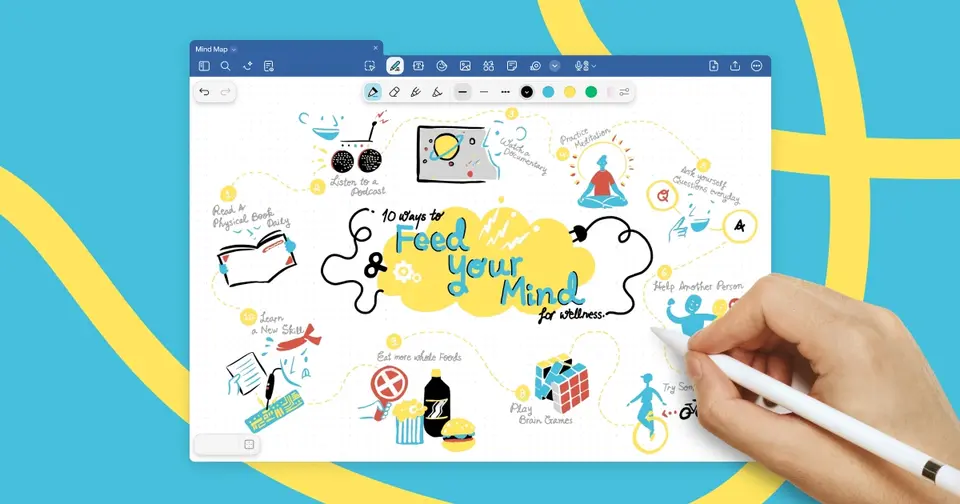
- An infinite-canvas whiteboard for diagrams and mind maps and typed text documents with inline blocks sit in the same library as notebooks.
- Audio recording and meeting notes
- Audio is recorded in sync with what you write. On Pro, Goodnotes AI for Meetings transcribes and summarizes discussions and links notes to calendar events.
- Goodnotes AI
- An in-app assistant answers questions from handwriting, typed text and PDFs, with citations back to the source page. AI credits vary by plan; AI Pass adds about 12 times more.
- Sharing and real-time collaboration
- Every plan can share documents by link. Essential can join real-time collaborative documents, and Pro can host them and share by private link.
Goodnotes pricing
As of Nov 2, 2026, Goodnotes has a free plan, and paid plans start at $11.99 per year (Essential).
- Starts at
- $11.99 per year (Essential)
- Free plan
- Free forever: up to 3 files in total across notebooks, whiteboards and text documents, 100 MB of storage, a 5 MB import limit, 20 minutes of audio recording and watermarked exports.
- Free trial
- 7-day free trial on Essential and Pro; 30-day free trial on Teams.
| Plan | Price | What you get |
|---|---|---|
| Free | $0 | Up to 3 files, 100 MB of storage, 20 minutes of audio recording, limited sharing and limited Goodnotes AI usage. |
| Essential | $11.99per year | Unlimited files and audio recording, 5 GB of storage, exports without a watermark, basic Goodnotes AI and Google Calendar integration. |
| Pro | $35.99per year | Adds cross-platform library sync, private link sharing, hosting real-time collaboration, Drive integration and advanced AI including meeting notes. |
| Special Edition | $35.99one-time purchase, Apple devices only (US App Store) | Unlimited note-taking on Apple devices without a subscription. Limited Goodnotes AI and not eligible for Goodnotes Cloud. |
| Teams | $120per seat / year | Everything in Pro, plus SAML SSO, domain control, consolidated billing and user and admin management. |
| Enterprise | Custom | For 25 seats and above: AI permissions, the Microsoft Intune App SDK, dedicated account support and custom contracts. |
Read from goodnotes.com on Nov 2, 2026. Prices change, so confirm with Goodnotes before you buy.
8 price changes on recordWhat the app costs in other countries
Ways to pay less
- EducationGoodnotes Education is free for K-12 schools
K-12 schools get Goodnotes Education at no cost, with no trial period, including its classroom tools for teachers and students. It currently works only on Apple devices.
Stated on goodnotes.com - Lifetime licenseSpecial Edition one-time purchase on Apple devices
Special Edition unlocks unlimited note-taking on Apple devices without a subscription and is listed at $35.99 on the US App Store. Availability varies by region.
Stated on goodnotes.com
Goodnotes refunds and cancellation
Ordinary · checked Oct 18, 2026
No money-back guarantee here. Goodnotes promises a refund only where your own country's law gives you a withdrawal right, or where the app store you bought from decides to give you one. Against that, leaving is easy: four taps in the app, the plan runs to the end of what you paid for, and your notebooks stay readable on the free plan. Ordinary terms, handled tidily, so a C.
- Refund window
- No set window
- How you cancel
- Yourself, in settings
- Getting your money back
The terms say you may be entitled to a refund in two cases only: where you exercise a statutory right of withdrawal within 14 days (or whatever period your law requires) of subscribing, or where the app store's own terms entitle you to one, in which case the store processes it. The help article adds that Apple alone decides App Store refunds, and that for other purchases you send the receipt through a refund form.
Stated on goodnotes.com- How to cancel Goodnotes
A subscription is cancelled in the Goodnotes app under Manage Account, then Subscription, then Manage Subscription, then Cancel Subscription. The article warns that the app must be installed from the store you subscribed through, and that deleting the account or the app does not stop the renewal. An App Store subscription is cancelled in Apple's Settings and a Google Play one in the Play app.
- Open the Goodnotes menu at the top right of the library
- Tap your name to open Manage Account
- Select Subscription, then Manage Subscription
- Select Cancel Subscription and follow the prompts
- What you keep afterwards
You stay on the paid plan until it expires, then the account returns to the free plan and your documents become read-only. The next time you try to edit, Goodnotes asks you to pick three documents to keep editable, and the article says that choice cannot be changed afterwards. The rest stay viewable. The terms add that Goodnotes Cloud data is deleted after two years of dormancy, with reminders sent first.
Stated on support.goodnotes.com- Renewals
The terms say a subscription renews automatically unless you cancel before the next renewal period, and that it renews at the rate in force at the time rather than the price you first paid. The help article says to cancel at least one day before the renewal date, notes that a Samsung premium subscription does not auto-renew at all, and says Goodnotes shows when access is due to end and gives an in-app reminder.
Stated on goodnotes.com
In your favour
- You cancel it yourself inside the app, in four taps, with nobody to write to.
- The plan runs to the end of the period you paid for, and Goodnotes gives an in-app reminder before access ends.
- Your notebooks are not taken away: three stay editable on the free plan and the rest remain readable.
Watch out for
- There is no money-back guarantee: the terms promise a refund only where your local law or the app store gives you one.
- Bought it in the App Store and Apple decides, with Goodnotes saying there is little it can do if Apple refuses.
- It renews at the price in force at renewal, not the one you signed up at, so check before the date.
- Back on free, the three editable documents you pick are locked in and cannot be swapped later.
Goodnotes customer support
Ordinary · checked Oct 18, 2026
Written help in quantity, a set of forms sorted by what has gone wrong, a Report an issue button inside the app and a Discord server. What is missing is any statement of when anyone is at their desk or how long a reply takes, and there is no phone line and no live chat. That is the ordinary arrangement for a note-taking app, so a C.
Ways to get help
Contact form or ticket
Goodnotes routes contacts through separate forms by subject: app crashes, account or subscription problems, other bugs, refund and cancellation requests, takedown requests and EU or UK withdrawal requests.
Stated on support.goodnotes.comHelp inside the app
On iOS and macOS you can tap your profile icon and then Report an issue, with a box to send diagnostic data along. Teams and Enterprise admins can raise a ticket from a Help and Support button in the Admin Console.
Stated on go.goodnotes.comHelp centre
A searchable help centre covering Goodnotes on iOS, Android, Windows and web, with sections on payment and subscriptions, sync and backup, note-taking and troubleshooting, plus a separate set for GoodNotes 5. It is open without signing in.
Stated on support.goodnotes.comCommunity or forum
Goodnotes runs a public Discord server, linked from its own site along with the community guidelines, where users talk to each other about the app.
Stated on goodnotes.com
Not listed on Goodnotes’s pages: live chat, phone.
- When people answer
Its pages do not say.
- How fast it says it replies
Its pages do not say.
- What depends on your plan
The business support site covers Teams and Enterprise only and sends Essential and Pro users to the general help centre instead. The pricing page's comparison table has a Support section listing prioritised customer support and, separately, dedicated account support, but which plans those ticks belong to could not be read from the page.
Stated on goodnotes.com
In your favour
- The forms are sorted by problem, so a refund request does not sit in the same queue as a bug report.
- You can report a problem from inside the app and attach diagnostic data in the same step.
- The help centre is open to everyone, free plan included, with plenty on billing and cancelling.
Watch out for
- No page says when the support team works or how quickly it aims to reply.
- There is no phone number and no live chat for anybody.
- Teams and Enterprise have their own support site, and individual plans are pointed away from it.
- The pricing table mentions prioritised support without making clear who gets it.
What these two grades rest on. Read on 18 October 2026: Goodnotes' terms and conditions, its help articles on refunds, cancelling on Android, Windows and web, cancelling on iPhone or iPad and contacting technical support, the help centre itself, the Discord page, the business support site and the pricing comparison table. The help centre turns plain readers away, so it was read in a browser. Nobody here cancelled a plan or contacted its support. They are graded apart from the five that make the GPA. How we grade refunds and support.
What people say about Goodnotes
4.7
out of 5 for the iPhone and iPad app
- 5 stars87%
- 4 stars7%
- 3 stars2%
- 2 stars1%
- 1 star4%
459,990 ratings on the App Store in the United States, read Oct 7, 2026. It rates the app, not everything the product does. See the listing
Often praised
- Writing notes by hand on an iPad and still being able to search them is the combination reviewers and commenters keep naming. App Store reviews · Hacker News 1, 2
- Importing PDFs and writing straight onto them with the Pencil is a use that reviewers and commenters describe again and again. App Store reviews · Hacker News 1, 2
Often criticised
- A reviewer and two commenters are uneasy about how far their notes depend on the app, from files that cannot be edited elsewhere to fear of losing notes kept in an older version. App Store reviews · Hacker News 1, 2
- Typed text is the weak spot for several otherwise happy reviewers, who describe the text tool as clunky, limited in formatting or prone to glitches. App Store reviews
Based on 10 App Store reviews, all four or five stars and seven of them more than three years old, and about 14 Hacker News comments from October 2024 to August 2026, read Oct 7, 2026. These are themes summarised in our words, not our own verdict. Follow the links to read what was said.
Works with
Who makes Goodnotes
Goodnotes is made by Goodnotes, a privately held company headquartered in London with offices in Hong Kong and Singapore. It earns money from paid plans for its note-taking apps, business subscriptions and a marketplace for digital stationery, and says it has over 25 million monthly active users.
- Founded
- 2011goodnotes.com
- Based
- Headquartered in London, remote-friendly, with offices in Hong Kong and Singaporegoodnotes.com
- Ownership
- Privately held. Privately held. Its About page says Goodnotes began as a one-person project that was bootstrapped and profitable from day one, and TechCrunch reported a $6 million seed investment from Race Capital in 2020.goodnotes.com
- Funding
- Goodnotes says on its About page that it was bootstrapped and profitable from day one. TechCrunch reported in January 2024 that the company had taken a $6 million seed investment from Race Capital in 2020 and that founder Steven Chan said it had no plans to raise again. No month was given for the seed round.goodnotes.comtechcrunch.com
- Team
- 300+ employees in 30+ countries, as its press page statesgoodnotes.com
- Founders and leaders
- Steven Chan, Founder & CEOgoodnotes.com
- Hiring
- 4 open roles on its job board, read Nov 17, 2026. See the roles
- Lately
Read on Oct 18, 2026 from the company’s own pages and from news reports. What is not stated there is left out.
Jobs at Goodnotes
Goodnotes has 4 open roles, most in Business Team (1), Infrastructure (1) and Insights (1). Here are the newest; open one to read the whole job and apply on Goodnotes’ own site.
- View and apply
- Senior Cyber Security EngineerView and apply
Engineering · Security · Singapore · posted 4 weeks ago
- Senior Growth Marketer, 0-to-1 (12-months Fixed-Term Contract – Renewable)View and apply
Marketing · Business Team · London (UK) · posted 4 weeks ago
- Senior Data Engineer (12-months Fixed-Term Contract – Renewable)View and apply
Engineering · Insights · Singapore · posted 7 weeks ago
Read from Goodnotes’ job board on Greenhouse on Nov 17, 2026 and checked every week. Applications go to Goodnotes, not to us.
Goodnotes alternatives
- Goodnotes vs Notability
Free plan · from $14.99/yr
- Goodnotes vs Noteshelf
Free plan · from $7.99 one-time
- Goodnotes vs CollaNote
Free plan · from $13.90 one-time
- Goodnotes vs Microsoft OneNote
Free plan · from $9.99/mo


Common questions
Does Goodnotes have a Linux app?
No Linux app was listed when its pages were read on Nov 2, 2026. Goodnotes is listed for iOS, macOS, Android, Windows and Web.
Is Goodnotes open source?
Goodnotes is not described as open source on its own site, as read on Nov 2, 2026.
Does Goodnotes work offline?
Yes, according to its own site. What works without a connection differs by plan and platform, so check the vendor's page for the detail.
Sources for this page
The prices, plans, platforms and features above were read from these pages on Nov 2, 2026. What people say is linked where it appears.