NotePlan
Markdown notes, tasks and calendar in one daily note
What is NotePlan?
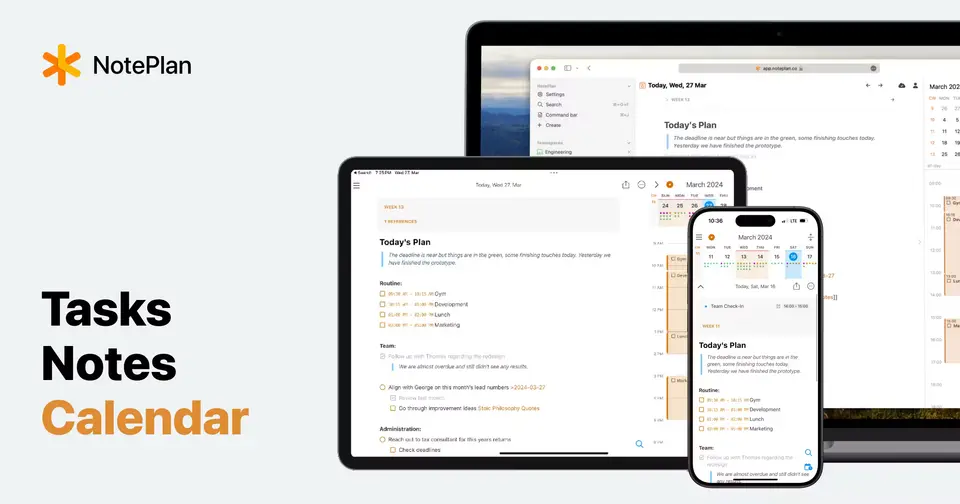
NotePlan combines notes, tasks and a calendar for Mac, iPhone, iPad and the web. Each day, week, month and year gets its own note, Apple Calendar events and Reminders appear beside it, and tasks can be dragged onto a timeline as time blocks. Notes are stored as plain Markdown files on the device and sync through the user's own iCloud account.
NotePlan is a paid product with a free trial, starting at $8.33 per month, billed annually ($99). See every plan
Good for
- Apple users who plan their day in notes next to calendar and reminders
- People who time-block tasks around their meetings
- Markdown fans who want plain-text files they control
Worth knowing
- There is no free plan: once a trial or subscription ends, notes become read-only.
- Native apps exist only for Mac, iPhone and iPad; Windows and other systems use the web version.
- Sync runs mainly through Apple's CloudKit and is tied to an Apple ID, which the web version also signs in with.
- The monthly plan's free trial lasts 3 days, compared with 7 days on the annual plan.
Key features
- Daily, weekly, monthly and yearly notes
- Every day gets its own note for tasks and meeting notes, and each week, month and year has one too, for targets, reviews and goals.
- Apple Calendar and Reminders
- Calendar events and reminders appear beside the daily note. Checking off a reminder in NotePlan also checks it off in Apple Reminders.
- Time blocking
- Drag a task onto the timeline to turn it into a time block next to your meetings, so you can see what fits in the day.
- Project notes and kanban
- Project notes hold briefs, decisions and next steps, link to daily work in both directions, and can be grouped into columns as a kanban board.
- Plain Markdown files
- Notes are plain Markdown files on your device that work offline and can be taken out as one folder. Sync uses your own iCloud account.
- Spaces
- Shared workspaces for teams or families with shared daily and weekly notes, folders and kanban boards, usable in the apps or in a browser.
NotePlan pricing
- Starts at
- $8.33 per month, billed annually ($99)
- Free plan
- None
- Free trial
- 7-day free trial on the annual plan, 3-day free trial on the monthly plan
| Plan | Price | What you get |
|---|---|---|
| Individual | $8.33per month, billed annually ($99); $12 billed monthly | Full access on Mac, iPad, iPhone and the web, with calendar and reminders, iCloud sync, Spaces, plugins, themes and templates. |
| Small Team | $19.99per month, for up to 5 members | One shared subscription and a single invoice for up to 5 members. Guests invited to a Space are not billed. |
| Business Team | $69.99per month, for up to 25 members | The same shared subscription and single invoice for up to 25 members. |
Read from noteplan.co on Oct 5, 2026. Prices change, so confirm with NotePlan before you buy.
Ways to pay less
- Annual discountSave 31% with annual billing
The annual plan is $99 a year, which works out to $8.33 a month against $12 on the monthly plan. NotePlan labels this a 31% saving.
Stated on noteplan.co - Other savingsTeam subscriptions for 5 or 25 members
A shared subscription covers up to 5 members for $19.99 a month or up to 25 for $69.99, which NotePlan says is cheaper than separate individual subscriptions.
Stated on help.noteplan.co
How people rate the NotePlan app
4.8
out of 5 for the iPhone and iPad app
1,509 ratings on the App Store in the United States, read Oct 5, 2026. It rates the app, not everything the product does. See the listing
Works with
NotePlan alternatives
- NotePlan vs Agenda
Free plan · from $39.99/yr
- NotePlan vs Amplenote
Free plan · from $7.99/mo
- NotePlan vs Obsidian
Free plan · from $4/mo
- NotePlan vs Craft
Free plan · from $96/yr
- NotePlan vs Logseq
Free plan · from $5/mo





Common questions
Is NotePlan free?
No, NotePlan is a paid product, but you can try it first. 7-day free trial on the annual plan, 3-day free trial on the monthly plan.
How much does NotePlan cost?
NotePlan lists 3 plans. Individual: $8.33 per month, billed annually ($99); $12 billed monthly. Small Team: $19.99 per month, for up to 5 members. Business Team: $69.99 per month, for up to 25 members. Prices were read from noteplan.co on Oct 5, 2026.
What platforms does NotePlan work on?
NotePlan is available on macOS, iOS and Web.
Does NotePlan offer any discounts?
NotePlan publicly lists the following: Save 31% with annual billing; Team subscriptions for 5 or 25 members.
How is NotePlan rated?
NotePlan's iPhone and iPad app averages 4.8 out of 5 from 1,509 ratings on the App Store in the United States, as read on Oct 5, 2026. That is the store's rating of the app, not a score from us.
Does NotePlan have an Android app?
No Android app was listed when its pages were read on Oct 5, 2026. NotePlan is listed for macOS, iOS and Web.
Does NotePlan have a Windows app?
No Windows app was listed when its pages were read on Oct 5, 2026. NotePlan is listed for macOS, iOS and Web.
Is NotePlan open source?
NotePlan is not described as open source on its own site, as read on Oct 5, 2026.
Does NotePlan work offline?
Yes, according to its own site. What works without a connection differs by plan and platform, so check the vendor's page for the detail.
What does NotePlan integrate with?
NotePlan's listing names Apple Calendar, Apple Reminders, Google Calendar, Outlook, Apple Shortcuts and iCloud. A listing names up to eight integrations, so it may connect to more.
Who makes NotePlan?
NotePlan is made by NotePlan LLC.
What are the alternatives to NotePlan?
The closest alternatives to NotePlan in our directory are Agenda, Amplenote, Obsidian, Craft and Logseq. Each one has a side-by-side comparison with NotePlan.
Sources for this page
The prices, plans, platforms and features above were read from these pages on Oct 5, 2026. What people say is linked where it appears.