
Lazy
Keyboard-shortcut capture tool for notes and clippings on Mac
Lazy report card
Good · out of 4.0 · graded Oct 9, 2026
Best for saving things with one shortcut while you work
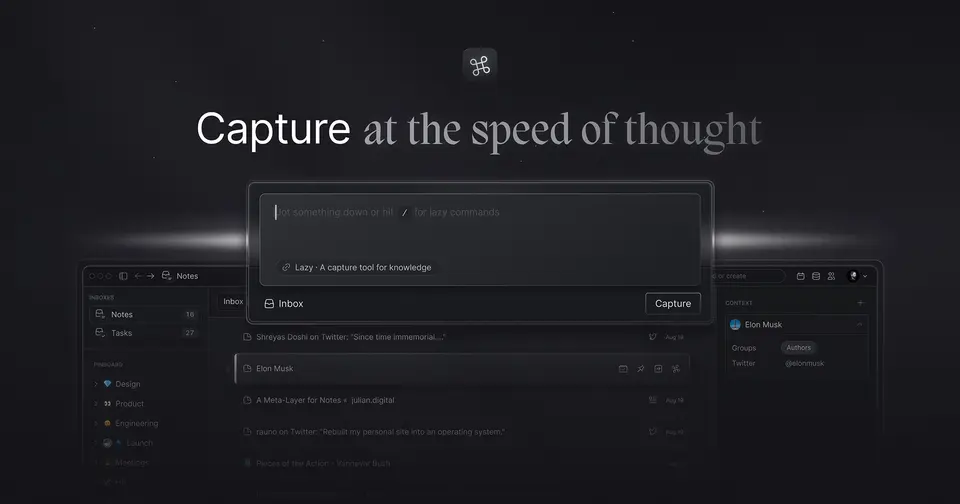
Lazy is about one keyboard shortcut. Press it and the idea, link or tweet in front of you is saved, without leaving the app you're in, and it lands in a notes space where things link together. Handy if you collect a lot while you work. There's no free plan though, and it's a Mac tool with capture on iPhone and nothing else.
Who Lazy is for
- Great if you save articles, threads and quotes all day while working on a Mac
- Handy when switching apps to take a note is what kills your train of thought
- Good for readers who want their Kindle highlights sitting next to their own notes
Who Lazy is not for
- Skip it if you use Windows, Linux or Android, as only Mac builds and iOS capture are offered
- Not for you if you want a free notes app, because there's no free plan after the 14-day trial
- Pricey if you want AI answers from your notes, which need the $12.50 Lazy AI plan
Why Lazy gets a 2.6
Five grades, each with its reason. The GPA is their average: an A is 4 points, an F is none.
- BValue for moneyLazy Capture is $6 a month billed yearly, or $8 monthly, which is bang on typical for notes apps here. It includes unlimited notes and file uploads, Kindle highlights and capture to Notion. AI answers need Lazy AI at $12.50, and the terms give no refunds unless the law requires them.
- CFree plan and trialNo free plan. There's a 14-day free trial, and the listing doesn't say whether it asks for a card. After that it's $6 or $12.50 a month billed yearly, or nothing.
- BFeaturesIt does capture properly: one shortcut from any app, clipping that isn't stuck in the browser, linked notes, Kindle highlights and a hand-off to Notion. Beyond capture it's lighter. Offline mode is listed for notes only, and AI chat sits on the higher plan.
- BEase of useOne shortcut to remember, and it works over whatever app is in front. That's about as low as effort gets. There's no App Store rating on record to go by, so a B is as high as we go.
- CPlatforms and integrationsMac, with capture on iOS. The download page offers Apple Silicon and Intel builds only, and no Windows, Linux or Android version is listed. It connects to Notion and Kindle, and that's the list.
What these grades rest on. Graded from this listing, whose facts were read from Lazy's own pages on 9 October 2026. Not based on using the product, and shorter than our full reviews. How we review and grade.
Make Lazy? Put this grade on your site

Paste this where you want the badge. It links here and follows the grade if it changes. About badges
<a href="https://toolgpa.com/tools/lazy#review"><img src="https://toolgpa.com/badge/lazy.svg" alt="Lazy: 2.6 GPA on ToolGPA" width="196" height="56"></a>What is Lazy?
Lazy is a capture tool for notes and saved material, built around a single keyboard shortcut that takes a note or clips what you are looking at without leaving the app you are working in. Clips can come from articles, Twitter threads, videos and other apps, and they land in a networked notes space where ideas can be linked together. It runs on the Mac with capture on iOS, and a higher plan adds AI answers and chat grounded in what you have saved.
Lazy is a paid product with a free trial, starting at $6 per month, billed yearly. See every plan
Good for
- Mac users who save articles, threads and quotes while they work
- People who want capture and linked notes in one tool
- Readers who want Kindle highlights next to their own notes
Worth knowing
- There is no free plan: after a 14-day trial it costs $6 or $12.50 a month billed yearly, and the terms give no refunds unless the law requires them.
- The download page offers Mac builds only (Apple Silicon and Intel); no Windows, Linux or Android version is listed.
- AI answers and chat with the knowledge base need the Lazy AI plan.
- The offline mode is listed for notes only.
Key features
- Capture without switching apps
- One keyboard shortcut saves an idea, link or tweet from whatever app is in front, so taking a note does not mean leaving the work in progress.
- Universal clipper
- Clipping is not limited to the browser: information can be saved from the app you are working in, covering articles, Twitter threads, videos and more.
- Networked note-taking
- Captures and notes live in one space where they can be connected to each other, with unlimited notes and file uploads on both plans.
- Kindle highlights and Notion
- Kindle highlights sync into Lazy, and captures can be sent on to Notion. Both are included in the Lazy Capture plan.
- Lazy AI
- The Lazy AI plan answers questions using your own captures as context and lets you chat with your knowledge base from the desktop.
- Offline mode and iOS capture
- Notes can be written without a connection, and an iOS capture option covers ideas that arrive away from the computer.
Lazy pricing
- Starts at
- $6 per month, billed yearly
- Free plan
- None
- Free trial
- 14-day free trial.
| Plan | Price | What you get |
|---|---|---|
| Lazy Capture | $6per month, billed yearly ($8 billed monthly) | Lazy Capture, networked note-taking, unlimited notes and file uploads, offline mode for notes, Kindle highlights sync, capture to Notion and iOS capture. |
| Lazy AI | $12.50per month, billed yearly ($15 billed monthly) | Everything in Lazy Capture, plus Lazy AI, context-aware answers from captures, chat with your knowledge base and priority access to new AI features. |
Read from lazy.so on Oct 9, 2026. Prices change, so confirm with Lazy before you buy.
Ways to pay less
- Annual discountYearly billing costs less per month
The pricing page labels yearly billing a 25% saving. Lazy Capture drops from $8 to $6 a month, and Lazy AI from $15 to $12.50, about 17%.
Stated on lazy.so
Works with
- Notion
- Kindle
Lazy alternatives
- Lazy vs Reflect
Free plan · from $9.99/mo
- Lazy vs Fabric
Free plan · from $8/mo
- Lazy vs mymind
Free plan · from $4.99/mo
- Lazy vs Capacities
Free plan · from $9.99/mo
- Lazy vs Obsidian
Free plan · from $4/mo





Common questions
Is Lazy free?
No, Lazy is a paid product, but you can try it first. 14-day free trial.
How much does Lazy cost?
Lazy lists 2 plans. Lazy Capture: $6 per month, billed yearly ($8 billed monthly). Lazy AI: $12.50 per month, billed yearly ($15 billed monthly). Prices were read from lazy.so on Oct 9, 2026.
What platforms does Lazy work on?
Lazy is available on macOS and iOS.
Does Lazy offer any discounts?
Lazy publicly lists the following: Yearly billing costs less per month.
Does Lazy have an Android app?
No Android app was listed when its pages were read on Oct 9, 2026. Lazy is listed for macOS and iOS.
Does Lazy have a Windows app?
No Windows app was listed when its pages were read on Oct 9, 2026. Lazy is listed for macOS and iOS.
Is Lazy open source?
Lazy is not described as open source on its own site, as read on Oct 9, 2026.
Does Lazy work offline?
Yes, according to its own site. What works without a connection differs by plan and platform, so check the vendor's page for the detail.
What does Lazy integrate with?
Lazy's listing names Notion and Kindle. A listing names up to eight integrations, so it may connect to more.
Who makes Lazy?
Lazy is made by Lazy Labs Inc.
What are the alternatives to Lazy?
The closest alternatives to Lazy in our directory are Reflect, Fabric, mymind, Capacities and Obsidian. Each one has a side-by-side comparison with Lazy.
Sources for this page
The prices, plans, platforms and features above were read from these pages on Oct 9, 2026.