QOwnNotes
Open-source Markdown notes app with Nextcloud and ownCloud support
QOwnNotes report card
Excellent · out of 4.0 · graded Oct 9, 2026
Best for Markdown notes on a desktop, paired with Nextcloud
QOwnNotes is a free desktop notes app that makes the most sense if you already run Nextcloud or ownCloud. Your notes are plain Markdown files in a folder, and the server adds version history, trash, sharing and to-do lists on top. You can script nearly everything. Without a Nextcloud server, though, you lose the best bits, and phone support is thin.
Who QOwnNotes is for
- Great if you run Nextcloud or ownCloud and want a proper desktop app for your notes
- Handy when you want plain Markdown files any other editor can open
- A treat if you like bending an app to your habits with scripts
Who QOwnNotes is not for
- Skip it if you have an iPhone, as the site lists no iOS app
- Not for you if you don't have a Nextcloud or ownCloud server and want sync included
- Tight if you're on Android, where the app is a GitHub download that only works through a Nextcloud server
Why QOwnNotes gets a 3.6
Five grades, each with its reason. The GPA is their average: an A is 4 points, an F is none.
- AValue for moneyFree and open source under the GPL. The project says it generates no revenue and runs on donations through PayPal, GitHub Sponsors and Liberapay. There's nothing to buy.
- AFree plan and trialThe full desktop app, the Web Companion extension and the Android app are all free. No paid tier exists, so there's no limit to run into.
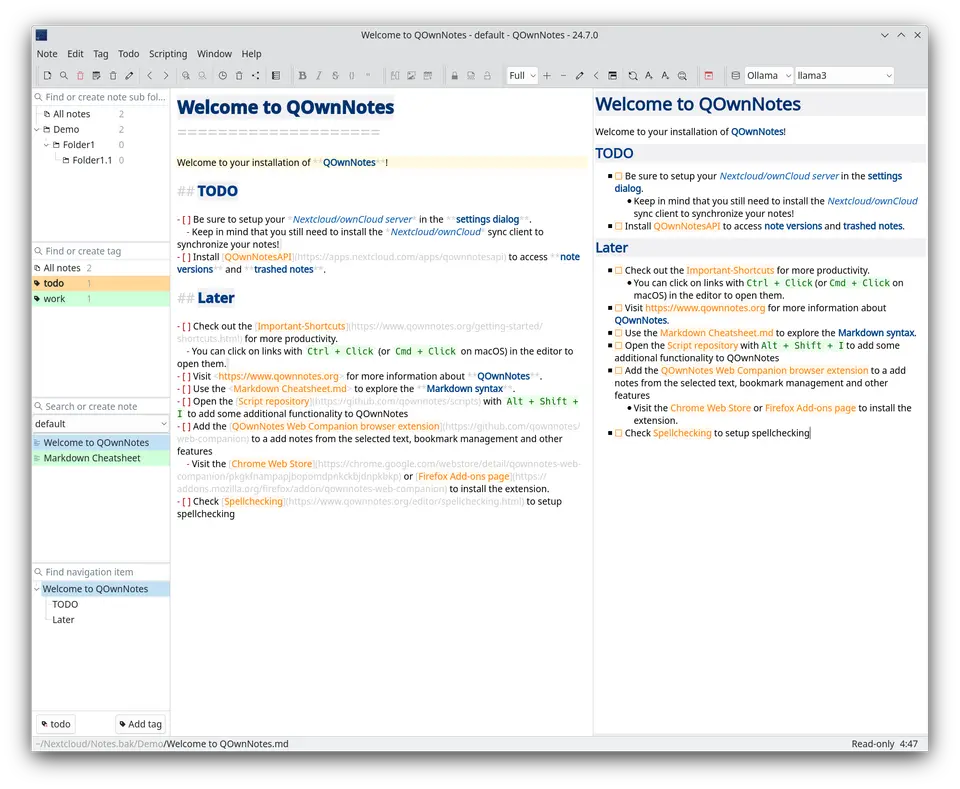
- AFeaturesHierarchical tags, subfolders, [[Note]] links with backlinks, AES-256 encryption for single notes, and a browser clipper. With Nextcloud or ownCloud you can restore old versions and trashed notes and share notes publicly. Scripts install from an in-app repository, and there's a built-in MCP server.
- BEase of useNo store rating to go on, so a B is our ceiling. On a computer it's install, pick a folder, write. It gets more involved once you want sync, since the app doesn't sync by itself and leans on a Nextcloud or ownCloud client.
- BPlatforms and integrationsLinux, macOS and Windows, a Chrome and Firefox extension, and hooks into Nextcloud, ownCloud, OpenAI and Groq. The Android app is an APK from GitHub that needs a Nextcloud server running Notes, and the site lists no iOS app. That keeps it off the A.
What these grades rest on. Graded from this listing, whose facts were read from QOwnNotes' own pages on 9 October 2026. Not based on using the product, and shorter than our full reviews. How we review and grade.
Make QOwnNotes? Put this grade on your site

Paste this where you want the badge. It links here and follows the grade if it changes. About badges
<a href="https://toolgpa.com/tools/qownnotes#review"><img src="https://toolgpa.com/badge/qownnotes.svg" alt="QOwnNotes: 3.6 GPA on ToolGPA" width="196" height="56"></a>What is QOwnNotes?
QOwnNotes is a free, open-source (GPL) desktop app for Linux, macOS and Windows that keeps notes as plain-text Markdown files in a folder you choose. It can optionally work with the Notes apps of Nextcloud and ownCloud for note history, trash, sharing and to-do lists, and it is extended through scripts. A browser extension clips web content and an Android app reads and edits notes through a Nextcloud server.
QOwnNotes is free to use. See every plan
Good for
- Nextcloud or ownCloud users who want a desktop Markdown notes app
- People who keep notes as plain files that any editor can open
- Users who want to script and rearrange their notes app
Worth knowing
- The app does not sync notes or attachments itself; syncing across devices depends on a Nextcloud or ownCloud sync client or another file-sync tool.
- The Android app is installed as an APK from its GitHub release page and needs a Nextcloud server running the Notes app. The site lists no iOS app.
- The browser extension works only while the desktop app is running.
- Current builds need Windows 10 or macOS 13 or later; the older Qt5 builds cannot use the built-in updater.
Key features
- Plain Markdown files
- Notes are plain-text Markdown files in a folder you pick, so existing text files work without an import and any other editor can open them.
- Nextcloud and ownCloud integration
- Restores older note versions and trashed notes from the server, shares notes publicly, creates Nextcloud Deck cards and manages server to-do lists.
- Tags, subfolders and wiki links
- Hierarchical tags and note subfolders, plus optional [[Note]] links with autocomplete, heading anchors, aliases and backlinks.
- Web Companion browser extension
- A Chrome and Firefox extension clips selected text or a screenshot of a page into a note and manages bookmarks kept in notes.
- Scripting and AI support
- Scripts install from an in-app repository. Opt-in AI support takes Groq and OpenAI keys, and a built-in MCP server lets outside agents search and fetch notes.
- Optional note encryption
- AES-256 encryption of individual notes is built in, and scripts add Keybase or PGP as alternative encryption methods.
QOwnNotes pricing
- Starts at
- Free
- Free plan
- Free and open source under the GPL. The project says it generates no revenue and accepts donations through PayPal, GitHub Sponsors and Liberapay.
- Free trial
- None listed
| Plan | Price | What you get |
|---|---|---|
| QOwnNotes | $0 | The full desktop app for Linux, macOS and Windows, plus the Web Companion extension and the Android app. |
Read from qownnotes.org on Oct 9, 2026. Prices change, so confirm with QOwnNotes before you buy.
Works with
QOwnNotes alternatives
- QOwnNotes vs Joplin
Free plan · from €2.40/mo
- QOwnNotes vs Obsidian
Free plan · from $4/mo
- QOwnNotes vs Zim
Free



Common questions
Is QOwnNotes free?
Yes. QOwnNotes is free to use. Free and open source under the GPL. The project says it generates no revenue and accepts donations through PayPal, GitHub Sponsors and Liberapay.
How much does QOwnNotes cost?
QOwnNotes lists one plan. QOwnNotes: $0. Prices were read from qownnotes.org on Oct 9, 2026.
What platforms does QOwnNotes work on?
QOwnNotes is available on Windows, macOS, Linux and Android. It also has a browser extension.
Does QOwnNotes have an iPhone app?
No iPhone app was listed when its pages were read on Oct 9, 2026. QOwnNotes is listed for Windows, macOS, Linux and Android.
Is QOwnNotes open source?
Yes. QOwnNotes is open source, according to its own site.
What does QOwnNotes integrate with?
QOwnNotes's listing names Nextcloud, ownCloud, Nextcloud Deck, LanguageTool, Harper, OpenAI, Groq and Keybase. A listing names up to eight integrations, so it may connect to more.
Who makes QOwnNotes?
QOwnNotes is made by Patrizio Bekerle.
What are the alternatives to QOwnNotes?
The closest alternatives to QOwnNotes in our directory are Joplin, Obsidian, Zim, VNote and CherryTree. Each one has a side-by-side comparison with QOwnNotes.
Sources for this page
The prices, plans, platforms and features above were read from these pages on Oct 9, 2026.
- qownnotes.org
- qownnotes.org/getting-started/overview.html
- qownnotes.org/getting-started/concept.html
- qownnotes.org/getting-started/qownnotes-android.html
- qownnotes.org/getting-started/browser-extension.html
- qownnotes.org/getting-started/web-app.html
- qownnotes.org/editor/ai.html
- qownnotes.org/installation/macos.html
- qownnotes.org/installation/windows.html
- qownnotes.org/contributing/donate.html