Cleft
Voice notes turned into structured notes on Apple devices
Cleft report card
Very good · out of 4.0 · graded Oct 9, 2026
Best for talking a thought into a tidy note on Apple gear
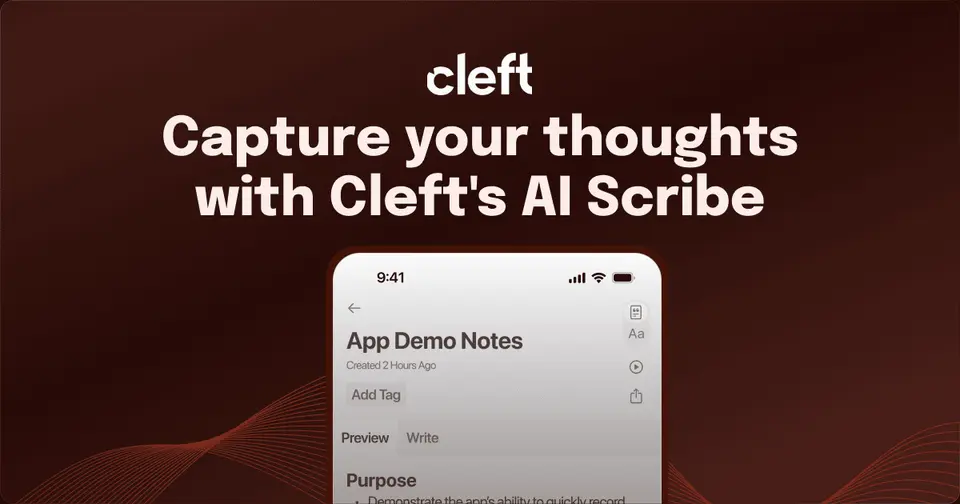
Cleft is for people who think out loud. You ramble into your iPhone, Watch or car, it transcribes on the device, and an AI step hands back a titled note with the main points and actions pulled out. The free plan does all of that for recordings up to 5 minutes. It's Apple only though, with no Android, Windows or web version.
Who Cleft is for
- Great if you think out loud and want the ramble turned into something readable
- Handy when ideas hit in the car or on a walk, since it records from CarPlay and Apple Watch
- Good for passing voice notes on to Notion, Obsidian or Apple Notes
Who Cleft is not for
- Skip it if you use Android or Windows, as it's Apple devices only
- Tight if you're staying free and record long meetings, because Basic stops at 5 minutes
- Pricey if you pay monthly, at $6.99 against $39.99 for the whole year
Why Cleft gets a 3.2
Five grades, each with its reason. The GPA is their average: an A is 4 points, an F is none.
- AValue for moneyCleft Plus is $39.99 a year, well under what a typical notes subscription here costs, and Family Sharing covers up to 5 people. Pay monthly and it's $6.99, which is a much worse deal. The pricing page calls the yearly plan a 52% saving.
- AFree plan and trialBasic is free and has the main event: on-device transcription, structured notes, 3 built-in styles, tags, search, export and Local Sync. The limit is 5 minutes a recording. For quick thoughts, most people could stay here.
- BFeaturesIt does one job and does it fully: transcription in 99 languages, notes shaped by AI, recording from the Watch, CarPlay, the Lock Screen or Siri, and a Markdown editor with tags and search. It's about capture more than filing, and appending, attachments and custom styles are Plus only.
- BEase of usePress record and talk, from the Lock Screen or the Action Button if you like. You do have to sign in, and a note is only finished once the device is back online. There's no App Store rating on record to go by, so a B.
- CPlatforms and integrationsiPhone, iPad, Mac, Apple Watch and CarPlay. Notes can go on to Notion and Zapier with Plus, or to Obsidian and Apple Notes through the share sheet and Local Sync. All Apple, though. No Android, Windows or web version is listed.
What these grades rest on. Graded from this listing, whose facts were read from Cleft's own pages on 9 October 2026. Not based on using the product, and shorter than our full reviews. How we review and grade.
Make Cleft? Put this grade on your site
Paste this where you want the badge. It links here and follows the grade if it changes. About badges
<a href="https://toolgpa.com/tools/cleft#review"><img src="https://toolgpa.com/badge/cleft.svg" alt="Cleft: 3.2 GPA on ToolGPA" width="196" height="56"></a>What is Cleft?
Cleft is a voice-first notes app for iPhone, iPad, Mac, Apple Watch and CarPlay. You record yourself talking, the recording is transcribed on the device, and an AI step turns the transcript into a titled note with the main points and actions pulled out. Finished notes can stay in Cleft or be sent on to apps such as Notion, Apple Notes and Obsidian.
Cleft has a free plan. Paid plans start at $39.99 per year (or $6.99 billed monthly). See every plan
Good for
- People who think out loud and want the ramble turned into a tidy note
- Apple users capturing ideas from a Watch, a car or the Lock Screen
- Passing voice notes on to Notion, Obsidian or Apple Notes
Worth knowing
- Apple only: the apps are for iPhone, iPad, Mac, Apple Watch and CarPlay, with no Android, Windows or web version listed.
- Basic recordings stop at 5 minutes; 30-minute recordings need Cleft Plus.
- Notion and Zapier integrations, attachments, custom styles, appending and password-protected links are Plus only.
- Sign-in is required. Recording and transcription work offline, but the note is finished once the device is back online.
Key features
- On-device transcription
- Recordings are turned into text locally on iPhone, iPad or Mac using Whisper, in 99 languages, including when the speaker switches language mid-sentence.
- Structured notes from rambles
- An AI step pulls out the main points and actions and titles the note. Three built-in styles are Structured, Structured Prose and Clean Transcript; Plus adds custom styles.
- Capture from Watch, CarPlay and Siri
- Recording can start from an Apple Watch, the CarPlay screen, the Lock Screen, Dynamic Island, Control Center, the iPhone Action Button or a Siri request.
- Send notes to other apps
- Notes go to any app through the share sheet. Local Sync writes Markdown and optional audio to a folder, and Plus adds direct Notion and Zapier integrations.
- Markdown editor, tags and search
- Notes can be edited with headings, bold, lists and code blocks, tagged by project or topic, and searched across the whole collection.
- Append and continue
- With Plus, a new recording can be added to an existing note so one topic stays in one place, and recordings can run to 30 minutes.
Cleft pricing
- Starts at
- $39.99 per year (or $6.99 billed monthly)
- Free plan
- Basic plan: recordings up to 5 minutes with on-device transcription, structured notes, 3 built-in output styles, tags, search, export, Local Sync, widgets and Siri Shortcuts.
- Free trial
- None listed
| Plan | Price | What you get |
|---|---|---|
| Basic | $0 | 5-minute recordings, on-device transcription, structured notes, 3 built-in output styles, tags, search and export. |
| Cleft Plus | $39.99per year, or $6.99 per month billed monthly | 30-minute recordings, append to existing notes, custom output styles, attachments, Notion and Zapier integrations, and Family Sharing for up to 5. |
Read from cleftnotes.com on Oct 9, 2026. Prices change, so confirm with Cleft before you buy.
Ways to pay less
- Annual discountSave 52% with annual billing
Cleft Plus costs $6.99 a month or $39.99 a year. The pricing page labels the annual plan a 52% saving, under $3.50 a month.
Stated on cleftnotes.com
Works with
- Notion
- Zapier
- Apple Notes
- Apple Reminders
- Obsidian
- Bear
- Things 3
- Todoist
Cleft alternatives
- Cleft vs AudioPen
Free plan · from $33/mo
- Cleft vs Whisper Memos
Free trial · from $5.83/mo
- Cleft vs Talknotes
Free trial · from $197/yr
- Cleft vs Voicenotes
Free plan · from $9/mo
- Cleft vs Letterly
Free trial · from $19.99/mo

Common questions
Is Cleft free?
Cleft has a free plan. Basic plan: recordings up to 5 minutes with on-device transcription, structured notes, 3 built-in output styles, tags, search, export, Local Sync, widgets and Siri Shortcuts. Paid plans start at $39.99 per year (or $6.99 billed monthly).
How much does Cleft cost?
Cleft lists 2 plans. Basic: $0. Cleft Plus: $39.99 per year, or $6.99 per month billed monthly. Prices were read from cleftnotes.com on Oct 9, 2026.
What platforms does Cleft work on?
Cleft is available on iOS and macOS.
Does Cleft offer any discounts?
Cleft publicly lists the following: Save 52% with annual billing.
Does Cleft have an Android app?
No Android app was listed when its pages were read on Oct 9, 2026. Cleft is listed for iOS and macOS.
Does Cleft have a Windows app?
No Windows app was listed when its pages were read on Oct 9, 2026. Cleft is listed for iOS and macOS.
Is Cleft open source?
Cleft is not described as open source on its own site, as read on Oct 9, 2026.
Does Cleft work offline?
Yes, according to its own site. What works without a connection differs by plan and platform, so check the vendor's page for the detail.
What does Cleft integrate with?
Cleft's listing names Notion, Zapier, Apple Notes, Apple Reminders, Obsidian, Bear, Things 3 and Todoist. A listing names up to eight integrations, so it may connect to more.
Who makes Cleft?
Cleft is made by Cleft AI Limited.
What are the alternatives to Cleft?
The closest alternatives to Cleft in our directory are AudioPen, Whisper Memos, Talknotes, Voicenotes and Letterly. Each one has a side-by-side comparison with Cleft.
Sources for this page
The prices, plans, platforms and features above were read from these pages on Oct 9, 2026.