
Open Sunsama review (2026): is the free plan enough?
Self-hostable daily planner with time blocking and an MCP server
Black Friday: is there a Open Sunsama sale?
Open Sunsama report card
Very good · out of 4.0 · graded Oct 10, 2026
Best for Sunsama-style planning you can host yourself
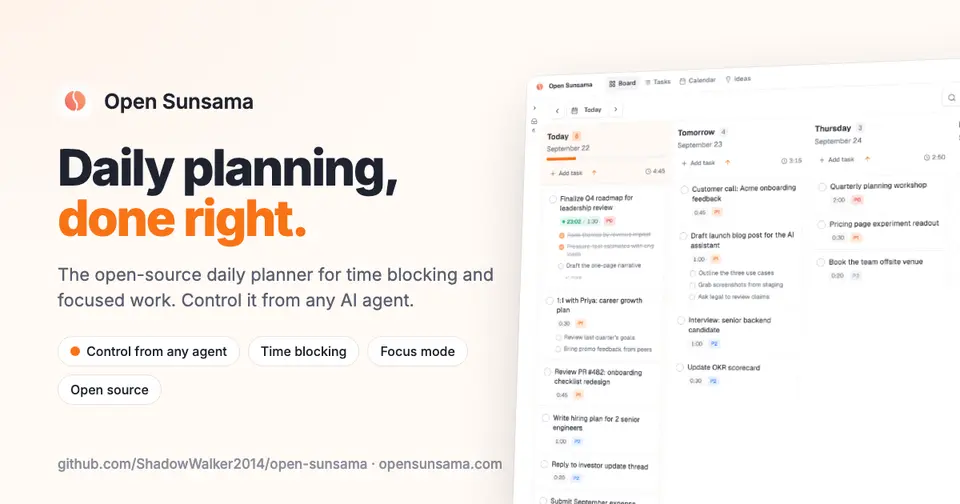
Open Sunsama is an independent open-source take on Sunsama's way of planning, not something Sunsama makes: a board of days, tasks dragged onto a calendar as time blocks, and a focus timer. It's free for non-commercial use, hosted or on your own server with Docker. But for-profit companies need an enterprise license with no public price, there's no phone app, and team workspaces and auto-scheduling are still roadmap items.
Who Open Sunsama is for
- Fits if you plan Sunsama's way and want code you can read and host yourself
- Works for planning your day through Claude or ChatGPT with its MCP server
Who Open Sunsama is not for
- Skip it if you want a real phone app, as it's a mobile web app in the browser for now
- Not for you if you're a for-profit company, since that needs an enterprise license with no public price
- Too light for teams, because team workspaces haven't shipped yet
- Watch out: auto-scheduling and the Linear, GitHub, Jira and Notion links are unchecked roadmap items, not features
- Tight if you self-host, as the desktop apps only connect to opensunsama.com and you're left with the web app
Why Open Sunsama gets a 3.2
Five grades, each with its reason. The GPA is their average: an A is 4 points, an F is none.
- AValue for moneyNothing to pay for personal, educational or non-profit use, with no paid tier holding features back, when the rest of this category wants $5.99 a month in the middle. For-profit companies need an enterprise license, asked for by email, with no price published.
- AFree plan and trialFor non-commercial use it's free under its license, with no paid tier and no caps on record. You can use the hosted app or run the whole thing on your own server.
- BFeaturesIt covers the planning job: a board with a column per day, drag-and-drop time blocking, Google, Outlook and iCloud events alongside, a focus timer that logs real time against your estimate, rollover and repeating tasks, a REST API and an MCP server. Auto-scheduling and team workspaces are still roadmap items.
- CEase of useNo store rating on record, and there's wiring to do: calendars to connect, API keys if you want the MCP server, and Docker Compose if you self-host. Self-hosters work through the web app, since the desktop apps only connect to the hosted one.
- BPlatforms and integrationsWeb, Mac, Windows and Linux, with calendar sync, a REST API and an MCP server for Claude, ChatGPT and Cursor. But there's no native phone app yet, so on a phone it's a mobile web app.
What these grades rest on. Graded from this listing, whose facts were read from Open Sunsama's own pages on 9 October 2026. Also tested with a demo account on 2026-04-28. How we review and grade.
Make Open Sunsama? Put this grade on your site
Paste this where you want the badge. It links here and follows the grade if it changes. About badges
<a href="https://toolgpa.com/tools/open-sunsama#review"><img src="https://toolgpa.com/badge/open-sunsama.svg" alt="Open Sunsama: 3.2 GPA on ToolGPA" width="196" height="56"></a>Where Open Sunsama stands among daily planner apps
Open Sunsama's GPA of 3.2 is higher than 70 of the 75 other daily planner apps we grade, and level with 3.
It stands best on free plan and trial (A, above 66 of 75) and worst on ease of use (C, above 0).
Each grade against the category
Every bar is all 76 daily planner apps we grade, cut by the letter each got. Open Sunsama’s own letter is outlined.
- AValue for moneyAbove 57 of 75, level with 18
- AFree plan and trialAbove 66 of 75, level with 9
- BFeaturesAbove 38 of 75, level with 32
- CEase of useAbove 0 of 75, level with 41
- BPlatforms and integrationsAbove 27 of 75, level with 33
Keep Open Sunsama, or make your own?
You could make this
A daily planner at its plainest is today's tasks laid along a timeline.
What Open Sunsama does at its core is tasks, time blocking, calendar and kanban boards, and that is the kind of thing an AI app builder makes well. You would give up 3 things, listed below, and little else. Open Sunsama is open source, so there is a third way: take its code and run it yourself.
What you could make
- Tasks, time blocking, calendar and kanban boards: an app builder makes these well.
What you could not
- Apps for macOS, Windows and Linux that stay in step with each other.
- It plugs into other products, Google Calendar, Outlook and iCloud among them, and has an API.
- The depth: we grade its features B, which means it covers the whole job.
What this rests on. Open Sunsama’s listing: what it does, where it runs, what it plugs into and what it costs. It is a judgement about the kind of software this is. We have not built a replacement for it, and making your own means looking after it too. How we decide, and every tool’s verdict.
What is Open Sunsama?
Open Sunsama is a daily planner modeled on Sunsama: tasks are planned on a kanban board of days, dragged onto a calendar as time blocks and worked through in a focus mode with a timer. It is an independent open-source project and is not made by Sunsama. Its code is public on GitHub under a non-commercial license and can be self-hosted with Docker. A hosted MCP server and a REST API let AI assistants such as Claude and ChatGPT read and change the plan.
Worth knowing
- The license is non-commercial: personal, educational and non-profit use is free, and for-profit companies need an enterprise license with no public price.
- There is no native phone app yet; on a phone it runs as a mobile web app in the browser.
- The desktop apps connect only to opensunsama.com, so a self-hosted install is used through the web app.
- Team workspaces, auto-scheduling and integrations with Linear, GitHub, Jira and Notion are unchecked roadmap items, not shipped features.
Key features
- Kanban board of days
- Tasks sit on a board with a column per day and a backlog. Each task can carry a P0 to P3 priority, a time estimate, subtasks, rich-text notes and attachments.
- Drag-and-drop time blocking
- Dragging a task onto the calendar creates a block linked to that task, and resizing the block sets its length. The calendar has day, 3-day, week and month views.
- Calendar sync
- Events from Google Calendar, Outlook and iCloud appear next to tasks and time blocks, so a day is planned around existing meetings.
- Focus mode and rollover
- Focus mode shows one task with a timer and records actual time against the estimate. Unfinished tasks roll over to the next day, and recurring tasks repeat on their own.
- MCP server for AI agents
- A hosted MCP server with 24 tools lets Claude, ChatGPT, Cursor and other MCP clients read the schedule and create or move tasks and time blocks after an OAuth sign-in.
- REST API and self-hosting
- A REST API with scoped API keys covers tasks, time blocks and ideas. The app can be run on your own server with Docker Compose, which starts PostgreSQL, Redis, the API and the web app.
Open Sunsama pricing
As of Oct 9, 2026, Open Sunsama has a free plan.
- Starts at
- Not published
- Free plan
- Free of charge for non-commercial use under its license: personal, educational, non-profit and non-commercial open-source use, plus evaluation. The site states no price for the hosted app.
- Free trial
- None listed
| Plan | Price | What you get |
|---|---|---|
| Non-commercial use | $0 | The license provides the software free of charge for personal, educational, non-profit and non-commercial open-source use, and for evaluation. |
| Enterprise license | Custom | Required for commercial use, including for-profit companies running it in production. Requested by email; no price is published. |
Read from github.com on Oct 9, 2026. Prices change, so confirm with Open Sunsama before you buy.
Ways to pay less
- NonprofitFree for non-profit organizations
The license lists non-profit organization use among the permitted uses that are free of charge, while for-profit companies need an enterprise license.
Stated on github.com - EducationFree for educational use
Educational use is one of the permitted non-commercial uses that the license provides free of charge.
Stated on github.com
Works with
Open Sunsama alternatives
- Open Sunsama vs Sunsama
Free trial · from $17/mo
- Open Sunsama vs Akiflow
Free trial · from $19/mo
- Open Sunsama vs Motion
Free trial · from $19/mo





Common questions
Does Open Sunsama have an Android app?
No Android app was listed when its pages were read on Oct 9, 2026. Open Sunsama is listed for Web, macOS, Windows and Linux.
Does Open Sunsama have an iPhone app?
No iPhone app was listed when its pages were read on Oct 9, 2026. Open Sunsama is listed for Web, macOS, Windows and Linux.
Is Open Sunsama open source?
Yes. Open Sunsama is open source, according to its own site. It can also be run on a server of your own.
Does Open Sunsama have an API?
Yes. Open Sunsama offers a public API, according to its own site.
Sources for this page
The prices, plans, platforms and features above were read from these pages on Oct 9, 2026.