The Super Productivity Insider’s Guide
Everything we know about Super Productivity in one document: what it costs, its grades, getting a refund, getting help and what else to look at. Read it here, or keep a copy.
Super Productivity
The Insider’s Guide
Free, open-source to-do app with time tracking and a Pomodoro timer
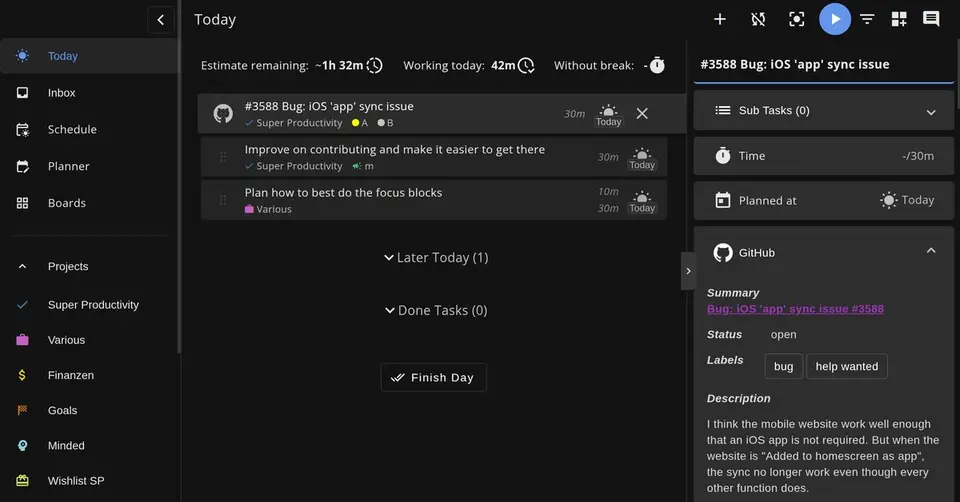
Every plan, grade, refund rule and rival among to-do list apps, read from Super Productivity’s own pages.
Made by Johannes Millan · checked Oct 5, 2026 · toolgpa.com
Contents
- 01WelcomeWhat it is, who it suits, its grades and the ten things to know first
- 02What it costsEvery plan, the free plan, ways to pay less and how prices have moved
- 03What it doesIts main features, where it runs, what it works with and who makes it
- 04Where it standsIts grades against its category, and whether to keep it or make your own
- 05After you payGetting your money back, getting out, and getting help
- 06The alternativesThe tools it is most often weighed against, side by side
- 07Quick answersThe questions people ask about it, each answered in a line or two
- 08About ToolGPAWho made this guide, what else is on the site, and how to cite it
ToolGPA put this guide together from Super Productivity’s own pages, its app-store listings and our grades. Every fact in it is on Super Productivity’s page too, where it is kept up to date. Checked Oct 5, 2026.
Part 01 · Overview
Welcome
What it is, who it suits, its grades and the ten things to know first
3.4
GPA, above 117 of the 123 other to-do list apps we grade
Super Productivity is a free, open-source task manager that combines a to-do list with time tracking, timeboxing and focus sessions. Tasks are organized with subtasks, projects and tags, can be laid out on Kanban or Eisenhower boards, and can be imported from Jira, GitHub and GitLab. Data stays on the device by default with no account, and syncing between devices is optional through Dropbox, WebDAV or the project's own SuperSync service.
To get you started, here are 8 things to know about Super Productivity, taken from its own pages and our grades.
No account and no setup: install it and your data sits on your device from the first minute.
- 1
Best for free task tracking with time sheets built in
Skip it if you want sync that just works.
- 2
It is free
Super Productivity has no paid plan at all. Every feature on every platform is free under the MIT license, with no account, premium tier or trial. Development is supported by optional donations through GitHub Sponsors.
- 3
It runs on 6 platforms
Web, macOS, Windows, Linux, iOS and Android.
- 4
Tasks, projects and boards
Tasks take subtasks, notes, tags, projects and repeat rules, and can be viewed as lists, on a Kanban board, in an Eisenhower Matrix or on boards you build yourself.
- 5
Time tracking and time sheets
Starting a task tracks time against it. Tracked time can be turned into time sheets and work summaries for export to a company's time-tracking system.
- 6
Focus mode and break reminders
Focus mode offers Pomodoro, Flowtime and countdown sessions, and a break reminder tells you when it is time to step away.
- 7
A 3.4 GPA, above 117 of 123
That is against the other to-do list apps we grade, on value, the free plan, features, ease of use and platforms.
- 8
Keep it
Super Productivity is free, so making your own would save you nothing.
Super Productivity at a glance
- Pricing
- Free
- Free plan
- Yes
- Free trial
- None stated
- Runs on
- Web, macOS, Windows, Linux, iOS, Android
- Made by
- Johannes Millan, since 2016
- Category
- To-Do List Apps
- Our grade
- 3.4 GPA, very good
The report card
Best for free task tracking with time sheets built in
Super Productivity is a free, open-source to-do app that also tracks time and turns it into time sheets, pulling in issues from Jira, GitHub and GitLab on every platform. Sync is yours to set up through Dropbox or WebDAV, since its own SuperSync is still beta, the web app is more limited than the desktop one, and help comes only from volunteers. Skip it if you want sync that just works.
| Subject | Grade | Comment |
|---|---|---|
| Value for money | A | Free on every platform under the MIT license, with no premium tier and no trial. You download it and run it, and there is simply nothing to buy. Development runs on optional donations through GitHub Sponsors. |
| Free plan and trial | A | Every feature on every platform is free, with no account needed. There's no paid plan, so there are no limits to bump into. Download it and you have the lot. |
| Features | C | Tasks, projects and boards, time tracking that turns into time sheets, a day planner and issue imports from Jira and GitHub. But the listing names a gap in the basics: SuperSync is beta, the wiki says use Dropbox or WebDAV instead, and in a browser calendar and WebDAV sync are likely to fail. |
| Ease of use | B | No account and no setup: install it and your data sits on your device from the first minute. There's no rating on record to go by, so a B rather than higher, and arranging sync later is its own job. |
| Platforms and integrations | A | Windows, Mac, Linux, iPhone, Android and the web, with links to Jira, GitHub, GitLab, Gitea, Trello, Google Calendar, CalDAV and Dropbox. That's the full set plus a real list of things to connect to. |
An A is worth 4 points, a B 3, a C 2, a D 1 and an F nothing. The GPA is the average of the five.
Who Super Productivity is for
- Fits if you're a developer and your day starts from Jira, GitHub or GitLab issues
- Works for people who bill by the hour and want time sheets from tracked tasks, with no account
Who it is not for
- Skip it if you want sync that needs no setting up, because you connect Dropbox or WebDAV yourself
- Watch out: its own SuperSync is labeled beta, and the wiki says to use Nextcloud, WebDAV or Dropbox instead
- Not for you if you'd work mostly in a browser, as calendar and WebDAV sync are likely to fail there
- Watch out: fetching issues needs a connection, and a failed issue update isn't retried automatically
- Not for you if you expect a support desk, since it's run by volunteers and help comes from the community
Good to know
Good for
- Developers who plan their day from Jira, GitHub or GitLab issues
- Freelancers who need time sheets from the tasks they tracked
- People who want a free app that keeps data on their own device
Worth knowing
- The web app is more limited than the desktop app: calendar integration and WebDAV sync are likely to fail in a browser because of CORS.
- SuperSync is labeled beta, and the project's wiki suggests Nextcloud, WebDAV or Dropbox for production use until it is stable.
- Fetching issues and sending work logs needs a network connection, and a failed issue update is not retried automatically.
- The project is maintained by volunteers and funded by donations; help comes from the community on GitHub and Reddit.
Part 02 · Pricing
What it costs
Every plan, the free plan, ways to pay less and how prices have moved
Free
No paid plan at all
Super Productivity is free to use.
Free on every platform under the MIT license, with no premium tier and no trial.
Free
$0
All features on Windows, macOS, Linux, Android, iOS and the web, released as open source under the MIT license.
The free plan
Every feature on every platform is free under the MIT license, with no account, premium tier or trial. Development is supported by optional donations through GitHub Sponsors.
Read from super-productivity.com on Oct 5, 2026.
Part 03 · Features
What it does
Its main features, where it runs, what it works with and who makes it
6
Places it runs: Web, macOS, Windows, Linux, iOS and Android
Free, open-source to-do app with time tracking and a Pomodoro timer. Here is what it does, as its own site describes it, and what it covers: open source, works offline, local-first, tasks, kanban boards, Pomodoro timer, time tracking.
Tasks, projects and boards, time tracking that turns into time sheets, a day planner and issue imports from Jira and GitHub.
- Tasks, projects and boards
- Tasks take subtasks, notes, tags, projects and repeat rules, and can be viewed as lists, on a Kanban board, in an Eisenhower Matrix or on boards you build yourself.
- Time tracking and time sheets
- Starting a task tracks time against it. Tracked time can be turned into time sheets and work summaries for export to a company's time-tracking system.
- Focus mode and break reminders
- Focus mode offers Pomodoro, Flowtime and countdown sessions, and a break reminder tells you when it is time to step away.
- Planner and schedule
- The planner lays the day out on a schedule timeline next to calendar events, which come in through Google Calendar or any CalDAV calendar.
- Issue tracker imports
- Issues assigned to you can be imported from Jira, GitHub, GitLab, Gitea and other trackers, with time tracked per issue and work logs sent back.
- Local data and optional sync
- Data is stored on the device and no account is needed. Devices can sync through Dropbox, WebDAV or SuperSync, the project's end-to-end encrypted service that can be self-hosted.
Where it runs
- Web
- macOS
- Windows
- Linux
- iOS
- Android
What it works with
- Jira
- GitHub
- GitLab
- Gitea
- Trello
- Google Calendar
- CalDAV
- Dropbox
Who makes Super Productivity
Super Productivity is an open-source project started and run by Johannes Millan, a web developer in Berlin. The app is free on every platform under the MIT licence, there are no paid tiers, and the project asks for support through GitHub Sponsors.
- Based
- Berlin, Germany, the address its imprint gives for the person responsiblesuper-productivity.com
- Ownership
- Community project. An open-source project rather than a company. Its press kit names Johannes Millan as founder and the MIT licence, and the imprint names him as the person responsible for the site. No company, parent or investor appears anywhere.super-productivity.com
- Founders and leaders
- Johannes Millan, Foundersuper-productivity.com
- Lately
- v19.2.0: numeric task priorities, dragging selected tasks between sections and projects, and search for projects and tags · Oct 11, 2026
- v19.1.0: two-way Trello card sync, multiple Google Calendar accounts, and keyboard navigation in boards and the planner · Sep 19, 2026
- v19.0.1: live Markdown editing in notes, multi-select with bulk actions, and the unpublished 18.22 and 19.0 changes · Sep 12, 2026
- v18.21.1: opt-in live tracking presence for SuperSync, plus Android startup and migration fixes · Aug 29, 2026
Read on Oct 18, 2026 from the company’s own pages and from news reports. What is not stated there is left out.
Part 04 · Standing
Where it stands
Its grades against its category, and whether to keep it or make your own
117/123
Other to-do list apps it is graded above
Super Productivity's GPA of 3.4 is higher than 117 of the 123 other to-do list apps we grade, and level with 4.
It stands best on platforms and integrations (A, above 108 of 123) and worst on features (C, above 8).
Super Productivity has no paid plan.
On features, ease of use and platforms it scores 3.0 out of 4. Nothing scores higher for less, though at least one tool matches that score at a lower price.
Each grade against the category
Every bar is all 124 to-do list apps we grade, cut by the letter each got. Super Productivity’s own letter is outlined.
- AValue for moneyAbove 69 of 123
- AFree plan and trialAbove 87 of 123
- CFeaturesAbove 8 of 123
- BEase of useAbove 56 of 123
- APlatforms and integrationsAbove 108 of 123
Price against what you get
Each dot is one of 99 to-do list apps. Further left costs less; higher up scores better on features, ease of use and platforms. Super Productivity is the marked dot.
What paid plans start at, a month (each step along is roughly double) →
Keep it, or make your own?
Whether this is something you could build for yourself with an AI app builder, and what you would give up.
Keep it
Super Productivity is free, so making your own would save you nothing.
It is one of the better ones too: its GPA of 3.4 is higher than 117 of the 123 other to-do list apps we grade.
What you could make
- Tasks, time tracking, Pomodoro timer and kanban boards: an app builder makes these well.
What you could not
- Apps for macOS, Windows, Linux, iOS and Android that stay in step with each other.
- It plugs into other products, Jira, GitHub and GitLab among them.
What this rests on. Super Productivity’s listing: what it does, where it runs, what it plugs into and what it costs. It is a judgement about the kind of software this is. We have not built a replacement for it, and making your own means looking after it too. How we decide, and every tool’s verdict.
Part 05 · Refunds
After you pay
Getting your money back, getting out, and getting help
What happens once you have paid: whether you can get your money back, how to leave, and how to reach a person when something goes wrong. Each is graded from Super Productivity’s own terms and help pages.
Leaving Super Productivity
Not graded · checked Oct 18, 2026
There is nothing to pay for here, so there is nothing to refund. Super Productivity is free under the MIT licence with no premium tier, no trial and no account for ordinary use, and the pricing page says so in as many words. Your tasks sit on your own device until you delete them, so walking away is a matter of uninstalling the app.
- Closing your account
There is no paid plan and, for normal use, no account: the pricing page says you can start without registering. The optional free Super Sync service does hold data on servers in Germany, and the privacy policy says erasure there is requested by writing to the maintainer. Data synced through your own Dropbox or WebDAV server is yours to remove at that service.
Stated on super-productivity.com- What you keep afterwards
The privacy policy says local app data is kept until you delete it, and that you exercise your right to erasure over it with the app's own export and delete features. Super Sync data is listed as kept until account deletion. Desktop data sits in your user data folder, the web app's in the browser's IndexedDB, and the Android app's in its local storage.
Stated on super-productivity.com
In your favour
- Nothing to pay, so nothing to cancel and nothing to claim back.
- No account is needed to use it, so there is no sign-up to undo.
- Your data sits on your own device and the app has its own export and delete controls.
Watch out for
- Turn on the free Super Sync and a copy does land on servers in Germany, held until that account is deleted.
- Deleting Super Sync data is not a button: the privacy policy says to write to the maintainer.
Customer support
Ordinary · checked Oct 18, 2026
This is community support, done properly. A public issue tracker, GitHub Discussions, a Discord server and a subreddit, plus documentation and an FAQ in the project's repository, and you can write to the maintainer directly. Nobody states hours or a reply time, and nobody is paid to answer you, which is the deal with free open-source software. A solid C.
Ways to get help
Email
The contact page points to an email address for the project on its About page, and the privacy policy gives the same address for data requests. It reaches the maintainer rather than a support desk.
Stated on super-productivity.comHelp centre
The project's README on GitHub carries the documentation and an FAQ section, and the website adds long written guides on the handbook, time boxing, GTD, deep work and time tracking.
Stated on github.comCommunity or forum
The contact page lists four public places to ask: the GitHub issue tracker for bugs and feature requests, GitHub Discussions for longer questions, a Discord server for real-time chat, and a subreddit for workflows and release news.
Stated on super-productivity.com
Not listed on Super Productivity’s pages: live chat, phone.
- When people answer
Its pages do not say.
- How fast it says it replies
Its pages do not say.
- What depends on your plan
Its pages do not say.
In your favour
- Everything is open to everyone: there is no paid tier to buy your way into a faster queue.
- Four public channels, from a Discord for quick questions to an issue tracker for bugs.
- You can write to the maintainer directly, and the privacy policy uses that same address for data requests.
Watch out for
- No page states hours or a reply time, so there is no telling how long an answer takes.
- Volunteers answer, not a support team, and the pricing page says as much.
- The documentation lives in the project's repository rather than in a searchable help centre.
What these two grades rest on. Read on 18 October 2026: Super Productivity's pricing page and its FAQ, its privacy policy on where data is stored and how to have it erased, the imprint, the contact page listing its community channels, and the project's README on GitHub. Nobody here closed an account or contacted the project. They are graded apart from the five that make the GPA. How we grade refunds and support.
Part 06 · Alternatives
The alternatives
The tools it is most often weighed against, side by side





TickTick, Amazing Marvin, Vikunja, Todoist and Tasks.org
The 5 tools Super Productivity is most often weighed against, with where each one differs from it.
- 3.4GPA
TickTick
Free plan · from $49.99/yr
To-do list with a calendar, habit tracker and Pomodoro timer built in.
- Only TickTick lists a browser extension.
- Super Productivity is open source, according to its own site.
- Super Productivity also covers time tracking.
- 2.6GPA
Amazing Marvin
Free trial · from $8/mo
Customizable task manager with 100+ features you switch on as needed.
- Super Productivity has a free plan. Amazing Marvin does not, though it has a free trial.
- Only Amazing Marvin lists a browser extension.
- Super Productivity is open source, according to its own site.
- 2.4GPA
Vikunja
Free plan · from €4/mo
Open-source task manager to self-host or use as a paid cloud.
- Only Super Productivity lists an iOS app.
- Vikunja is self-hostable, according to its own site.
- Super Productivity also covers Pomodoro timer and time tracking.
- 2.8GPA
Todoist
Free plan · from $5/mo
Cross-platform to-do list with natural-language task entry.
- Only Todoist lists a browser extension.
- Super Productivity is open source, according to its own site.
- Super Productivity also covers Pomodoro timer and time tracking.
- 3.4GPA
Tasks.org
Free plan · from $0.99/yr
Open-source Android to-do list with CalDAV and Google Tasks sync.
- Only Super Productivity lists a web app.
- Only Super Productivity lists an iOS app.
- Super Productivity also covers kanban boards, Pomodoro timer and time tracking.
Part 07 · Questions
Quick answers
The questions people ask about it, each answered in a line or two
14
Questions, each answered in a line or two
The short version of everything above, for when you only need the answer. Each one is told in full in its part of the guide.
Is Super Productivity free?
Yes. Super Productivity is free to use.
How much does Super Productivity cost?
Super Productivity lists one plan. Free: $0.
What platforms does Super Productivity work on?
Super Productivity is available on Web, macOS, Windows, Linux, iOS and Android.
Is Super Productivity open source?
Yes. Super Productivity is open source, according to its own site.
Does Super Productivity work offline?
Yes, according to its own site. What works without a connection differs by plan and platform, so check the vendor's page for the detail.
What does Super Productivity integrate with?
Super Productivity's listing names Jira, GitHub, GitLab, Gitea, Trello, Google Calendar, CalDAV and Dropbox.
Who makes Super Productivity?
Super Productivity is made by a company of the same name. An open-source project rather than a company.
What are the alternatives to Super Productivity?
The closest alternatives to Super Productivity in our directory are TickTick, Amazing Marvin, Vikunja, Todoist and Tasks.org.
How do I close a Super Productivity account?
There is no paid plan and, for normal use, no account: the pricing page says you can start without registering.
What happens to my data if I leave Super Productivity?
The privacy policy says local app data is kept until you delete it, and that you exercise your right to erasure over it with the app's own export and delete features.
How do I contact Super Productivity support?
Super Productivity's pages list these ways to get help: email, help centre and community or forum.
How does Super Productivity compare with other to-do list apps?
Super Productivity's GPA of 3.4 is higher than 117 of the 123 other to-do list apps we grade, and level with 4.
Is Super Productivity good value for money?
ToolGPA grades Super Productivity A for value for money. Super Productivity has no paid plan.
Could I make my own version of Super Productivity?
Super Productivity is free, so making your own would save you nothing.
Where this guide comes from
The prices, plans, platforms and features were read from Super Productivity’s own pages on Oct 5, 2026, and the grades were given on Oct 10, 2026. Graded from this listing, whose facts were read from Super Productivity's own pages on 5 October 2026. Also tested with a demo account on 2026-06-24.
Every tool we list gets five grades, A to F, each with its reason, and a GPA that averages them. How each is decided is at toolgpa.com/grades. This guide is ToolGPA’s own work; it is not made, paid for or approved by Johannes Millan. Prices change, so check super-productivity.com before you buy.
- super-productivity.com/pricing/
- super-productivity.com/
- super-productivity.com/download/
- super-productivity.com/integrations/
- super-productivity.com/about/
- super-productivity.com/imprint/
- github.com/super-productivity/super-productivity/blob/master/README.md
- github.com/super-productivity/super-productivity/wiki/3.05-Web-App-vs-Desktop
- github.com/super-productivity/super-productivity/wiki/3.08-Sync-Integration-Comparison
- apps.apple.com/us/app/super-productivity/id1482572463
Part 08 · About
About ToolGPA
Who made this guide, what else is on the site, and how to cite it
3,189
Tools graded, in 94 categories
ToolGPA grades software the way a school report grades a pupil: five subjects, a letter for each with the reason written beside it, and a GPA that averages them. Prices, plans and platforms are read from each maker’s own pages and dated, so you always know how fresh a figure is.
Every grade, review and ranking on ToolGPA is our own judgement. No company can pay for a grade or change one. Every tool on the site has a guide like this one, free to download and pass on. It all lives at toolgpa.com.
3,189
tools graded
94
categories
426
price changes on record
579
apps priced in 12 countries
What else is on toolgpa.com
- Super Productivity, kept up to dateEverything in this guide, with prices and grades as they are todaytoolgpa.com/tools/super-productivity
- How grades are givenThe rules behind every letter and every GPAtoolgpa.com/grades
- Value chartsWhat each tool costs against what it scores, for every categorytoolgpa.com/charts
- CompareAny two tools side by side, plan by plantoolgpa.com/compare
- Price changesEvery price rise and cut on record, each with its sourcetoolgpa.com/price-changes
- Prices by countryWhat apps cost on the App Store in 12 countriestoolgpa.com/prices-by-country
- Pay lessEvery public discount: yearly billing, students, nonprofitstoolgpa.com/save
- Keep or makeWhich tools are worth paying for, and which you could build yourselftoolgpa.com/keep-or-make
Scan for the live page
Prices and grades as they are today
Quoting this guide?
Please name ToolGPA and link to the live page, so readers can check the figures for themselves:
ToolGPA, "Super Productivity: The Insider's Guide", checked Oct 5, 2026. https://toolgpa.com/tools/super-productivity
Know someone choosing between to-do list apps?
Send them this guide: toolgpa.com/tools/super-productivity/guide
ToolGPA elsewhere: youtube.com/@toolgpa
See our other guides
The best-graded to-do list apps after Super Productivity, each with an Insider's Guide of its own.
- To-Do List Apps Insider's GuideEvery one of the 124 to-do list apps we grade, compared
- Apple Reminders Insider's GuideApple's free to-do app for iPhone, iPad, Mac and Apple Watch3.6 GPA
- Microsoft To Do Insider's GuideFree to-do list from Microsoft that syncs with Outlook tasks3.6 GPA
- Google Tasks Insider's GuideGoogle's to-do list, built into Gmail, Calendar, Chat and Docs3.4 GPA



Choosing software? Every tool graded, every price dated.
Compare tools at toolgpa.com ›Everything in this guide is ToolGPA’s own summary of what Super Productivity’s pages, its app-store listings and public reviews said on the dates shown. Grades are our judgement under the rules at toolgpa.com/grades. Every grade, review and ranking on ToolGPA is our own judgement. No company can pay for a grade or change one. Super Productivity is a trademark of its owner, and this guide is not made, paid for or approved by Johannes Millan. Prices and plans change: check super-productivity.com before you buy.